I have 334 apps on my phone. You probably have more than me. My browser bookmarks and history are stuffed with sites I infrequently use. We’re inundated with “apps” that require us to learn some bespoke interface just to get something done. That era is coming to an end. Quickly.我的手机里装了 334 个应用。你手机里的可能比我还多。我的浏览器书签和历史记录里堆满了平时很少访问的网站。我们被各种“应用”淹没了,为了完成某项任务,还得专门去学习它们各自独特的界面。那个时代正在迅速终结。
Don’t take my word for it. Many are acknowledging that AI agents have made many apps unnecessary. Oh, I still need the data or function from that app. But I never want to “see” it again. Drop the user interface. Go headless. Why am I still logging into a system three times a year to mark my vacation time? Or navigating multiple travel sites to find the best deals? Or even doing “regular” web searches to find stats to include a presentation? I just want my agent, harness, or super-app (like Gemini, Grok Bot, Meta Muse, Claude Cowork) to do it.别只听我的一面之词。许多人已经意识到,AI 智能体让许多应用变得不再必要。没错,我依然需要这些应用背后的数据或功能,但我再也不想“看到”它们的界面了。抛弃用户界面,转向无头(headless)模式。为什么我一年还要登录某个系统三次来标记我的休假时间?或者为了找到最优惠的价格而浏览多个旅游网站?甚至为了在演示文稿中加入统计数据而进行“常规”的网络搜索?我只想让我的智能体、调度器或超级应用(如 Gemini、Grok Bot、Meta Muse、Claude Cowork)来完成这些工作。
So if we’re not building a bunch of static frontends, what should developers do instead? Here are a few suggestions. Let’s look at two categories of tools that developers should create. And then three types of activities developers (or agents) can do with those tools.那么,如果我们不再构建一堆静态前端,开发者应该做些什么呢?这里有几点建议。让我们来看看开发者应该创建的两类工具,以及开发者(或智能体)利用这些工具可以进行的三个活动。
Create CLIs, APIs, skills, and MCP servers for anywhere access to data and functionality创建 CLI、API、技能和 MCP 服务器,实现对数据和功能的随时随地访问
Good models have “computer use” where they can navigate your web frontend if they need to. But spelunking your DOM wastes tokens and time. At least create some WebMCP tools on your site to give agents a better shot at completing a task.优秀的模型具备“计算机使用”能力,在需要时可以浏览你的 Web 前端。但深入挖掘你的 DOM 结构既浪费 Token 又耗费时间。至少在你的网站上创建一些 WebMCP 工具,让智能体能更顺利地完成任务。
But honestly, those harnesses, super-apps, and agents just want your data and commands. Give it to them! Salesforce announced this headless experience in a partnership with Anthropic (ClaudeForce). Box too. HubSpot as well. Expect most SaaS products to do this. Same with platform companies. Google shipped an Android CLI for use in any harness, 150 agent skills, and tons of remote managed MCP servers. UI optional.但老实说,那些调度器、超级应用和智能体需要的只是你的数据和指令。给它们吧!Salesforce 宣布了与 Anthropic 合作推出的这种无头体验(ClaudeForce)。Box 和 HubSpot 也是如此。预计大多数 SaaS 产品都会这样做。平台公司也不例外。Google 发布了一个可用于任何调度器的 Android CLI、150 种智能体技能以及大量远程托管的 MCP 服务器。UI 已成为可选项。
We did before, but now we have even more options to build these types of tools. There are toolkits for creating MCP servers, generating skills, and even cranking out a CLI. Help out your users by giving them the tools they need to get to your data and functionality without forcing them to use your UI.我们以前就做过类似的事,但现在我们有了更多构建此类工具的选择。市面上已有用于创建 MCP 服务器、生成技能甚至快速生成 CLI 的工具包。通过提供工具帮助你的用户访问你的数据和功能,而无需强迫他们使用你的 UI。
Create A2UI or MCP Apps components for dynamic rendering创建用于动态渲染的 A2UI 或 MCP Apps 组件
The technology is now there to create more personalized and interactive experiences for humans.现在,创造更具个性化和交互性的人类体验的技术已经成熟。
A2UI is a protocol that enables agents to create dynamic user interfaces. You have the data and you have the available widgets that an agent sends a client to render. You’re not shipping arbitrary HTML and JavaScript; the agent sends component descriptions that get safely rendered client side. There are renderers for Angular, React, Flutter, and more. Developers should consider building components that agents can use to compose a beautiful, personalized site for the user.A2UI 是一种允许智能体创建动态用户界面的协议。你拥有数据,也拥有智能体发送给客户端进行渲染的可用组件。你无需发布任意的 HTML 和 JavaScript;智能体发送组件描述,这些描述会在客户端安全地渲染。目前已有针对 Angular、React、Flutter 等框架的渲染器。开发者应考虑构建智能体可以使用的组件,为用户组合出美观、个性化的网站。
Then you have MCP Apps. Have you looked at these? Here you’re returning interactive HTML interfaces that get rendered in your agentic chat experience. Developers can build these so that chat users get more than boring text results in their sessions.此外还有 MCP Apps。你看过这些吗?在这里,你返回的是交互式 HTML 界面,它们会在你的智能体聊天体验中被渲染。开发者可以构建这些应用,让聊天用户在会话中获得比枯燥的文本结果更丰富的内容。
Build these portable UI components that users can apply to get richer experiences on whatever surface they can render them on.构建这些可移植的 UI 组件,让用户无论在什么界面上渲染,都能获得更丰富的体验。
Retrieve info or trigger action from where I’m at在我所在的地方检索信息或触发操作
Let’s now look at the user.现在让我们看看用户端。
Maybe I don’t want to use your fancy portal to get my work done. Give me those CLIs, agents, MCPs, or MCP Apps to retrieve the data I want, in the surfaces I’m already using.也许我不想使用你那花哨的门户网站来完成工作。给我那些 CLI、智能体、MCP 或 MCP Apps,让我能在已经在使用的界面中检索我想要的数据。
Here in my Google Antigravity CLI, I’ve got a reference to the remote MCP Server for Cloud Run. I could also use a locally installed CLI to do the same things.在我的 Google Antigravity CLI 中,我已经引用了 Cloud Run 的远程 MCP 服务器。我也可以使用本地安装的 CLI 来完成同样的事情。
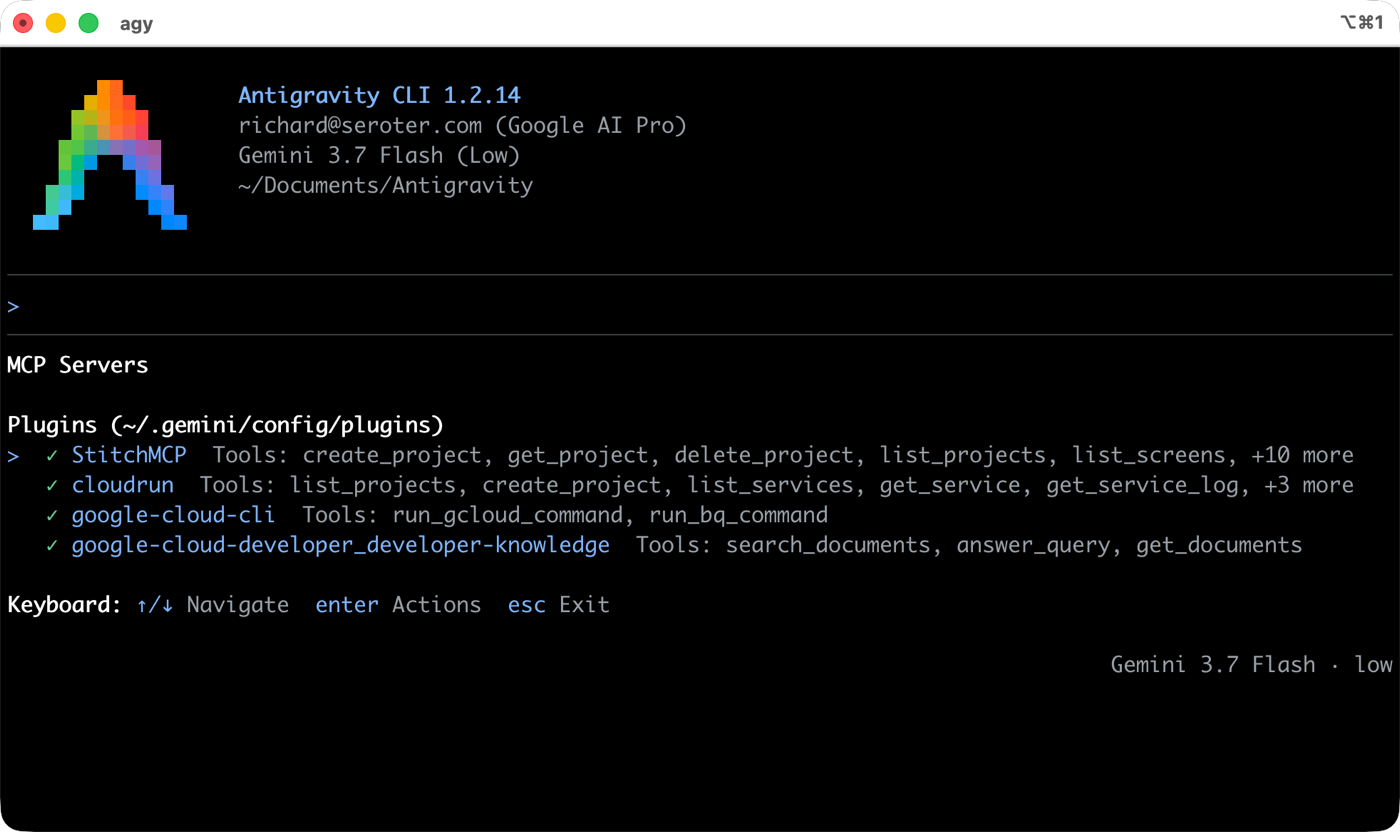
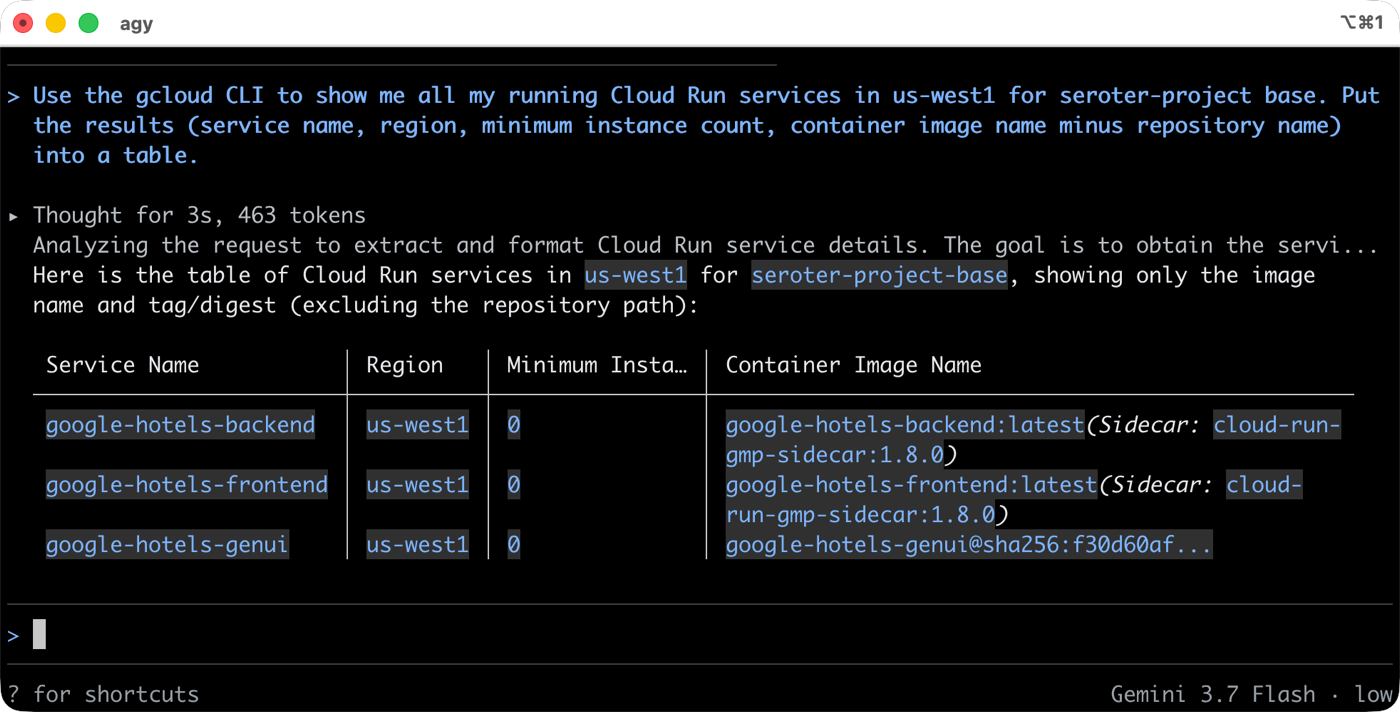
Using an existing MCP or CLI, I can do most anything with Google Cloud Run. Want a list of running services? Don’t break flow and bounce to a fixed UI somewhere else. Just get the data in your harness or super-app of choice.利用现有的 MCP 或 CLI,我可以对 Google Cloud Run 执行几乎任何操作。想要获取正在运行的服务列表?不必中断工作流去跳转到其他固定的 UI。只需在你选择的调度器或超级应用中获取数据即可。
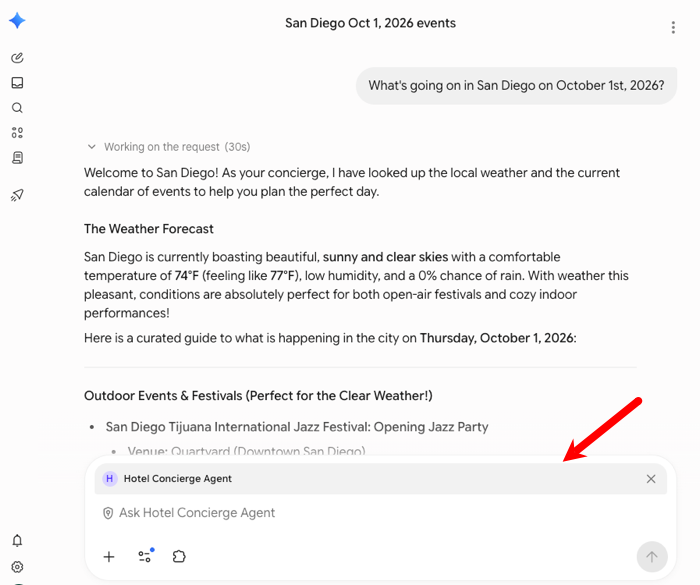
Using those tools created by app or product owners, we can now aggregate or interact with systems however we want. Maybe instead of a web front end, you build an agent. Cool. I took a hotel concierge agent that might have warranted a whole fancy website, and used it from within Gemini Enterprise instead.利用应用或产品所有者创建的这些工具,我们现在可以按照自己的方式聚合系统或与系统交互。也许你没有构建 Web 前端,而是构建了一个智能体。太棒了。我拿了一个本可能需要一整个华丽网站的酒店礼宾智能体,直接在 Gemini Enterprise 内部使用了它。
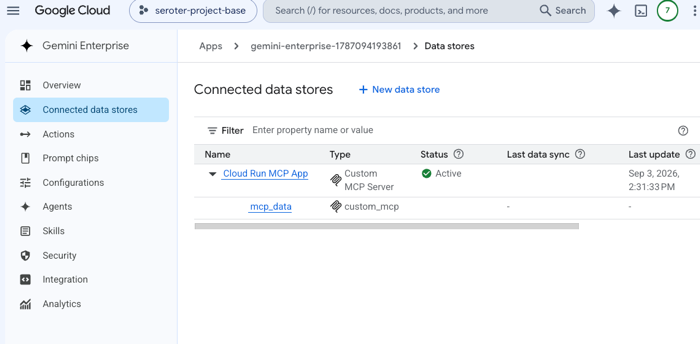
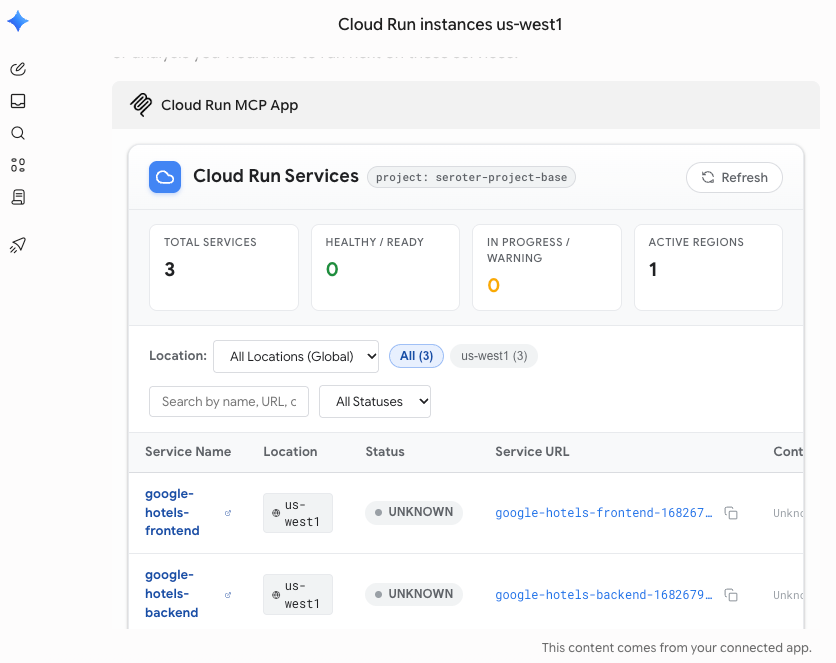
Need something more interactive? I built an MCP App that talked to Google Cloud Run and returned a fancy dashboard that I can use from within Gemini Enterprise. Why leave my super-app if I don’t need to? First I configured my MCP App (running in Cloud Run) as a data source.需要更具交互性的功能?我构建了一个与 Google Cloud Run 对接的 MCP App,并返回了一个可以在 Gemini Enterprise 内部使用的精美仪表盘。如果不需要,为什么要离开我的超级应用呢?首先,我将我的 MCP App(运行在 Cloud Run 中)配置为数据源。
And now anyone can chat with it, getting a full UI back in Gemini Enterprise chat experience.现在任何人都可以与它聊天,并在 Gemini Enterprise 聊天体验中获得完整的 UI。
Build on-the-fly visualizers, apps, and pages personalized to me构建即时可视化的、个性化的应用和页面
The era of personal software is here. Maybe that software is disposable, or just for you. Possibly for a small circle of friends. Whatever. Build entirely new interfaces that work exactly for you by mashing up the APIs, CLIs, and MCPs available to you.个人软件时代已经到来。也许这些软件是一次性的,或者只是为你自己准备的。也可能只是为了一个小圈子。无所谓。通过整合你可用的 API、CLI 和 MCP,构建完全为你所用的全新界面。
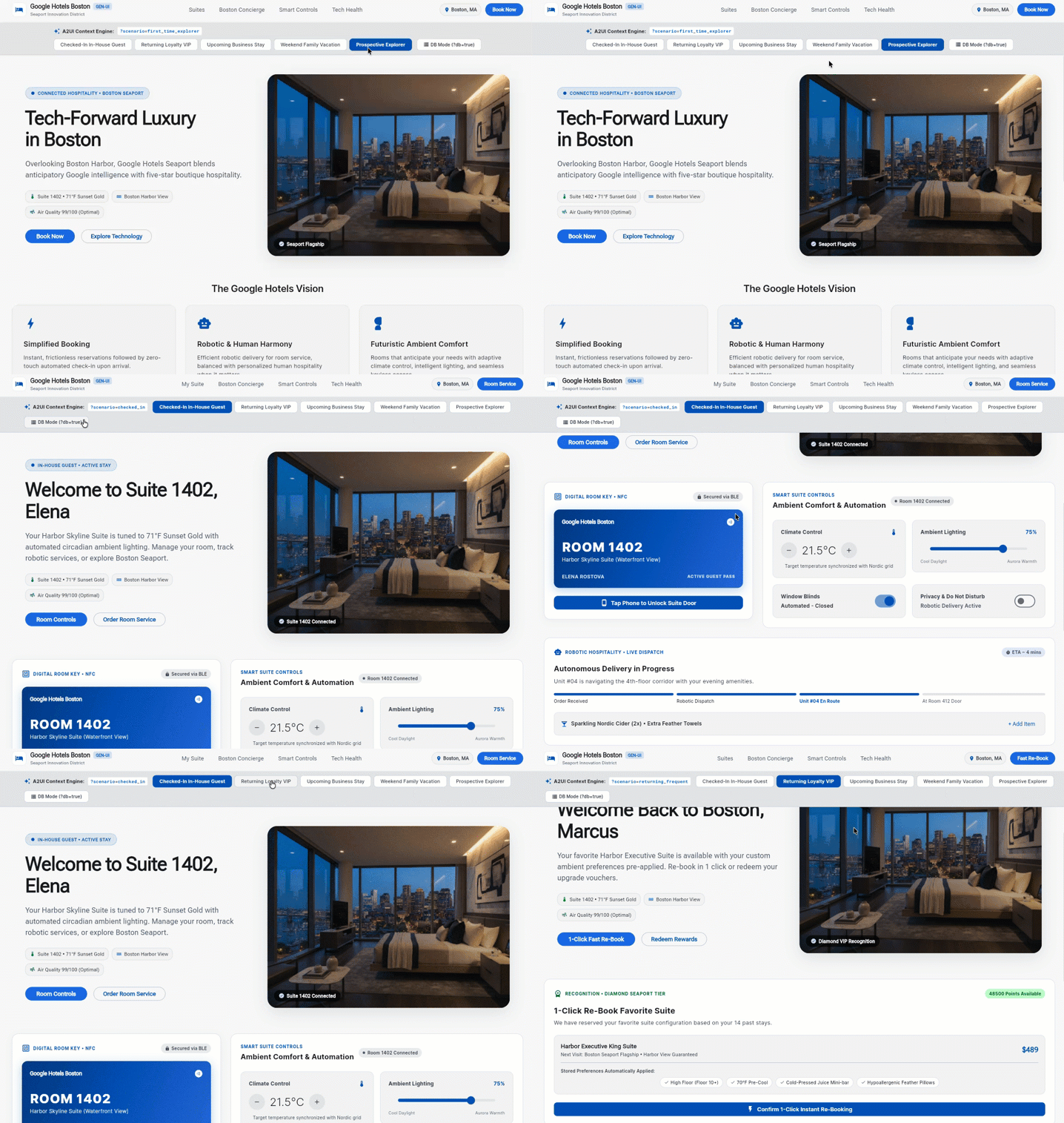
For example, I could use a series of pre-built A2UI components to create a hotel website that reacts to the situation at hand. Completely new user? Show one thing. Checked-in hotel guest, here’s another. Frequent guest coming to book a room? Here you go. Instead of building dozens of static pages to anticipate each scenario, I have ONE PAGE that applies relevant components on the fly.例如,我可以使用一系列预构建的 A2UI 组件来创建一个能够根据当前情况做出反应的酒店网站。如果是全新用户?展示一种内容。如果是已办理入住的酒店客人?展示另一种。如果是常客来预订房间?给你看这个。与其构建数十个静态页面来预判每种场景,我只需要一个页面,就能即时应用相关组件。
Build wherever-I-want-it experiences to get work done构建随心所欲的体验以完成工作
This is a variation of the previous two. You might want to stay in your tool of choice, but also want a customized interface just for you. Let’s try that.这是前两种方法的变体。你可能希望停留在自己选择的工具中,但同时也想要一个专为你定制的界面。让我们试试看。
We released a new MCP server for the Google Cloud CLI. It executes gcloud CLI commands remotely. This is handy if you’re on an agentic client that can’t execute CLIs, trusted or otherwise.我们为 Google Cloud CLI 发布了一个新的 MCP 服务器。它能远程执行 gcloud CLI 命令。如果你使用的智能体客户端无法执行 CLI(无论是否受信任),这会非常方便。
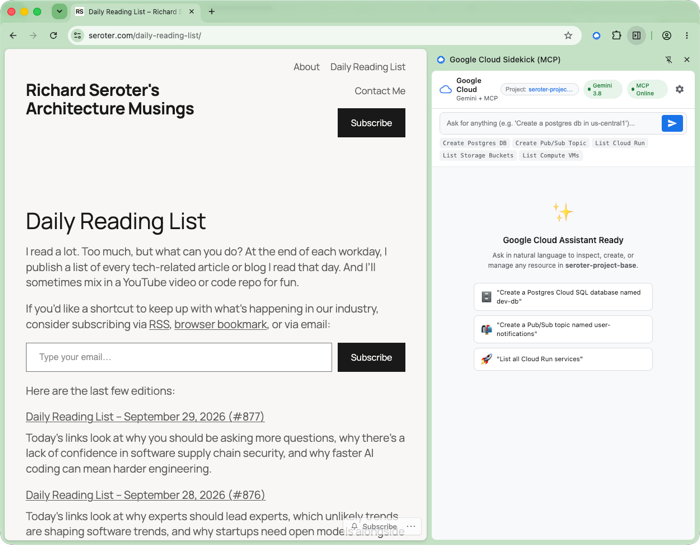
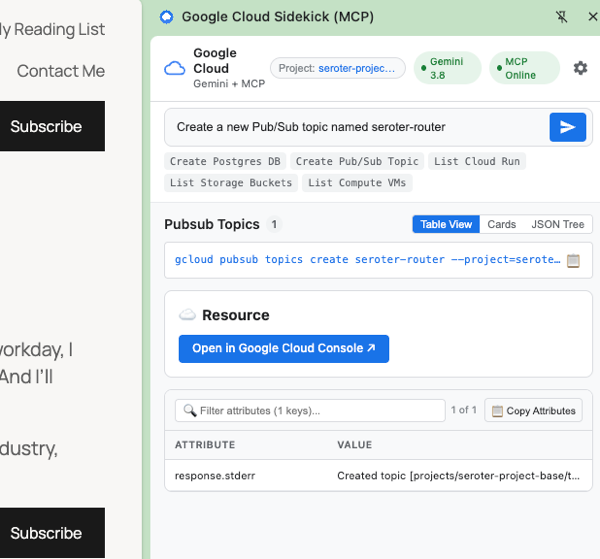
I could use this to build a full Google Cloud management experience as a Chrome plugin! I can’t easily execute CLI commands in the Chrome sandbox without some hoops. No problem. I can use the logged in user to invoke the MCP server via agent inside a custom plugin. This makes it possible to do almost anything in Google Cloud. from anywhere.我可以利用它将完整的 Google Cloud 管理体验构建为 Chrome 插件!在 Chrome 沙箱中,如果不绕过一些限制,很难直接执行 CLI 命令。没问题。我可以使用已登录的用户,通过自定义插件内的智能体来调用 MCP 服务器。这使得在任何地方对 Google Cloud 进行几乎任何操作成为可能。
In this example, I spun up a Google Cloud Pub/Sub topic while browsing my daily reading list.在这个例子中,我在浏览每日阅读列表的同时,启动了一个 Google Cloud Pub/Sub 主题。
Look, static frontends won’t become truly optional for a while. But developers, don’t wait too long to adapt. These personal agents are growing fast, and fairly soon, many websites and mobile apps will have significantly more agent visitors than human ones. Build accordingly!看,静态前端在一段时间内不会完全成为可选项。但开发者们,不要等待太久才去适应。这些个人智能体正在快速发展,很快,许多网站和移动应用接待的智能体访问者将远多于人类访问者。请据此进行构建!


Leave a comment