Feb 24, 2026/5 min readCore Platform
Snowflake Semantic View Autopilot: Using AI to Improve AI


Improving context quality leads to better data agents, but how much does the human analyst need to be in the loop? On February 3, we announced the general availability of Semantic View Autopilot (SVA), a system that autogenerates semantic views from your existing queries and BI assets. 提升上下文质量有助于打造更出色的数据智能体,但人类分析师需要多大程度地参与其中?2 月 3 日,我们宣布 Semantic View Autopilot (SVA) 正式发布,该系统可根据您现有的查询和商业智能 (BI) 资产自动生成语义视图。
Let’s explore our learnings from building this feature, and the evolving interface between context, AI-driven suggestions and human review.让我们探讨一下我们在构建此功能过程中的心得,以及上下文、人工智能驱动的建议与人工审核之间不断演变的交互界面。
The problem with manually optimizing your semantic view手动优化语义视图的难题
Semantic views allow data analysts to map Snowflake data to clear business concepts (metrics, dimensions, relationships) in a context file.语义视图允许数据分析师在上下文文件中将 Snowflake 数据映射到清晰的业务概念(指标、维度、关系)上。
Snowflake AI Agents use semantic views to answer non-technical business questions from sources like dashboards, Tableau and SQL worksheets. However, creating a robust semantic view is deceptively difficult. Unlike standard code, natural language context lacks objective "compiler errors." A few missing descriptions can block the AI from returning useful answers, forcing analysts into a slow, manual loop of tweaking context and testing the agent’s responses.Snowflake AI 智能体利用语义视图来回答来自仪表板、Tableau 和 SQL 工作表等来源的非技术性业务问题。然而,创建一个稳健的语义视图难度远超预期。与标准代码不同,自然语言上下文缺乏客观的“编译器错误”。缺少几处描述就可能导致人工智能无法返回有用的答案,迫使分析师陷入缓慢的手动循环,不断调整上下文并测试智能体的响应。
To address this difficulty, we built a feature (dubbed internally as Agentic Optimize) in our semantic view editing tool. It automates an analyst’s optimization loop by comparing generated SQL against known-correct queries, scoring the results using an LLM judge, and applying targeted fixes to the semantic view automatically.为了解决这一难题,我们在语义视图编辑工具中构建了一项功能(内部称为 Agentic Optimize)。它通过将生成的 SQL 与已知正确的查询进行对比,利用大模型 (LLM) 评估器对结果进行评分,并自动对语义视图应用针对性修复,从而实现了分析师优化循环的自动化。
In this post, we explore how we iterated on the UI paradigms for Agentic Optimize, revealing key insights into how data analysts reason around semantic context and where AI assistance helps versus hinders.在本文中,我们将探讨如何迭代 Agentic Optimize 的用户界面范式,揭示数据分析师围绕语义上下文进行推理的关键见解,以及人工智能辅助在哪些方面有所帮助,又在哪些方面造成了阻碍。
Iteration 1: One big diff迭代 1:一个巨大的差异对比
Our initial approach was straightforward: Run an optimization job that analyzes verified queries, identifies gaps in the semantic view, and produces an improved version. Users would have to trigger optimization, wait 1-2 hours, and receive a comprehensive diff showing all proposed changes.我们最初的方法很简单:运行一个优化作业,分析经过验证的查询,识别语义视图中的缺失部分,并生成一个改进版本。用户必须触发优化,等待 1-2 小时,然后收到一份包含所有拟议更改的综合差异对比报告。
The algorithm could analyze up to 50 verified queries and produce a single comprehensive diff with descriptions, metrics, filters, synonyms and custom instructions. We also made the evaluation process visible. Users see percentage scores before and after optimization; counts of descriptions and synonyms changed; the number of evaluation runs performed; and the specific, verified queries that improved. When the system proposes a change, it shows its work.该算法最多可以分析 50 个经过验证的查询,并生成一份包含描述、指标、筛选器、同义词和自定义指令的综合差异报告。我们还让评估过程变得透明。用户可以看到优化前后的百分比得分;描述和同义词更改的数量;执行的评估运行次数;以及得到改进的具体、经过验证的查询。当系统提出更改建议时,它会展示其工作过程。
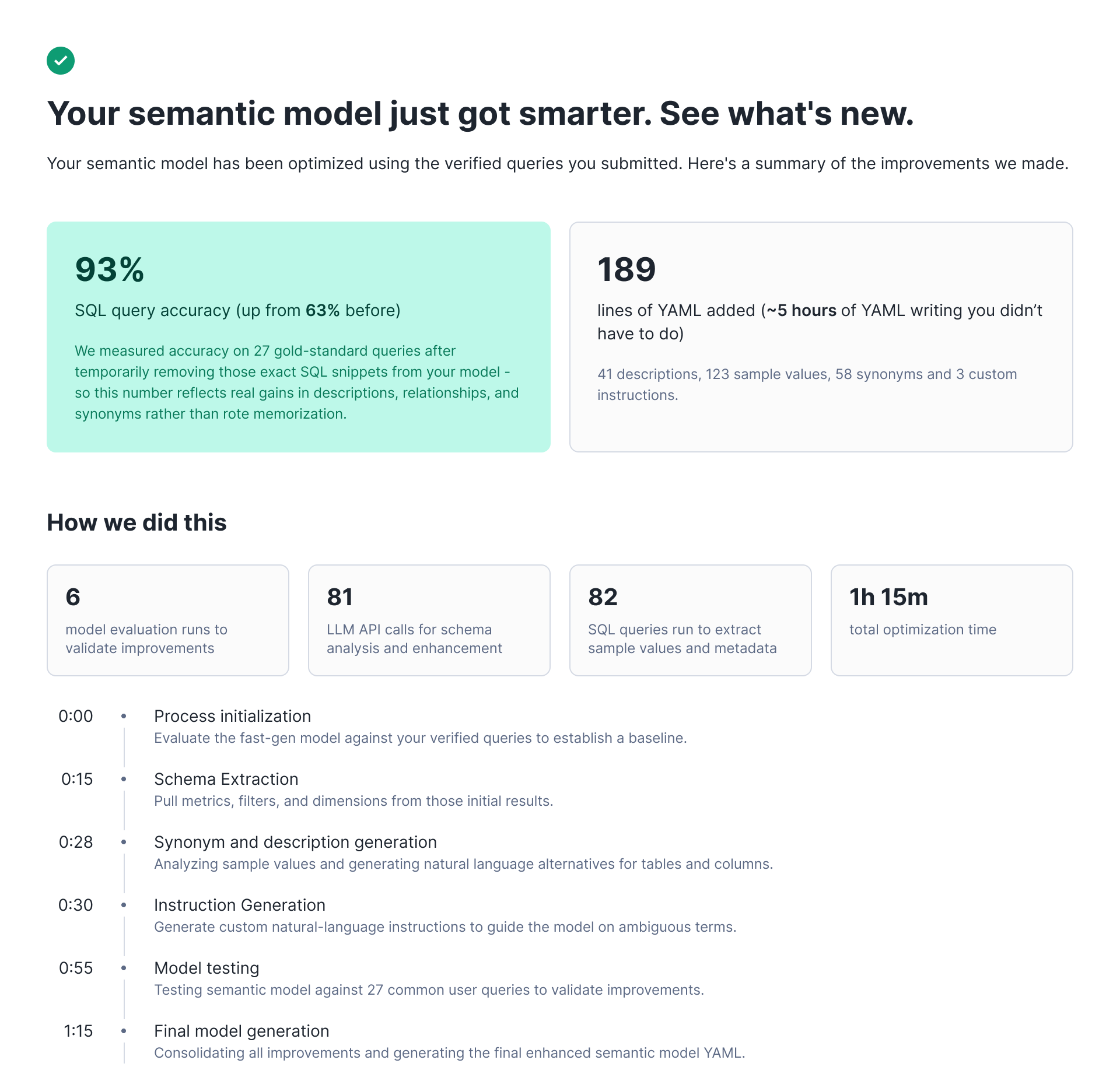
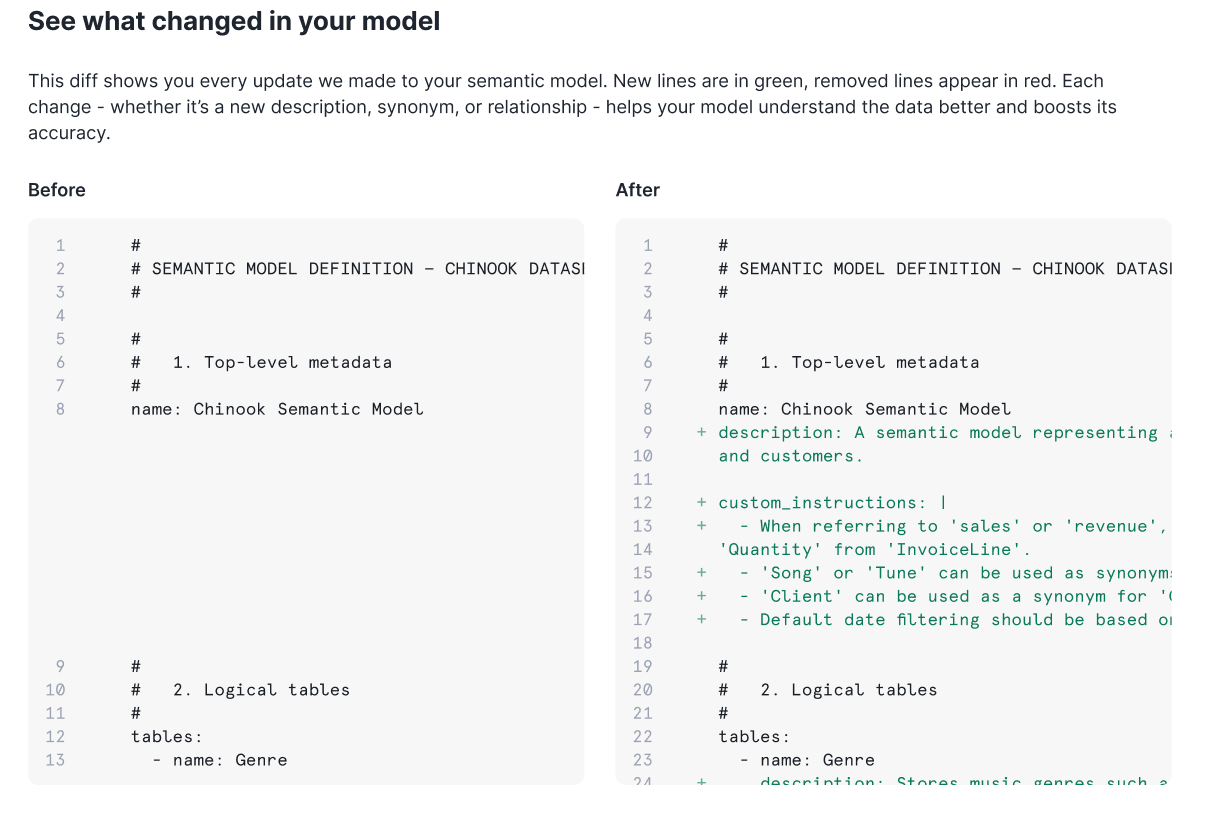
But after testing this UI with early users, we learned that blind acceptance wasn't what our end users wanted. Data analysts preferred to filter through suggestions individually, evaluate changes incrementally and edit proposals before accepting them. Even when the golden evals showed clear improvement, users were reluctant to accept wholesale changes to a live system they didn't fully understand.但在向早期用户测试此界面后,我们了解到盲目接受并不是终端用户想要的。数据分析师更倾向于逐个筛选建议,逐步评估更改,并在接受之前编辑建议。即使黄金评估结果显示有明显的改进,用户也不愿对他们不完全理解的实时系统进行全面更改。
After interviewing users, we learned that they were quite happy with the majority of suggestions produced by this process. In fact, data showed that these were some of the most frequently accepted suggestions. The real issue was the interface. Our users needed granular control and the ability to exercise judgment on individual changes.在采访用户后,我们了解到他们对这一流程产生的大多数建议感到非常满意。事实上,数据表明这些建议是用户最常接受的建议之一。真正的问题在于界面。我们的用户需要细粒度的控制权,以及对个别更改进行判断的能力。
Iteration 2: Granular suggestions (public preview)迭代 2:细粒度建议(公开预览版)
We created a new UI that broke optimization results into discrete suggestions. We surfaced each proposed change (adding/mutating a description, synonym or custom instruction) as an individual card that users can review, accept or reject.我们创建了一个新的用户界面,将优化结果拆分为离散的建议。我们将每个拟议的更改(添加/修改描述、同义词或自定义指令)呈现为一张单独的卡片,供用户审核、接受或拒绝。
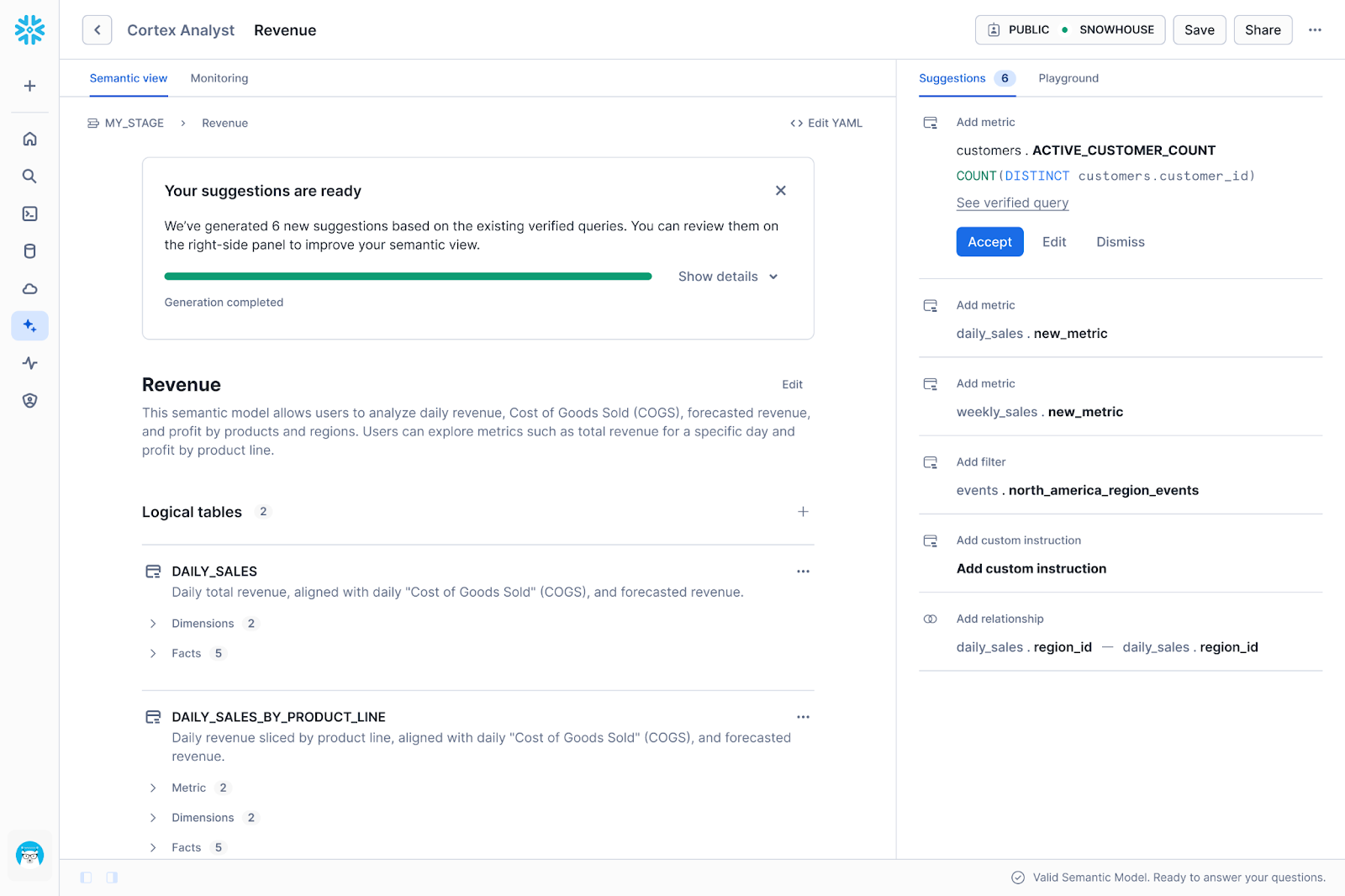
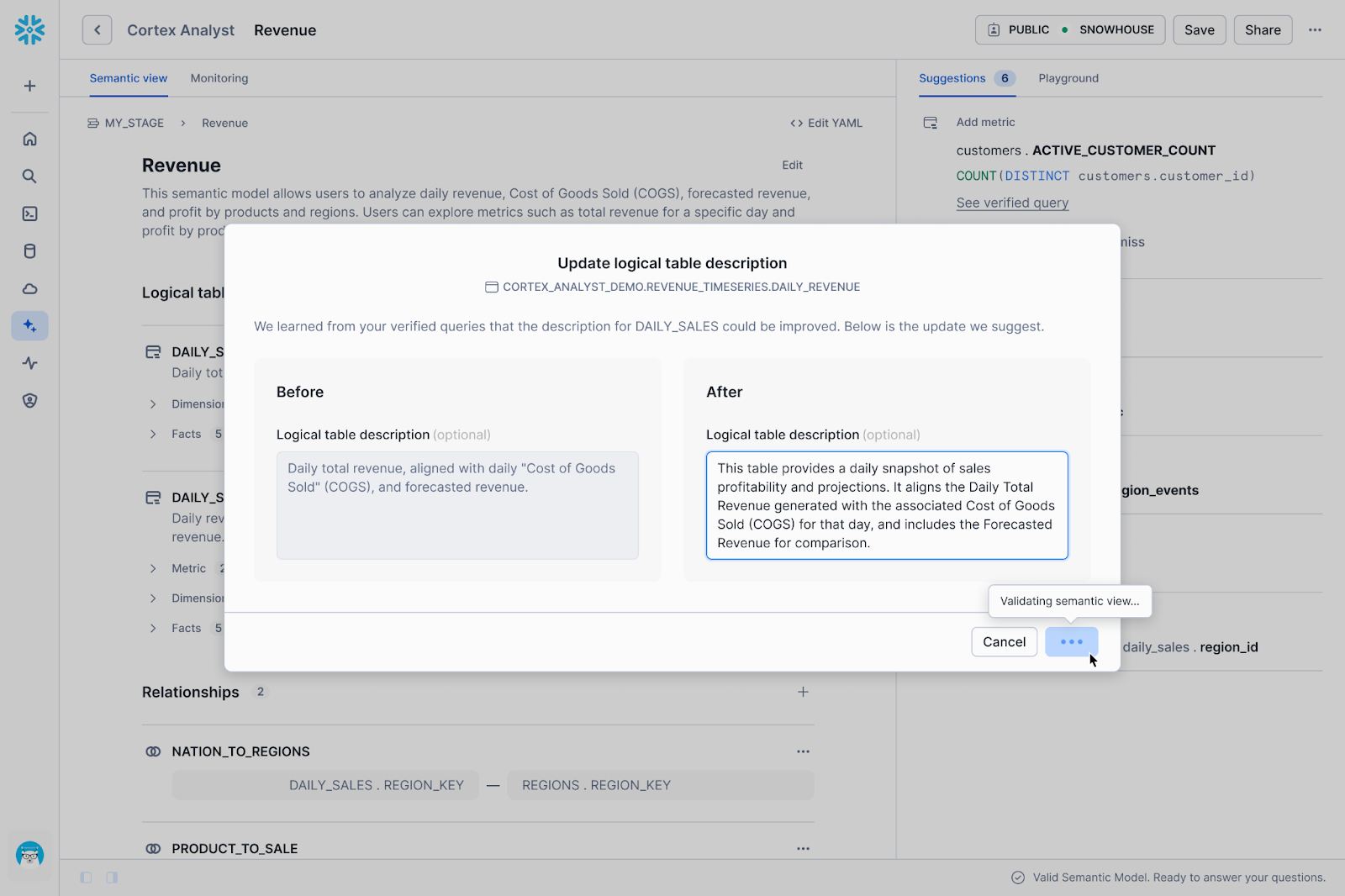
While users appreciated the added control, we quickly realized through usage data and feedback that the new UI introduced significant friction. We prioritized fine-grained control over each suggestion, which shifted the burden of execution back onto the human. We identified three specific areas where this approach wasn't working well:虽然用户很赞赏这种增加的控制权,但我们通过使用数据和反馈很快意识到,新的界面带来了显著的阻力。我们优先考虑了对每条建议的精细控制,这反而将执行负担重新转嫁给了人类。我们确定了这种方法在三个方面效果不佳:
High administrative overhead (Setup)高昂的管理开销(设置)
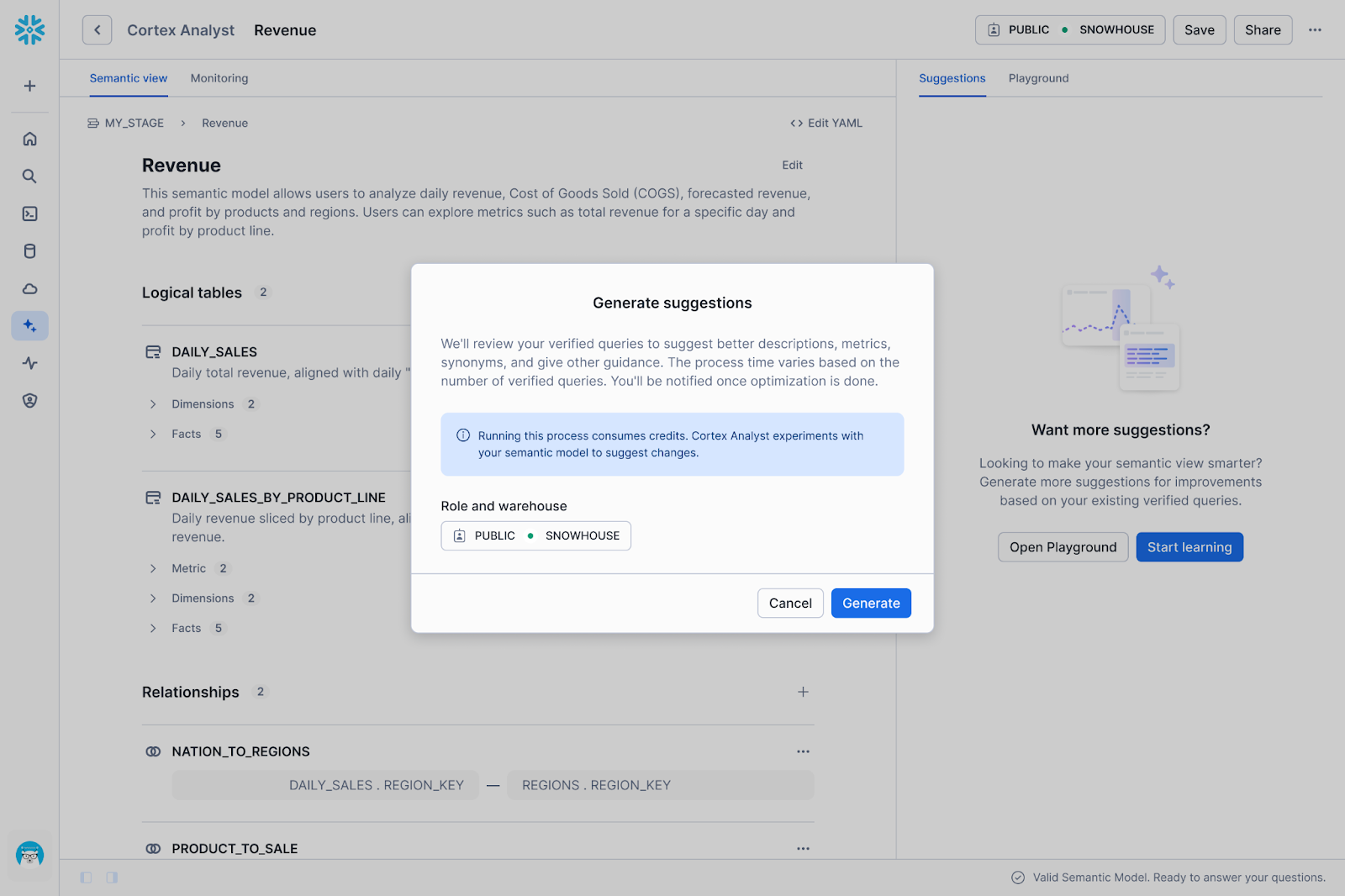
Usage was initially lower than expected because the setup barrier was simply too high. Before a user could even see a single AI suggestion, they had to navigate a list of dependencies: selecting a warehouse, configuring a role, ensuring specific privileges to run and ration credits, and curating verified queries.最初的使用量低于预期,因为设置门槛实在太高了。用户甚至在看到第一条人工智能建议之前,就必须浏览一长串依赖项:选择仓库、配置角色、确保运行和分配额度的特定权限,以及整理经过验证的查询。
Decision fatigue (The "Human-in-the-loop" tax)决策疲劳(“人在回路”的代价)
A user presented with 50 granular suggestions now faced 50 separate decisions to review. It’s also not obvious which of these suggestions are absolutely required to get the data agent to answer questions correctly. 用户面对 50 条细粒度建议,现在不得不做出 50 次单独的决定来审核。此外,哪些建议对于让数据智能体正确回答问题是绝对必要的,这一点也不明显。
The context-switching gap上下文切换的鸿沟
We learned that verification doesn't happen in a vacuum. To decide if a suggestion is "correct," an analyst often needs to check the underlying data. Take, for instance, the question: Does this new filter definition actually match how the business calculates "active users"? To answer that, the user has to leave the semantic view editor and open a worksheet, run SQL queries or check a dashboard. This constant context switching fragmented the workflow, making the review process slow and disjointed.我们了解到验证工作并非孤立进行。为了判断一条建议是否“正确”,分析师通常需要检查底层数据。例如,以这个问题为例:这个新的筛选器定义是否真的符合业务计算“活跃用户”的方式?为了回答这个问题,用户必须离开语义视图编辑器,打开工作表,运行 SQL 查询或查看仪表板。这种不断的上下文切换使工作流程变得碎片化,导致审核过程缓慢且脱节。
Iteration 3: Agentic UI is the future迭代 3:智能体化界面是未来
The friction described above is something you’ll see in lots of B2B SaaS products. To complete a single workflow, users are often forced to act as the bridge between fragmented UIs. In our case, properly reviewing a suggestion can require a data analyst to bounce between role and warehouse settings, SQL worksheets, dashboards and back to Cortex Analyst to apply the change — reorienting themselves to a new set of knobs with every click.上述阻力在许多 B2B SaaS 产品中都很常见。为了完成单一工作流程,用户往往被迫充当碎片化界面之间的桥梁。在我们的案例中,正确审核建议可能需要数据分析师在角色和仓库设置、SQL 工作表、仪表板以及 Cortex Analyst 之间来回切换以应用更改——每次点击都需要重新适应一套新的设置。
Our thinking is the next iteration of Agentic Optimize needs to be as easy as prompting a Snowflake Agent: “Our sales team keeps asking about 'qualified pipeline' but the data agent doesn't understand it.”我们的想法是,Agentic Optimize 的下一次迭代需要像提示 Snowflake 智能体一样简单:“我们的销售团队一直在询问‘合格渠道’,但数据智能体无法理解它。”
In this future, the agent would handle the investigation autonomously. Instead of asking you to input definitions, it could read your setup documentation, parse Slack threads for context, and scan existing dashboards to identify how "qualified pipeline" is actually calculated. It would then propose a metric definition, verify that the generated SQL is correct, and monitor the consumption costs of the operation. The analyst can then accept/edit the evidence-backed suggestion.在未来,智能体将自主处理调查工作。它无需您输入定义,而是可以阅读您的设置文档,解析 Slack 讨论串以获取上下文,并扫描现有仪表板以确定“合格渠道”的实际计算方式。然后,它将提议一个指标定义,验证生成的 SQL 是否正确,并监控操作的消耗成本。分析师随后可以接受/编辑这条基于证据的建议。
In this model, the analyst retains authority over how the semantic view becomes optimized while the agent handles the labor. 在这种模式下,分析师保留了对语义视图如何优化的决策权,而智能体则负责处理繁琐的工作。
Get started today 立即开始使用
While we build toward the conversational experience, the current Semantic View Autopilot (SVA) already delivers granular, reviewable suggestions that improve your semantic views. Try SVA in your account and learn best practices for creating semantic views for Cortex Analyst. Your feedback shapes what comes next.在我们朝着对话式体验迈进的同时,当前的 Semantic View Autopilot (SVA) 已经能够提供细粒度、可审核的建议,从而改善您的语义视图。请在您的账户中试用 SVA,并了解为 Cortex Analyst 创建语义视图的最佳实践。您的反馈将塑造未来的发展方向。