AWS Big Data BlogAWS 大数据博客
Cost-effective ETL with DuckDB and Amazon S3 Tables on AWS Glue利用 DuckDB 和 Amazon S3 Tables 在 AWS Glue 上实现经济高效的 ETL
Many data integration jobs are SQL-centric: they filter, join, and aggregate data on a schedule, and they run frequently enough that fast startup matters. For this shape of work, teams want to match the engine to the job and run it quickly and cost-effectively, without standing up and tuning separate infrastructure.许多数据集成作业都以 SQL 为核心:它们按计划筛选、联接和聚合数据,且运行频率较高,因此快速启动至关重要。对于这类工作,团队希望能够根据作业需求匹配引擎,并以快速且经济高效的方式运行,而无需建立和调整独立的底层基础设施。
AWS Glue is the serverless data integration service that customers use to run extract, transform, and load (ETL) jobs at any scale, without managing infrastructure. With AWS Glue, you can run DuckDB, an embedded, in-process, vectorized SQL engine, inside a standard AWS Glue job. DuckDB reads Parquet files from Amazon Simple Storage Service (Amazon S3) and writes Apache Iceberg tables directly to Amazon S3 Tables, a capability of Amazon S3. DuckDB is an open source, in-process, vectorized analytical SQL engine that runs embedded in your application, with no separate server or cluster to manage. It reads and writes cloud data formats such as Parquet and Apache Iceberg natively. AWS Glue 6.0 is the latest version, running on a modernized runtime with a 30 percent price reduction over previous versions. DuckDB reads Amazon S3 Parquet through its httpfs extension and commits Iceberg snapshots to Amazon S3 Tables through the Iceberg REST endpoint, so no separate catalog synchronization is required. Running DuckDB in AWS Glue is well suited to SQL-centric transformations such as filters, joins, and aggregations. It also fits frequent, scheduled jobs such as hourly or daily aggregations, incremental loads, and rollups that benefit from fast startup. This pattern complements Apache Spark on AWS Glue rather than replacing it: when a workload needs distributed processing, the same job type runs PySpark with no change to your infrastructure, IAM, or triggers.AWS Glue 是一项无服务器数据集成服务,客户无需管理基础设施即可大规模运行提取、转换和加载 (ETL) 作业。借助 AWS Glue,您可以在标准的 AWS Glue 作业中运行 DuckDB(一种嵌入式、进程内、向量化 SQL 引擎)。DuckDB 可从 Amazon Simple Storage Service (Amazon S3) 读取 Parquet 文件,并将 Apache Iceberg 表直接写入 Amazon S3 Tables(Amazon S3 的一项功能)。DuckDB 是一款开源、进程内、向量化分析型 SQL 引擎,可嵌入到您的应用程序中运行,无需管理独立的服务器或集群。它能以原生方式读取和写入 Parquet 和 Apache Iceberg 等云数据格式。AWS Glue 6.0 是最新版本,运行在现代化的运行时环境上,与之前版本相比价格降低了 30%。DuckDB 通过其 httpfs 扩展读取 Amazon S3 中的 Parquet 文件,并通过 Iceberg REST 端点将 Iceberg 快照提交到 Amazon S3 Tables,因此无需进行额外的目录同步。在 AWS Glue 中运行 DuckDB 非常适合筛选、联接和聚合等以 SQL 为中心的转换任务。它也适用于需要快速启动的频繁调度作业,例如每小时或每日聚合、增量加载和汇总。这种模式是对 AWS Glue 上 Apache Spark 的补充而非替代:当工作负载需要分布式处理时,相同的作业类型可以运行 PySpark,而无需更改您的基础设施、IAM 或触发器。
This post walks through the pattern with a concrete ETL use case and provides complete, runnable code. It also compares measured cost and runtime against a Spark job performing the same work on the same AWS Glue 6.0 runtime.本文将通过一个具体的 ETL 用例来演示这种模式,并提供完整、可运行的代码。此外,文中还对比了在相同的 AWS Glue 6.0 运行时上执行相同任务时,DuckDB 与 Spark 作业的实际成本和运行时间。
When to use this pattern何时使用此模式
This pattern is a complement to Spark on AWS Glue, not a replacement. The following table summarizes when each approach yields the best results.此模式是对 AWS Glue 上 Spark 的补充,而非替代。下表总结了每种方法在何种情况下能获得最佳结果。
Signal |
DuckDB on AWS Glue 6.0 |
Apache Spark on AWS Glue 6.0 |
| Dataset size per run | Scales with worker size | Scales horizontally across multiple nodes for datasets of any size |
| Parallelism requirement | Single-node, in-process execution | Distributed processing across a managed cluster |
| SQL complexity | Aggregations, joins, window functions | Complex graph operations, custom UDFs, ML pipelines |
| Cost priority | Minimize per-run cost and duration | Maximize throughput at scale |
| Iceberg writes | DuckDB iceberg extension to S3 Tables | Native Spark Iceberg integration |
For workloads that need distributed processing, the same glueetl job type runs PySpark with no change to your infrastructure, AWS Identity and Access Management (IAM) configuration, or triggers. You choose the engine that fits each workload.对于需要分布式处理的工作负载,相同的 glueetl 作业类型可以运行 PySpark,而无需更改您的基础设施、AWS Identity and Access Management (IAM) 配置或触发器。您可以为每个工作负载选择最合适的引擎。
How DuckDB runs on AWS Glue 6.0DuckDB 如何在 AWS Glue 6.0 上运行
Running DuckDB in an AWS Glue job comes down to two things working together: a runtime modern enough to load DuckDB and its native extensions, and the capabilities DuckDB brings to ETL once it does.在 AWS Glue 作业中运行 DuckDB 取决于两方面的协同:一个足以加载 DuckDB 及其原生扩展的现代化运行时环境,以及 DuckDB 在 ETL 过程中所具备的功能。
What the AWS Glue 6.0 runtime providesAWS Glue 6.0 运行时提供了什么
Modern runtime compatibility. AWS Glue 6.0 runs on Amazon Linux 2023 with glibc 2.34 and Python 3.13. DuckDB 1.5.x and its native C++ extension binaries (httpfs, aws, iceberg) install through pip and load without workarounds. The DuckDB extension binaries require a modern glibc (2.28 or later), which the AWS Glue 6.0 runtime provides.现代运行时兼容性。AWS Glue 6.0 运行在带有 glibc 2.34 和 Python 3.13 的 Amazon Linux 2023 上。DuckDB 1.5.x 及其原生 C++ 扩展二进制文件(httpfs、aws、iceberg)可通过 pip 安装并直接加载,无需任何变通方法。DuckDB 扩展二进制文件需要现代 glibc(2.28 或更高版本),而 AWS Glue 6.0 运行时正好提供了这一支持。
AWS Glue 6.0 resolves this compatibility requirement. You can add DuckDB 1.5.x to an AWS Glue 6.0 job in two ways. The first is the --additional-python-modules job parameter (duckdb==1.5.1), which pip-installs the package at job startup and loads all extensions without additional steps. Alternatively, you can package the dependencies as a Python virtual environment, upload it to Amazon S3, and reference it using the --python-virtual-env parameter. On AWS Glue 6.0, you can also add --python-virtual-env-storage-prefix to have AWS Glue build and cache the virtual environment automatically. For more information, see Using Python virtual environments with AWS Glue.AWS Glue 6.0 解决了这一兼容性要求。您可以通过两种方式将 DuckDB 1.5.x 添加到 AWS Glue 6.0 作业中。第一种是使用 --additional-python-modules 作业参数 (duckdb==1.5.1),它会在作业启动时通过 pip 安装该包并加载所有扩展,无需额外步骤。或者,您可以将依赖项打包为 Python 虚拟环境,上传到 Amazon S3,并使用 --python-virtual-env 参数进行引用。在 AWS Glue 6.0 上,您还可以添加 --python-virtual-env-storage-prefix,让 AWS Glue 自动构建并缓存虚拟环境。有关更多信息,请参阅在 AWS Glue 中使用 Python 虚拟环境。
What DuckDB providesDuckDB 提供了什么
DuckDB is an open source, in-process analytical SQL engine. It runs inside an AWS Glue job as a single process, with no separate cluster or coordinator. The following capabilities make it a practical fit for ETL on the AWS Glue 6.0 runtime.DuckDB 是一款开源、进程内分析型 SQL 引擎。它作为单个进程在 AWS Glue 作业内部运行,无需独立的集群或协调器。以下功能使其成为 AWS Glue 6.0 运行时上 ETL 任务的实用选择。
- Single-node vectorized execution. DuckDB runs inside a single AWS Glue job. For a couple of gigabytes, there is no shuffle, no executor scheduling, and no inter-node network I/O. The work happens in a single vectorized pass over columnar memory.单节点向量化执行。DuckDB 在单个 AWS Glue 作业内部运行。对于几个 GB 的数据量,无需进行数据重排 (shuffle)、执行程序调度或节点间网络 I/O。所有工作都在对列式内存进行单次向量化遍历的过程中完成。
- Native Amazon S3 and Parquet access. The
httpfsextension reads and writes Amazon S3 objects directly, using the IAM role of the AWS Glue job automatically throughCREDENTIAL_CHAIN.原生 Amazon S3 和 Parquet 访问。httpfs 扩展通过 CREDENTIAL_CHAIN 自动使用 AWS Glue 作业的 IAM 角色,直接读取和写入 Amazon S3 对象。 - Native Amazon S3 Tables writes. The
icebergextension connects to the Amazon S3 Tables Iceberg REST endpoint (ENDPOINT_TYPE s3_tables) and commits standard Iceberg snapshots. With AWS Glue 6.0, you can use two capabilities that matured independently: Amazon S3 Tables and DuckDB Iceberg writes.原生 Amazon S3 Tables 写入。iceberg 扩展连接到 Amazon S3 Tables Iceberg REST 端点 (ENDPOINT_TYPE s3_tables) 并提交标准 Iceberg 快照。借助 AWS Glue 6.0,您可以利用两项独立成熟的功能:Amazon S3 Tables 和 DuckDB Iceberg 写入。 - Larger-than-memory operators. Sort, join, and aggregate spill to
/tmp, so datasets larger than available RAM still process without code changes.内存溢出处理算子。排序、联接和聚合操作会溢出到 /tmp,因此即使数据集大于可用内存,也能在不更改代码的情况下完成处理。
The output is a standard Apache Iceberg table in Amazon S3 Tables. It is queryable by Amazon Athena, Amazon Redshift, and Amazon EMR, and other Iceberg-compatible engines that support the Iceberg REST Catalog API.输出结果是 Amazon S3 Tables 中的标准 Apache Iceberg 表。它可由 Amazon Athena、Amazon Redshift、Amazon EMR 以及其他支持 Iceberg REST Catalog API 的 Iceberg 兼容引擎进行查询。
Sizing guidance. DuckDB runs within a single AWS Glue worker, so its available memory and disk scale with the worker type. This walkthrough uses the minimum glueetl configuration of 2 workers (2 data processing units, or DPUs) with worker type G.1X: each G.1X worker provides 4 vCPUs and 16 GB of memory. DuckDB runs on the driver and processes data in memory, spilling to local disk when a dataset or intermediate result exceeds available RAM. For larger inputs, choose a bigger worker: G.2X provides 8 vCPUs and 32 GB of memory, and the G.4X and G.8X types scale higher. Size the worker to your input volume and the memory footprint of your aggregations and joins. For current specifications, see AWS Glue worker types.规模调整指南。DuckDB 在单个 AWS Glue 工作节点内运行,因此其可用内存和磁盘资源随工作节点类型而扩展。本演示使用最基本的 glueetl 配置,即 2 个 G.1X 类型的工作节点(2 个数据处理单元,即 DPU):每个 G.1X 工作节点提供 4 个 vCPU 和 16 GB 内存。DuckDB 在驱动程序上运行并在内存中处理数据,当数据集或中间结果超过可用内存时,会溢出到本地磁盘。对于更大的输入,请选择更大的工作节点:G.2X 提供 8 个 vCPU 和 32 GB 内存,G.4X 和 G.8X 类型则提供更高的扩展能力。请根据您的输入量以及聚合和联接操作的内存占用情况来调整工作节点规模。有关当前规格,请参阅 AWS Glue 工作节点类型。
Architecture架构
The following image shows the architecture described in this post.下图展示了本文所述的架构。
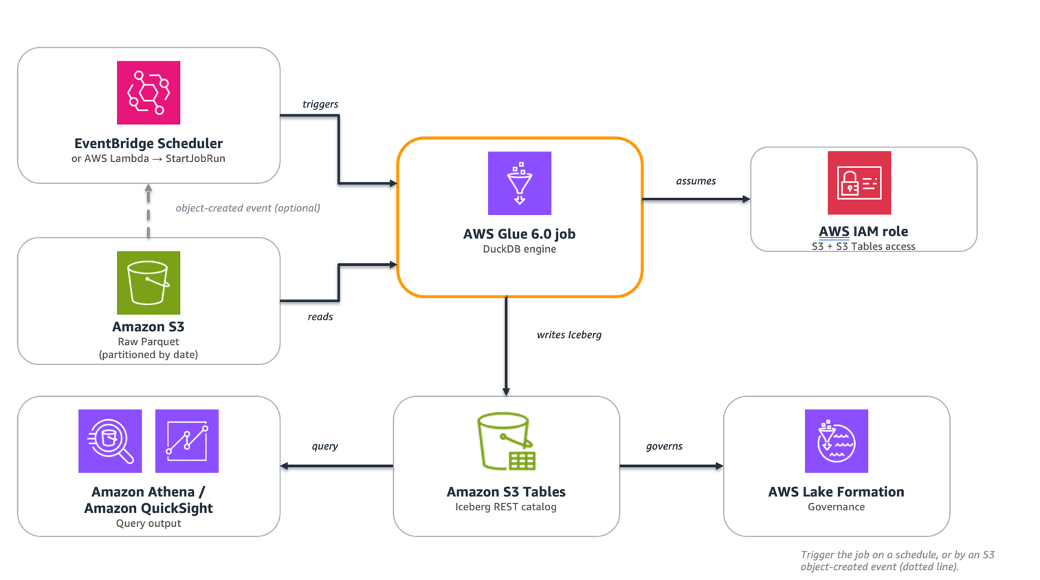
Figure 1: Data flows from raw Parquet in Amazon S3 through an AWS Glue 6.0 job running DuckDB, which writes Apache Iceberg tables to Amazon S3 Tables for querying by Amazon Athena and Amazon QuickSight.图 1:数据从 Amazon S3 中的原始 Parquet 文件流向运行 DuckDB 的 AWS Glue 6.0 作业,该作业将 Apache Iceberg 表写入 Amazon S3 Tables,供 Amazon Athena 和 Amazon QuickSight 查询。
The pipeline consists of the following managed components:该管道由以下托管组件组成:
Layer |
Role |
AWS Service |
| Source | Raw Parquet files, partitioned by date | Amazon S3 |
| Compute | DuckDB SQL engine running on the AWS Glue 6.0 runtime | AWS Glue 6.0 (glueetl) |
| Destination | Iceberg analytical tables, queryable by any engine | Amazon S3 Tables |
| Governance | Permissions and access control for S3 Tables writes | AWS Lake Formation |
| Query | Analytics and business intelligence (BI) on the output tables | Amazon Athena, Amazon QuickSight |
Raw Parquet files land in Amazon S3 on a schedule. An AWS Glue 6.0 job runs DuckDB. DuckDB reads the files, applies SQL transformations in memory, and writes the aggregated result as an Iceberg table to Amazon S3 Tables through the Iceberg REST catalog. Amazon Athena and Amazon QuickSight can query the output immediately. No separate catalog synchronization is required.原始 Parquet 文件按计划存入 Amazon S3。AWS Glue 6.0 作业运行 DuckDB。DuckDB 读取这些文件,在内存中应用 SQL 转换,并通过 Iceberg REST 目录将聚合后的结果作为 Iceberg 表写入 Amazon S3 Tables。Amazon Athena 和 Amazon QuickSight 可以立即查询输出结果。无需进行额外的目录同步。
You can trigger the job several ways:您可以通过多种方式触发该作业:
- With a native AWS Glue trigger, which can be scheduled, on-demand, or conditional on another job or crawler completing.使用原生的 AWS Glue 触发器,可以是计划触发、按需触发,或在另一个作业或爬虫完成后触发。
- With Amazon EventBridge Scheduler calling
StartJobRunon a fixed schedule.使用 Amazon EventBridge Scheduler 按固定计划调用 StartJobRun。 - In response to new data through an Amazon S3 event notification that invokes an AWS Lambda function calling
StartJobRun.通过 Amazon S3 事件通知响应新数据,从而调用 AWS Lambda 函数来执行 StartJobRun。 - As part of an AWS Glue Workflow.作为 AWS Glue 工作流的一部分。
Walkthrough: eCommerce daily order summary演示:电子商务每日订单汇总
This section walks through a daily ETL pipeline for an eCommerce application. The pipeline reads raw transaction files from Amazon S3, cleanses and aggregates them, and writes a query-ready summary to Amazon S3 Tables.本节将演示一个电子商务应用程序的每日 ETL 管道。该管道从 Amazon S3 读取原始交易文件,进行清洗和聚合,并将可查询的汇总数据写入 Amazon S3 Tables。
Step |
Operation |
Detail |
| 1. Source | Read raw Parquet from S3 | s3://<amzn-s3-demo-source-bucket>/orders/year=2026/month=08/*.parquet |
| 2. Filter | status IN (‘completed’,‘processing’) |
Drop canceled and test orders |
| 3. Enrich | net_revenue, avg_order_value |
Derived columns via SQL expressions |
| 4. Aggregate | GROUP BY order_day, region, category |
Daily revenue, order count, unique customers |
| 5. Write | INSERT into an Amazon S3 Tables Iceberg table |
Idempotent per-day reload |
Prerequisites先决条件
- An AWS account with permissions for AWS Glue, Amazon S3, Amazon S3 Tables, AWS Identity and Access Management (IAM), and AWS Lake Formation.一个拥有 AWS Glue、Amazon S3、Amazon S3 Tables、AWS Identity and Access Management (IAM) 和 AWS Lake Formation 权限的 AWS 账户。
- An Amazon S3 bucket containing raw Parquet files (referred to as
<amzn-s3-demo-source-bucket>in this post).一个包含原始 Parquet 文件的 Amazon S3 存储桶(本文中称为 <amzn-s3-demo-source-bucket>)。 - An Amazon S3 Tables table bucket (referred to as
<amzn-s3-demo-table-bucket>in this post). See the Create the S3 Tables table bucket section.一个 Amazon S3 Tables 表存储桶(本文中称为 <amzn-s3-demo-table-bucket>)。请参阅“创建 S3 Tables 表存储桶”一节。 - An IAM role for the AWS Glue job with:
- Amazon S3 read access on
<amzn-s3-demo-source-bucket>.<amzn-s3-demo-source-bucket> 的 Amazon S3 读取权限。 - Amazon S3 Tables read/write access.Amazon S3 Tables 的读/写权限。
- AWS Glue job execution permissions.AWS Glue 作业执行权限。
- Amazon S3 read access on
- AWS Lake Formation grants on the S3 Tables catalog and namespace (required for Iceberg write operations).S3 Tables 目录和命名空间的 AWS Lake Formation 授权(Iceberg 写入操作所必需)。
- An AWS Glue 6.0 job (
glueetl) with:--additional-python-modules:duckdb==1.5.1.--additional-python-modules: duckdb==1.5.1。- Minimum worker configuration: 2 workers, type G.1X.最小工作节点配置:2 个工作节点,G.1X 类型。
Note on DuckDB versions. DuckDB support for writing Apache Iceberg tables through a REST catalog, including Amazon S3 Tables, requires version 1.4.0 or later. This walkthrough uses duckdb==1.5.1. On the AWS Glue 6.0 runtime (Amazon Linux 2023), it installs and all native extensions load without additional configuration.关于 DuckDB 版本的说明。DuckDB 通过 REST 目录(包括 Amazon S3 Tables)写入 Apache Iceberg 表的支持需要 1.4.0 或更高版本。本演示使用 duckdb==1.5.1。在 AWS Glue 6.0 运行时(Amazon Linux 2023)上,它会自动安装,并且所有原生扩展无需额外配置即可加载。
Create the S3 Tables table bucket创建 S3 Tables 表存储桶
If you don’t already have an Amazon S3 Tables table bucket, create one using the AWS Command Line Interface (AWS CLI):如果您还没有 Amazon S3 Tables 表存储桶,请使用 AWS 命令行界面 (AWS CLI) 创建一个:
Note the table bucket Amazon Resource Name (ARN) from the output. It follows the format:从输出中记录表存储桶的 Amazon 资源名称 (ARN)。其格式如下:
arn:aws:s3tables:<YOUR-REGION>:<YOUR-ACCOUNT-ID>:bucket/<amzn-s3-demo-table-bucket>arn:aws:s3tables:<YOUR-REGION>:<YOUR-ACCOUNT-ID>:bucket/<amzn-s3-demo-table-bucket>
Turn on integration with AWS analytics services so the table is discoverable by Amazon Athena, Amazon Redshift, and Amazon EMR. Complete the integration by creating the s3tablescatalog catalog in the AWS Glue Data Catalog using the AWS CLI. For the steps, see Integrating Amazon S3 Tables with AWS analytics services.开启与 AWS 分析服务的集成,以便 Amazon Athena、Amazon Redshift 和 Amazon EMR 可以发现该表。通过使用 AWS CLI 在 AWS Glue Data Catalog 中创建 s3tablescatalog 目录来完成集成。有关步骤,请参阅“将 Amazon S3 Tables 与 AWS 分析服务集成”。
After turning on integration, grant the AWS Glue job role Lake Formation permissions on the Amazon S3 Tables catalog and the analytics namespace:开启集成后,向 AWS Glue 作业角色授予 Amazon S3 Tables 目录和分析命名空间的 Lake Formation 权限:
Generate sample data生成示例数据
This walkthrough uses a synthetic eCommerce dataset. Run the following Python script locally or in AWS CloudShell to generate Parquet files that match the schema used in the transform. It produces roughly 8.4 million rows across 12 files (about 94 MB on disk as Parquet, roughly 1.2 GB uncompressed in memory).本演示使用合成的电子商务数据集。在本地或 AWS CloudShell 中运行以下 Python 脚本,以生成与转换过程中所用架构匹配的 Parquet 文件。它会产生 12 个文件,总计约 840 万行数据(在磁盘上作为 Parquet 存储约为 94 MB,在内存中解压后约为 1.2 GB)。
Upload the generated files to your source bucket:将生成的文件上传到您的源存储桶:
Note. The CLI commands and code examples in this walkthrough use angle-bracket placeholders such as <amzn-s3-demo-source-bucket> and <amzn-s3-demo-table-bucket>. Replace these with your own values before running.注意:本演示中的 CLI 命令和代码示例使用了尖括号占位符,例如 <amzn-s3-demo-source-bucket> 和 <amzn-s3-demo-table-bucket>。运行前请将其替换为您自己的值。
Step 1: Configure DuckDB in the AWS Glue 6.0 job第 1 步:在 AWS Glue 6.0 作业中配置 DuckDB
The AWS Glue filesystem is read-only except for /tmp, so DuckDB uses /tmp as a writable home directory for its extension cache and spill files. The job loads DuckDB extensions: httpfs reads and writes Amazon S3 objects directly, aws handles AWS credential resolution, refresh, and AWS Region detection, and iceberg connects to the Amazon S3 Tables REST catalog. The CREDENTIAL_CHAIN provider (from the aws extension) tells DuckDB to use the standard AWS credential provider chain, which automatically picks up the IAM role attached to the AWS Glue job. No access keys or secrets appear in the code.AWS Glue 文件系统除 /tmp 外均为只读,因此 DuckDB 使用 /tmp 作为其扩展缓存和溢出文件的可写主目录。作业会加载 DuckDB 扩展:httpfs 直接读取和写入 Amazon S3 对象,aws 处理 AWS 凭证解析、刷新和 AWS 区域检测,iceberg 连接到 Amazon S3 Tables REST 目录。CREDENTIAL_CHAIN 提供程序(来自 aws 扩展)告知 DuckDB 使用标准的 AWS 凭证提供程序链,该链会自动获取附加到 AWS Glue 作业的 IAM 角色。代码中不会出现任何访问密钥或机密信息。
The home_directory setting must be applied before loading any extensions. Without it, DuckDB attempts to write to /.duckdb/ and fails with IOError: Permission denied.home_directory 设置必须在加载任何扩展之前应用。否则,DuckDB 会尝试写入 /.duckdb/ 并导致 IOError: Permission denied(权限被拒绝)错误。
Step 2: Read and transform with DuckDB SQL第 2 步:使用 DuckDB SQL 读取和转换
DuckDB reads Amazon S3 Parquet files directly through the httpfs extension. No local download is required. The read_parquet() function accepts Amazon S3 glob patterns, reading multiple files as a single relation.DuckDB 通过 httpfs 扩展直接读取 Amazon S3 Parquet 文件。无需本地下载。read_parquet() 函数接受 Amazon S3 通配符模式,将多个文件读取为单个关系。
GROUP BY ALL is a DuckDB SQL extension that groups by every non-aggregate column in the SELECT list. It’s a convenience feature rather than standard SQL, and support varies across query engines. If you adapt this query for another engine, check whether it supports GROUP BY ALL or list the grouping columns explicitly (GROUP BY order_day, region, category).GROUP BY ALL 是 DuckDB 的 SQL 扩展,它会对 SELECT 列表中所有非聚合列进行分组。这是一种便利功能而非标准 SQL,不同查询引擎的支持情况各不相同。如果您要将此查询适配到其他引擎,请检查其是否支持 GROUP BY ALL,或者显式列出分组列(GROUP BY order_day, region, category)。
The WHERE clause retains both completed and processing orders. The gross_revenue column reflects all in-flight revenue, while net_revenue counts only completed orders. A partition containing only processing orders shows net_revenue = 0. This is by design: the two columns serve different reporting purposes.WHERE 子句保留了已完成和处理中的订单。gross_revenue 列反映了所有进行中的收入,而 net_revenue 仅计算已完成订单。仅包含处理中订单的分区其 net_revenue 为 0。这是刻意设计的:这两列服务于不同的报告目的。
Step 3: Write to Amazon S3 Tables第 3 步:写入 Amazon S3 Tables
DuckDB attaches the S3 Tables bucket as an Iceberg REST catalog using the ENDPOINT_TYPE s3_tables option. DuckDB commits each write as a new Iceberg snapshot through the catalog.DuckDB 使用 ENDPOINT_TYPE s3_tables 选项将 S3 Tables 存储桶附加为 Iceberg REST 目录。DuckDB 通过该目录将每次写入提交为一个新的 Iceberg 快照。
The write uses an idempotent per-day reload pattern: create the table if it does not exist, delete any existing rows for the batch’s date range, then insert. This way, re-runs don’t produce duplicate rows.写入操作使用每日幂等重载模式:如果表不存在则创建,删除该批次日期范围内已有的行,然后插入。这样,重新运行作业不会产生重复行。
Note: The DELETE and INSERT are not committed atomically. If the job fails between them, the affected partition is left empty. For mitigations, see Error handling for production.注意:DELETE 和 INSERT 操作并非原子提交。如果作业在两者之间失败,受影响的分区可能会留空。有关缓解措施,请参阅“生产环境的错误处理”。
The resulting Iceberg table is immediately readable by Amazon Athena, Amazon Redshift, and Amazon EMR through the S3 Tables REST catalog. Amazon S3 Tables handles compaction, snapshot expiration, and orphan-file cleanup automatically.生成的 Iceberg 表可立即通过 S3 Tables REST 目录供 Amazon Athena、Amazon Redshift 和 Amazon EMR 读取。Amazon S3 Tables 会自动处理压缩、快照过期和孤立文件清理。
Complete AWS Glue 6.0 job script完整的 AWS Glue 6.0 作业脚本
The following script combines all three steps with structured logging, error handling, and AWS Glue job parameter parsing. It can be used directly as the script for an AWS Glue 6.0 glueetl job.以下脚本结合了这三个步骤,并包含了结构化日志记录、错误处理和 AWS Glue 作业参数解析。它可以直接用作 AWS Glue 6.0 glueetl 作业的脚本。
Create the job using the AWS CLI:使用 AWS CLI 创建作业:
Note. Replace the angle-bracket placeholders (<amzn-s3-demo-source-bucket>, <amzn-s3-demo-table-bucket>, <YOUR-REGION>, <YOUR-ACCOUNT-ID>, <YOUR-AWS-GLUE-ROLE>) with your own values before running.注意:运行前请将尖括号占位符(<amzn-s3-demo-source-bucket>、<amzn-s3-demo-table-bucket>、<YOUR-REGION>、<YOUR-ACCOUNT-ID>、<YOUR-AWS-GLUE-ROLE>)替换为您自己的值。
Lake Formation permissions. Amazon S3 Tables access is governed by AWS Lake Formation. Grant the AWS Glue job role only the permissions the job needs: SELECT, INSERT, and DELETE on the target table (daily_order_summary), plus CREATE_TABLE on the analytics namespace so the job can create the table on first run. For the exact permission names and resource scoping, see the Lake Formation permissions reference. The role also requires the lakeformation:GetDataAccess IAM action. Without these grants, the ATTACH and CREATE TABLE statements fail with an access-denied error.Lake Formation 权限。Amazon S3 Tables 的访问受 AWS Lake Formation 管辖。仅向 AWS Glue 作业角色授予作业所需的权限:目标表 (daily_order_summary) 上的 SELECT、INSERT 和 DELETE,以及分析命名空间上的 CREATE_TABLE,以便作业在首次运行时能够创建表。有关确切的权限名称和资源范围,请参阅 Lake Formation 权限参考。该角色还需要 lakeformation:GetDataAccess IAM 操作。如果没有这些授权,ATTACH 和 CREATE TABLE 语句将因访问被拒绝错误而失败。
Error handling for production生产环境的错误处理
For production use, plan for three failure modes:对于生产环境,请规划以下三种故障模式:
- Catalog access. If
ATTACHto Amazon S3 Tables returns an access-denied error, verify that the IAM role of the job has the scoped Amazon S3 Tables actions on the table bucket ARN and the required AWS Lake Formation grants. Writes need both.目录访问。如果 ATTACH 到 Amazon S3 Tables 返回访问被拒绝错误,请验证作业的 IAM 角色是否在表存储桶 ARN 上拥有范围限定的 Amazon S3 Tables 操作,以及是否拥有所需的 AWS Lake Formation 授权。写入操作两者缺一不可。 - Partial writes. The
DELETEandINSERTare not committed atomically, so a failure between them can leave a partition empty. SetMaxRetriesto 1 so the idempotent reload re-runs automatically, or write to a staging table and swap on success.部分写入。DELETE 和 INSERT 并非原子提交,因此两者之间的故障可能导致分区留空。将 MaxRetries 设置为 1 以便自动重新运行幂等重载,或者写入临时表并在成功后进行交换。 - Timeouts. Set the job
Timeouthigher than the expected run time to stop hung runs.超时。将作业的 Timeout 设置为高于预期的运行时间,以停止挂起的作业运行。
Monitoring监控
DuckDB runs inside a standard AWS Glue job, so you monitor it with the same Amazon CloudWatch metrics as any AWS Glue job. Two are useful for right-sizing this workload:DuckDB 在标准 AWS Glue 作业中运行,因此您可以使用与任何 AWS Glue 作业相同的 Amazon CloudWatch 指标对其进行监控。以下两个指标对于调整此工作负载的规模非常有用:
glue.driver.jvm.heap.usage: driver memory pressure. A high or climbing value means the worker needs more memory or the query is spilling heavily to disk.glue.driver.jvm.heap.usage:驱动程序内存压力。数值较高或持续攀升意味着工作节点需要更多内存,或者查询正在大量溢出到磁盘。glue.driver.aggregate.bytesRead: bytes read from Amazon S3, useful for correlating input size with runtime and cost.glue.driver.aggregate.bytesRead:从 Amazon S3 读取的字节数,有助于将输入大小与运行时间和成本相关联。
The internal execution metrics of DuckDB (query plan, operator timings, spill volume) aren’t exposed to Amazon CloudWatch. Structured logging from the job script is the primary way to observe DuckDB itself: the production script uses logger.info to record the rows transformed and rows written, and those lines appear in the CloudWatch Logs stream of the job. Add more logger.info statements around each stage if you need finer-grained timing.DuckDB 的内部执行指标(查询计划、算子计时、溢出量)不会暴露给 Amazon CloudWatch。来自作业脚本的结构化日志记录是观察 DuckDB 本身的主要方式:生产脚本使用 logger.info 记录转换和写入的行数,这些行会出现在作业的 CloudWatch Logs 流中。如果您需要更细粒度的计时,请在每个阶段周围添加更多的 logger.info 语句。
Measured results测量结果
The measurements in this section were collected on AWS Glue 6.0 with DuckDB 1.5.1 writing to Amazon S3 Tables in the US East (N. Virginia) Region (us-east-1). Output tables were verified by querying them in Amazon Athena. Both jobs produced identical output: 1,176 summary rows.本节中的测量结果是在美国东部(弗吉尼亚北部)区域 (us-east-1) 的 AWS Glue 6.0 上,使用 DuckDB 1.5.1 写入 Amazon S3 Tables 时收集的。输出表已通过在 Amazon Athena 中进行查询验证。两个作业产生的输出完全相同:1,176 行汇总数据。
The dataset consisted of 8.4 million rows across 12 Parquet files (approximately 94 MB compressed on disk, approximately 1.2 GB uncompressed). One job ran DuckDB on the AWS Glue 6.0 runtime. The other ran Apache Spark on AWS Glue 6.0 with the equivalent transform and a native Iceberg write.数据集包含 12 个 Parquet 文件,总计 840 万行(磁盘上压缩后约 94 MB,解压后约 1.2 GB)。一个作业在 AWS Glue 6.0 运行时上运行 DuckDB。另一个作业在 AWS Glue 6.0 上运行 Apache Spark,执行相同的转换和原生 Iceberg 写入。
Metric |
DuckDB on AWS Glue 6.0 |
Spark on AWS Glue 6.0 |
| Compute configuration | 2 DPU (2x G.1X) | 2 DPU (2x G.1X) |
| Job Duration | ~56 seconds | ~117 seconds |
| Billed duration | 1 minute (minimum) | 2 minutes |
| Cost per run | $0.0103 | $0.0205 |
| Output rows (Athena-verified) | 1,176 | 1,176 |
On the same AWS Glue 6.0 runtime and the same 2 DPU configuration, DuckDB completed in approximately half the time at approximately half the cost of Spark for this workload.在相同的 AWS Glue 6.0 运行时和相同的 2 DPU 配置下,对于此工作负载,DuckDB 的完成时间约为 Spark 的一半,成本也约为 Spark 的一半。
Cost is calculated at $0.308 per DPU-hour (AWS Glue 6.0 rate). AWS Glue bills in 1-second increments with a 1-minute minimum per run. Verify against the current AWS Glue pricing page for your Region. Results scale with dataset size, query complexity, and Region.成本按每 DPU 小时 $0.308 计算(AWS Glue 6.0 费率)。AWS Glue 以 1 秒为增量计费,每次运行最少计费 1 分钟。请根据您所在区域的当前 AWS Glue 定价页面进行核实。结果会随数据集大小、查询复杂性和区域而变化。
At 20 runs per day, this job costs approximately $75 per year with DuckDB, compared to $150 per year with Spark. Beyond the cost savings, this pattern keeps SQL-centric work quick to iterate on: you express the transformation in SQL, and DuckDB runs it in-process on the AWS Glue worker.按每天 20 次运行计算,使用 DuckDB 的作业每年成本约为 $75,而使用 Spark 则为 $150。除了节省成本外,这种模式还使以 SQL 为中心的工作能够快速迭代:您只需用 SQL 表达转换逻辑,DuckDB 就会在 AWS Glue 工作节点内以进程内方式运行它。
Clean up清理
To avoid ongoing charges, delete the resources created during this walkthrough:为避免持续产生费用,请删除演示期间创建的资源:
- Delete the AWS Glue job (
duckdb-order-summary).删除 AWS Glue 作业 (duckdb-order-summary)。 - Remove the sample data from your Amazon S3 bucket (
s3://<amzn-s3-demo-source-bucket>/orders/).从您的 Amazon S3 存储桶中删除示例数据 (s3://<amzn-s3-demo-source-bucket>/orders/)。 - Drop the Iceberg table in Amazon Athena:
DROP TABLE analytics.daily_order_summary;在 Amazon Athena 中删除 Iceberg 表:DROP TABLE analytics.daily_order_summary; - Delete the Amazon S3 Tables table bucket if it was created for this walkthrough.如果为本次演示创建了 Amazon S3 Tables 表存储桶,请将其删除。
- Revoke the AWS Lake Formation grants and remove the IAM role if no longer needed.撤销 AWS Lake Formation 授权,如果不再需要,请删除 IAM 角色。
Conclusion结论
In this post, we demonstrated how to run DuckDB inside an AWS Glue 6.0 job to read Amazon S3 Parquet, transform it with SQL, and write Apache Iceberg tables directly to Amazon S3 Tables. AWS Glue 6.0 modernized the runtime environment to Amazon Linux 2023, Python 3.13, and Apache Spark 4.1. With that modernization, you can run embedded SQL in the AWS Glue job and write Iceberg tables directly to Amazon S3 Tables. For ETL jobs where the data fits in memory on a single worker, this pattern completed the same work in approximately half the time and half the cost of Spark. The Measured results section describes these measurements. The job uses the same glueetl job type, IAM configuration, and triggering mechanisms as any Spark job on AWS Glue. When a workload outgrows single-worker processing, switching the script back to PySpark requires no infrastructure changes. The result is the ability to match the engine to each job: a scheduled SQL transformation and a large distributed workload can run on one platform, and you pick the engine per job without managing separate systems.在本文中,我们演示了如何在 AWS Glue 6.0 作业中运行 DuckDB,以读取 Amazon S3 Parquet 文件,通过 SQL 进行转换,并将 Apache Iceberg 表直接写入 Amazon S3 Tables。AWS Glue 6.0 将运行时环境现代化为 Amazon Linux 2023、Python 3.13 和 Apache Spark 4.1。通过这种现代化升级,您可以在 AWS Glue 作业中运行嵌入式 SQL,并将 Iceberg 表直接写入 Amazon S3 Tables。对于数据适合单个工作节点内存的 ETL 作业,这种模式完成相同工作的速度约为 Spark 的两倍,成本仅为其一半。“测量结果”一节描述了这些测试数据。该作业使用与 AWS Glue 上任何 Spark 作业相同的 glueetl 作业类型、IAM 配置和触发机制。当工作负载超出单个工作节点的处理能力时,将脚本切回 PySpark 无需任何基础设施变更。其结果是能够根据每个作业匹配最合适的引擎:计划的 SQL 转换和大型分布式工作负载可以在同一个平台上运行,您可以根据每个作业选择引擎,而无需管理多个独立的系统。
To get started, create an AWS Glue 6.0 job, add duckdb==1.5.1 through the --additional-python-modules parameter, and point it at your Amazon S3 source data and an Amazon S3 Tables bucket. The complete script in this post is a working starting point you can adapt to your own datasets and schedules. For more information, see the AWS Glue Developer Guide and the Amazon S3 Tables user guide. For a complementary pattern that uses DuckDB to read and query data in Amazon S3 Tables, see Streamlining access to tabular datasets stored in Amazon S3 Tables with DuckDB.要开始使用,请创建一个 AWS Glue 6.0 作业,通过 --additional-python-modules 参数添加 duckdb==1.5.1,并将其指向您的 Amazon S3 源数据和 Amazon S3 Tables 存储桶。本文中的完整脚本是一个可行的起点,您可以根据自己的数据集和计划进行调整。有关更多信息,请参阅《AWS Glue 开发人员指南》和《Amazon S3 Tables 用户指南》。有关使用 DuckDB 读取和查询 Amazon S3 Tables 中数据的补充模式,请参阅“使用 DuckDB 简化对存储在 Amazon S3 Tables 中的表格数据集的访问”。