AWS News BlogAWS 新闻博客
Announcing AWS Well-Architected Agent, an AI-powered intelligence to optimize your cloud environment (preview)发布 AWS Well-Architected Agent:利用 AI 驱动的智能技术优化您的云环境(预览版)

|
Today, we’re announcing the public preview of AWS Well-Architected Agent, an AI-powered service that analyzes your AWS environment to deliver targeted, contextual recommendations for improving your applications’ cost, security, performance, and resilience. The AWS Well-Architected Agent analyzes your infrastructure, understands unique business goals, and delivers contextual recommendations with ready-to-implement fixes. It delivers context-aware optimization without relying on manual audits or generic checklists.今天,我们宣布推出 AWS Well-Architected Agent 公共预览版。这是一项由 AI 驱动的服务,通过分析您的 AWS 环境,为您提供针对性的情境化建议,以改善您应用程序的成本、安全性、性能和弹性。AWS Well-Architected Agent 会分析您的基础设施,理解您独特的业务目标,并提供带有即用型修复方案的情境化建议。它无需依赖手动审计或通用检查清单,即可实现上下文感知的优化。
The agent evaluates your environment as an experienced cloud architect would. It automatically correlates utilization metrics, resource configurations, and application topology, and analyzes against Well-Architected best practices across 65+ AWS services. It generates recommendations aligned to your declared business goals, delivers implementation packages with every finding, and surfaces cross-pillar trade-offs making it simpler to remediate the findings.该代理会像经验丰富的云架构师一样评估您的环境。它能自动关联利用率指标、资源配置和应用程序拓扑,并对照 65 种以上的 AWS 服务中的 Well-Architected 最佳实践进行分析。它会根据您申报的业务目标生成建议,为每项发现提供实施方案,并呈现跨支柱的权衡分析,从而简化修复流程。
Here are the three main features of this service:以下是该服务的三大主要功能:
- Goal-aligned intelligence: AWS Well-Architected Agent replaces flat, undifferentiated findings with context-aware, prioritized recommendations. You declare your business objectives and share your application context. The agent automatically generates and prioritizes recommendations by impact and effort against those goals.目标对齐的智能:AWS Well-Architected Agent 用上下文感知且分优先级的建议取代了扁平、无差异的发现结果。您只需申报业务目标并分享应用程序上下文,代理即可根据这些目标,自动按影响程度和工作量生成并排列建议的优先级。
- Three-level recommendations: AWS Well-Architected Agent provides individual resource findings with specific dollar impact (where applicable) and step-by-step remediation, consolidated findings across multiple resources scoped to your application, and broad architectural patterns and designs with Infrastructure as Code (IaC) code changes needed to align with Well-Architected best practices.三级建议:AWS Well-Architected Agent 提供针对单个资源的发现结果(包含具体的美元影响金额,如适用)及分步修复指南;针对多个资源并限定在您应用程序范围内的汇总发现结果;以及为符合 Well-Architected 最佳实践所需的、包含基础设施即代码(IaC)变更的广泛架构模式和设计。
- Optionality in remediation: You can choose your path on how you want to remediate with a complete implementation steps tailored to your environment: the console walk-throughs, updated IaC changes for architecture-level recommendations, and AWS Command Line Interface (AWS CLI) commands.修复方案的选择性:您可以根据量身定制的完整实施步骤,选择适合您的修复路径,包括控制台演练、针对架构级建议的更新版 IaC 变更,以及 AWS 命令行界面(AWS CLI)命令。
AWS Well-Architected Agent in action
To get started, create an agent profile to define the scope of what Well-Architected Agent can access and provide recommendations on, complete the IAM role setup to access resources, conduct architecture review, and remediate recommendations.AWS Well-Architected Agent 实践
要开始使用,请创建一个代理配置文件,以定义 Well-Architected Agent 可以访问和提供建议的范围,完成用于访问资源的 IAM 角色设置,进行架构审查,并实施建议的修复措施。
Create an agent profile
In the AWS Well-Architected console, choose Get started with Well-Architected Agent. You can define an agent profile that specifies which AWS accounts and applications to monitor, which optimization pillars to focus on, and the permissions required.创建代理配置文件
在 AWS Well-Architected 控制台中,选择“开始使用 Well-Architected Agent”。您可以定义一个代理配置文件,指定要监控的 AWS 账户和应用程序、要重点关注的优化支柱,以及所需的权限。
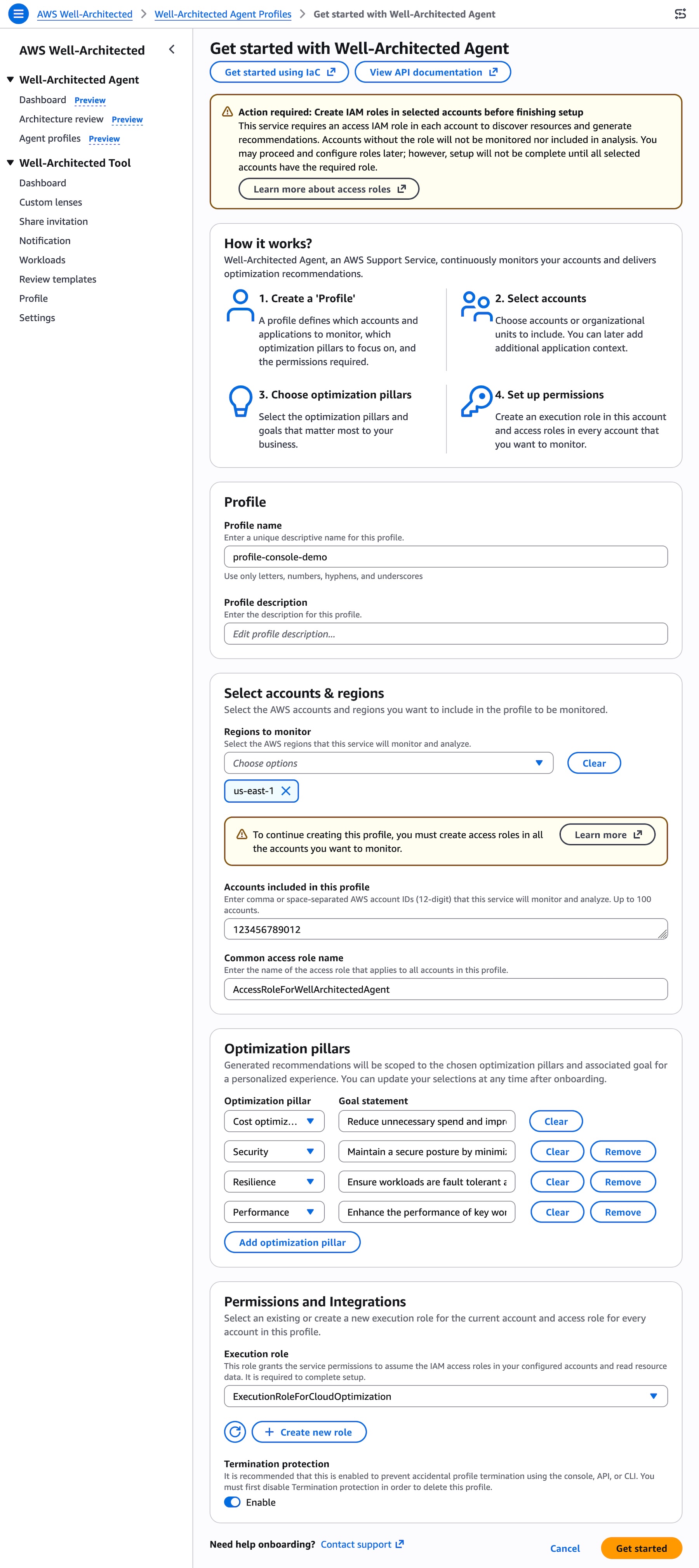
You can choose AWS accounts or AWS Regions to monitor and optimization pillars that matter most to your business. You can also set goals for each pillar: cost optimization, performance, resilience, and security.您可以选择要监控的 AWS 账户或 AWS 区域,以及对您的业务最重要的优化支柱。您还可以为每个支柱设定目标:成本优化、性能、弹性和安全性。
To give access to the agent for your AWS environment, provision customer-managed IAM roles the agent uses to read resource configurations, utilization metrics, and application topology. To learn more, visit the IAM prerequisite for AWS Well-Architected Agent.为了让代理能够访问您的 AWS 环境,请配置客户管理的 IAM 角色,供代理读取资源配置、利用率指标和应用程序拓扑。要了解更多信息,请访问 AWS Well-Architected Agent 的 IAM 前提条件页面。
When you choose Get Started, the agent creates your agent profile. Resource and application recommendations will be generated within 24 hours after profile creation.当您选择“开始使用”时,代理会创建您的代理配置文件。资源和应用程序建议将在配置文件创建后的 24 小时内生成。
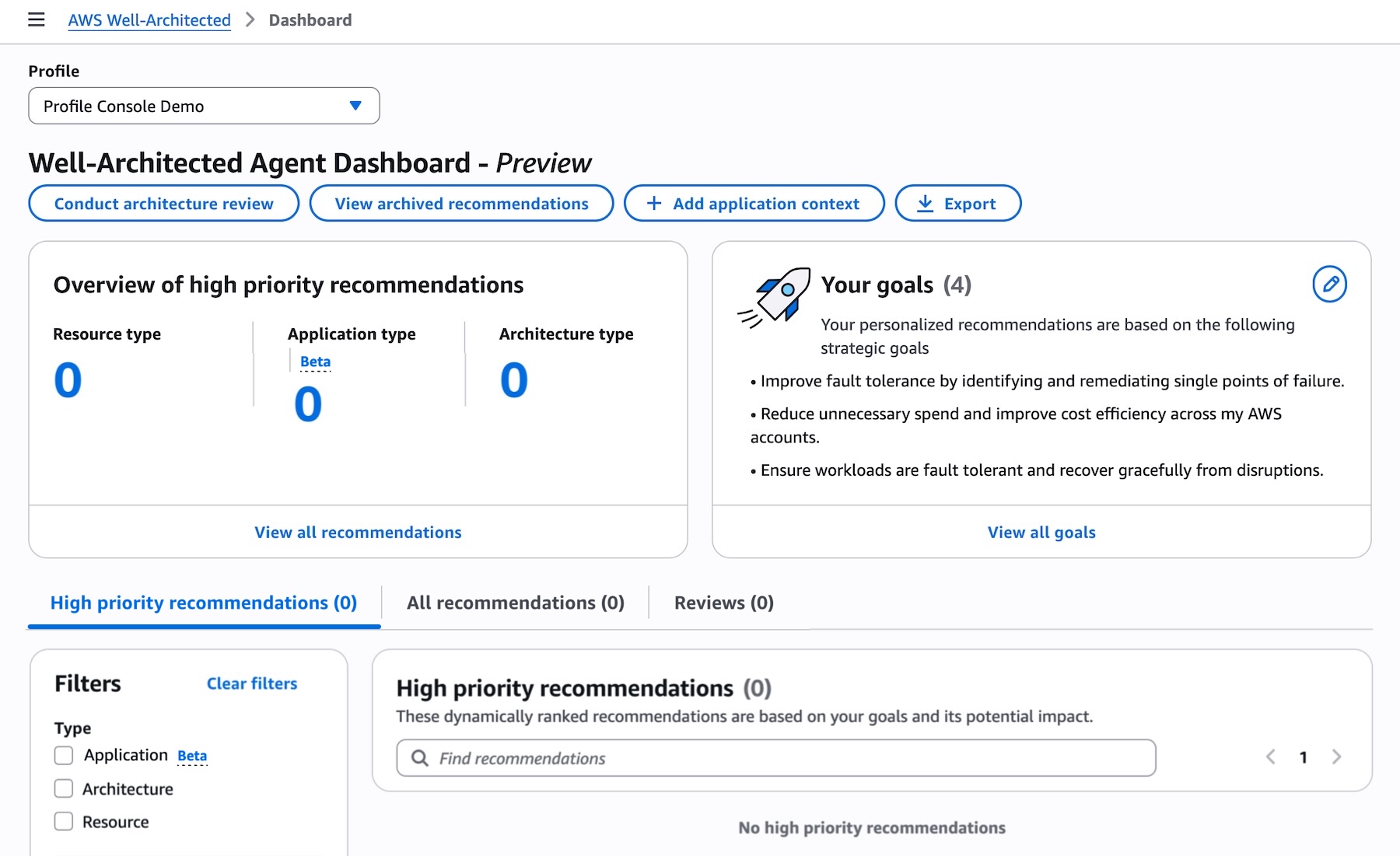
You can conduct an architecture review on pre-deployment workloads by uploading an IaC project in Terraform, AWS CloudFormation, or AWS Cloud Development Kit (CDK) to be analyzed. Choose Conduct architecture review in the dashboard, upload a.zip file containing IaC project or repository file, and select which Well-Architected lens to use for reviewing your infrastructure.您可以通过上传 Terraform、AWS CloudFormation 或 AWS Cloud Development Kit (CDK) 中的 IaC 项目进行分析,从而对部署前的负载进行架构审查。在仪表板中选择“进行架构审查”,上传包含 IaC 项目或存储库文件的 .zip 文件,并选择用于审查基础设施的 Well-Architected Lens。
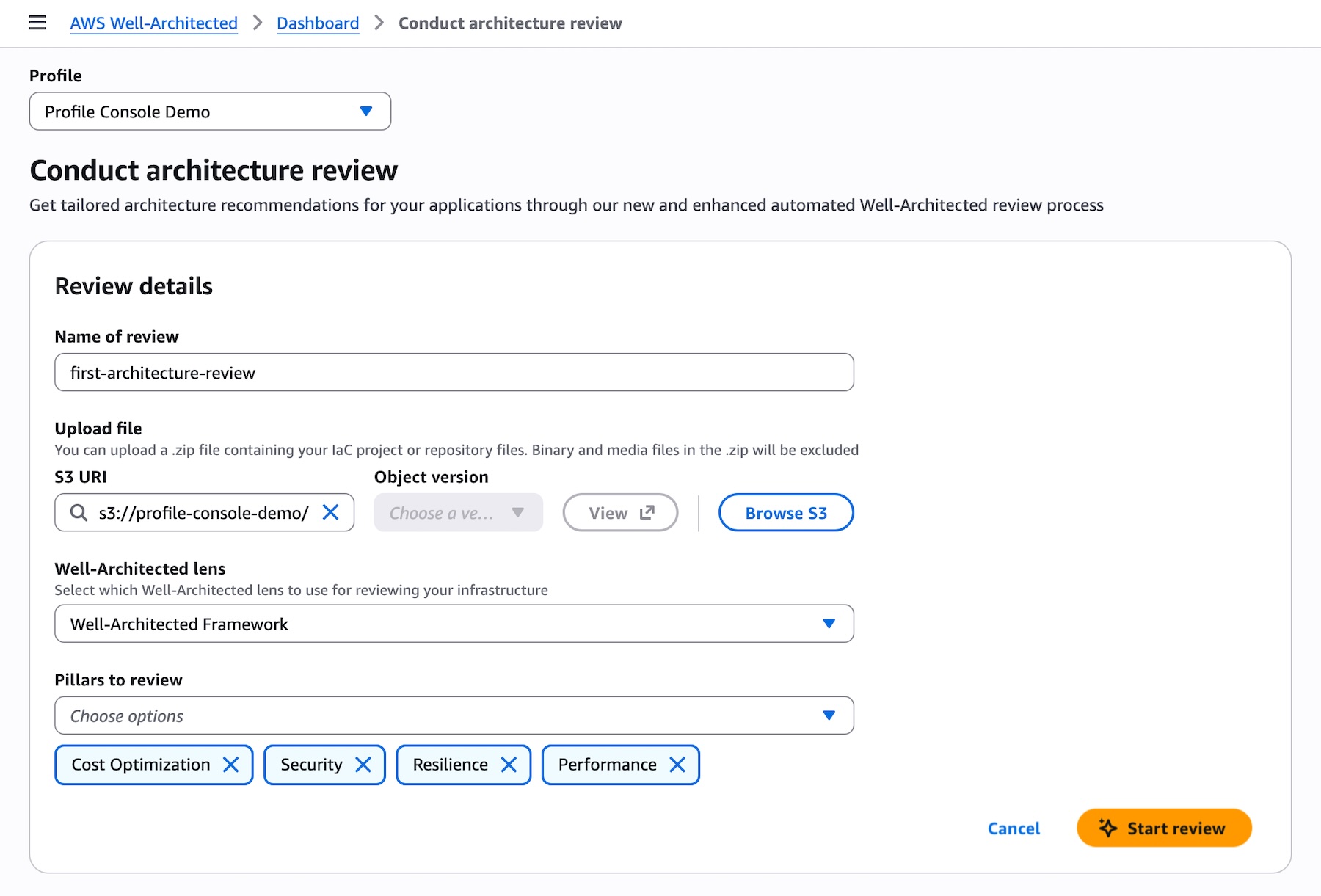
You can define your applications to add context which will enhance the relevancy and further contextualize recommendations. Choose Add application context in the dashboard, add your applications with AWS accounts, AWS Regions, AWS services, tags if you want to narrow the scope to specific resources, and the details of applications.您可以定义应用程序以添加上下文,从而提高相关性并进一步情境化建议。在仪表板中选择“添加应用程序上下文”,添加包含 AWS 账户、AWS 区域、AWS 服务、标签(如果您想将范围缩小到特定资源)以及应用程序详细信息的应用程序。
Review prioritized recommendations and start remediating
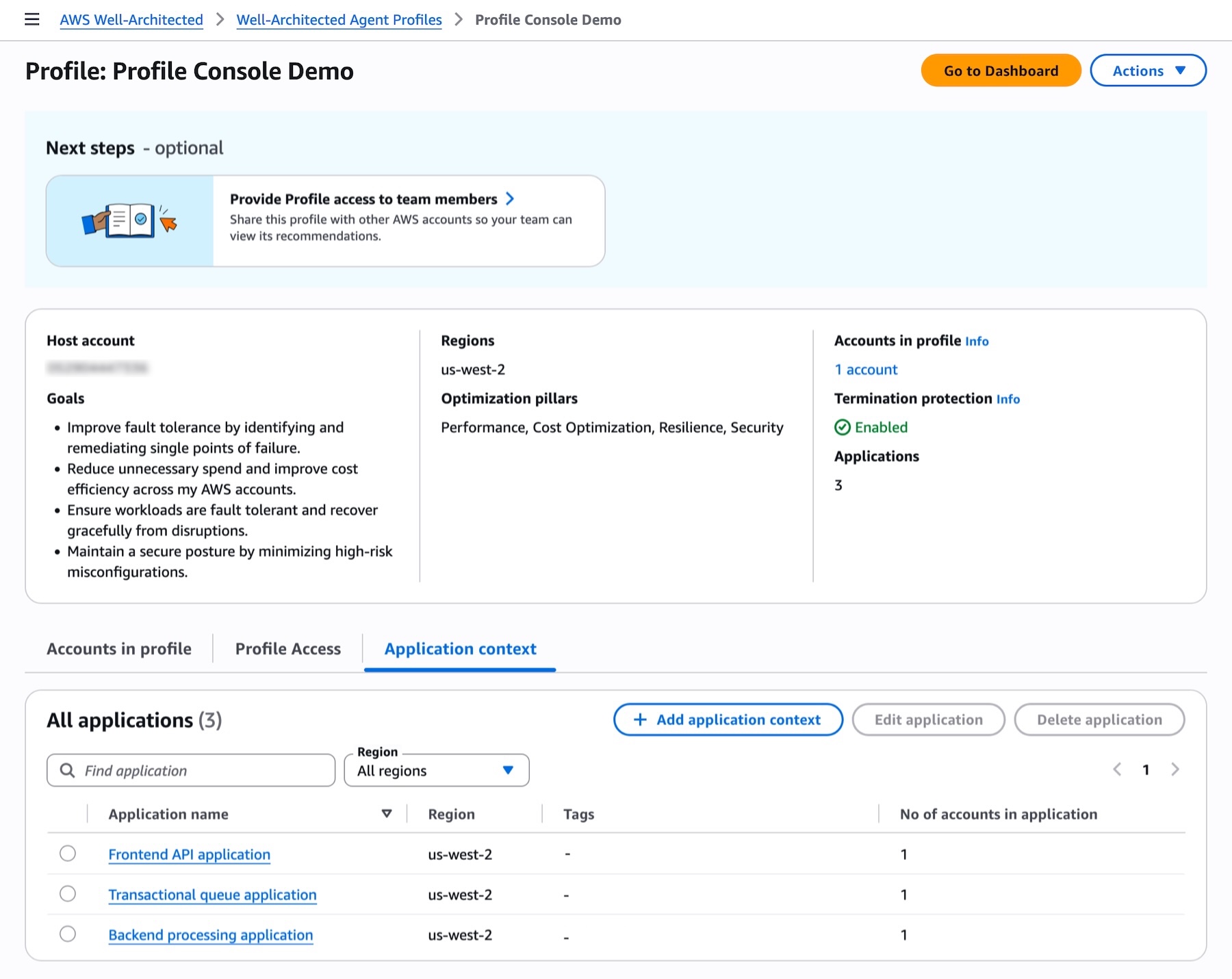
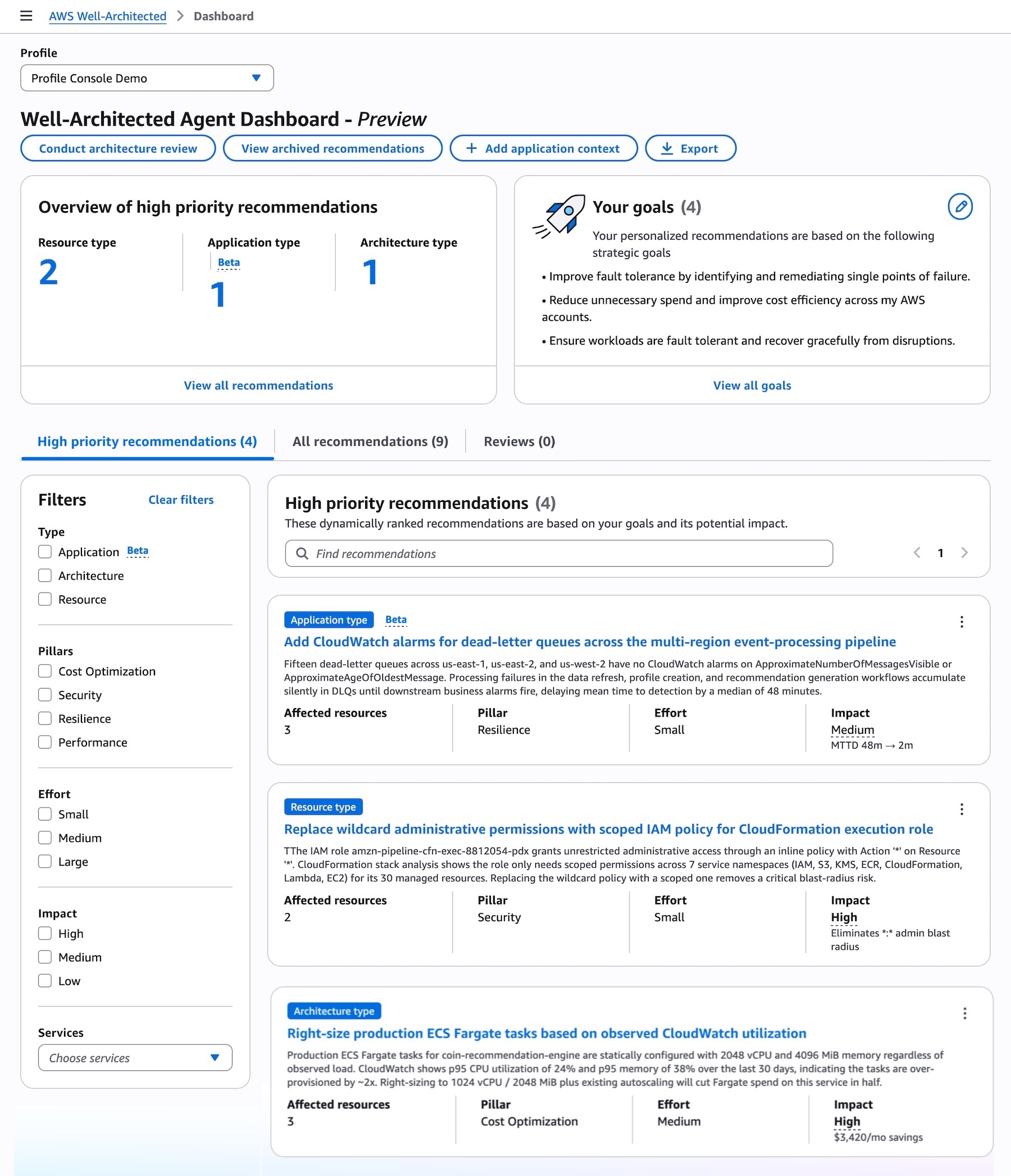
Now you can see generated prioritized recommendations generated by the agent across your resources and applications, selected pillars, ranked against your declared goals, with automation-ready remediation included.查看优先建议并开始修复
现在,您可以看到代理针对您的资源和应用程序、所选支柱生成的优先建议,这些建议已根据您申报的目标进行了排序,并包含了可直接自动执行的修复方案。
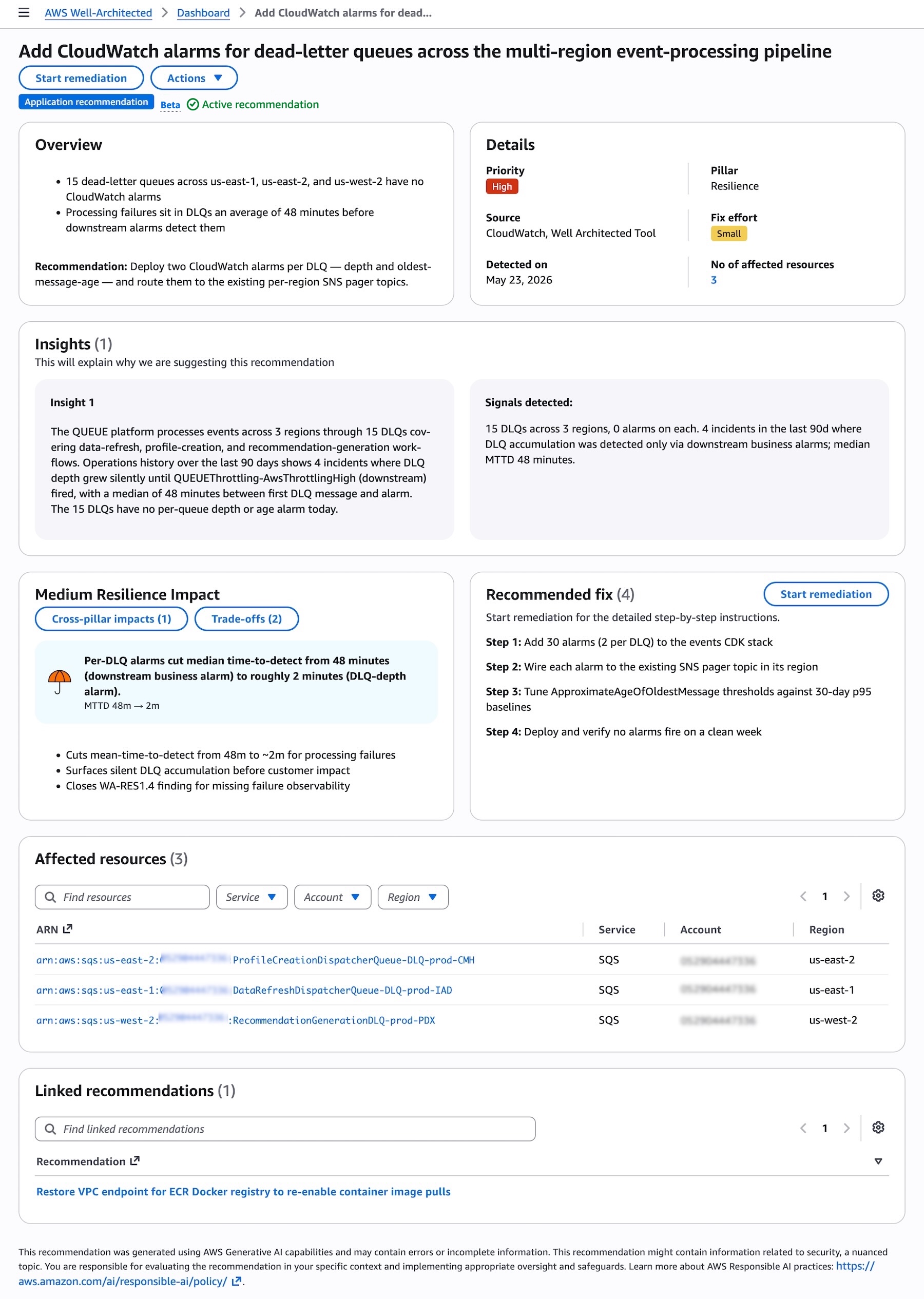
When you choose the specific recommendation, you can see the details, insights into why the agent are suggesting the recommendation, impacts and trade-off, and recommended fixes across affected AWS resources.当您选择特定建议时,可以查看详细信息、代理提出该建议的原因分析、影响和权衡,以及针对受影响 AWS 资源的推荐修复方案。
Choose Start remediation to address recommended fixes. You can choose the console, updated IaC template, CLI commands to remediate by the resolution type. It provides detailed step-by-step instructions and you can roll out this instruction and verify the result.选择“开始修复”以处理推荐的修复方案。您可以根据解决方案类型,选择通过控制台、更新后的 IaC 模板或 CLI 命令进行修复。它提供了详细的分步说明,您可以执行这些说明并验证结果。
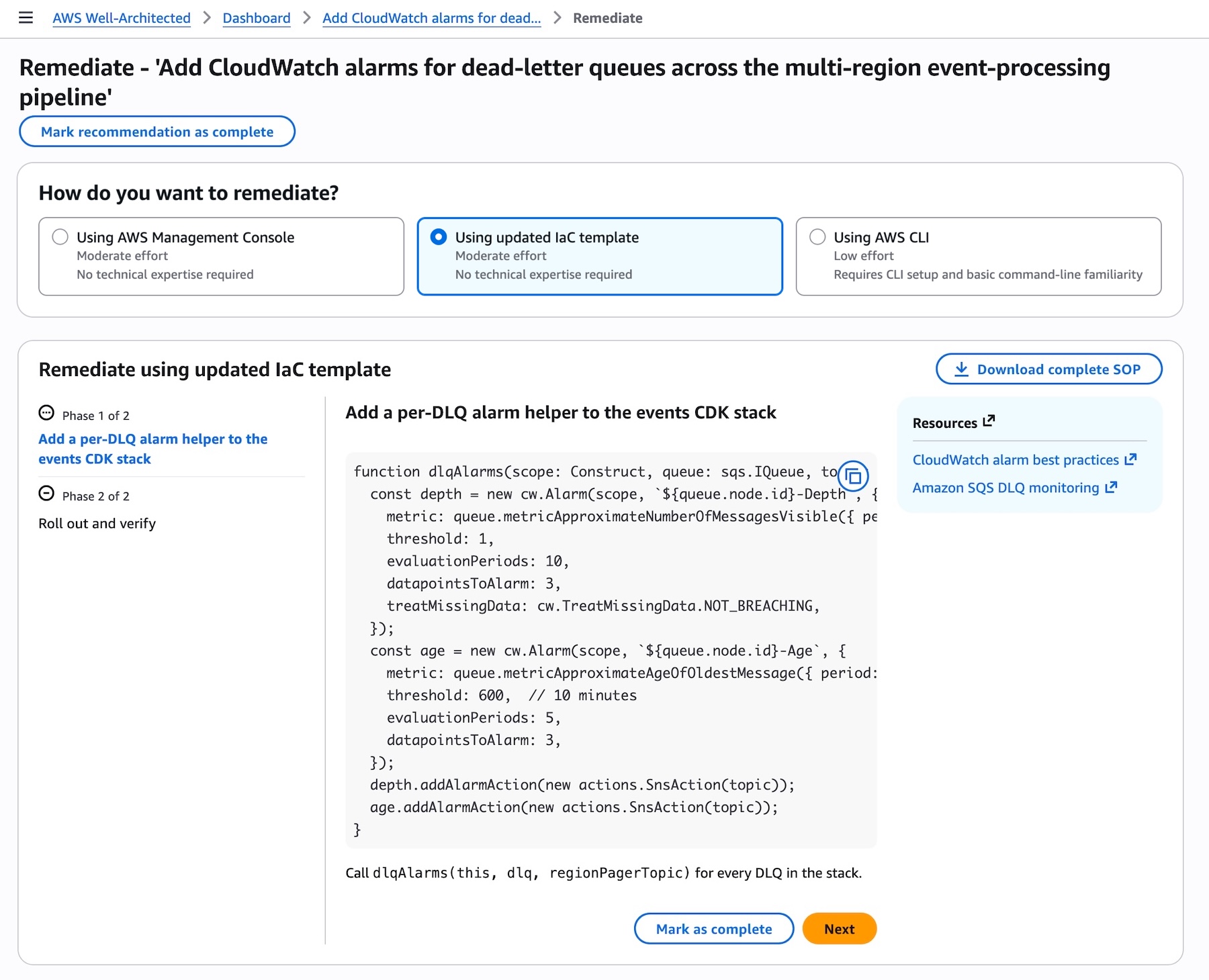
When you choose Using updated IaC template, the agent provides the code changes needed to update your existing IaC templates such as the CDK function shown above which you can copy directly into your codebase.当您选择“使用更新后的 IaC 模板”时,代理会提供更新现有 IaC 模板所需的代码变更(例如上面显示的 CDK 函数),您可以直接将其复制到代码库中。
You can also configure API access to integrate recommendations directly into your existing development and operations workflows. To interact with the agent programmatically, including calling APIs and searching documentation, try the AWS MCP Server and plugins with your preferred AI coding tool. To learn more, visit the AWS Well-Architected Agent documentation.您还可以配置 API 访问权限,将建议直接集成到现有的开发和运维工作流程中。要以编程方式与代理交互(包括调用 API 和搜索文档),请尝试将 AWS MCP Server 和插件与您首选的 AI 编码工具配合使用。要了解更多信息,请访问 AWS Well-Architected Agent 文档。
Things to know
Here are some things that you should know about the Well-Architected Agent.须知事项
以下是关于 Well-Architected Agent 的一些须知事项。
- Automation: You can receive recommendations with the exact IaC code changes needed to remediate, with risks identified by pillar, catching issues before they reach production. Recommendations are delivered through the console and API so you can act without context-switching. Recommendations are also updated periodically, so new recommendations are available for your team to track regularly.自动化:您可以收到包含修复所需的精确 IaC 代码变更的建议,并按支柱识别风险,从而在问题进入生产环境之前将其捕获。建议通过控制台和 API 提供,因此您无需切换上下文即可采取行动。建议也会定期更新,以便您的团队可以定期跟踪新的建议。
- Evaluation: Generative AI capabilities produce this recommendation, which may contain errors or incomplete information. You are responsible for evaluating the recommendation in your specific context and implementing appropriate oversight and safeguards. Learn more about AWS Responsible AI practices.评估:生成式 AI 功能会产生此建议,其中可能包含错误或不完整的信息。您有责任在您的特定上下文中评估该建议,并实施适当的监督和保障措施。了解更多关于 AWS 负责任 AI 实践的信息。
You can still use existing AWS Well-Architected Tool to manually evaluate your cloud architecture with user-defined lenses that measure your workload using your own best practices.您仍然可以使用现有的 AWS Well-Architected Tool,通过用户定义的 Lens 手动评估您的云架构,并根据您自己的最佳实践来衡量您的工作负载。
Join the preview
Access to the AWS Well-Architected Agent and its recommendations is available in US East (N. Virginia), US East (Ohio), and US West (Oregon). You can onboard workloads from any AWS commercial Region. AWS Well-Architected Agent is delivered by AWS Support and available to AWS customers with an AWS Support plan.加入预览
AWS Well-Architected Agent 及其建议目前可在美东(弗吉尼亚北部)、美东(俄亥俄)和美西(俄勒冈)区域使用。您可以从任何 AWS 商业区域接入负载。AWS Well-Architected Agent 由 AWS Support 提供,适用于拥有 AWS 支持计划的 AWS 客户。
Give it a try today in the AWS Well-Architected console and send feedback through your usual AWS Support contacts.立即在 AWS Well-Architected 控制台中试用,并通过您常用的 AWS Support 联系渠道发送反馈。
— Channy— Channy