AWS Architecture BlogAWS 架构博客
Build adaptive AI interfaces with the AG-UI protocol, agent swarms, and Nova Act on AWS使用 AG-UI 协议、智能体群组和 Nova Act 在 AWS 上构建自适应 AI 界面
Your generative AI applications produce different results each time they run. One medical scan shows a single fracture, and another reveals twenty ambiguous regions that require expert review. Static interfaces can’t adapt to this variability.您的生成式 AI 应用程序每次运行产生的结果各不相同。同一份医学扫描报告可能显示一处骨折,而另一份则可能揭示出需要专家审查的二十个模糊区域。静态界面无法适应这种多变性。
In this post, we show you how to build interfaces that automatically adapt to your AI’s variable outputs. This approach reduces interface development time and removes the need for custom integration code by using the AG-UI protocol, the Strands Agents Software Development Kit (SDK), and Amazon Nova Act. You learn to build adaptive interfaces using the agent-to-UI (AG-UI) protocol for dynamic UI generation, the Strands Agents SDK Swarm pattern for multi-agent collaboration, and Amazon Nova Act for legacy system integration. After reading this post, you understand when to use adaptive interfaces and how to deploy them in your applications.在本文中,我们将向您展示如何构建能够自动适应 AI 多变输出的界面。通过使用 AG-UI 协议、Strands Agents 软件开发工具包 (SDK) 和 Amazon Nova Act,这种方法可以缩短界面开发时间,并消除对自定义集成代码的需求。您将学习到如何利用用于动态 UI 生成的智能体到界面 (AG-UI) 协议、用于多智能体协作的 Strands Agents SDK 群组模式,以及用于传统系统集成的 Amazon Nova Act 来构建自适应界面。阅读本文后,您将了解何时使用自适应界面以及如何在应用程序中部署它们。
The problem with static interfaces静态界面的问题
You design screens with fixed layouts, predetermined controls, and static data binding. This works well when your application’s output space is known and consistent. An ecommerce checkout page needs the same fields for every transaction. A dashboard displays the same metrics regardless of the data. Static interfaces excel at these predictable scenarios.您设计的屏幕通常具有固定的布局、预设的控件和静态数据绑定。当应用程序的输出空间已知且一致时,这种方式效果很好。电子商务结账页面对每笔交易都需要相同的字段。仪表板无论数据如何,显示的指标都是相同的。静态界面在这些可预测的场景中表现出色。
AI-driven applications introduce new requirements. Consider two scenarios when you review bone X-rays. In the first scenario, one image shows a single obvious fracture requiring minimal interface controls. In the second scenario, another image reveals three subtle regions where multiple AI agents must debate findings, track confidence progression, and reach consensus before presenting results. A static interface optimized for the first scenario lacks the controls needed for the second. An interface built for the second scenario presents unnecessary complexity in the first scenario with empty panels and unused controls.AI 驱动的应用程序引入了新的需求。考虑审阅骨骼 X 光片的两种场景。在第一种场景中,一张图像显示出明显的单处骨折,仅需极少的界面控件。在第二种场景中,另一张图像揭示了三个细微区域,需要多个 AI 智能体对发现结果进行辩论、跟踪置信度进展,并在呈现结果前达成共识。为第一种场景优化的静态界面缺乏第二种场景所需的控件。而为第二种场景构建的界面在第一种场景中则显得过于复杂,会出现空白面板和未使用的控件。
This problem appears in multiple domains. Fraud detection systems encounter variable evidence chains. Legal document review surfaces unpredictable numbers of relevant clauses. Security event response reveals different threat patterns requiring different analysis tools. Domains where AI discovers things dynamically rather than classifying into predetermined categories face this architectural challenge.这个问题出现在多个领域。欺诈检测系统会遇到多变的证据链。法律文档审查会浮现出数量不可预测的相关条款。安全事件响应会揭示出不同的威胁模式,需要不同的分析工具。在这些 AI 动态发现事物而非将其分类到预定类别的领域中,都面临着这一架构挑战。
The core challenge is that AI agents discover and reason about the world dynamically, while traditional interface design assumes static, predetermined outputs.核心挑战在于,AI 智能体是动态地发现世界并进行推理的,而传统的界面设计则假设输出是静态且预先确定的。
Business impact业务影响
This mismatch costs development teams significant time and creates poor user experiences. You spend weeks building interface variations to handle different scenarios, then maintain multiple code paths as your AI models evolve. Your users face either overwhelming complexity when AI finds simple results, or insufficient controls when AI discovers complex patterns requiring deeper analysis. The development cost compounds as you add new AI capabilities. Each new agent or model requires rethinking your entire interface architecture.这种不匹配不仅浪费了开发团队大量时间,还导致了糟糕的用户体验。您需要花费数周时间构建各种界面变体来处理不同场景,并随着 AI 模型的演进维护多个代码路径。当 AI 发现简单的结果时,您的用户会面对过于复杂的界面;而当 AI 发现需要深入分析的复杂模式时,界面控件又显得不足。随着您添加新的 AI 功能,开发成本会不断累积。每一个新的智能体或模型都需要重新思考整个界面架构。
Solution overview解决方案概览
Three AWS technologies address this challenge, so you can build interfaces that adapt to what AI agents discover.三项 AWS 技术解决了这一挑战,使您能够构建适应 AI 智能体发现结果的界面。
The AG-UI protocol offers standardized streaming for agent-to-user interface (UI) communication. Before AG-UI, connecting agents to interfaces required custom code for each framework. You built custom WebSocket formats, polling mechanisms, and bespoke integration code every time you switched agent frameworks or added new capabilities. AG-UI removes this work by providing a standard format of typed events that stream over Server-Sent Events (SSE). Agent frameworks emit AG-UI events, and frontends consume them, creating a universal contract so you can swap frameworks without rewriting integration code.AG-UI 协议为智能体到用户界面 (UI) 的通信提供了标准化流式传输。在 AG-UI 出现之前,将智能体连接到界面需要为每个框架编写自定义代码。每次切换智能体框架或添加新功能时,您都必须构建自定义 WebSocket 格式、轮询机制和定制的集成代码。AG-UI 通过提供在服务器发送事件 (SSE) 上流式传输的类型化事件标准格式,消除了这些工作。智能体框架发出 AG-UI 事件,前端消费这些事件,从而创建了一个通用契约,使您无需重写集成代码即可更换框架。
The Strands Agents SDK offers the Swarm pattern for peer-to-peer multi-agent collaboration. In swarm patterns, your agents operate as peers that share hypotheses and iteratively refine findings until reaching consensus. This debate process, visible to you in real time, builds trust and catches errors that single-agent systems miss. For medical imaging, the swarm pattern mirrors how radiologists consult specialists, with multiple expert perspectives converging on accurate diagnoses.Strands Agents SDK 提供了用于点对点多智能体协作的群组模式。在群组模式中,您的智能体作为对等体运行,共享假设并迭代细化发现结果,直到达成共识。这种实时可见的辩论过程建立了信任,并能捕获单智能体系统容易遗漏的错误。对于医学影像,群组模式模拟了放射科医生咨询专家的过程,即多位专家的观点汇聚成准确的诊断。
Amazon Nova Act offers browser-based automation using natural language commands, so your AI agents can interact with legacy systems through their web interfaces. Your agent navigates login screens, searches for related records, fills form fields, and captures confirmation numbers, while streaming actions back to the primary interface so you can observe the process.Amazon Nova Act 提供使用自然语言命令的浏览器自动化功能,使您的 AI 智能体能够通过 Web 界面与传统系统进行交互。您的智能体可以导航登录屏幕、搜索相关记录、填写表单字段并捕获确认编号,同时将操作流式传输回主界面,以便您观察整个过程。
These three technologies work together naturally: AG-UI adapts your interface to swarm findings, the swarm produces explainable multi-agent analysis, and Nova Act bridges the gap with legacy systems that lack API access.这三项技术自然地协同工作:AG-UI 使您的界面能够适应群组的发现,群组产生可解释的多智能体分析,而 Nova Act 则弥补了缺乏 API 访问权限的传统系统之间的差距。
Prerequisites先决条件
Before starting, verify you have:开始之前,请确认您具备:
Required AWS Resources:所需的 AWS 资源:
- AWS account with Amazon Bedrock access in a supported region (us-east-1, us-west-2, or eu-west-1)在支持区域(us-east-1、us-west-2 或 eu-west-1)拥有可访问 Amazon Bedrock 的 AWS 账户
- Your Identity and Access Management (IAM) user or role needs these specific permissions:
bedrock:InvokeModel– For calling foundation models.bedrock:InvokeModel – 用于调用基础模型。bedrock:CreateAgentandbedrock:CreateAgentActionGroup– For agent deployment.bedrock:CreateAgent 和 bedrock:CreateAgentActionGroup – 用于智能体部署。lambda:CreateFunctionandlambda:InvokeFunction– For serverless compute.lambda:CreateFunction 和 lambda:InvokeFunction – 用于无服务器计算。s3:PutObjectands3:GetObject– For file storage.s3:PutObject 和 s3:GetObject – 用于文件存储。dynamodb:PutItemanddynamodb:GetItem– For state management.dynamodb:PutItem 和 dynamodb:GetItem – 用于状态管理。secretsmanager:GetSecretValue– For credential retrieval.secretsmanager:GetSecretValue – 用于凭证检索。logs:CreateLogGroupandlogs:PutLogEvents– For Amazon CloudWatch logging.logs:CreateLogGroup 和 logs:PutLogEvents – 用于 Amazon CloudWatch 日志记录。
Development Environment:开发环境:
- Python 3.9+ with pip installed.已安装 Python 3.9+ 和 pip。
- Node.js 16+ and React 18+ installed.已安装 Node.js 16+ 和 React 18+。
- AWS Command Line Interface (CLI) configured with your credentials.已配置凭证的 AWS 命令行界面 (CLI)。
Technical Skills:技术技能:
- Intermediate Python programming experience.中级 Python 编程经验。
- Familiarity with event-driven architectures (your interface listens for messages from agents and updates in real time, similar to how chat applications work).熟悉事件驱动架构(您的界面监听来自智能体的消息并实时更新,类似于聊天应用程序的工作方式)。
- Basic understanding of Representational State Transfer (REST) APIs and Server-Sent Events (SSE).对表述性状态转移 (REST) API 和服务器发送事件 (SSE) 的基本了解。
Data protection and HIPAA compliance数据保护与 HIPAA 合规性
This solution processes Protected Health Information (PHI) including medical images, patient MRN, and clinical findings. Apply the following safeguards before deploying to any environment handling real patient data.此解决方案处理受保护健康信息 (PHI),包括医学影像、患者病历号 (MRN) 和临床发现。在部署到任何处理真实患者数据的环境之前,请应用以下保障措施。
Encryption at rest — Configure SSE-KMS with a customer managed key on all Amazon S3 buckets storing medical images. Enable encryption with a customer managed AWS KMS key on all DynamoDB tables storing session state, conversation history, and analysis findings.静态加密 — 在所有存储医学影像的 Amazon S3 存储桶上配置使用客户托管密钥的 SSE-KMS。在所有存储会话状态、对话历史记录和分析结果的 DynamoDB 表上,启用使用客户托管的 AWS KMS 密钥进行加密。
Encryption in transit — Enforce TLS 1.2+ on all connections. Attach a bucket policy denying all S3 actions when aws:SecureTransport is false. Do not override DynamoDB SDK endpoints to HTTP. Do not set ignore_https_errors=True on Nova Act workflows. If the legacy system uses self-signed certificates, add its CA to your runtime trust store.传输中加密 — 在所有连接上强制执行 TLS 1.2+。附加一个存储桶策略,当 aws:SecureTransport 为 false 时拒绝所有 S3 操作。不要将 DynamoDB SDK 端点覆盖为 HTTP。不要在 Nova Act 工作流中设置 ignore_https_errors=True。如果传统系统使用自签名证书,请将其 CA 添加到您的运行时信任存储中。
S3 Block Public Access — Enable Block Public Access at the account level and on every bucket in this solution. Medical images must never be exposed through public bucket policies or ACLs.S3 阻止公共访问 — 在账户级别和本解决方案中的每个存储桶上启用“阻止公共访问”。医学影像绝不能通过公共存储桶策略或 ACL 暴露。
HIPAA-eligible services and BAA — All AWS services in this architecture (Amazon Bedrock, Amazon S3, DynamoDB, Lambda, API Gateway, CloudFront, Cognito, Secrets Manager, CloudWatch) are HIPAA-eligible. Before processing PHI, execute a Business Associate Agreement (BAA) with AWS covering these services.符合 HIPAA 资格的服务与 BAA — 本架构中的所有 AWS 服务(Amazon Bedrock、Amazon S3、DynamoDB、Lambda、API Gateway、CloudFront、Cognito、Secrets Manager、CloudWatch)均符合 HIPAA 资格。在处理 PHI 之前,请与 AWS 执行涵盖这些服务的商业伙伴协议 (BAA)。
PHI minimization — Never write MRN, patient name, or clinical findings to plaintext logs. Enable CloudWatch Logs data protection policies to detect and mask PHI patterns automatically. Suppress Nova Act trajectory logging during steps that display patient data. Verify Cognito JWT on the SSE endpoint before emitting any PHI-bearing event.PHI 最小化 — 切勿将 MRN、患者姓名或临床发现写入明文日志。启用 CloudWatch Logs 数据保护策略以自动检测并掩码 PHI 模式。在显示患者数据的步骤中禁止 Nova Act 轨迹记录。在发出任何携带 PHI 的事件之前,请验证 SSE 端点上的 Cognito JWT。
Important: Code samples in this post are for educational purposes. Review all configurations against your organization’s HIPAA Security Rule implementation before production deployment.重要提示:本文中的代码示例仅供教育参考。在生产部署之前,请根据贵组织的 HIPAA 安全规则实施情况审查所有配置。
Architecture架构
You implement an orchestrator pattern where your frontend interacts with a single entry point that internally coordinates specialized sub-agents. The solution follows this pattern: your React app sends requests to Amazon API Gateway, which triggers AWS Lambda functions that coordinate AI agents through Amazon Bedrock, then streams results back over Server-Sent Events. We use Amazon Bedrock AgentCore, a platform to build, connect, and optimize agents at scale with any framework or model.您实现了一个编排器模式,其中您的前端与单个入口点交互,该入口点在内部协调专门的子智能体。该解决方案遵循以下模式:您的 React 应用程序向 Amazon API Gateway 发送请求,触发 AWS Lambda 函数通过 Amazon Bedrock 协调 AI 智能体,然后通过服务器发送事件将结果流式传输回前端。我们使用 Amazon Bedrock AgentCore,这是一个用于通过任何框架或模型大规模构建、连接和优化智能体的平台。
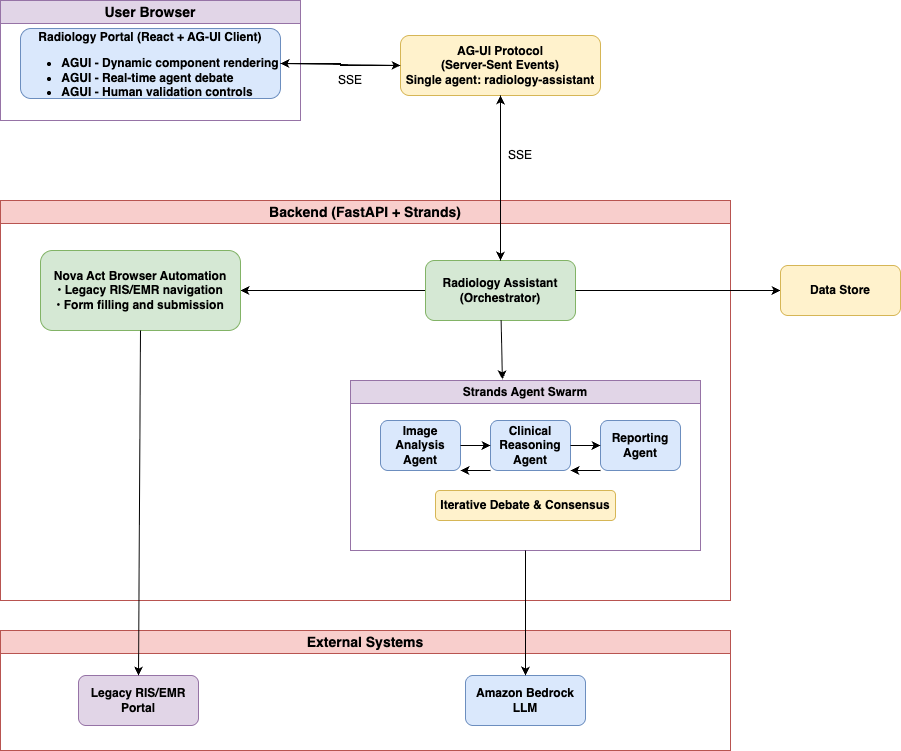
Figure 1: Logical view of the adaptive interface, showing the AG-UI client, the backend orchestrator, the Strands agent swarm, and integrations with legacy systems and Amazon Bedrock图 1:自适应界面的逻辑视图,展示了 AG-UI 客户端、后端编排器、Strands 智能体群组,以及与传统系统和 Amazon Bedrock 的集成
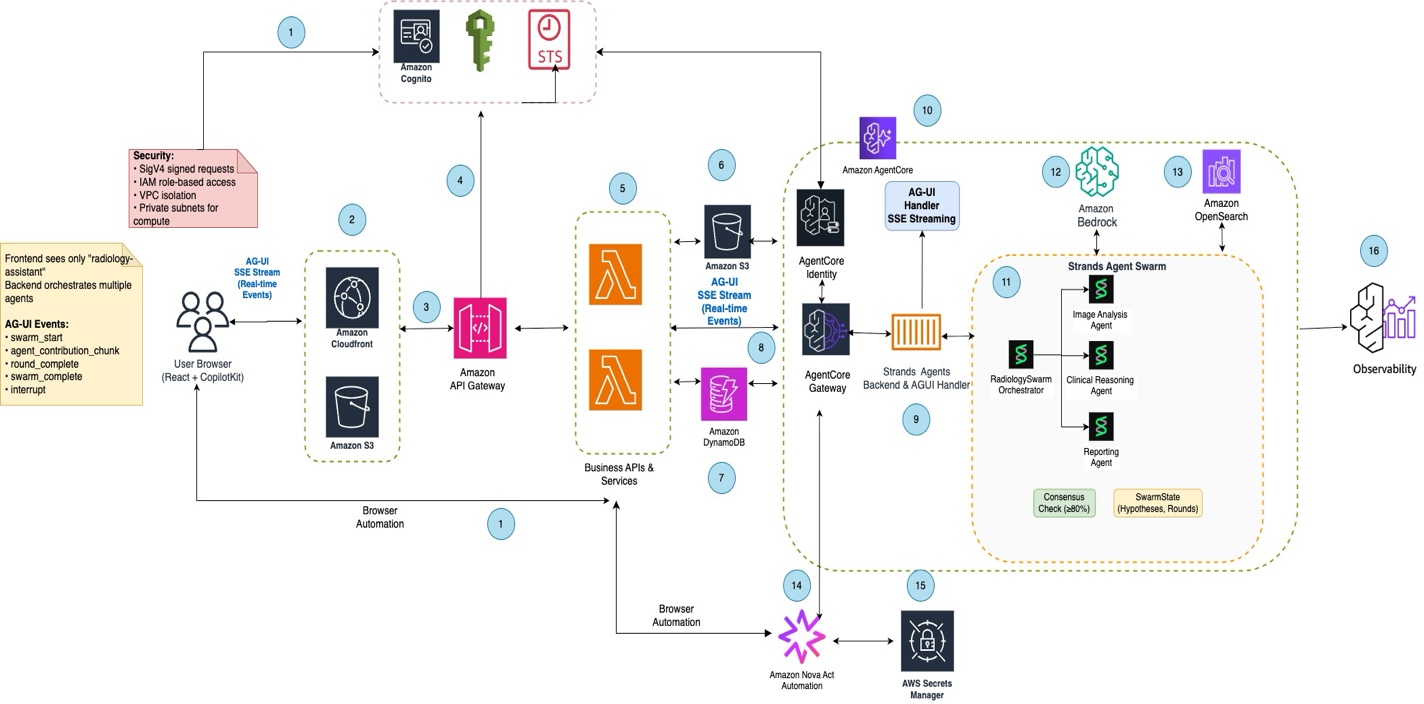
Figure 2: End-to-end AWS architecture showing the 16 components that deliver authentication, content delivery, agent orchestration, foundation model inference, and legacy system automation图 2:端到端 AWS 架构,展示了提供身份验证、内容交付、智能体编排、基础模型推理和传统系统自动化的 16 个组件
Architecture components架构组件
The architecture consists of 16 integrated components working together:该架构由 16 个协同工作的集成组件组成:
① User authentication You authenticate through Amazon Cognito, which provides secure identity management and generates JWT tokens for accessing the radiology portal application.① 用户身份验证:您通过 Amazon Cognito 进行身份验证,它提供安全身份管理并生成用于访问放射科门户应用程序的 JWT 令牌。
② Content delivery Amazon CloudFront serves the React application and static assets from Amazon S3, providing global low-latency access and caching for optimal performance.② 内容交付:Amazon CloudFront 从 Amazon S3 提供 React 应用程序和静态资产,提供全球低延迟访问和缓存以实现最佳性能。
③ API Gateway Amazon API Gateway handles both REST API requests and Server-Sent Events (SSE) connections, providing the entry point for client-server communication.③ API Gateway:Amazon API Gateway 处理 REST API 请求和服务器发送事件 (SSE) 连接,提供客户端-服务器通信的入口点。
④ Authorization of user API request with token validation④ 带有令牌验证的用户 API 请求授权
⑤ Backend processing AWS Lambda functions act as the AG-UI handler, managing authentication, invoking agents through Amazon Bedrock AgentCore Gateway, and formatting responses as SSE streams.⑤ 后端处理:AWS Lambda 函数作为 AG-UI 处理程序,管理身份验证、通过 Amazon Bedrock AgentCore Gateway 调用智能体,并将响应格式化为 SSE 流。
⑥ Image storage Amazon S3 stores medical images with SSE-KMS encryption using a customer managed key. S3 Block Public Access is enabled at the bucket level. Lambda generates short-lived, tightly scoped pre-signed URLs for secure direct uploads, pinned to the PUT method, scoped to a per-user key prefix, restricted to the application/dicom content type, and set to expire in 300 seconds. A bucket policy enforces maximum upload size through the s3:content-length-range condition and denies requests where aws:SecureTransport is false.⑥ 图像存储:Amazon S3 使用客户托管密钥通过 SSE-KMS 加密存储医学影像。在存储桶级别启用了 S3 阻止公共访问。Lambda 生成生命周期短、范围严格限定的预签名 URL,用于安全直接上传,固定为 PUT 方法,限定于每个用户的密钥前缀,限制为 application/dicom 内容类型,并设置为 300 秒后过期。存储桶策略通过 s3:content-length-range 条件强制执行最大上传大小,并拒绝 aws:SecureTransport 为 false 的请求。
⑦ Session management Amazon DynamoDB maintains session state, conversation history, analysis findings, and agent registry data for stateful multi-turn interactions.⑦ 会话管理:Amazon DynamoDB 维护会话状态、对话历史记录、分析结果和智能体注册表数据,用于有状态的多轮交互。
⑧ AgentCore Gateway Amazon Bedrock AgentCore Gateway serves as the orchestration layer, routing agent requests, managing sessions, coordinating multi-agent workflows, and load balancing across runtime instances.⑧ AgentCore Gateway:Amazon Bedrock AgentCore Gateway 作为编排层,路由智能体请求、管理会话、协调多智能体工作流,并在运行时实例间进行负载均衡。
⑨ AG-UI handler A specialized component within AgentCore that manages AG-UI protocol events, formatting agent responses as standardized events for dynamic UI rendering.⑨ AG-UI 处理程序:AgentCore 内的一个专用组件,用于管理 AG-UI 协议事件,将智能体响应格式化为用于动态 UI 渲染的标准化事件。
⑩ AgentCore runtime AgentCore Runtime provides the execution environment for agent instances, running the Strands Agent Swarm with isolated runtime instances for each agent type.⑩ AgentCore 运行时:AgentCore 运行时为智能体实例提供执行环境,运行 Strands 智能体群组,并为每种智能体类型提供隔离的运行时实例。
⑪ Agent swarm execution The Strands Agent Swarm consists of three specialized agents (Image Analysis, Clinical Reasoning, Reporting) that collaborate through iterative debate rounds to reach consensus.⑪ 智能体群组执行:Strands 智能体群组由三个专门的智能体(图像分析、临床推理、报告)组成,它们通过迭代辩论轮次协作以达成共识。
⑫ Foundation model inference Amazon Bedrock provides access to the Claude Sonnet foundation model for reasoning, interpretation, and natural language generation across agents using a large language model (LLM).⑫ 基础模型推理:Amazon Bedrock 提供对 Claude Sonnet 基础模型的访问,用于跨智能体使用大型语言模型 (LLM) 进行推理、解释和自然语言生成。
⑬ Knowledge base retrieval Amazon OpenSearch Serverless stores medical knowledge base with vector embeddings, providing semantic search for relevant medical literature and clinical guidelines.⑬ 知识库检索:Amazon OpenSearch Serverless 存储带有向量嵌入的医学知识库,为相关医学文献和临床指南提供语义搜索。
⑭ Legacy system automation Amazon Nova Act performs browser-based automation to submit validated findings to a legacy hospital’s Radiology Information System (RIS) and Electronic Medical Record (EMR) systems, with each action streamed back to your UI.⑭ 传统系统自动化:Amazon Nova Act 执行基于浏览器的自动化,将验证后的结果提交给医院传统的放射科信息系统 (RIS) 和电子病历 (EMR) 系统,并将每个操作流式传输回您的 UI。
⑮ Credential management AWS Secrets Manager securely stores and rotates credentials for legacy system access, providing Nova Act with authentication details at runtime.⑮ 凭证管理:AWS Secrets Manager 安全地存储和轮换用于访问传统系统的凭证,在运行时为 Nova Act 提供身份验证详细信息。
⑯ Observability and monitoring Amazon CloudWatch captures logs and metrics, with data protection policies enabled to detect and mask PHI. AWS Distro for OpenTelemetry (ADOT) provides distributed tracing with AWS X-Ray-compatible trace export. AWS Security Token Service (AWS STS) manages temporary security credentials.⑯ 可观测性与监控:Amazon CloudWatch 捕获日志和指标,并启用数据保护策略以检测和掩码 PHI。AWS Distro for OpenTelemetry (ADOT) 提供与 AWS X-Ray 兼容的分布式跟踪导出。AWS 安全令牌服务 (AWS STS) 管理临时安全凭证。
Key architectural decisions关键架构决策
Your frontend sees one agent (radiology-assistant), not three, through the orchestrator pattern. This simplifies integration and encapsulates workflow complexity. The orchestrator internally coordinates the swarm based on analysis stage.通过编排器模式,您的前端看到的是一个智能体(放射科助手),而不是三个。这简化了集成并封装了工作流的复杂性。编排器会根据分析阶段在内部协调群组。
Rather than generating arbitrary HTML, agents select from themed, accessible components (ROICard, DebatePanel, ConfidenceMeter). This balances flexibility with design consistency and security through the predefined component library approach.智能体不是生成任意 HTML,而是从主题化、可访问的组件(ROICard、DebatePanel、ConfidenceMeter)中进行选择。这种预定义组件库的方法在灵活性与设计一致性及安全性之间取得了平衡。
SSE provides real-time updates as agents work through the streaming protocol. You see agent contributions character by character, creating transparency into the reasoning process.SSE 在智能体通过流式协议工作时提供实时更新。您可以看到智能体逐个字符的贡献,从而使推理过程变得透明。
Your frontend exposes state (current findings, validation decisions) to agents through bidirectional state synchronization. Agents update state through actions. This synchronization supports human-in-the-loop workflows where agents pause for validation before proceeding.您的前端通过双向状态同步向智能体公开状态(当前发现、验证决策)。智能体通过操作更新状态。这种同步支持人机协同工作流,即智能体在继续之前会暂停以进行验证。
Solution walkthrough解决方案演练
The following steps walk through the solution, from authentication and swarm configuration to the AG-UI endpoint, legacy system integration, and deployment.以下步骤演练了该解决方案,从身份验证和群组配置到 AG-UI 端点、传统系统集成和部署。
Step 0: Configure authentication第 0 步:配置身份验证
Add JWT validation to your API endpoint to enforce authentication before processing requests containing PHI.将 JWT 验证添加到您的 API 端点,以在处理包含 PHI 的请求之前强制执行身份验证。
Full Amazon Cognito user pool setup (pool creation, hosted UI, and token exchange) is covered in the Amazon Cognito Developer Guide. This post focuses on the agent architecture layer.完整的 Amazon Cognito 用户池设置(池创建、托管 UI 和令牌交换)在《Amazon Cognito 开发人员指南》中有介绍。本文重点介绍智能体架构层。
Step 1: Install the Strands Agents SDK第 1 步:安装 Strands Agents SDK
Install required packages by running the following command:通过运行以下命令安装所需的软件包:
This command installs the required packages for building your multi-agent swarm, including the Strands framework, AG-UI integration, and web server components.此命令安装用于构建多智能体群组所需的软件包,包括 Strands 框架、AG-UI 集成和 Web 服务器组件。
Step 2: Configure your swarm agents第 2 步:配置您的群组智能体
Create specialized agents for your swarm by adding the following code to your project:通过将以下代码添加到您的项目中,为您的群组创建专门的智能体:
Note: The agents use a foundation model accessed through Amazon Bedrock. The example defaults to Claude Sonnet 4, but you should select a currently active model from the Amazon Bedrock model lifecycle page for your AWS Region. Read the model ID from an environment variable so you can update it without code changes as newer models become available. Amazon Bedrock retires models on a published lifecycle schedule, so hardcoding a model ID risks failure when that model reaches end of life. Check the Amazon Bedrock model lifecycle page and supported Regions, and use an environment variable or AWS Systems Manager Parameter Store to manage the model ID externally.注意:智能体使用通过 Amazon Bedrock 访问的基础模型。示例默认使用 Claude Sonnet 4,但您应从 Amazon Bedrock 模型生命周期页面为您的 AWS 区域选择当前活跃的模型。从环境变量中读取模型 ID,以便在有更新的模型可用时无需更改代码即可进行更新。Amazon Bedrock 会按照公布的生命周期计划淘汰模型,因此硬编码模型 ID 会在该模型生命周期结束时导致失败。请检查 Amazon Bedrock 模型生命周期页面和支持的区域,并使用环境变量或 AWS Systems Manager 参数存储在外部管理模型 ID。
This code creates three specialized agents (Image Analysis, Clinical Reasoning, Reporting) that work together as peers in a swarm pattern, sharing hypotheses and refining findings through iterative debate until reaching consensus.此代码创建了三个专门的智能体(图像分析、临床推理、报告),它们以群组模式作为对等体协同工作,共享假设并通过迭代辩论细化发现结果,直到达成共识。
Step 3: Implement consensus mechanism第 3 步:实现共识机制
Configure your swarm to continue debate rounds until agents reach consensus or exhaust maximum iterations:配置您的群组以继续辩论轮次,直到智能体达成共识或用尽最大迭代次数:
Your swarm reaches consensus when proposed findings achieve confidence scores above your configured threshold (80% for this example). Confidence progresses as agents validate or debate each other.当建议的发现结果达到高于您配置的阈值(本例中为 80%)的置信度分数时,您的群组即达成共识。置信度随着智能体相互验证或辩论而提高。
In the first example of subtle fracture detection, Round 1 shows the Image Agent proposing a Region of Interest (ROI) with confidence above 80%. Round 2 shows the Clinical Agent validating with anatomical context, maintaining confidence above the threshold. Round 3 shows agents agreeing on clinical significance, reaching consensus when the three agents reach confidence scores above the configured threshold.在第一个细微骨折检测示例中,第 1 轮显示图像智能体提出了一个置信度高于 80% 的感兴趣区域 (ROI)。第 2 轮显示临床智能体以解剖学背景进行验证,置信度保持在阈值以上。第 3 轮显示智能体对临床意义达成一致,当三个智能体达到高于配置阈值的置信度分数时,即达成共识。
In the second example of false positive challenge, Round 1 shows the Image Agent proposing an ROI with confidence above the threshold. Round 2 shows the Clinical Agent challenging it as an artifact, with confidence dropping below 80%. Round 3 shows the Image Agent acknowledging the challenge, with confidence dropping further. Round 4 shows agents continuing debate without consensus. Round 5 shows maximum rounds reached, with the finding marked as disputed.在第二个误报挑战示例中,第 1 轮显示图像智能体提出了一个置信度高于阈值的 ROI。第 2 轮显示临床智能体将其质疑为伪影,置信度降至 80% 以下。第 3 轮显示图像智能体承认了这一质疑,置信度进一步下降。第 4 轮显示智能体在没有达成共识的情况下继续辩论。第 5 轮显示达到最大轮次,该发现被标记为有争议。
This iterative refinement, visible to you in real time, provides explainability that black-box AI systems can’t match.这种实时可见的迭代细化过程提供了黑盒 AI 系统无法比拟的可解释性。
Step 4: Set up the AG-UI protocol endpoint第 4 步:设置 AG-UI 协议端点
Create a streaming endpoint by adding the following code:通过添加以下代码创建流式传输端点:
This code creates a streaming endpoint that emits standardized AG-UI events, so your frontend receives real-time updates as agents work without requiring custom integration code for each agent framework.此代码创建了一个流式传输端点,用于发出标准化的 AG-UI 事件,这样您的前端就能在智能体工作时接收实时更新,而无需为每个智能体框架编写自定义集成代码。
The AG-UI protocol defines event types that cover agent-to-UI communication needs. Instead of custom formats, agents emit structured events over SSE, and frontends subscribe to this stream and react to each event type. TEXT_MESSAGE_CONTENT streams agent reasoning or responses token by token for real-time visibility into agent thinking. STATE_DELTA provides incremental state updates for bidirectional synchronization between agent and interface. TOOL_CALL_START and TOOL_CALL_END show tool execution when agents invoke external functions or APIs. With UI_COMPONENT_SPEC, agents control which UI components appear and how they’re configured through interface element specifications.AG-UI 协议定义了涵盖智能体到 UI 通信需求的事件类型。智能体不再使用自定义格式,而是通过 SSE 发出结构化事件,前端订阅此流并对每种事件类型做出反应。TEXT_MESSAGE_CONTENT 按标记流式传输智能体推理或响应,以便实时查看智能体的思考过程。STATE_DELTA 为智能体和界面之间的双向同步提供增量状态更新。TOOL_CALL_START 和 TOOL_CALL_END 在智能体调用外部函数或 API 时显示工具执行情况。通过 UI_COMPONENT_SPEC,智能体可以通过界面元素规范控制显示哪些 UI 组件以及如何配置它们。
Configure your frontend to subscribe to this stream and handle each event type:配置您的前端以订阅此流并处理每种事件类型:
Step 5: Implement real-time agent debate visualization第 5 步:实现实时智能体辩论可视化
Create interface components that make multi-agent collaboration visible to you by implementing the following visualization features:通过实现以下可视化功能,创建使多智能体协作对您可见的界面组件:
A key benefit of the swarm pattern combined with AG-UI is making multi-agent collaboration visible. Rather than presenting you with final results from a black-box system, the interface shows agents debating findings in real time.群组模式与 AG-UI 相结合的一个关键优势是使多智能体协作变得可见。界面不会仅仅向您呈现黑盒系统的最终结果,而是展示智能体实时辩论发现结果的过程。
Your interface includes specialized components for visualizing agent collaboration. The agent contribution display shows each agent’s reasoning streaming character by character with a typing effect, indicating which agent is currently “thinking.” Color-coding distinguishes agents (blue for Image Analysis, purple for Clinical Reasoning, cyan for Reporting). The confidence timeline uses a line graph to show how confidence evolves across rounds. Increasing confidence (72% → 78% → 85%) indicates agents converging on consensus. Decreasing confidence (68% → 52% → 45%) shows successful challenge of a false positive. Evidence cards display each region of interest with a status badge (Challenged, Consensus, Disputed) based on the debate outcome, an AI-generated summary of key reasoning points, and an expandable section showing complete agent contributions for radiologists who want detailed analysis.您的界面包括用于可视化智能体协作的专用组件。智能体贡献显示屏以打字效果逐字显示每个智能体的推理,指示当前哪个智能体正在“思考”。颜色编码区分了智能体(蓝色代表图像分析,紫色代表临床推理,青色代表报告)。置信度时间轴使用折线图显示置信度如何随轮次演变。置信度增加(72% → 78% → 85%)表明智能体正在达成共识。置信度下降(68% → 52% → 45%)表明对误报的成功质疑。证据卡片显示每个感兴趣区域的状态标记(被质疑、达成共识、有争议),基于辩论结果、AI 生成的关键推理点摘要,以及一个可展开的部分,为需要详细分析的放射科医生显示完整的智能体贡献。
This visibility serves multiple purposes. For explainability, you see why agents reached conclusions, not only what they concluded. For error detection, visible debate helps you spot flawed reasoning. For confidence calibration, watching agents debate each other helps you assess reliability. For educational value, radiologists learn from agent reasoning, improving their own analysis.这种可见性有多种用途。为了可解释性,您可以看到智能体为何得出结论,而不仅仅是得出了什么结论。为了错误检测,可见的辩论有助于您发现错误的推理。为了置信度校准,观察智能体之间的辩论有助于您评估可靠性。为了教育价值,放射科医生可以从智能体的推理中学习,从而改进他们自己的分析。
Step 6: Integrate Amazon Nova Act for legacy systems第 6 步:为传统系统集成 Amazon Nova Act
Implement browser automation to submit findings to legacy systems by adding the following code:通过添加以下代码实现浏览器自动化以将发现结果提交给传统系统:
Security note: Nova Act captures prompts and screenshots as trajectory data. Never interpolate credentials or PHI into act() commands. Use type_text with sensitive=True to prevent credential capture in logs and trajectories. In production, suppress trajectory capture entirely for authentication steps, or route trajectory storage to a KMS-encrypted, access-controlled bucket subject to your BAA安全提示:Nova Act 将提示和屏幕截图捕获为轨迹数据。切勿将凭证或 PHI 插入 act() 命令中。使用 type_text 并设置 sensitive=True 以防止凭证被捕获到日志和轨迹中。在生产环境中,请完全禁止身份验证步骤的轨迹捕获,或将轨迹存储路由到受 BAA 约束的 KMS 加密、访问受控的存储桶。
Many enterprise systems, particularly in healthcare, lack modern APIs. Hospital RIS and EMR systems often run on decades-old technology stacks that can’t be modified without significant effort. Amazon Nova Act offers a pragmatic solution: browser-based automation using natural language commands.许多企业系统,特别是在医疗保健领域,缺乏现代 API。医院的 RIS 和 EMR 系统通常运行在几十年前的技术堆栈上,如果不付出巨大努力就无法修改。Amazon Nova Act 提供了一种实用的解决方案:使用自然语言命令进行基于浏览器的自动化。
This code implements browser automation that interacts with legacy systems through their existing web interfaces, retrieving credentials securely from AWS Secrets Manager and streaming each action back to your interface for transparency.此代码实现了浏览器自动化,通过现有的 Web 界面与传统系统交互,从 AWS Secrets Manager 安全地检索凭证,并将每个操作流式传输回您的界面以实现透明化。
Each Nova Act command streams back to the radiology portal, so you can observe the submission process. Your interface displays a live action log showing authentication, navigation, form filling, and confirmation capture. This transparency helps you understand what the automation is doing and intervene if issues arise.每个 Nova Act 命令都会流式传输回放射科门户,因此您可以观察提交过程。您的界面显示实时操作日志,展示身份验证、导航、表单填写和确认捕获。这种透明度有助于您了解自动化正在执行的操作,并在出现问题时进行干预。
Browser automation requires careful credential management. The implementation stores credentials in AWS Secrets Manager, retrieves them at runtime, and never exposes them to the frontend. Audit logging captures Nova Act actions for compliance and troubleshooting. For production deployment, additional controls include IP allowlisting, session timeout enforcement, and multi-factor authentication where supported by legacy systems.浏览器自动化需要谨慎的凭证管理。该实现将凭证存储在 AWS Secrets Manager 中,在运行时检索,并且绝不会将其暴露给前端。审计日志捕获 Nova Act 操作以进行合规性和故障排除。对于生产部署,额外的控制措施包括 IP 允许列表、会话超时强制执行以及在传统系统支持的情况下进行多因素身份验证。
Step 7: Deploy to AWS第 7 步:部署到 AWS
Configure DynamoDB tables with customer-managed KMS encryption:使用客户托管的 KMS 加密配置 DynamoDB 表:
Deploy your solution using Amazon Bedrock AgentCore, which offers managed runtime for agents with built-in identity, memory, and observability. AgentCore supports long-running tasks (up to 8 hours), asynchronous tool execution, and native CloudWatch integration, making it ideal for production deployments requiring minimal operational overhead.使用 Amazon Bedrock AgentCore 部署您的解决方案,它为智能体提供了具有内置身份、内存和可观测性的托管运行时。AgentCore 支持长时间运行的任务(最长 8 小时)、异步工具执行和原生 CloudWatch 集成,使其成为需要最少运营开销的生产部署的理想选择。
Pattern selection guidance模式选择指南
Choosing the right architecture pattern depends on problem characteristics and requirements.选择正确的架构模式取决于问题的特征和需求。
When to use dynamic agent-generated UIs何时使用动态智能体生成的 UI
| Characteristic | Dynamic UI (AG-UI) | Static UI (Traditional) |
| Output Variability | High – unpredictable number/structure of results | Low – consistent data structure |
| Multi-Agent Value | Visible collaboration builds trust | Single agent or no collaboration to show |
| Interface Complexity | Varies per case | Consistent across cases |
| Explainability Needs | Important – users must understand reasoning | Less important – results speak for themselves |
| Development Effort | Higher – protocol integration, component library | Lower – standard REST API |
Swarm compared to other multi-agent patterns群组与其他多智能体模式的比较
Use swarm when multiple perspectives improve accuracy (peer review, consensus building), debate process offers value (explainability, error detection), no clear hierarchy exists (agents are peers, not supervisor/worker), and iterative refinement is beneficial (findings improve through rounds).当多种视角能提高准确性(同行评审、共识构建)、辩论过程具有价值(可解释性、错误检测)、不存在明确的层级(智能体是对等体,而非主管/工作者)、且迭代细化有益(发现结果通过轮次改进)时,请使用群组模式。
Use agents as tools when clear task decomposition exists (supervisor delegates to specialists), subtasks are independent (parallel execution possible), hierarchy is natural (manager coordinating experts), and no need for peer debate exists (each agent’s output stands alone).当存在明确的任务分解(主管委派给专家)、子任务独立(可并行执行)、层级自然(经理协调专家)且无需同行辩论(每个智能体的输出是独立的)时,请将智能体用作工具。
Use sequential workflow when strict ordering is required (step B needs step A’s output), checkpoints are needed (validate before proceeding), process is well-defined (known stages, dependencies), and no benefit from parallel exploration exists (linear pipeline).当需要严格的排序(步骤 B 需要步骤 A 的输出)、需要检查点(在继续之前进行验证)、流程定义明确(已知阶段、依赖关系)且并行探索没有益处(线性管道)时,请使用顺序工作流。
Use cases beyond medical imaging医学影像之外的用例
This architectural pattern applies to domains with high output variability and multi-agent value. For fraud detection, you encounter variable evidence chains (1-20 suspicious transactions), multiple analyst perspectives (financial, behavioral, network analysis), and legacy banking systems requiring browser automation. For legal document review, you face unpredictable numbers of relevant clauses, expert opinions from different legal domains (contract law, regulatory compliance, risk assessment), and integration with legacy case management systems. For security event response, you deal with variable threat indicators, team collaboration (network analysis, malware analysis, threat intelligence), and legacy Security Information and Event Management (SIEM) systems without modern APIs.此架构模式适用于具有高输出多变性和多智能体价值的领域。对于欺诈检测,您会遇到多变的证据链(1-20 笔可疑交易)、多位分析师的视角(财务、行为、网络分析)以及需要浏览器自动化的传统银行系统。对于法律文档审查,您面临着数量不可预测的相关条款、来自不同法律领域(合同法、监管合规性、风险评估)的专家意见,以及与传统案例管理系统的集成。对于安全事件响应,您需要处理多变的威胁指标、团队协作(网络分析、恶意软件分析、威胁情报)以及没有现代 API 的传统安全信息和事件管理 (SIEM) 系统。
Anti-patterns反模式
Avoid this approach when you have simple classification (predetermined categories with fixed confidence scores), deterministic calculations (no uncertainty or debate needed), low-latency requirements (multi-round debate adds latency), cost-sensitive scenarios with predictable outputs (swarm pattern increases token usage), or minimal explainability needs (users trust results without seeing reasoning).当您进行简单的分类(具有固定置信度分数的预定类别)、确定性计算(无需不确定性或辩论)、低延迟需求(多轮辩论会增加延迟)、具有可预测输出的成本敏感型场景(群组模式会增加令牌使用量)或最低限度的可解释性需求(用户无需查看推理即可信任结果)时,请避免使用此方法。
Clean up清理
To avoid incurring future charges, delete the resources you created while following this walkthrough. Delete them in the following order. The sequence removes the frontend and compute layers first, then the data stores, and finally the encryption keys and IAM roles, so no deletion fails because another resource still depends on it. Because this solution can process PHI, this teardown also removes any stored medical images, patient identifiers, and findings.为避免产生未来费用,请删除您在按照本演练操作时创建的资源。请按以下顺序删除它们。该顺序首先删除前端和计算层,然后是数据存储,最后是加密密钥和 IAM 角色,从而确保不会因为其他资源仍依赖于它而导致删除失败。由于此解决方案可以处理 PHI,因此此拆除过程还会删除所有存储的医学影像、患者标识符和发现结果。
- Amazon CloudFront — Disable the distribution, let it propagate, then delete it. This stops traffic and releases the S3 app bucket.Amazon CloudFront — 禁用分发,等待其传播,然后删除它。这会停止流量并释放 S3 应用程序存储桶。
- Amazon API Gateway — Delete the REST API and SSE endpoint.Amazon API Gateway — 删除 REST API 和 SSE 端点。
- Amazon Bedrock AgentCore — Delete the Gateway, then the Runtime instances (and their identity, memory, and session resources). This stops all agent activity against the downstream services.Amazon Bedrock AgentCore — 删除网关,然后删除运行时实例(及其身份、内存和会话资源)。这会停止针对下游服务的所有智能体活动。
- AWS Lambda — Delete the AG-UI handler and any other functions.AWS Lambda — 删除 AG-UI 处理程序和任何其他函数。
- Amazon Bedrock model access — Confirm nothing is still invoking the models. Revoke access to Claude Sonnet or Amazon Nova Act if enabled only for this walkthrough.Amazon Bedrock 模型访问 — 确认没有任何内容仍在调用模型。如果仅为此演练启用了 Claude Sonnet 或 Amazon Nova Act,请撤销访问权限。
- Amazon OpenSearch Serverless — Delete the knowledge base collection and its access, network, and encryption policies. OCUs bill hourly.Amazon OpenSearch Serverless — 删除知识库集合及其访问、网络和加密策略。OCU 按小时计费。
- Amazon DynamoDB — Delete the radiology-sessions table and any other tables you created.Amazon DynamoDB — 删除 radiology-sessions 表和您创建的任何其他表。
- Amazon S3 — Empty (including all object versions) and delete the medical-image and app-hosting buckets.Amazon S3 — 清空(包括所有对象版本)并删除 medical-image 和 app-hosting 存储桶。
- AWS Secrets Manager — Delete the legacy RIS/EMR credential secrets. A 7 to 30 day recovery window applies unless you force deletion.AWS Secrets Manager — 删除传统的 RIS/EMR 凭证密钥。除非您强制删除,否则适用 7 到 30 天的恢复窗口。
- Amazon Cognito — Delete the user pool and app client.Amazon Cognito — 删除用户池和应用程序客户端。
- AWS KMS — Only now, schedule deletion of the customer managed keys used for Amazon S3 and DynamoDB. Deleting them earlier can make encrypted data unrecoverable.AWS KMS — 此时才安排删除用于 Amazon S3 和 DynamoDB 的客户托管密钥。过早删除它们可能会导致加密数据无法恢复。
- AWS IAM — Delete the roles and policies created for Lambda and AgentCore.AWS IAM — 删除为 Lambda 和 AgentCore 创建的角色和策略。
- Amazon CloudWatch — Delete the log groups, dashboards, and alarms (kept until last for troubleshooting).Amazon CloudWatch — 删除日志组、仪表板和警报(保留到最后以进行故障排除)。
Finally, review the AWS Billing and Cost Management console to confirm no unexpected charges remain.最后,查看 AWS 账单和成本管理控制台,确认没有遗留意外费用。
Conclusion结论
In this post, we showed you how to build adaptive AI interfaces using three AWS technologies. You learned to use the AG-UI protocol for dynamic UI generation, apply Strands swarm patterns for multi-agent collaboration, and integrate Amazon Nova Act for legacy systems. Through a complete radiology assistant implementation, you saw how these technologies work together to handle variable AI outputs while maintaining explainability and practical enterprise integration.在本文中,我们向您展示了如何使用三项 AWS 技术构建自适应 AI 界面。您学习了如何使用 AG-UI 协议进行动态 UI 生成,应用 Strands 群组模式进行多智能体协作,并集成 Amazon Nova Act 以适配传统系统。通过一个完整的放射科助手实现,您了解了这些技术如何协同工作以处理多变的 AI 输出,同时保持可解释性和实用的企业集成。
The AG-UI protocol creates interfaces that adapt to what your agents discover, not what you anticipated. Use it when output variability is high and you can’t predetermine interface requirements. The Strands swarm pattern creates explainability through visible multi-agent debate. Use when multiple perspectives improve accuracy and you benefit from seeing reasoning processes. Amazon Nova Act bridges the gap with legacy systems lacking APIs. Use when browser automation is the only viable integration path and action transparency matters.AG-UI 协议创建的界面能适应智能体的发现,而非您的预期。当输出多变性很高且您无法预先确定界面需求时,请使用它。Strands 群组模式通过可见的多智能体辩论创造了可解释性。当多种视角能提高准确性且您能从观察推理过程中获益时,请使用它。Amazon Nova Act 弥补了缺乏 API 的传统系统之间的差距。当浏览器自动化是唯一可行的集成路径且操作透明度很重要时,请使用它。
These technologies work together naturally because they address different aspects of the same problem: building AI systems that are flexible, explainable, and practical for real-world enterprise environments.这些技术自然地协同工作,因为它们解决了同一问题的不同方面:构建灵活、可解释且适用于现实企业环境的 AI 系统。
Next steps后续步骤
- Explore the AG-UI protocol on GitHub.在 GitHub 上探索 AG-UI 协议。
- Read the Strands Agents SDK documentation.阅读 Strands Agents SDK 文档。
- Learn more about Amazon Bedrock AgentCore.了解更多关于 Amazon Bedrock AgentCore 的信息。
Read related AWS blogs:阅读相关的 AWS 博客:
- Multi-Agent Collaboration Patterns with Strands Agents and Amazon Nova.使用 Strands Agents 和 Amazon Nova 的多智能体协作模式。
- Strands Agents SDK: A Technical Deep Dive into Agent Architectures and Observability.Strands Agents SDK:智能体架构与可观测性的技术深潜。
- Build a Drug Discovery Research Assistant using Strands Agents and Amazon Bedrock.使用 Strands Agents 和 Amazon Bedrock 构建药物发现研究助手。