

When to use agent teams何时使用智能体团队
Agent teams are most effective for tasks where parallel exploration adds real value. See use case examples for full scenarios. The strongest use cases are:对于并行探索能带来实际价值的任务,智能体团队最为有效。请参阅用例示例了解完整场景。最适用的场景包括:- Research and review: multiple teammates can investigate different aspects of a problem simultaneously, then share and challenge each other’s findings研究与评审:多名成员可以同时调查问题的不同方面,然后分享并质疑彼此的发现。
- New modules or features: teammates can each own a separate piece without stepping on each other新模块或功能开发:成员可以各自负责独立的部分,互不干扰。
- Debugging with competing hypotheses: teammates test different theories in parallel and converge on the answer faster基于竞争性假设的调试:成员并行测试不同的理论,从而更快地收敛到正确答案。
- Cross-layer coordination: changes that span frontend, backend, and tests, each owned by a different teammate跨层协调:涉及前端、后端和测试的变更,由不同的成员分别负责。
Compare with subagents与子智能体对比
Both agent teams and subagents let you parallelize work, but they operate differently. For separate sessions that pass messages to each other without a team, see cross-session messaging.智能体团队和子智能体都能让你实现工作并行化,但它们的运作方式不同。如需了解不组建团队而仅在独立会话间传递消息的方式,请参阅跨会话通信。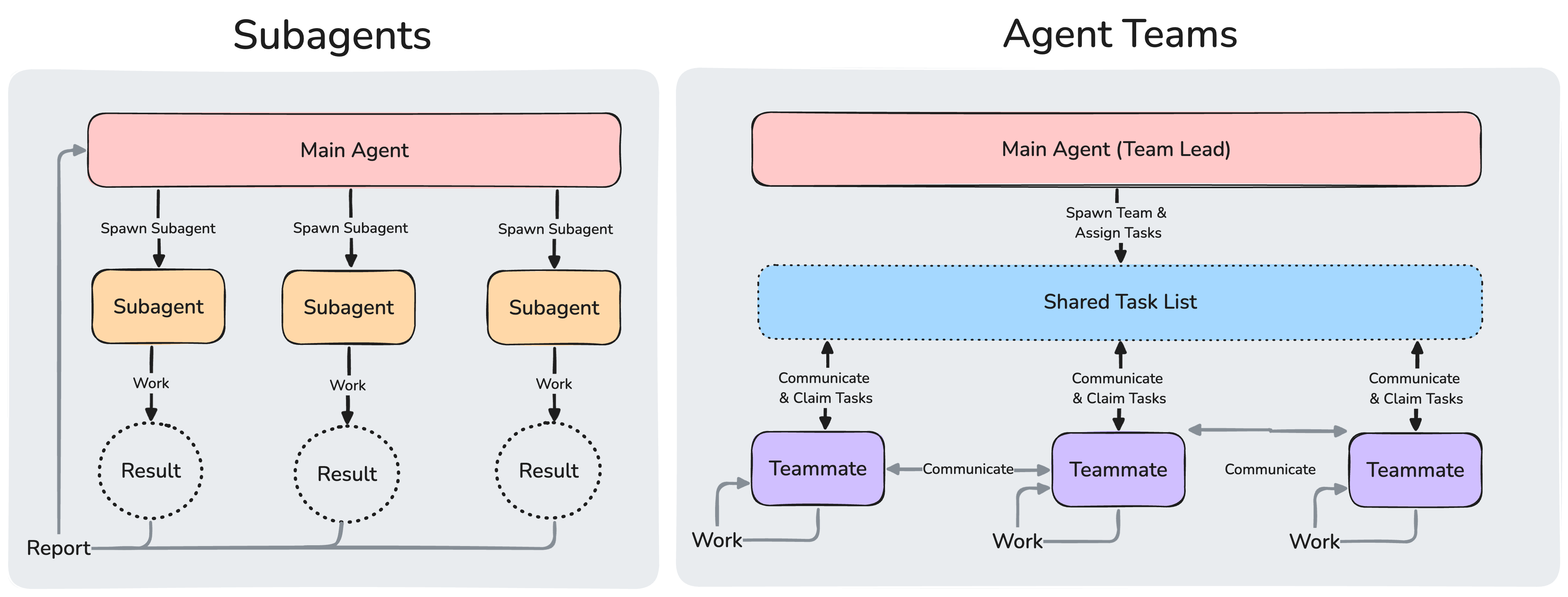
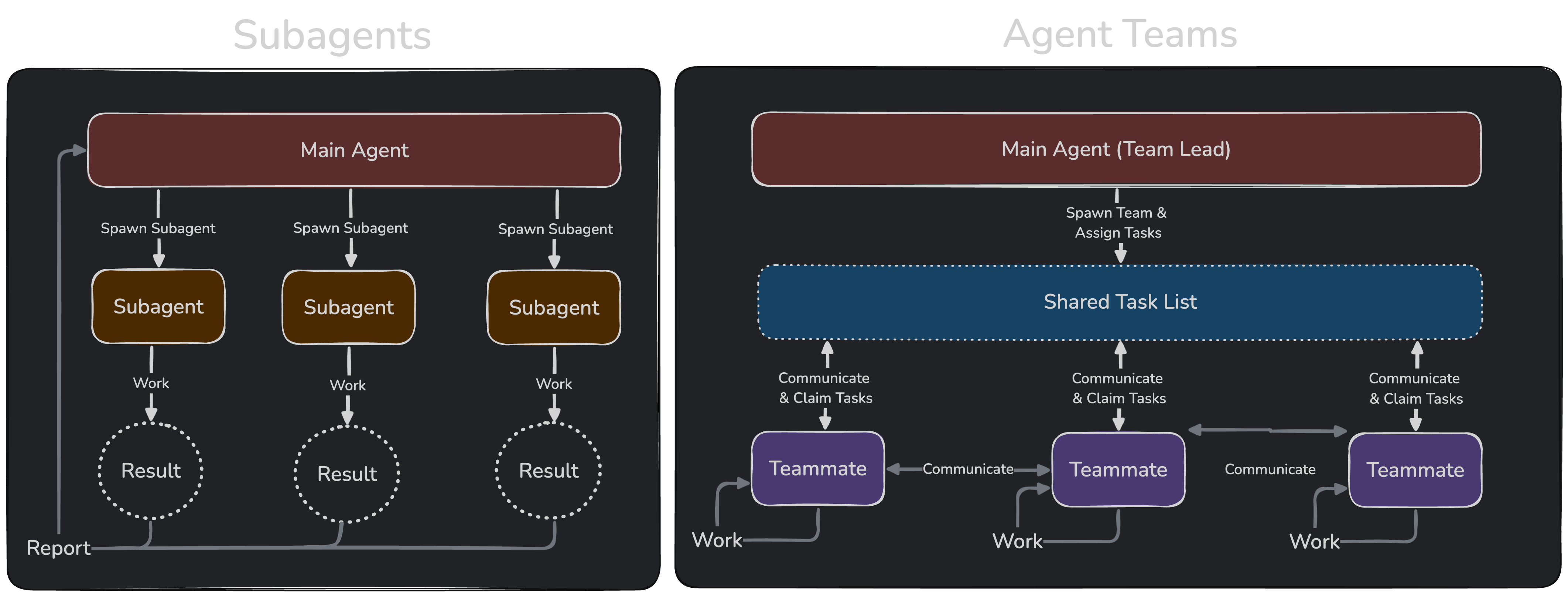
Subagents report results back to the main agent. In agent teams, teammates share a task list, claim work, and communicate directly with each other.子智能体向主智能体汇报结果。而在智能体团队中,成员共享任务列表、认领工作并直接相互通信。
Use subagents when you need quick, focused workers that report back. Use agent teams when teammates need to share findings, challenge each other, and coordinate on their own.当你需要快速、专注且会汇报结果的工作单元时,请使用子智能体。当你需要成员分享发现、相互质疑并自主协调时,请使用智能体团队。
Enable agent teams启用智能体团队
Agent teams are disabled by default. Enable them by setting theCLAUDE_CODE_EXPERIMENTAL_AGENT_TEAMS environment variable to 1, either in your shell environment or through settings.json:智能体团队默认禁用。请在 shell 环境变量或 settings.json 中设置 CLAUDE_CODE_EXPERIMENTAL_AGENT_TEAMS 为 1 来启用:
settings.json
-p flag, including Agent SDK sessions, Claude doesn’t spawn teammates, and a subagent that Claude names runs as an ordinary subagent even with agent teams enabled.生成团队成员同样需要交互式会话。在带有 -p 标志的非交互模式(包括 Agent SDK 会话)下,Claude 不会生成团队成员,即使启用了智能体团队,Claude 命名的子智能体也会作为普通子智能体运行。
Start your first agent team启动你的第一个智能体团队
After enabling agent teams, describe the task and the teammates you want in natural language. Claude spawns them and coordinates work based on your prompt.启用智能体团队后,用自然语言描述任务和你想要的团队成员。Claude 会根据你的提示生成成员并协调工作。 This example works well because the three roles are independent and can explore the problem without waiting on each other:此示例效果良好,因为这三个角色是独立的,可以无需等待彼此即可探索问题:- Up and down arrows: select a teammate向上和向下箭头:选择团队成员
- Enter: open the selected teammate’s transcript and message it directly回车键:打开所选成员的对话记录并直接发送消息
- Escape: clear the selection. While you’re viewing a teammate’s transcript, Escape interrupts that teammate’s current turnEsc 键:清除选择。当你正在查看成员的对话记录时,Esc 键会中断该成员当前的轮次
2 idle agents when five are idle. Select it and press Enter to expand the collapsed rows, or press Esc to collapse them again. Working teammates, failed teammates, and the teammate you’re viewing always keep their own rows.当同时有超过三个成员处于空闲状态时,超出前三个的行会折叠成一行,显示折叠成员的数量(例如“2 个空闲智能体”)。选择该行并按回车键可展开折叠行,或按 Esc 键再次折叠。正在工作的成员、失败的成员以及你正在查看的成员始终保持各自的行。
If you want each teammate in its own split pane, see Choose a display mode.如果你希望每个成员都在各自的分割窗格中,请参阅“选择显示模式”。
Control your agent team控制你的智能体团队
Tell the lead what you want in natural language. It handles team coordination, task assignment, and delegation based on your instructions.用自然语言告诉负责人你的需求。它会根据你的指令处理团队协调、任务分配和委派。Choose a display mode选择显示模式
Agent teams support two display modes:智能体团队支持两种显示模式:- In-process: all teammates run inside your main terminal. Use the up and down arrow keys in the agent panel to select a teammate, then press Enter to view it and type to message it directly. Works in any terminal, no extra setup required.进程内 (In-process):所有成员在你的主终端内运行。使用智能体面板中的上下箭头键选择成员,按回车键查看并输入消息直接与其对话。适用于任何终端,无需额外设置。
- Split panes: each teammate gets its own pane. You can see everyone’s output at once and click into a pane to interact directly. Requires tmux, or iTerm2.分割窗格 (Split panes):每个成员拥有自己的窗格。你可以同时查看所有人的输出,并点击进入某个窗格进行直接交互。需要 tmux 或 iTerm2。
tmux has known limitations on certain operating systems and traditionally works best on macOS. Using tmux -CC in iTerm2 is the suggested entrypoint into tmux.tmux 在某些操作系统上存在已知局限性,通常在 macOS 上表现最佳。在 iTerm2 中使用 tmux -CC 是进入 tmux 的推荐入口。"in-process". Set "auto" to enable split panes when you’re already running inside a tmux session, or when your terminal is iTerm2 with the it2 CLI installed, falling back to in-process otherwise. The "tmux" setting enables split-pane mode and auto-detects whether to use tmux or iTerm2 based on your terminal.默认模式为“in-process”。设置为“auto”可在你已处于 tmux 会话中,或终端为已安装 it2 CLI 的 iTerm2 时启用分割窗格模式,否则回退到进程内模式。“tmux”设置会启用分割窗格模式,并根据你的终端自动检测是使用 tmux 还是 iTerm2。
Set "iterm2" to use iTerm2 native split panes explicitly. This mode requires the it2 CLI and shows an error with the install command if it2 is missing. The setup prompt that offers to install it2 or switch to tmux appears under "auto" or "tmux" when your terminal is iTerm2 and tmux is available as a fallback.设置为“iterm2”可明确使用 iTerm2 原生分割窗格。此模式需要 it2 CLI,如果缺少 it2,会显示包含安装命令的错误提示。当你的终端是 iTerm2 且 tmux 可作为备选时,“auto”或“tmux”模式下会出现建议安装 it2 或切换到 tmux 的设置提示。
To override the default, set teammateMode in ~/.claude/settings.json:要覆盖默认设置,请在 ~/.claude/settings.json 中设置 teammateMode:
--teammate-mode flag is experimental and doesn’t appear in claude --help.--teammate-mode 标志目前处于实验阶段,不会显示在 claude --help 中。
Split-pane mode requires either tmux or iTerm2 with the it2 CLI. To install manually:分割窗格模式需要 tmux 或安装了 it2 CLI 的 iTerm2。手动安装方法:
- tmux: install through your system’s package manager. See the tmux wiki for platform-specific instructions.tmux:通过系统包管理器安装。请参阅 tmux wiki 获取特定平台的安装说明。
- iTerm2: install the
it2CLI, then enable the Python API in iTerm2 → Settings → General → Magic → Enable Python API.iTerm2:安装 it2 CLI,然后在 iTerm2 → Settings → General → Magic → Enable Python API 中启用 Python API。
Specify teammates and models指定成员和模型
Claude decides the number of teammates to spawn based on your task, or you can specify exactly what you want:Claude 会根据你的任务决定生成的成员数量,或者你也可以精确指定你的需求:- The model your spawn prompt names for that teammate.你在生成提示词中为该成员指定的模型。
- For a teammate spawned from a subagent definition, the definition’s
model, whereinheritselects the lead’s model.对于从子智能体定义生成的成员,使用该定义的模型(inherit 表示继承负责人的模型)。 CLAUDE_CODE_SUBAGENT_MODEL, when it’s set to anything other thaninherit.当 CLAUDE_CODE_SUBAGENT_MODEL 设置为非 inherit 的值时,使用该值。- The lead’s current model.负责人的当前模型。
CLAUDE_CODE_SUBAGENT_MODEL_FORCE=1, the first two sources don’t apply. Claude Code picks every teammate’s model from CLAUDE_CODE_SUBAGENT_MODEL when it’s set to anything other than inherit, and from the lead’s current model otherwise. Requires Claude Code v2.1.257 or later.如果设置 CLAUDE_CODE_SUBAGENT_MODEL_FORCE=1,前两个来源将不适用。Claude Code 会在 CLAUDE_CODE_SUBAGENT_MODEL 设置为非 inherit 时使用该模型,否则使用负责人的当前模型。需要 Claude Code v2.1.257 或更高版本。
Before v2.1.251, CLAUDE_CODE_SUBAGENT_MODEL came first in this order.在 v2.1.251 之前,CLAUDE_CODE_SUBAGENT_MODEL 在此顺序中排在第一位。
teammateDefaultModel was removed in v2.1.234; Claude Code ignores a leftover value. Name the model in your prompt instead.teammateDefaultModel 已在 v2.1.234 中移除;Claude Code 会忽略残留值。请在提示词中直接指定模型名称。availableModels allowlist. When the allowlist blocks a value, Claude Code substitutes another model:Claude Code 会根据你组织中的 availableModels 白名单检查为成员选择的模型。当白名单拦截某个值时,Claude Code 会替换为另一个模型:
- Family alias such as
opus: On the Anthropic API and Claude Platform on AWS, Claude Code runs the teammate on the newest version of that family the allowlist permits. On providers with provider-specific model IDs, where the substitution doesn’t operate, a blocked alias falls back like any other blocked value per the next bullet系列别名(如 opus):在 Anthropic API 和 AWS 上的 Claude Platform 中,Claude Code 会在白名单允许的该系列最新版本上运行成员。在提供商特定模型 ID 的提供商处(不支持替换功能),被拦截的别名会按照下一点的规则回退。 - Any other blocked value, including a family alias on providers where the substitution doesn’t operate, or one whose family has no permitted version: Claude Code runs the teammate on the lead’s model instead. If you set
CLAUDE_CODE_SUBAGENT_MODEL, Claude Code tries that model first, under these same rules任何其他被拦截的值,包括不支持替换功能的提供商处的系列别名,或其系列中没有允许版本的别名:Claude Code 会在负责人的模型上运行成员。如果你设置了 CLAUDE_CODE_SUBAGENT_MODEL,Claude Code 会根据这些规则优先尝试该模型。
Have teammates plan before implementing让成员在实施前进行规划
For complex or risky tasks, you can have teammates plan before implementing. A teammate that Claude spawns while the lead is in plan mode works in read-only plan mode until its plan is ready. Switch the lead into plan mode first, then ask for the teammate:对于复杂或高风险任务,你可以让成员在实施前进行规划。当负责人处于规划模式时,Claude 生成的成员将在只读的规划模式下工作,直到其计划准备就绪。请先将负责人切换到规划模式,然后请求生成成员:Talk to teammates directly直接与成员对话
Each teammate is a full, independent Claude Code session. You can message any teammate directly to give additional instructions, ask follow-up questions, or redirect their approach.每个成员都是一个完整、独立的 Claude Code 会话。你可以直接向任何成员发送消息,以提供额外说明、询问后续问题或调整其工作方向。- In-process mode: use the up and down arrow keys in the agent panel to select a teammate, then press Enter to view its session and type to send it a message. Press
xon a selected teammate to stop it. Press Ctrl+T to toggle the task list.进程内模式:使用智能体面板中的上下箭头键选择成员,按回车键查看其会话并输入消息。在选定成员上按 x 可停止它。按 Ctrl+T 可切换任务列表。 - Split-pane mode: click into a teammate’s pane to interact with their session directly. Each teammate has a full view of their own terminal.分割窗格模式:点击进入成员的窗格以直接与其会话交互。每个成员都拥有其自身终端的完整视图。
/model and /fast only change the lead’s settings. As of v2.1.199, typing either command while viewing a teammate shows a notice that the change applies to the lead; earlier versions applied it to the lead with no indication. /effort still applies to the viewed teammate’s later turns, because teammates follow the lead’s effort level.成员的模型和快速模式在生成时即固定,因此 /model 和 /fast 仅更改负责人的设置。自 v2.1.199 起,在查看成员时输入这些命令会显示通知,说明更改适用于负责人;早期版本会直接应用到负责人且无任何提示。/effort 仍适用于所查看成员的后续轮次,因为成员遵循负责人的努力程度。
Assign and claim tasks分配和认领任务
The shared task list coordinates work across the team. The lead creates tasks and teammates work through them. Tasks have three states: pending, in progress, and completed. Tasks can also depend on other tasks: a pending task with unresolved dependencies cannot be claimed until those dependencies are completed.共享任务列表用于协调整个团队的工作。负责人创建任务,成员完成任务。任务有三种状态:待处理、进行中和已完成。任务还可以依赖其他任务:具有未决依赖项的待处理任务在依赖项完成之前无法被认领。 Agents without the Task tools coordinate through messages instead of the shared task list.没有任务工具的智能体通过消息而非共享任务列表进行协调。 The lead can assign tasks explicitly, or teammates can self-claim:负责人可以显式分配任务,成员也可以自行认领:- Lead assigns: tell the lead which task to give to which teammate负责人分配:告诉负责人将哪个任务交给哪个成员。
- Self-claim: after finishing a task, a teammate picks up the next unassigned, unblocked task on its own自行认领:成员完成任务后,会自动拾取下一个未分配且未被阻塞的任务。
Shut down teammates关闭成员
To gracefully end a teammate’s session, refer to it by name. For example, with a teammate named researcher:要优雅地结束成员会话,请通过名称引用它。例如,对于名为 researcher 的成员:Enforce quality gates with hooks使用钩子执行质量门禁
Use hooks to enforce rules when teammates finish work or tasks are created or completed:使用钩子在成员完成工作或任务被创建/完成时强制执行规则:TeammateIdle: runs when a teammate is about to go idle. Exit with code 2 to send feedback and keep the teammate working.TeammateIdle:当成员即将进入空闲状态时运行。以代码 2 退出可发送反馈并让成员继续工作。TaskCreated: runs when a task is being created. Exit with code 2 to prevent creation and send feedback.TaskCreated:当任务被创建时运行。以代码 2 退出可阻止创建并发送反馈。TaskCompleted: runs when a task is being marked complete. Exit with code 2 to prevent completion and send feedback.TaskCompleted:当任务被标记为完成时运行。以代码 2 退出可阻止完成并发送反馈。
How agent teams work智能体团队的工作原理
This section covers the architecture and mechanics behind agent teams. If you want to start using them, see Control your agent team above.本节介绍智能体团队背后的架构和机制。如果你想开始使用它们,请参阅上文的“控制你的智能体团队”。How Claude starts agent teamsClaude 如何启动智能体团队
To start a team, ask Claude for teammates. Claude launches a teammate when it calls the Agent tool with aname while agent teams are enabled, unless the call is a fork or passes isolation on the call itself. Claude Code doesn’t ask you to confirm the launch.要启动团队,请向 Claude 请求生成成员。当启用智能体团队时,Claude 在调用带有名称的 Agent 工具时会启动成员,除非该调用是分支或在调用本身通过了隔离设置。Claude Code 不会要求你确认启动。
Claude also names ordinary subagents on its own so it can message them later. Those calls follow the same rule, so teams can form even when you didn’t ask for one. If you want subagents instead, turn agent teams off.Claude 也会自行命名普通子智能体,以便稍后与其通信。这些调用遵循相同的规则,因此即便你未主动要求,团队也可能会形成。如果你希望使用子智能体,请关闭智能体团队功能。
Architecture架构
An agent team consists of:智能体团队包含:
Each agent’s mailbox is a JSON file at
~/.claude/teams/{team-name}/inboxes/{agent-name}.json. Claude Code validates every entry when it reads a mailbox file. Entries that don’t match the message format are reported as errors and removed from the file; the valid messages are still delivered. Before v2.1.207, a single malformed mailbox entry caused a repeated error every second and blocked delivery for that mailbox until you deleted the file manually.每个智能体的邮箱都是位于 ~/.claude/teams/{team-name}/inboxes/{agent-name}.json 的 JSON 文件。Claude Code 在读取邮箱文件时会验证每个条目。不符合消息格式的条目会被报告为错误并从文件中移除;有效消息仍会正常投递。在 v2.1.207 之前,单个格式错误的邮箱条目会导致每秒重复报错,并阻塞该邮箱的投递,直到你手动删除该文件。
Claude Code reports a message as sent only when the write to the recipient’s mailbox file succeeds, whether the message is plain text or a structured protocol message such as a plan approval or shutdown request. When the write fails, for example because the disk is full or the mailbox directory isn’t writable, the sending agent receives an error and nothing is sent. See Failed to write to a teammate’s inbox for the error messages and recovery steps.Claude Code 仅在成功写入接收者的邮箱文件后才会报告消息已发送,无论是纯文本消息还是结构化协议消息(如计划批准或关闭请求)。当写入失败时(例如磁盘已满或邮箱目录不可写),发送方智能体会收到错误且消息不会发送。请参阅“写入成员收件箱失败”获取错误消息和恢复步骤。
Claude Code manages task dependencies automatically: when a teammate completes a task that other tasks depend on, it unblocks the dependent tasks without any action from you.Claude Code 会自动管理任务依赖关系:当成员完成其他任务所依赖的任务时,它会自动解除相关任务的阻塞,无需你进行任何操作。
Teams and tasks are stored locally under a session-derived name. The name is session- followed by the first eight characters of the session ID:团队和任务存储在本地,名称源自会话。名称为 session- 加上会话 ID 的前八位字符:
- Team config:
~/.claude/teams/{team-name}/config.json团队配置:~/.claude/teams/{team-name}/config.json - Task list:
~/.claude/tasks/{team-name}/任务列表:~/.claude/tasks/{team-name}/
cleanupPeriodDays you already control for session transcripts, following the retention sweep rules.Claude Code 会在会话启动时自动生成这两者,并随着成员加入、空闲或离开进行更新。团队配置目录会在会话结束时删除。任务列表目录在本地持久化且从不上传,因此恢复的会话会保留其任务。保留期限遵循你已为会话记录设置的 cleanupPeriodDays,并遵循保留清理规则。
The team config holds runtime state such as session IDs and tmux pane IDs, so don’t edit it by hand or pre-author it: your changes are overwritten on the next state update.团队配置包含会话 ID 和 tmux 窗格 ID 等运行时状态,请勿手动编辑或预先创建:你的修改会在下一次状态更新时被覆盖。
To define reusable teammate roles, use subagent definitions instead.要定义可复用的成员角色,请使用子智能体定义。
The team config contains a members array with each member’s name and agent ID. The lead’s entry always carries the agent type team-lead. A teammate’s entry carries whatever agent type the lead named when spawning it, whether a built-in type or a subagent definition, and omits the field when the lead named none. Teammates can read this file to discover other team members.团队配置包含一个 members 数组,其中列出每个成员的名称和智能体 ID。负责人的条目始终带有 agent 类型 team-lead。成员的条目带有负责人生成时命名的 agent 类型(无论是内置类型还是子智能体定义),若负责人未命名则省略该字段。成员可以读取此文件以发现其他团队成员。
There is no project-level equivalent of the team config. A file like .claude/teams/teams.json in your project directory is not recognized as configuration; Claude treats it as an ordinary file.不存在项目级的团队配置等效项。项目目录中的 .claude/teams/teams.json 等文件不会被识别为配置;Claude 会将其视为普通文件。
Use subagent definitions for teammates使用子智能体定义作为成员
When spawning a teammate in either display mode, you can reference a subagent type from the project, user, or managed subagent scope. This lets you define a role once, such as a security-reviewer or test-runner, and reuse it both as a delegated subagent and as an agent team teammate.在任一显示模式下生成成员时,你可以引用项目、用户或托管子智能体范围内的子智能体类型。这使你能够定义一次角色(例如 security-reviewer 或 test-runner),并将其同时用作委派的子智能体和智能体团队成员。 To use a subagent definition, name it when you ask Claude to spawn the teammate:要使用子智能体定义,请在请求 Claude 生成成员时指定其名称:tools: Claude Code limits the teammate to the tools in the definition’stoolslist. For an in-process teammate, Claude Code addsSendMessageto that list, and in a session that has the Task tools it addsTaskCreate,TaskGet,TaskList, andTaskUpdatetoo.tools:Claude Code 将成员限制为定义中工具列表内的工具。对于进程内成员,Claude Code 会将 SendMessage 添加到该列表;若会话拥有任务工具,还会添加 TaskCreate、TaskGet、TaskList 和 TaskUpdate。model: Claude Code uses the definition’smodelin either display mode when your spawn prompt doesn’t name one. See how Claude Code picks a teammate’s model.model:当你的生成提示词未命名模型时,Claude Code 在任一显示模式下都会使用定义的模型。请参阅“Claude Code 如何选择成员模型”。- Body: for an in-process teammate, Claude Code appends the definition’s body to its default system prompt as additional instructions. For a split-pane teammate, Claude Code uses the body in place of its default system prompt.Body:对于进程内成员,Claude Code 会将定义的 Body 附加到其默认系统提示词中作为额外说明。对于分割窗格成员,Claude Code 使用该 Body 替代其默认系统提示词。
skills: Claude Code doesn’t apply the definition’sskillsto a teammate in either display mode. The teammate loads skills from your project and user settings.skills:Claude Code 不会在任一显示模式下将定义的技能应用于成员。成员会从你的项目和用户设置中加载技能。mcpServers: for a split-pane teammate, Claude Code applies the definition’smcpServersunder the rules for that field, which cover a session started with--agentas well. An in-process teammate ignores the field and loads MCP servers from your project and user settings.mcpServers:对于分割窗格成员,Claude Code 根据该字段的规则应用定义的 mcpServers(同样涵盖使用 --agent 启动的会话)。进程内成员会忽略该字段并从你的项目和用户设置中加载 MCP 服务器。
.claude/agents/ directory or an --add-dir directory only if you’ve trusted the folder the agent file is in. Trusting a parent folder doesn’t count. Until then, the teammate comes back with none of the definition’s tools or instructions, keeping only the tools Claude Code adds to every in-process teammate. See the teammate’s agent definition was not restored for the notice text.对于 Claude Code 恢复的成员,仅当你已信任智能体文件所在的文件夹时,它才会重新应用来自项目 .claude/agents/ 目录或 --add-dir 目录的定义。信任父文件夹无效。在此之前,成员恢复时将不具备定义的任何工具或说明,仅保留 Claude Code 添加给每个进程内成员的工具。请参阅“成员智能体定义未恢复”获取通知文本。
Permissions权限
Teammates start with the lead’s permission mode, exceptdontAsk mode, which they don’t inherit. If the lead runs with --dangerously-skip-permissions, all teammates do too. After spawning, you can change an individual teammate’s permission mode, but you can’t set per-teammate permission modes at spawn time.成员启动时采用负责人的权限模式,但不会继承 dontAsk 模式。如果负责人以 --dangerously-skip-permissions 运行,所有成员也会如此。生成后,你可以更改单个成员的权限模式,但无法在生成时设置每个成员的权限模式。
Teammate permission prompts appear in the lead session, so approve them there yourself. Plan approval is the designed exception: the lead session grants teammate plan approvals without a separate prompt to you.成员的权限提示会出现在负责人会话中,因此请自行在那里批准。计划批准是既定的例外情况:负责人会话会在不向你发出单独提示的情况下授予成员计划批准。
Messages between agents智能体间的消息
When one agent sends another a message overSendMessage, Claude Code tells the receiving agent the message came from another Claude session, not from you. A teammate can’t approve a permission prompt or supply consent on your behalf, and a teammate that was denied an action can’t relay it to another teammate to bypass the check. The same rules apply to a message that arrives from one of your other Claude Code sessions, outside the team entirely.当一个智能体通过 SendMessage 向另一个智能体发送消息时,Claude Code 会告知接收方智能体该消息来自另一个 Claude 会话,而非来自你。成员不能代表你批准权限提示或提供同意,且被拒绝操作的成员不能将其转达给另一个成员以绕过检查。相同的规则适用于来自你其他 Claude Code 会话(完全在团队之外)的消息。
In auto mode, the classifier applies two checks to messages between agents:在自动模式下,分类器对智能体间的消息应用两项检查:
- It treats an approval claim relayed from another agent as untrusted input rather than confirmation from you.它将从另一个智能体转达的批准声明视为不可信输入,而非来自你的确认。
- It reviews each message before Claude Code delivers it, whether a plain message or a structured protocol message such as a shutdown request or plan approval response. A message it blocks never reaches the recipient.它会在 Claude Code 投递消息前审查每条消息,无论是纯文本消息还是结构化协议消息(如关闭请求或计划批准响应)。被拦截的消息永远不会到达接收方。
Context and communication上下文与通信
Each teammate has its own context window. When spawned, a teammate loads the same project context as a regular session: CLAUDE.md, MCP servers, and skills. If you start the lead with--setting-sources, teammates load from the same restricted list of sources. Before v2.1.281, split-pane teammates loaded every settings source.每个成员都有自己的上下文窗口。生成时,成员会加载与常规会话相同的项目上下文:CLAUDE.md、MCP 服务器和技能。如果你使用 --setting-sources 启动负责人,成员也会从相同的受限来源列表中加载。在 v2.1.281 之前,分割窗格成员会加载所有设置来源。
A teammate also receives the spawn prompt from the lead. The lead’s conversation history does not carry over.成员还会接收来自负责人的生成提示词。负责人的对话历史不会被继承。
How teammates share information:成员共享信息的方式:
- Automatic message delivery: when teammates send messages, they’re delivered automatically to recipients. The lead doesn’t need to poll for updates.自动消息投递:当成员发送消息时,它们会自动投递给接收者。负责人无需轮询更新。
- Idle notifications: when a teammate finishes and stops, it automatically notifies the lead and includes its final answer in the notification. A teammate whose turn ends on an API error notifies the lead that it failed and includes the error text.空闲通知:当成员完成工作并停止时,它会自动通知负责人并在通知中包含其最终答案。轮次因 API 错误而结束的成员会通知负责人其失败并包含错误文本。
- Shared task list: agents that have the Task tools can see task status and claim available work.共享任务列表:拥有任务工具的智能体可以查看任务状态并认领可用工作。
- Teammate messaging: send a message to one specific teammate by name. To reach everyone, send one message per recipient.成员消息:按名称向特定成员发送消息。若要联系所有人,请为每个接收者发送一条消息。
Token usageToken 使用量
Agent teams use significantly more tokens than a single session. Each teammate has its own context window, and token usage scales with the number of active teammates. For research, review, and new feature work, the extra tokens are usually worthwhile. For routine tasks, a single session is more cost-effective. See agent team token costs for usage guidance.智能体团队消耗的 Token 远多于单个会话。每个成员都有自己的上下文窗口,Token 使用量随活跃成员数量线性增长。对于研究、评审和新功能开发,额外的 Token 通常是值得的。对于日常任务,单个会话更具成本效益。请参阅“智能体团队 Token 成本”获取使用指导。 An in-process teammate’s requests fall outside the main conversation’s cache TTL bucket, so its cache holds for five minutes by default, including on a Claude subscription. To keep it for an hour, setsubagentPromptCacheTtl to 1h. The API bills 1-hour cache writes at a higher rate.进程内成员的请求不在主对话的缓存 TTL 桶内,因此其缓存默认保留五分钟(包括 Claude 订阅)。若要保留一小时,请将 subagentPromptCacheTtl 设置为 1h。API 会按更高费率计费 1 小时的缓存写入。
Use case examples用例示例
These examples show how agent teams handle tasks where parallel exploration adds value.这些示例展示了智能体团队如何处理并行探索能带来价值的任务。Run a parallel code review运行并行代码评审
A single reviewer tends to gravitate toward one type of issue at a time. Splitting review criteria into independent domains means security, performance, and test coverage all get thorough attention simultaneously. The prompt assigns each teammate a distinct lens so they don’t overlap:单个评审员倾向于一次只关注一种类型的问题。将评审标准拆分为独立的领域,意味着安全性、性能和测试覆盖率都能同时得到充分关注。提示词为每个成员分配了不同的视角,以确保它们不会重叠:Investigate with competing hypotheses基于竞争性假设的调查
When the root cause is unclear, a single agent tends to find one plausible explanation and stop looking. The prompt fights this by making teammates explicitly adversarial: each one’s job is not only to investigate its own theory but to challenge the others’.当根本原因不明确时,单个智能体往往会找到一种合理的解释并停止寻找。提示词通过使成员具有明确的对抗性来对抗这一点:每个人的工作不仅是调查自己的理论,还要质疑他人的理论。Best practices最佳实践
Give teammates enough context给予成员足够的上下文
Teammates load project context automatically, including CLAUDE.md, MCP servers, and skills, but they don’t inherit the lead’s conversation history. See Context and communication for details. Include task-specific details in the spawn prompt:成员会自动加载项目上下文(包括 CLAUDE.md、MCP 服务器和技能),但它们不会继承负责人的对话历史。详情请参阅“上下文与通信”。请在生成提示词中包含特定任务的详细信息:Choose an appropriate team size选择合适的团队规模
There’s no hard limit on the number of teammates, but practical constraints apply:成员数量没有硬性限制,但存在实际约束:- Token costs scale linearly: each teammate has its own context window and consumes tokens independently. See agent team token costs for details.Token 成本线性扩展:每个成员都有自己的上下文窗口并独立消耗 Token。详情请参阅“智能体团队 Token 成本”。
- Coordination overhead increases: more teammates means more communication, task coordination, and potential for conflicts协调开销增加:成员越多,意味着更多的通信、任务协调和潜在冲突。
- Diminishing returns: beyond a certain point, additional teammates don’t speed up work proportionally边际效应递减:超过一定点后,增加成员不会按比例加快工作速度。
Size tasks appropriately合理拆分任务规模
- Too small: coordination overhead exceeds the benefit太小:协调开销超过收益。
- Too large: teammates work too long without check-ins, increasing risk of wasted effort太大:成员在没有核对的情况下工作时间过长,增加了浪费工作的风险。
- Just right: self-contained units that produce a clear deliverable, such as a function, a test file, or a review恰到好处:产生明确交付成果的自包含单元,例如函数、测试文件或评审。
Wait for teammates to finish等待成员完成
Sometimes the lead starts implementing tasks itself instead of waiting for teammates. If you notice this:有时负责人会自己开始实施任务而不是等待成员。如果你注意到这一点:Start with research and review从研究和评审开始
If you’re new to agent teams, start with tasks that have clear boundaries and don’t require writing code: reviewing a PR, researching a library, or investigating a bug. These tasks show the value of parallel exploration without the coordination challenges that come with parallel implementation.如果你是智能体团队的新手,请从边界清晰且不需要编写代码的任务开始:评审 PR、研究库或调查 Bug。这些任务展示了并行探索的价值,而没有并行实施带来的协调挑战。Avoid file conflicts避免文件冲突
Two teammates editing the same file leads to overwrites. Break the work so each teammate owns a different set of files.两名成员编辑同一文件会导致覆盖。请拆分工作,使每个成员负责一组不同的文件。Monitor and steer监控与引导
Check in on teammates’ progress, redirect approaches that aren’t working, and synthesize findings as they come in. Letting a team run unattended for too long increases the risk of wasted effort.检查成员的进度,重定向无效的方法,并在发现结果时进行汇总。让团队长时间无人看管会增加浪费工作的风险。Troubleshooting故障排除
Teammates not appearing成员未出现
If teammates aren’t appearing after you ask Claude to spawn them:如果请求 Claude 生成成员后它们没有出现:- In in-process mode, teammates appear in the agent panel below the prompt input. Use the up and down arrow keys to select one, then press Enter to view it.在进程内模式下,成员出现在提示输入下方的智能体面板中。使用上下箭头键选择一个,然后按回车键查看。
- A teammate row that disappeared after sitting idle has been hidden, not stopped. Idle rows hide 30 seconds after the whole panel goes idle and reappear on the teammate’s next turn. When more than three teammates are idle, their surplus rows collapse into a single
N idle agentsrow that Enter expands. Send the teammate a message by name to bring a hidden row back.空闲后消失的成员行是被隐藏了,而不是停止了。空闲行会在整个面板空闲 30 秒后隐藏,并在成员下一轮次时重新出现。当超过三个成员空闲时,多余的行会折叠成一行“N 个空闲智能体”,按回车键可展开。按名称向成员发送消息可使隐藏行重新出现。 - Check that the task you gave Claude was complex enough to warrant a team. Claude decides whether to spawn teammates based on the task.检查你给 Claude 的任务是否足够复杂以至于需要团队。Claude 根据任务决定是否生成成员。
- If you explicitly requested split panes, ensure tmux is installed and available in your PATH:
如果你显式请求了分割窗格,请确保 tmux 已安装且在你的 PATH 中: which tmux
- For iTerm2, verify the
it2CLI is installed and the Python API is enabled in iTerm2 preferences.对于 iTerm2,请验证 it2 CLI 已安装,并且在 iTerm2 首选项中启用了 Python API。
Claude spawns teammates instead of subagentsClaude 生成团队成员而非子智能体
While agent teams are enabled, a subagent that Claude names in the lead’s session launches as a teammate. Claude can name subagents on its own, so this can happen during delegation you never framed as team work.当启用智能体团队(agent teams)时,Claude 在主会话中指定的子智能体将作为团队成员启动。Claude 可以自行命名子智能体,因此即使你并未将其定义为团队协作,这种情况也可能发生。 To make named subagents launch as subagents again, turn agent teams off by settingCLAUDE_CODE_EXPERIMENTAL_AGENT_TEAMS to 0:若要让已命名的子智能体再次以子智能体形式启动,请通过将 CLAUDE_CODE_EXPERIMENTAL_AGENT_TEAMS 设置为 0 来关闭智能体团队功能:
settings.json
env values to the running session when you save, and rereads the variable each time Claude spawns a subagent, so the next subagent Claude names launches as a subagent.你无需开启新会话:当你保存设置时,Claude Code 会将设置文件中的环境变量值重新应用到正在运行的会话中,并在每次生成子智能体时重新读取该变量,因此 Claude 下次命名的子智能体将作为子智能体启动。
Setting the variable to 0 in your user settings.json overrides a shell export. Other settings sources can still enable agent teams:在用户 settings.json 中将该变量设置为 0 会覆盖 shell 导出(shell export)的值。其他设置来源仍可能启用智能体团队:
- Higher-precedence settings files: project settings, local settings, and a
--settingspayload apply after user settings, so anenventry that sets the variable to1in any of them wins. See Settings precedence.优先级更高的设置文件(如项目设置、本地设置以及 --settings 载荷)会在用户设置之后应用,因此在其中任何一个文件中将该变量设置为 1 的环境变量条目都将生效。请参阅“设置优先级”。 - Managed settings: managed settings apply after every other source. If your organization enables agent teams there, ask your administrator to change the managed value.托管设置:托管设置会在所有其他来源之后应用。如果你的组织在此处启用了智能体团队,请联系管理员更改托管值。
SendMessage address. Claude receives each subagent’s result when it completes.更改后,Claude 可能仍会命名子智能体,且该名称将继续作为 SendMessage 的地址使用。当子智能体完成任务时,Claude 会收到其结果。
Too many permission prompts权限提示过多
Teammate permission requests bubble up to the lead, which can create friction. Pre-approve common operations in your permission settings before spawning teammates to reduce interruptions.团队成员的权限请求会向上反馈给主智能体,这可能会造成干扰。在生成团队成员之前,请先在权限设置中预先批准常用操作,以减少中断。Agents stopping early智能体提前停止
Teammates may stop after encountering errors instead of recovering. Check their output by selecting the teammate in the agent panel and pressing Enter in in-process mode, or by clicking the pane in split mode, then either:团队成员在遇到错误时可能会停止运行,而不是进行恢复。你可以通过以下方式检查其输出:在智能体面板中选中该成员,并在进程内模式(in-process mode)下按回车键,或者在分屏模式下点击相应窗格,然后执行以下操作之一:- Give them additional instructions directly直接给予进一步指示
- Spawn a replacement teammate to continue the work生成一名新的团队成员来继续工作
Orphaned tmux sessions孤立的 tmux 会话
If a tmux session persists after the Claude Code session ends, it may not have been fully cleaned up. List sessions and end the one created by the team:如果 Claude Code 会话结束后 tmux 会话仍然存在,说明它可能未被完全清理。请列出会话并结束由团队创建的那个会话:Limitations限制
Agent teams are experimental. Current limitations to be aware of:智能体团队功能尚处于实验阶段。目前需注意以下限制:- No session resumption with in-process teammates:
/resumeand/rewinddo not restore in-process teammates. After resuming a session, the lead may attempt to message teammates that no longer exist. If this happens, tell the lead to spawn new teammates.进程内团队成员不支持会话恢复:/resume 和 /rewind 指令无法恢复进程内团队成员。恢复会话后,主智能体可能会尝试向已不存在的团队成员发送消息。如果发生这种情况,请指示主智能体生成新的团队成员。 - Task status can lag: teammates sometimes fail to mark tasks as completed, which blocks dependent tasks. If a task appears stuck, check whether the work is actually done and update the task status manually or tell the lead to nudge the teammate.任务状态可能滞后:团队成员有时无法将任务标记为已完成,这会阻塞后续任务。如果任务看起来卡住了,请检查工作是否实际已完成,并手动更新任务状态,或指示主智能体提醒该成员。
- Shutdown can be slow: teammates finish their current request or tool call before shutting down, which can take time.关闭过程可能较慢:团队成员在关闭前会完成当前的请求或工具调用,这可能需要一些时间。
- One team per session: a session has exactly one team, scoped to that session. You can’t create additional named teams or share a team across sessions.每个会话仅限一个团队:一个会话只能拥有一个团队,且作用域仅限于该会话。你无法创建额外的命名团队,也无法在不同会话间共享团队。
- No nested teams: teammates cannot spawn their own teammates. Only the lead can manage the team.不支持嵌套团队:团队成员无法生成自己的团队成员。只有主智能体可以管理团队。
- No background subagents from in-process teammates: an in-process teammate’s own subagents run in the foreground, because a teammate’s background work can’t outlive the lead’s process. Claude Code returns an error when a teammate spawns a subagent whose definition sets
background: true. A teammate’srun_in_background: truerequest also fails, either with an error or by running silently in the foreground, as described in how Claude Code picks foreground or background. Subagents launched from the main conversation follow the background default.进程内团队成员不支持后台子智能体:进程内团队成员的子智能体会在前台运行,因为团队成员的后台工作无法在主智能体的进程结束后继续存在。当团队成员生成定义了 background: true 的子智能体时,Claude Code 会返回错误。团队成员发出的 run_in_background: true 请求也会失败,要么报错,要么在后台静默运行(具体取决于 Claude Code 如何选择前台或后台运行,详见相关说明)。从主会话启动的子智能体遵循后台默认设置。 - Lead is fixed: the main session is the lead for its lifetime. You can’t promote a teammate to lead or transfer leadership.主智能体固定不变:主会话在整个生命周期内始终担任主智能体。你无法将团队成员提升为主智能体,也无法转移领导权。
- Permissions set at spawn: teammates start with the permission mode described under Permissions. You can change an individual teammate’s permission mode after spawning, but you can’t set per-teammate permission modes at spawn time.权限在生成时设定:团队成员启动时遵循“权限”部分描述的权限模式。你可以在生成后更改单个团队成员的权限模式,但无法在生成时针对每个成员单独设置权限模式。
- Split panes require tmux or iTerm2: the default in-process mode works in any terminal. Split-pane mode isn’t supported in VS Code’s integrated terminal, Windows Terminal, or Ghostty.分屏窗格需要 tmux 或 iTerm2:默认的进程内模式可在任何终端中使用。VS Code 集成终端、Windows Terminal 或 Ghostty 不支持分屏模式。
Next steps后续步骤
Explore related approaches for parallel work and delegation:探索并行工作和委派的相关方法:- Lightweight delegation: subagents spawn helper agents for research or verification within your session, better for tasks that don’t need inter-agent coordination轻量级委派:子智能体在你的会话内生成辅助智能体进行研究或验证,这更适合不需要智能体间协调的任务。
- Messaging between your own sessions: cross-session messaging lets Claude pass findings between the sessions you run yourself跨会话消息传递:跨会话消息传递允许 Claude 在你自己运行的多个会话之间传递发现的信息。
- Manual parallel sessions: Git worktrees let you run multiple Claude Code sessions yourself without automated team coordination手动并行会话:Git 工作树(worktrees)允许你自己运行多个 Claude Code 会话,而无需自动化的团队协调。