Better prompt caching for GPT‑6
Higher cache hit rates and new tools to help persistent agents run faster and cost less.
GPT‑6 enables persistent agents to work for hours on complex tasks, from refactoring codebases to producing well-researched documents and presentations. The applications behind these agents make a series of API requests that build on one another, often carrying forward the same instructions, tool definitions, and context from earlier turns. OpenAI caches that shared context to reuse computation across requests, reducing response times and giving developers discounts of up to 90% on cached input tokens.GPT-6 支持持久化智能体在数小时内处理复杂任务,从重构代码库到生成经过深入研究的文档和演示文稿。这些智能体背后的应用程序会进行一系列相互关联的 API 请求,通常会沿用之前的指令、工具定义和上下文。OpenAI 会缓存这些共享上下文,以便在不同请求间复用计算结果,从而缩短响应时间,并为开发者提供最高 90% 的缓存输入 Token 折扣。
With the GPT‑6 family, we launched an improved prompt caching system that delivers higher cache hit rates by default. We now give cache discounts for eligible shared prefixes reused within a 30-minute window. We’re also introducing new tools to help developers monitor cache performance, diagnose misses, and choose how much of a prompt to cache.随着 GPT-6 系列的发布,我们推出了改进后的提示词缓存系统,默认提供更高的缓存命中率。对于在 30 分钟窗口内重复使用的符合条件的共享前缀,我们现在提供缓存折扣。我们还推出了新的工具,帮助开发者监控缓存性能、诊断未命中情况,并选择缓存提示词的比例。
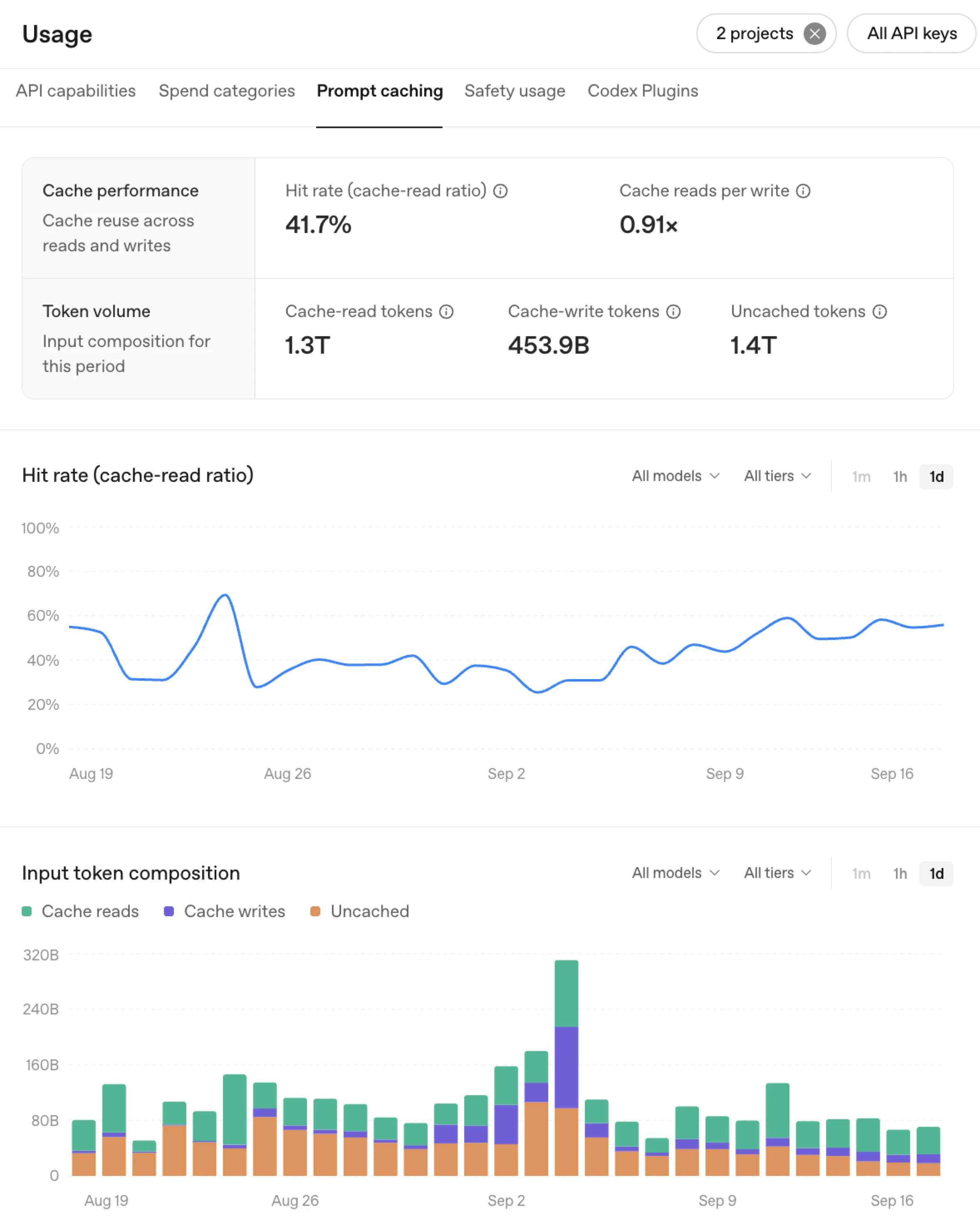
The new Prompt Caching Dashboard(opens in a new window) shows how much of your application’s input is served from cache. Track hit rates over time and use the input composition chart to compare cached and uncached tokens. These views help you spot drops in cache hits and evaluate how changes to your application impact caching performance.全新的“提示词缓存仪表板”(在新窗口中打开)可显示应用程序输入中有多少比例来自缓存。您可以追踪随时间变化的命中率,并使用输入构成图表对比已缓存和未缓存的 Token。这些视图有助于您发现缓存命中率的下降,并评估应用程序的变更对缓存性能的影响。
When you see an unexpected cache miss, use the prompt caching diagnostics tool(opens in a new window) to understand what happened. Compare a request with a recent response to identify changes to the model, tools, settings, or input that prevented reuse. The estimated number of affected tokens helps you assess the size of the impact and decide how you can optimize your integration to maximize cache hit rates. 当您发现意外的缓存未命中时,可以使用“提示词缓存诊断工具”(在新窗口中打开)来了解原因。通过对比请求与最近的响应,识别模型、工具、设置或输入中导致无法重用的变更。受影响的 Token 预估数量有助于您评估影响范围,并决定如何优化集成以最大化缓存命中率。
{
  "prompt_cache_diagnostics": {
    "type": "cache_miss",
    "reason": "tools_changed",
    "comparison_reusable_tokens": 5629,
    "cache_missed_tokens": 5629
  }
}
Choose what to cache. Explicit cache breakpoints let you choose which prompt prefixes to reuse. The refreshed prompt caching guide(opens in a new window) explains how to use them, how long cached prefixes remain eligible, and how changes to tools and inputs affect reuse.选择要缓存的内容。显式缓存断点让您可以选择要复用的提示词前缀。更新后的“提示词缓存指南”(在新窗口中打开)解释了如何使用这些断点、缓存前缀的有效时长,以及工具和输入的变更如何影响复用。
Adjust reasoning effort without breaking cache. On GPT‑6 models, you can now change reasoning effort(opens in a new window) between responses without breaking cache. Raise effort for a harder task or lower it for a routine follow-up by appending a configuration_update while leaving request-level reasoning effort unchanged. This lets you adjust how much reasoning a task needs while preserving reusable context.在不破坏缓存的情况下调整推理强度。在 GPT-6 模型上,您现在可以在不同响应之间更改“推理强度”(在新窗口中打开),而不会破坏缓存。通过附加 configuration_update,同时保持请求级别的推理强度不变,您可以为较难的任务提高强度,或为常规的后续问题降低强度。这让您能够在保留可复用上下文的同时,调整任务所需的推理量。
Preserve cache as tools and instructions change. As your agent’s tool use needs change, keep tool definitions, schemas, and ordering stable so earlier context stays reusable. Use allowed_tools to make only the relevant tools callable, or set tool_choice to none when no tools are needed, instead of removing definitions. Use new developer messages to append new instructions towards the end of the context to override older ones. See our guidance on managing tool changes(opens in a new window).在工具和指令变更时保留缓存。当智能体的工具使用需求发生变化时,请保持工具定义、模式和顺序的稳定,以便之前的上下文保持可复用性。使用 allowed_tools 仅调用相关工具,或者在无需工具时将 tool_choice 设置为 none,而不是移除定义。使用新的开发者消息将新指令追加到上下文末尾,以覆盖旧指令。请参阅我们关于管理工具变更的指南(在新窗口中打开)。
Prewarm the cache to reduce latency. Prewarming(opens in a new window) prepares known context ahead of time so the model can start responding sooner when a request arrives. For example, an application can prewarm shared instructions, tool definitions, or reference material during startup, before the user asks their first question. This moves processing out of the user’s wait time.预热缓存以降低延迟。“预热”(在新窗口中打开)可以提前准备已知的上下文,这样当请求到达时,模型就能更快开始响应。例如,应用程序可以在启动时预热共享指令、工具定义或参考资料,在用户提出第一个问题之前完成。这可以将处理过程从用户的等待时间中移出。
These optional controls build on the engine’s default performance, helping you tailor caching to your workload. 这些可选控制功能建立在引擎默认性能的基础上,帮助您根据工作负载定制缓存策略。
- Strawberry 浏览器
- Manus
- Wordsmith
Monitor cache hit rates in the Prompt Caching Dashboard(opens in a new window).在“提示词缓存仪表板”(在新窗口中打开)中监控缓存命中率。
Investigate unexpected misses with the diagnostics tool(opens in a new window).使用诊断工具(在新窗口中打开)调查意外的未命中情况。
Follow the prompt caching guide(opens in a new window) to improve your setup, or use Codex(opens in a new window) to review your code, apply improvements, and measure results.遵循“提示词缓存指南”(在新窗口中打开)来改进您的设置,或使用 Codex(在新窗口中打开)来审查代码、应用改进并衡量结果。