8 Tips for Writing Effective Agent Instructions编写高效智能体指令的 8 个技巧
Quick and simple tips to help you write better agent instructions助你编写更佳智能体指令的快速简易技巧

AI agents are used in many industries for various use cases — ranging from customer service and support to human resources to invoice processing. At their core, AI agents are software programs powered by a LLM that autonomously complete goals. They do this by breaking down complex tasks, and using tools and knowledge bases to execute action without step-by-step human intervention. AI 智能体广泛应用于各行各业的多种用例中,从客户服务与支持、人力资源到发票处理,不一而足。其核心在于,AI 智能体是由大语言模型(LLM)驱动的软件程序,能够自主完成目标。它们通过拆解复杂任务,并利用工具和知识库来执行操作,无需人工一步步干预。
When it comes to building AI agents there are a few key components, including:构建 AI 智能体时,有几个关键组件,包括:
Large language model (LLM) – this is the "brain" or the "processor" of the AI agent. The LLM is used to process information, reason, and make decisions.大语言模型 (LLM) —— 这是 AI 智能体的“大脑”或“处理器”。LLM 用于处理信息、进行推理并做出决策。
System instructions – i.e. the playbook. The instructions define the agent's goals, objectives & behavior.系统指令 —— 即“剧本”。这些指令定义了智能体的目标、任务和行为。
Tools – which are like the hands of the agent — they are things the AI agent can do / the actions it can take.工具 —— 就像智能体的“双手”,代表 AI 智能体可以执行的操作或采取的行动。
Short term chat history – this is context that's held during an active conversation with the AI agent. Think of this as a whiteboard you would use to jot down ideas during a meeting — it's available for the duration of the conversation, but not for new conversations afterwards.短期对话历史 —— 这是与 AI 智能体进行活跃对话时所保留的上下文。可以将其想象成会议期间用来记录想法的白板——它在对话期间有效,但在后续的新对话中不可用。
Long term memory – via external databases, like Milvus for RAG. Think of these database like a bookshelf, or a library, for the AI agent. They provide additional knowledge the agent may not otherwise have.长期记忆 —— 通过外部数据库实现,例如用于 RAG(检索增强生成)的 Milvus。可以将这些数据库想象成 AI 智能体的书架或图书馆。它们提供了智能体原本可能不具备的额外知识。
While all of these components are important for an AI agent, the playbook — i.e. the instructions — is what ties it all together.虽然所有这些组件对于 AI 智能体都很重要,但“剧本”(即指令)才是将一切串联起来的核心。
Without good instructions, your agent has no direction. No direction to tie together the brain, the memory, and the tools to perform those complex tasks and take action. 如果没有良好的指令,智能体就会失去方向。没有方向,就无法将大脑、记忆和工具结合起来去执行那些复杂的任务并采取行动。
When it comes to writing instructions for agents, teams often struggle to make it easy to read, modify, and maintain long-term. Below are a few tips I've picked up along the way for writing effective agent instructions. 在为智能体编写指令时,团队往往难以做到易于阅读、修改和长期维护。以下是我在实践中总结出的几条编写高效智能体指令的技巧。
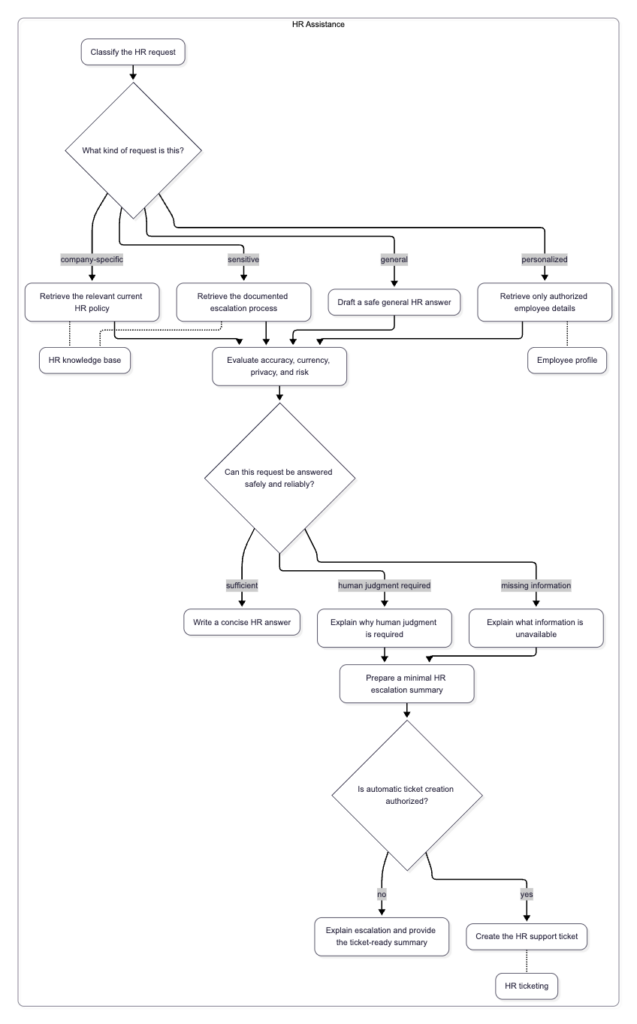
Tip #1: Draw it out — create a flow chart of the business process and the agent workflow 技巧 1:绘图说明 —— 创建业务流程和智能体工作流的流程图
Before you develop an agent and write instructions, it’s first important to understand the business process the agent is supposed to augment or enhance. Work with your business stakeholders to understand the current workflow. Then create a flow chart to define the high level steps and components.在开发智能体并编写指令之前,首先要了解该智能体旨在增强或改进的业务流程。与业务相关方合作,了解当前的工作流,然后创建流程图来定义高层步骤和组件。
You’re probably thinking, a flow chart? Really? 你可能在想:流程图?真的吗?
And yes, really, a flow chart. 是的,真的需要流程图。
Creating a visual, such as a flow chart, is imperative when designing and developing agents across large teams. Flow charts provide several benefits including: understanding the overall agent flow and the different tools and knowledge sources it should interact with, providing the ability to map back to business requirements, helping the team debug issues, mapping decision points, and most importantly, ensuring team alignment.在大型团队中设计和开发智能体时,创建可视化图表(如流程图)至关重要。流程图具有多重益处,包括:了解整体智能体流程及其应交互的不同工具和知识源、能够映射回业务需求、帮助团队调试问题、明确决策点,以及最重要的一点——确保团队达成共识。
draw.io and Mermaid.js are great tools to create these visuals. The following image shows a sample flow diagram sketch created with Mermaid.js. draw.io 和 Mermaid.js 是创建这些可视化图表的绝佳工具。下图展示了使用 Mermaid.js 创建的示例流程图草图。
Tip #2: Use AI developer tools to assist with writing, refining, and updating instructions 技巧 2:利用 AI 开发工具辅助编写、优化和更新指令
Whether you are creating a single agent, or multi-agent system, using AI developer tools, such as IBM Bob, can help speed up the process of writing, refining, and updating agent instructions. Similar to how you would work with a peer, AI tools can help with catching mistakes and ensuring consistency, especially as the length of the agent instructions grows.无论是在创建单个智能体还是多智能体系统,使用 AI 开发工具(如 IBM Bob)都能帮助加快编写、优化和更新智能体指令的过程。就像与同事协作一样,AI 工具可以帮助发现错误并确保一致性,尤其是当智能体指令变得越来越长时。
These AI tools are helpful for debugging as well. If you find an agent is not performing as expected, try analyzing the instructions with an AI tool to help detect any potential issues. When using AI tools to write and update instructions, review the output before accepting any changes. Additionally, provide general guidance and rules for the tool in regards to how the instructions should be written. For example, prompt the AI tool or provide a file with specific rules that should be referenced when writing the instructions.这些 AI 工具在调试方面也很有用。如果你发现智能体的表现不如预期,可以尝试用 AI 工具分析指令,以检测潜在问题。在使用 AI 工具编写和更新指令时,请在接受任何更改前审查输出结果。此外,应就指令的编写方式向工具提供通用指导和规则。例如,提示 AI 工具或提供一个包含特定规则的文件,作为编写指令时的参考。
You can also use these tools to create the flow charts referenced in Tip #1. Again, helpful for debugging, and helpful for understanding instructions developed by someone else. Personally I've found IBM Bob is a great way to auto-generate Mermaid.js diagrams, for either new agents, or existing agents.你还可以利用这些工具创建技巧 1 中提到的流程图。这同样有助于调试,也有助于理解他人开发的指令。就我个人而言,我发现 IBM Bob 是自动生成 Mermaid.js 图表的绝佳方式,无论是针对新智能体还是现有智能体。
Tip #3: Design for failure, uncertainty, and boundaries技巧 3:为失败、不确定性和边界进行设计
While agents handle tasks autonomously, it’s important to remember, in the real world, agents won’t always encounter a “happy path”. Which is why it is key to design agent instructions in a way that they can handle failures and uncertainty, and have clear boundaries. What should the agent do when the “happy path” breaks? 虽然智能体可以自主处理任务,但必须记住,在现实世界中,智能体并不总是会遇到“理想路径”。因此,设计智能体指令时,关键在于使其能够处理失败和不确定性,并具备明确的边界。当“理想路径”中断时,智能体该怎么办?
When writing agent instructions, the following list highlights some questions and scenarios to consider in how the agent addresses fallbacks: 在编写智能体指令时,以下列表列出了一些在考虑智能体如何处理回退(fallback)时需要思考的问题和场景:
How should the agent handle tool failures? 智能体应如何处理工具故障?
How should the agent handle scenarios where the knowledge base or tool doesn’t return the expected information? Or any information? 当知识库或工具未返回预期信息(或未返回任何信息)时,智能体应如何处理?
How many times should an agent retry a task that has failed? 对于失败的任务,智能体应该重试多少次?
When should the agent escalate? 智能体何时应该进行升级(人工介入)?
When any sort of error occurs, what information is passed back to the user? 当发生任何类型的错误时,应向用户反馈什么信息?
Tip #4: Add descriptions and clear guidance for tools and knowledge bases技巧 4:为工具和知识库添加描述和清晰的指南
For agents that use tools and knowledge bases, write instructions to help the agent select the correct one depending on the task at hand. In the agent’s instructions, when calling a tool or knowledge base, reference it by name. (Ideally, when you create the tool or knowledge base, provide a descriptive name. This will provide the agent with more context on what that tool or knowledge base is intended for).对于使用工具和知识库的智能体,要编写指令以帮助智能体根据当前任务选择正确的工具或知识库。在智能体的指令中,调用工具或知识库时请使用其名称。(理想情况下,在创建工具或知识库时,请提供描述性名称。这将为智能体提供更多关于该工具或知识库用途的上下文信息。)
Additionally, when calling a tool, explicitly state what parameters are required to call the tool, and how the agent should handle information that comes back from the tool output.此外,调用工具时,要明确说明调用该工具所需的参数,以及智能体应如何处理工具输出返回的信息。
Similarly, for any knowledge bases your agent has access to, in the instructions address what should be returned from the knowledge base, how it should be used going forward in the workflow, and what to do in cases where no output is returned. 同样,对于智能体可访问的任何知识库,请在指令中说明应从知识库中返回什么内容、在后续工作流中应如何使用这些内容,以及在没有返回任何输出时该怎么做。
Tip #5: Make instructions clear, specific, and maintainable 技巧 5:确保指令清晰、具体且易于维护
As you write instructions for an agent, there are three questions that are helpful to keep in mind. One, is it clear? Two, is it specific? And three, is it maintainable? 在编写智能体指令时,有三个问题值得牢记:第一,它清晰吗?第二,它具体吗?第三,它易于维护吗?
Why is this important? 为什么这很重要?
Instructions that aren't clear and specific can make it harder for the agent to reason and make decisions.不够清晰和具体的指令会增加智能体进行推理和决策的难度。
Additionally, over time, workflows and requirements can change. Meaning it's important to have something that is easy to maintain by multiple people.此外,工作流和需求会随时间变化。这意味着拥有一套易于多人维护的指令非常重要。
Here are a few ways to make your agent instructions clear, specific, & maintainable: 以下是让智能体指令变得清晰、具体且易于维护的几种方法:
Avoid conflicting rules – this can cause confusion for the AI agent. For any rules that must be addressed first, short-circuit them at the beginning of the agent instructions. (i.e. if you need to escalate based on self-harm)避免规则冲突 —— 这会导致 AI 智能体困惑。对于必须优先处理的规则,请在智能体指令的开头进行短路处理(例如:如果涉及自残行为需要立即升级)。
Minimize "fluff" text – this helps to save token context/count. Avoid unnecessary or polite filler as this adds extra length and dilutes the agent's focus.尽量减少“废话” —— 这有助于节省上下文/Token 计数。避免不必要的或客套的填充词,因为这会增加额外长度并分散智能体的注意力。
Avoid complex conditional logic – don't over-engineer logic in prompts. If you have large blocks of conditional logic in an agent, consider exploring other alternatives, such as developing a tool for the agent.避免复杂的条件逻辑 —— 不要在提示词中过度设计逻辑。如果智能体中存在大量条件逻辑块,请考虑探索其他替代方案,例如为智能体开发专门的工具。
Make it readable and easy to update – break down instructions into numbered sections with titles. This helps anyone reading the instructions later to quickly find and understand the key components.使其具有可读性且易于更新 —— 将指令拆分为带标题的编号部分。这有助于后续阅读指令的人员快速查找并理解关键组件。
Define rules for when different tools and knowledge bases should be called – tying back to Tip #4 above.定义调用不同工具和知识库的规则 —— 这与上面的技巧 4 相呼应。
Define constraints – define what the agent should not do.定义约束 —— 明确规定智能体不应做什么。
Tip #6: Provide concrete examples 技巧 6:提供具体示例
In addition to writing instructions that are clear, specific, and maintainable, it is helpful to provide concrete examples, particularly in situations that are more complex. 除了编写清晰、具体且易于维护的指令外,提供具体示例也非常有帮助,特别是在情况较为复杂时。
If you have agent instructions using words like "generally", "appropriately", "accurately", or "if applicable", those are opportunities to incorporate one shot or few shot prompts instead.如果你的智能体指令中使用了“通常”、“适当地”、“准确地”或“如果适用”等词汇,那么这些正是引入单样本(one-shot)或少样本(few-shot)提示的绝佳机会。
The following table provides a high-level overview of one-shot and few-shot prompts in agent instructions. 下表简要概述了智能体指令中的单样本和少样本提示。
One-Shot Prompting | Few-Shot Prompting | |
What it means? | One example is provided in the agent instructions | Multiple examples are provided in the agent instructions |
When to use? | Useful when you care about how the output looks, but there is not a lot of variation in the input. | Great for situations where you want to help the agent understand how to define rules, logic, and exceptions. |
Example | Defining input to a tool and the structure is always the same JSON format. | Showing different self-harm disclosures or escalation scenarios to help the agent recognize when different rules apply. |
Tip #7: Define expected outputs and formatting 技巧 7:定义预期的输出和格式
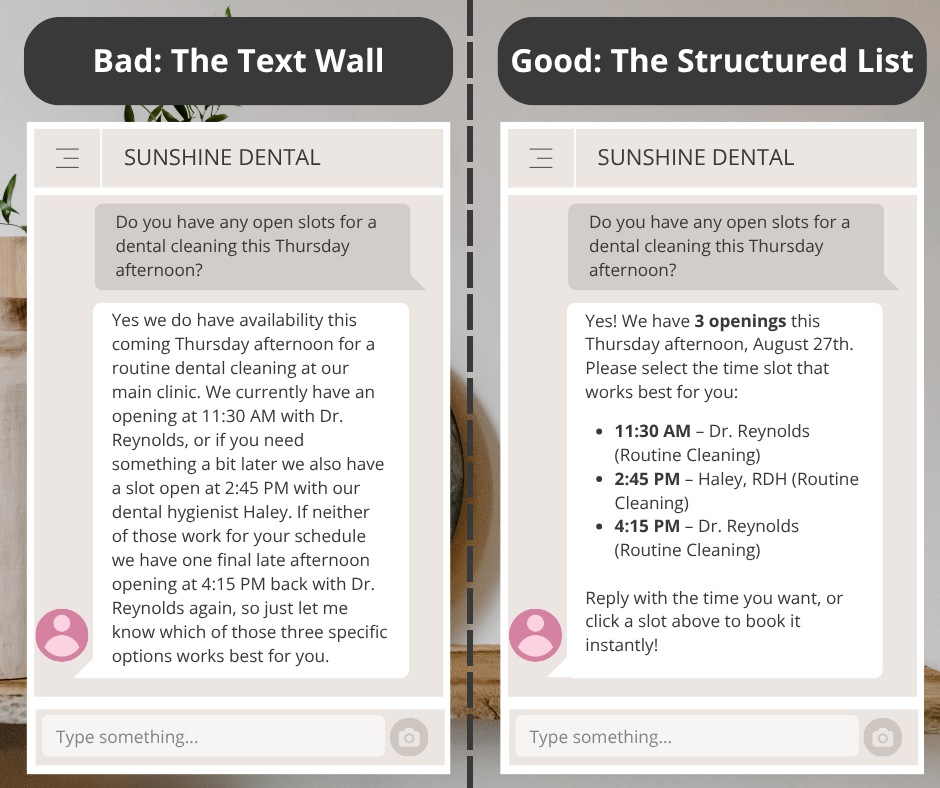
In the agent instructions, provide guidance on how the output to the user should be formatted. Does the response need to be provided in bullets or a table format? How many items should be presented to the user? How long should the response to the user be? 在智能体指令中,提供关于如何格式化用户输出的指南。响应需要以项目符号还是表格格式呈现?应向用户展示多少个条目?对用户的响应应该有多长?
Thinking about the output is key to the user experience! Poorly formatted output can affect how long your user remains engaged with the agent, and whether they escalate or choose to use the agent for assistance going forward.考虑输出格式对于用户体验至关重要!格式糟糕的输出会影响用户与智能体互动的时长,以及他们是否会选择升级问题或继续使用该智能体寻求帮助。
The following image shows an example of a poorly formatted agent response, and a more structured agent response.下图展示了一个格式糟糕的智能体响应示例,以及一个结构更清晰的智能体响应。
Tip #8: Start small — iterate, test, & improve技巧 8:从小处着手 —— 迭代、测试并改进
As you develop agent instructions start with a small part of the workflow, and build and scale from there. An anchor point allows you to establish a baseline quickly, and reduce confusion for developers and stakeholders. 在开发智能体指令时,从工作流的一小部分开始,然后逐步构建和扩展。锚点可以让你快速建立基准,并减少开发人员和相关方的困惑。
And with each iteration, make sure to test! When debugging, or implementing new features, it’s helpful to test small changes rather than multiple changes at once. This allows you to identify and understand the impact of a change, especially as LLMs are highly sensitive — even minor changes or tweaks can have large impacts. 在每次迭代中,请务必进行测试!在调试或实现新功能时,测试小的改动比一次进行多次改动更有帮助。这能让你识别并理解改动的影响,因为大语言模型非常敏感——即使是细微的改动或调整也可能产生巨大的影响。
Another thing to consider when writing agent instructions is what the definition of success is. Prior to agent development, and with each iteration, work with your stakeholders to define what “success” is for the agent, and for the business process. If you don't know what you are optimizing for, or which metrics are key for your use case, you can end up in cycles of testing that feel unproductive and unclear.编写智能体指令时还需要考虑的另一件事是“成功”的定义是什么。在智能体开发之前以及每次迭代时,与相关方共同定义智能体及业务流程的“成功”标准。如果你不知道自己在优化什么,或者不知道哪些指标对你的用例至关重要,你可能会陷入无效且模糊的测试循环中。
The following list highlights common metrics used to define agent success — all of which can be impacted by how instructions are written.以下列表重点列出了用于定义智能体成功与否的常用指标——所有这些指标都可能受到指令编写方式的影响。
Response Time/Latency: How fast does the agent reply?响应时间/延迟:智能体回复的速度有多快?
Accuracy and Correctness: How often are the agent responses accurate?准确性和正确性:智能体响应准确的频率如何?
Hallucination Rate: How often does the agent make up the response?幻觉率:智能体胡编乱造响应的频率如何?
Escalation Rate: How often is the user conversation handed off to a human?升级率:用户对话转交给人工处理的频率如何?
Cost and Token Usage: Is the agent running within budget? How many tokens is the agent consuming?成本和 Token 使用量:智能体的运行是否在预算内?智能体消耗了多少 Token?
Tool or Knowledge Base Usage: Does the agent accurately select and call the appropriate tool(s) and knowledge base(s)?工具或知识库使用情况:智能体是否能准确选择并调用适当的工具和知识库?
Well-written instructions are key to developing robust and high-performing agents. Next time you write agent instructions, keep these tips in mind!编写良好的指令是开发稳健且高性能智能体的关键。下次编写智能体指令时,请牢记这些技巧!
Payal is a Data & AI specialist. In her spare time, she enjoys reading, traveling, and writing. If you enjoy her work, follow or subscribe to her list, and never miss a story!Payal 是一位数据与 AI 专家。业余时间,她喜欢阅读、旅行和写作。如果你喜欢她的作品,请关注或订阅她的专栏,不错过任何精彩故事!
The above article is personal and does not necessarily represent IBM’s positions, strategies, or opinions.以上文章为个人观点,并不一定代表 IBM 的立场、战略或意见。