

The following article originally appeared on PulseMCP’s blog and is being republished here with the authors’ permission.本文最初发表于 PulseMCP 博客,经作者许可在此转载。
Most MCP demos feature a single server connecting to a single client. For example, you might wire up a Gmail MCP server to Claude Code. It works! It triages your inbox, drafts replies, finds that thing from three weeks ago.大多数 MCP 演示都展示了单个服务器连接到单个客户端的场景。例如,您可以将 Gmail MCP 服务器连接到 Claude Code。这确实有效!它可以整理您的收件箱、草拟回复、查找三周前的那件事。
But…it’s a little pointless. Gmail already has a perfectly good interface for email. It’s called Gmail. Google has spent 20 years refining it. If “chat with your inbox” were all MCP got you, you’d be right to wonder what the fuss is about.但是……这有点毫无意义。Gmail 本身已经具备了非常完善的电子邮件界面,那就是 Gmail。谷歌花了 20 年时间来打磨它。如果 MCP 能带给您的仅仅是“与收件箱聊天”,那么您有理由怀疑这到底有什么大惊小怪的。
Connecting to multiple servers starts the unlock连接到多个服务器才是解锁潜力的开始
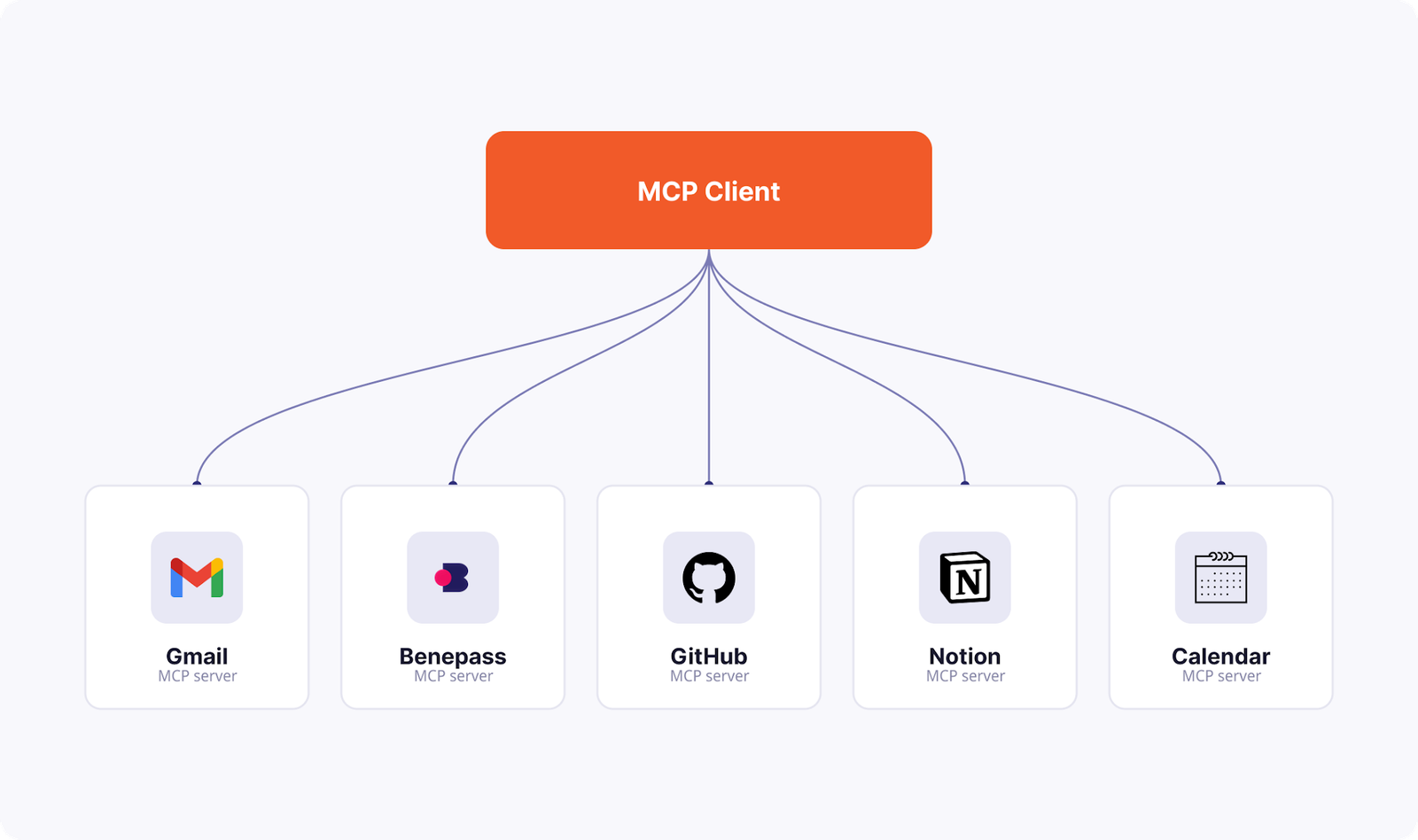
Here’s the same Gmail MCP server doing something Gmail can’t do alone: filing business expense receipts.以下是同一个 Gmail MCP 服务器执行 Gmail 无法单独完成的任务:归档商务费用收据。
An IKEA order confirmation is sitting in my inbox, receipt attached. Benepass—a benefits provider—wants that receipt uploaded and submitted. Claude Code can find the email, pull the attachment, log into Benepass by retrieving the one-time code from Gmail, upload the receipt, and submit. Done.我的收件箱里有一份宜家订单确认函,附有收据。福利提供商 Benepass 需要上传并提交该收据。Claude Code 可以找到这封邮件,提取附件,通过从 Gmail 获取一次性验证码登录 Benepass,上传收据并提交。大功告成。
No single app could do this, because the job crosses apps. Server composition is a killer feature of MCP, not just “your AI talks to one integration.”没有单一应用程序能做到这一点,因为这项工作跨越了多个应用。服务器组合是 MCP 的杀手级功能,而不仅仅是“让您的 AI 与一个集成工具对话”。
Where things get really interesting: Multiple clients更令人兴奋的是:多个客户端
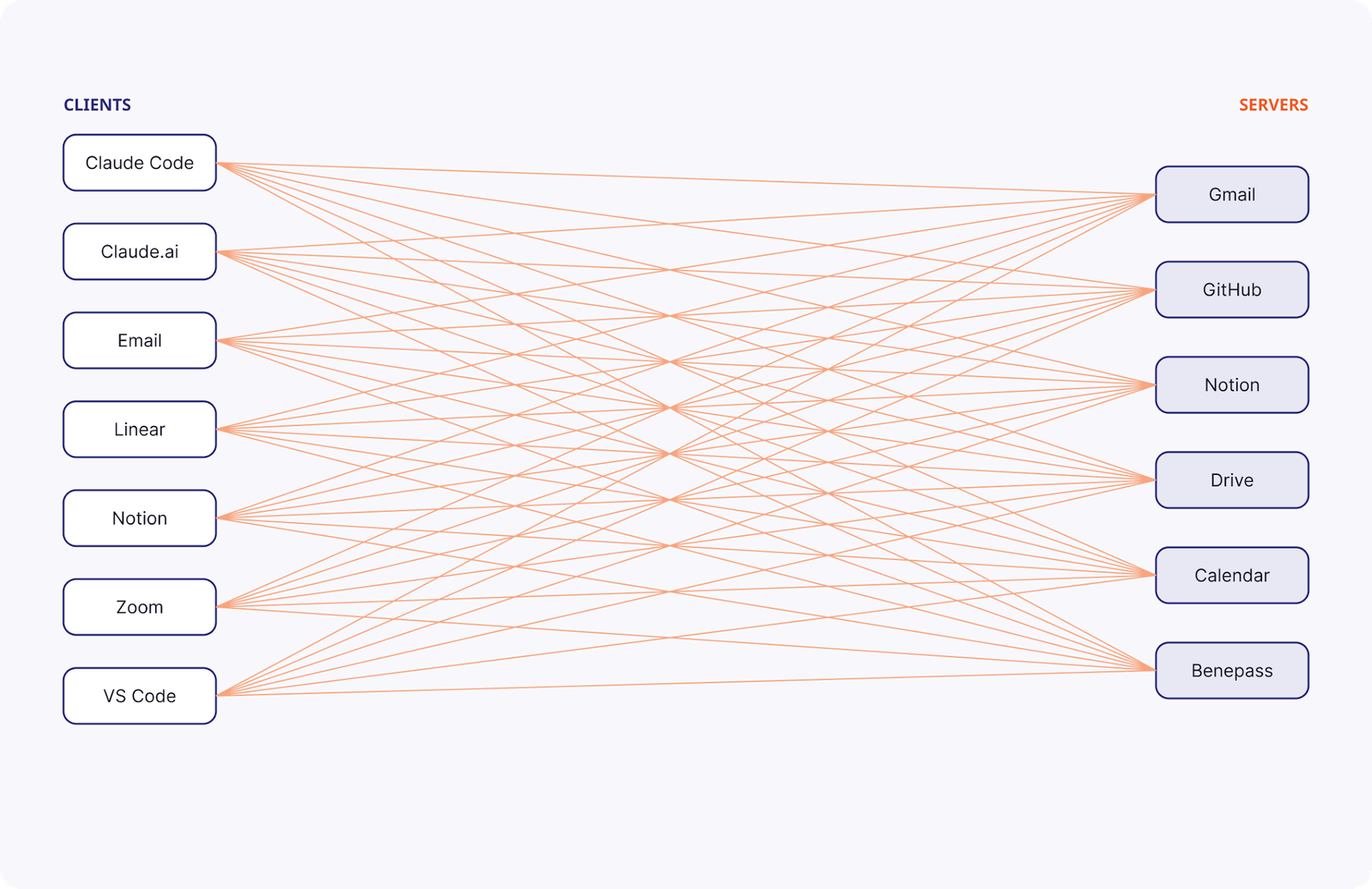
There is clear value in connecting multiple servers to a client like Claude Code. Taking the pattern a step further, there’s also value in connecting those same servers to other interfaces you like to use. Claude Code in your terminal shouldn’t be the only way you access AI. Claude.ai can be another entry point. Gmail can be another. Linear yet another. The list goes on.将多个服务器连接到像 Claude Code 这样的客户端显然具有价值。更进一步,将这些服务器连接到您喜欢的其他界面同样有价值。终端中的 Claude Code 不应是您访问 AI 的唯一方式。Claude.ai 可以是另一个入口,Gmail 可以是另一个,Linear 也可以是另一个,以此类推。
You’ll often want the same integrations available when you’re doing a quick task inside Slack as you would while running a long agentic task with Claude Code.您通常希望在 Slack 中处理快速任务时,也能获得与在 Claude Code 中运行长期代理任务时相同的集成能力。
You could be conversing with a coworker, CC in “@ai does our discussion here align well with current company strategy?” and get an inline response that incorporates your company OKRs from Notion and some recent Zoom transcripts from the last few product strategy meetings.例如,您正在与同事交谈,在抄送(CC)中加入“@ai 我们的讨论是否符合公司当前战略?”,并获得一个内嵌回复,其中整合了来自 Notion 的公司 OKR 以及最近几次产品战略会议的 Zoom 转录文本。
Or you’re working through your to-do list in Linear, realize you need to schedule a meeting as the action item for one of your tickets, and you can comment on a ticket “@ai schedule a meeting with John and draft an agenda based on the meeting I just had with Pam to address this.”或者,当您在 Linear 中处理待办事项列表时,意识到需要为其中一个工单安排会议作为行动项,您可以在工单中评论:“@ai 安排与 John 的会议,并根据我刚才与 Pam 的会议内容草拟一份议程来解决这个问题。”
These native MCP client functionalities are officially on their way to many of the interfaces you use today. And we’re starting to see prominent nonnative integrations like Claude Tag fill this need too.这些原生的 MCP 客户端功能正正式登陆您今天使用的许多界面。我们也开始看到像 Claude Tag 这样出色的非原生集成来满足这一需求。
But even better: You can already set up yourself and your team with these capabilities today. You just need to bridge the desired surface to your own agent harness behind the scenes.但更好的是:您今天就可以为您和您的团队配置这些功能。您只需要在幕后将所需的界面连接到您自己的代理工具包即可。
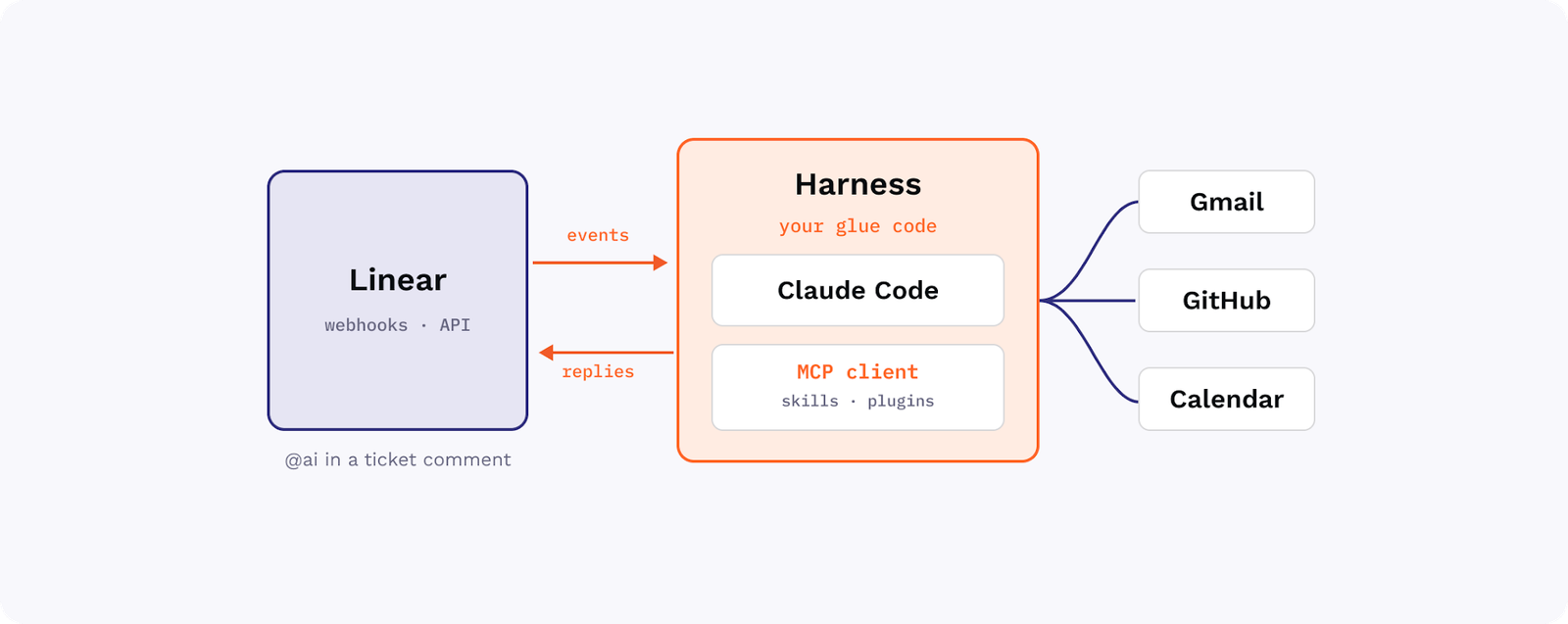
All it takes is awareness of the right patterns and some MCP-friendly glue.所需要的只是对正确模式的了解以及一些 MCP 友好的胶水代码。
Go remote ASAP; local servers won’t get you far尽快转向远程模式;本地服务器走不远
Local servers are hard for end-users. “Just install npm, then edit this JSON file, then set these environment variables” isn’t something you want to say to most of your colleagues.本地服务器对终端用户来说很难使用。“先安装 npm,然后编辑这个 JSON 文件,再设置这些环境变量”——您肯定不想对大多数同事说这些话。
Remote servers are much easier: “Here’s a URL to paste in somewhere.” Some surfaces only support remote servers, like claude.ai.远程服务器要容易得多:“这是一个链接,粘贴到某个地方就行。”有些界面(如 claude.ai)只支持远程服务器。
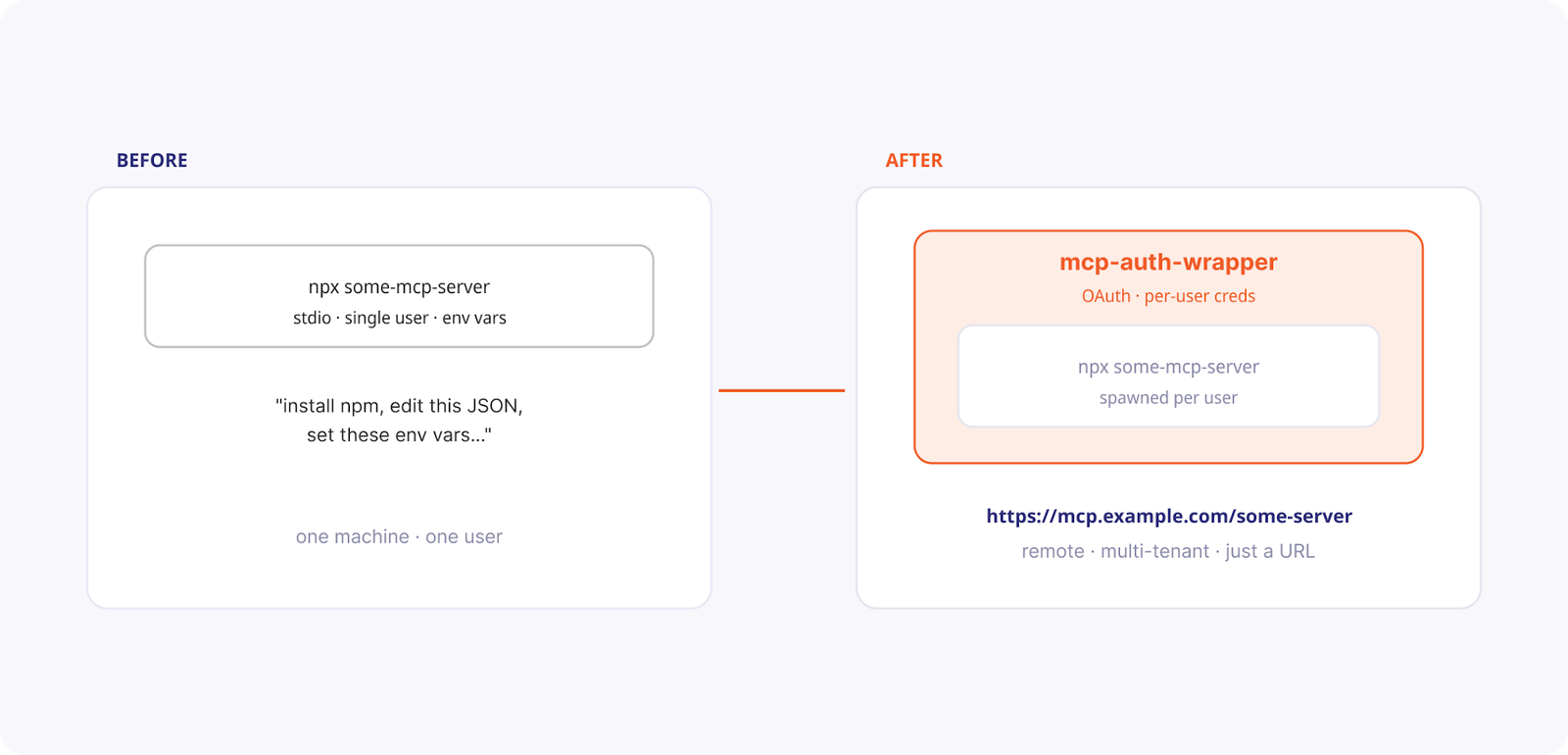
So you can use local servers to prove out some flow, but you should prefer remote. Many servers you may want to use are only provided as local implementations, so you need a tool to convert them to remote servers. Because most local servers were designed to be used by one authenticated user at a time, this can be tricky.因此,您可以使用本地服务器来验证某些流程,但应该优先选择远程模式。您可能想使用的许多服务器仅作为本地实现提供,因此您需要一个工具将它们转换为远程服务器。由于大多数本地服务器设计为一次只能由一个经过身份验证的用户使用,这可能会很棘手。
The pattern that solves this pain point is to use a bridge like mcp-auth-wrapper to take a local server and turn it into a remote, multitenant one: OAuth in front, per-user credentials behind. Sharing any server becomes sharing a link.解决这一痛点的模式是使用像 mcp-auth-wrapper 这样的桥接器,将本地服务器转换为远程的多租户服务器:前端使用 OAuth,后端使用用户凭据。分享任何服务器都变成了分享一个链接。
Remove friction from the configuration process减少配置过程中的摩擦
Okay, we’re down to one link per server. But exactly where do my users put this link?好了,每个服务器现在只需要一个链接。但用户到底应该把这个链接放在哪里呢?
The one-size-fits-all pattern here is to provide installation guidance for every possible MCP client app. A service like install-mcp makes this easy: clean UX to generate the right install link and per-client instructions, so you share one page instead of writing a tutorial.这里的万能模式是为每个可能的 MCP 客户端应用程序提供安装指南。像 install-mcp 这样的服务可以简化这一过程:通过简洁的 UX 生成正确的安装链接和针对每个客户端的说明,这样您只需分享一个页面,而无需编写教程。
Or if you want to roll it into your own interface, tap into the TypeScript library version of this: mcp-install-instructions.或者,如果您想将其整合到自己的界面中,可以利用此工具的 TypeScript 库版本:mcp-install-instructions。
We’re working on standardizing the mcp.json file format here to simplify this story in the long term, but ultimately we still expect non-CLI interfaces to each have a slightly different flow for “enabling a connector.” For many enterprises, this responsibility may soon become solely an IT affair with enterprise-managed auth.我们正在努力标准化 mcp.json 文件格式,以从长远上简化这一问题,但最终我们预计非 CLI 界面在“启用连接器”方面仍会有略微不同的流程。对于许多企业而言,这项职责很快可能完全变成由 IT 部门通过企业管理认证来处理。
Remove the need to do it again, and again消除重复操作的需要
What happens when we start to bring new clients into the fold? By default, each user has to configure and authenticate each MCP server independently. 10+ “add connector” flows. 10+ OAuth dances. Done once for Claude Code, then again for Linear, for email…and so on.当我们开始引入新的客户端时会发生什么?默认情况下,每个用户都必须独立配置和验证每个 MCP 服务器。10 次以上的“添加连接器”流程,10 次以上的 OAuth 授权。为 Claude Code 做一次,为 Linear 做一次,为电子邮件做一次……以此类推。
The solution: Centralize your configuration and auth storage in a single, aggregated MCP server. A deployment of mcp-aggregator can do this for you: one endpoint, one login, every tool namespaced behind it. Configure each client once. Login once per service. Share one link with your teammates.解决方案:将您的配置和身份验证存储集中在一个聚合的 MCP 服务器中。部署 mcp-aggregator 可以为您完成此操作:一个端点、一次登录,所有工具都在其命名空间下。每个客户端只需配置一次。每个服务只需登录一次。与队友分享一个链接即可。
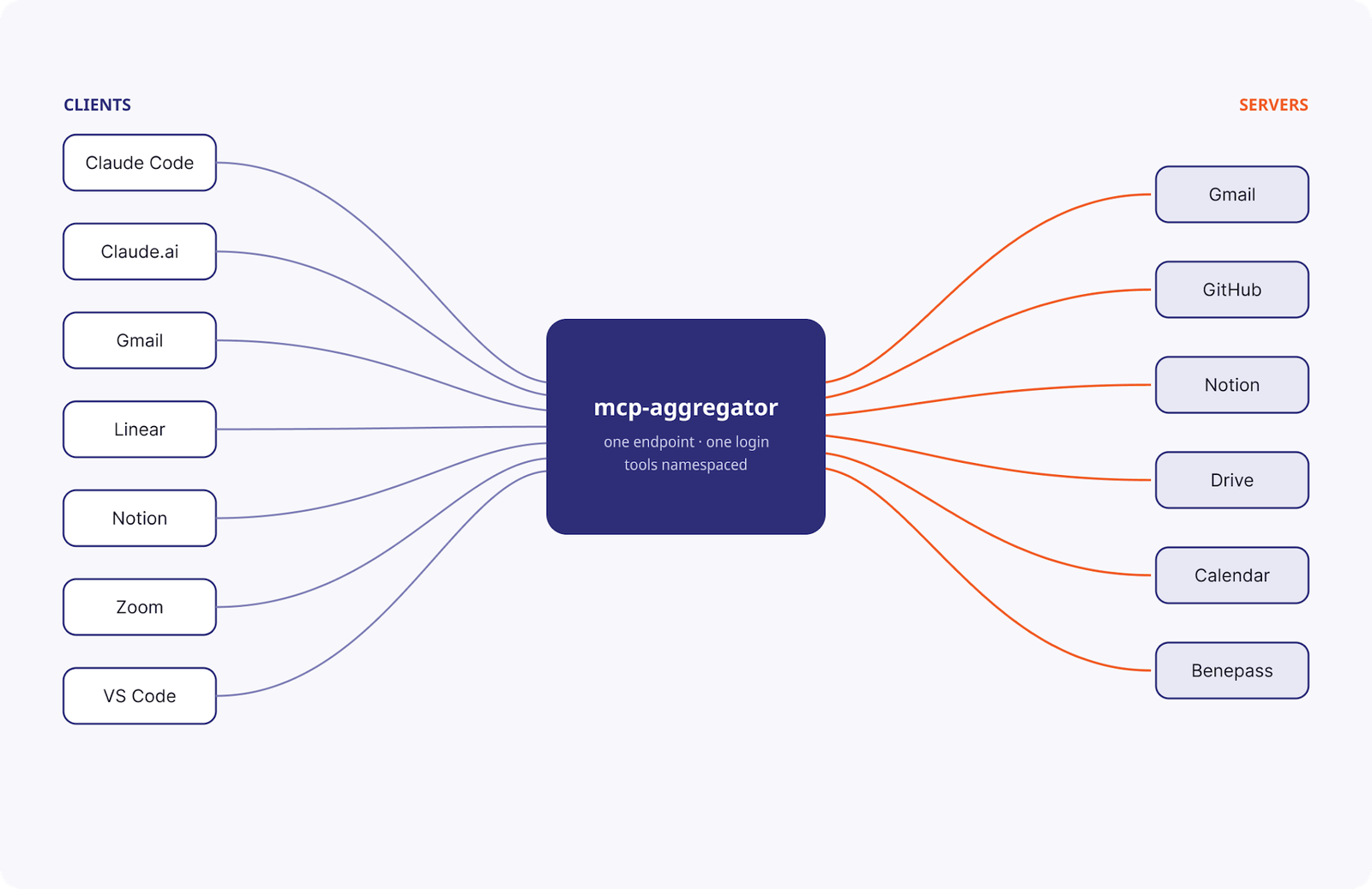
mcp-aggregator is the minimal, DIY version of an MCP gateway. If you have enterprise needs like SSO integration or fine-grained IT admin controls, you could use this layer of MCP server consolidation as the piece of your infrastructure where you can add those bells and whistles.mcp-aggregator 是 MCP 网关的极简 DIY 版本。如果您有 SSO 集成或精细的 IT 管理控制等企业需求,可以将此 MCP 服务器整合层作为基础设施的一部分,并添加这些高级功能。
By default, mcp-aggregator also loses out on the ability to use MCP server configurations as per-session constraints. However, you could build out your mcp-aggregator deployment to re-enable the constraints that matter to you. For example, by offering query parameters like ?readOnlyTools=true or ?serversEnabled=datadog,sentry. Or by giving discrete MCP servers unique endpoints (but still aggregating the auth concerns under the hood).默认情况下,mcp-aggregator 也会失去将 MCP 服务器配置用作会话级约束的能力。不过,您可以构建 mcp-aggregator 部署来重新启用对您重要的约束。例如,通过提供查询参数(如 ?readOnlyTools=true 或 ?serversEnabled=datadog,sentry),或者为离散的 MCP 服务器提供唯一的端点(但在底层仍然聚合身份验证问题)。
Work around the long tail of missing MCP servers绕过 MCP 服务器缺失的长尾问题
Most of your MCP server needs can be solved by walking through the options for choosing (or building) an MCP server. But is it always worth the effort?您的大多数 MCP 服务器需求都可以通过浏览选择(或构建)MCP 服务器的选项来解决。但这样做总是值得的吗?
Say you switched home utilities plans. An energy provider, Octopus Energy, emailed you a confirmation. You want the pricing data in Home Assistant, which controls your smart thermostat, and Octopus Energy does have an API for it—but the API key is behind a website login, and there’s no API for getting the API key.假设您更改了家庭公用事业计划。能源供应商 Octopus Energy 给您发了一封确认邮件。您希望将定价数据放入控制智能恒温器的 Home Assistant 中,Octopus Energy 确实为此提供了 API,但 API 密钥在网站登录之后,且没有获取 API 密钥的 API。
Solution: Give the agent a screen. computer-use-mcp is a minimal example of an MCP server that can click and type like a human to log into the website, copy the key, then go back to clean API calls to set up the dashboard.解决方案:给代理一个屏幕。computer-use-mcp 是一个极简的 MCP 服务器示例,它可以像人类一样点击和输入,从而登录网站、复制密钥,然后返回调用干净的 API 来设置仪表板。
With that one escape hatch, “there’s no API for that” or “it’s too much work to find an MCP server” stops being a blocker forever.有了这个逃生舱,就不会再因为“没有 API”或“寻找 MCP 服务器太麻烦”而受阻了。
To borrow from Anthropic’s framing of this problem:借用 Anthropic 对此问题的框架描述:
If you have an MCP server for the service, Claude uses that.
If the task is a shell command, Claude uses Bash.
If the task is browser work and you have Claude in Chrome set up, Claude uses that.
If none of those apply, Claude uses computer use.如果您有该服务的 MCP 服务器,Claude 会使用它;如果任务是 shell 命令,Claude 使用 Bash;如果任务是浏览器工作且您在 Chrome 中设置了 Claude,Claude 会使用它;如果以上都不适用,Claude 会使用计算机使用(computer use)。
And indeed, if you find yourself regularly leaning on inefficient approaches like browser use or computer use to get a predictable workflow done, it may be worth your while to abstract away those Playwright calls into a reliable MCP server, like this Good Eggs example.确实,如果您发现自己经常依赖浏览器使用或计算机使用等低效方法来完成可预测的工作流程,那么将这些 Playwright 调用抽象为一个可靠的 MCP 服务器(如这个 Good Eggs 示例)是值得的。
You can even bring local-only servers into the remote-first fold您甚至可以将仅限本地的服务器纳入远程优先的范畴
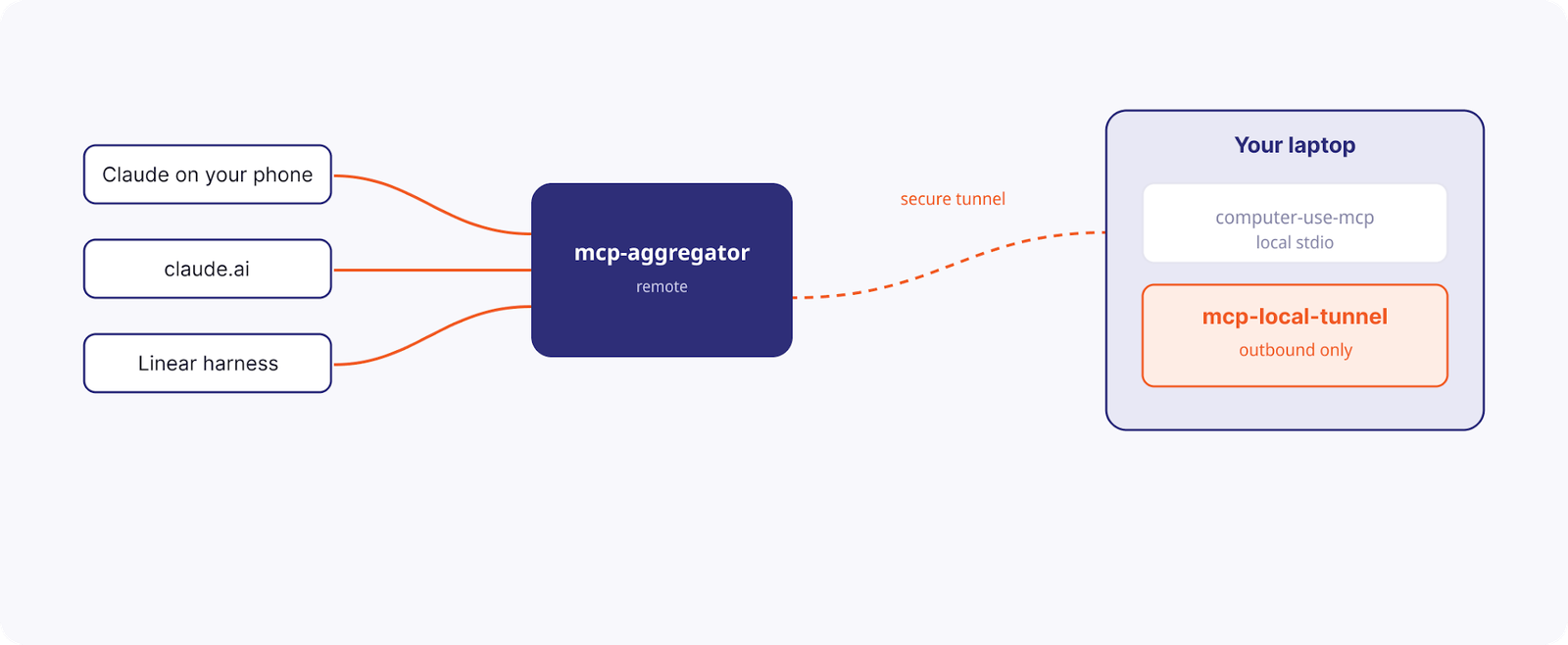
Some servers only work when they run on your own personal machine. computer-use is the obvious example. And sometimes, you just want to use your phone to tell Claude to do something that relies on something readily available on your laptop upstairs.有些服务器只有在您自己的个人机器上运行时才有效。computer-use 就是一个明显的例子。有时,您只想用手机告诉 Claude 做一些依赖于楼上笔记本电脑上现有内容的事情。
mcp-local-tunnel shows off the pattern that makes machine-bound servers available through remote aggregation just like everything else.mcp-local-tunnel 展示了一种模式,使得绑定在机器上的服务器能够像其他任何东西一样通过远程聚合来使用。
Don’t forget the context bloat footgun别忘了上下文膨胀这个陷阱
Naive tool calling has a much-maligned drawback: Every intermediate result flows through the model. And for many clients, every tool definition is placed in context up front, meaning you’ve spent tens of thousands of tokens before even starting.朴素的工具调用有一个备受诟病的缺点:每个中间结果都会流经模型。对于许多客户端,每个工具定义都会预先放置在上下文中,这意味着在开始之前您就已经消耗了数万个 token。
For example, asking the agent to copy a doc’s contents from Google Drive into Salesforce means the entire doc passes through the model twice—for no reason. Anthropic measured one workflow dropping from 150,000 tokens to 2,000 by fixing this.例如,要求代理将文档内容从 Google Drive 复制到 Salesforce,意味着整个文档会无缘无故地两次经过模型。Anthropic 测量过,通过修复此问题,一个工作流程的 token 消耗从 150,000 降至 2,000。
There are several ways to solve this problem, each with its own trade-offs worth its own blog post:有几种方法可以解决这个问题,每种方法都有其权衡,值得单独写一篇博客文章:
- Code execution with MCP.
tool-sandbox-mcpshows how a singleexecute_codeabstracts away the problem by adding a layer of code execution in between your agent and your aggregated set of servers. Works inside any MCP client.使用 MCP 进行代码执行。tool-sandbox-mcp 展示了单个 execute_code 如何通过在代理和聚合服务器集之间添加一层代码执行来抽象出该问题。适用于任何 MCP 客户端。 - MCP as a CLI tool.
call-mcpshows how wrapping your tools this way means you can compose them with your usual CLI toolkit—shell,jq, cron, scripts, and other CLI tools.将 MCP 作为 CLI 工具。call-mcp 展示了如何以这种方式封装工具,从而使您能够将它们与常用的 CLI 工具包(shell、jq、cron、脚本等)组合使用。 - Search tools, truncate large responses. This is the way Claude Code does it natively, but it could be implemented as a bridge, much like the above examples.搜索工具,截断大型响应。这是 Claude Code 原生实现的方式,但也可以像上面的例子一样作为桥接器实现。
Put these patterns together, and you’ve solved the MxN problem将这些模式结合起来,您就解决了 M×N 问题
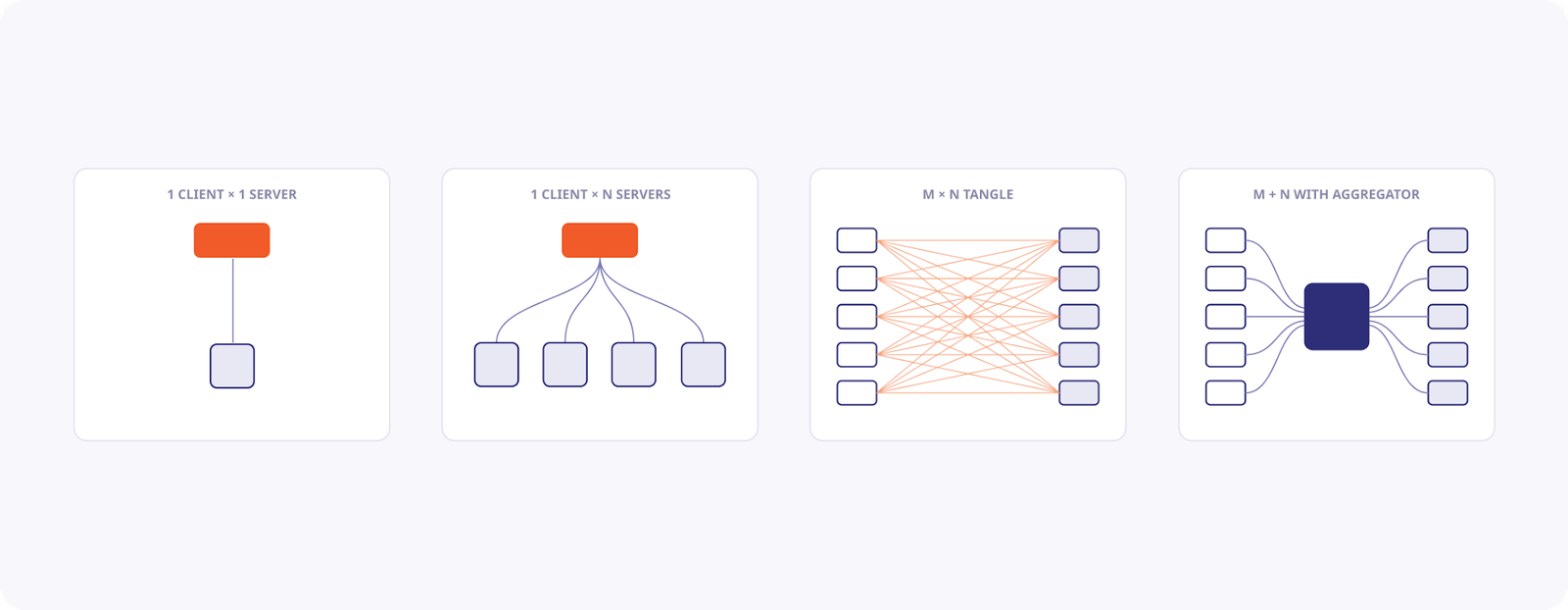
With your MCP aggregator in hand, you can now connect any service to any other service with just a little bit of glue code. When each service starts to implement an MCP client natively, this will be done for you. But for now, you can tackle the opportunities application by application.有了 MCP 聚合器,您现在只需少量胶水代码即可将任何服务连接到任何其他服务。当每个服务开始原生实现 MCP 客户端时,这一切都将自动完成。但目前,您可以逐个应用程序地解决这些机会。
Embed existing MCP client harnesses into SaaS apps you already love将现有的 MCP 客户端工具包嵌入到您喜爱的 SaaS 应用中
We’ll use a Linear integration as our example, and you can imagine doing almost the exact same thing with any project management tracker like Jira, Asana, and so on.我们将以 Linear 集成为例,您可以想象对任何项目管理跟踪器(如 Jira、Asana 等)执行几乎完全相同的操作。
The goal: inject a highly-capable MCP client, powered by your favorite coding agent, into a workflow inside a SaaS application you already use. We’ll take advantage of the fact that we have already consolidated all our integrations in the mcp-aggregator pattern above.目标:将一个功能强大的 MCP 客户端(由您最喜欢的编码代理驱动)注入到您已使用的 SaaS 应用程序的工作流程中。我们将利用已经使用上述 mcp-aggregator 模式整合所有集成的优势。
Here’s an end-to-end project showing off how to build this sort of “Linear harness” that bolts a Claude Code setup to serve as the MCP client.这是一个端到端的项目,展示了如何构建这种“Linear 工具包”,将 Claude Code 设置连接起来作为 MCP 客户端。
You can see how:您可以观察到:
- The harness can listen to any sort of activity on Linear—in our case, naively reading all ticket comments.该工具包可以监听 Linear 上的任何活动——在我们的例子中,是简单地读取所有工单评论。
- You can equip the harness with whatever skills, plug-ins, or other MCP connections you please.您可以为工具包配备任何您喜欢的技能、插件或其他 MCP 连接。
- It can respond back on Linear by way of a Linear MCP server (or, ideally, the MCP aggregator setup from above).它可以通过 Linear MCP 服务器(或者理想情况下,使用上述的 MCP 聚合器设置)在 Linear 上进行回复。
There’s no limit to where you can embed these capabilities嵌入这些功能的地方没有限制
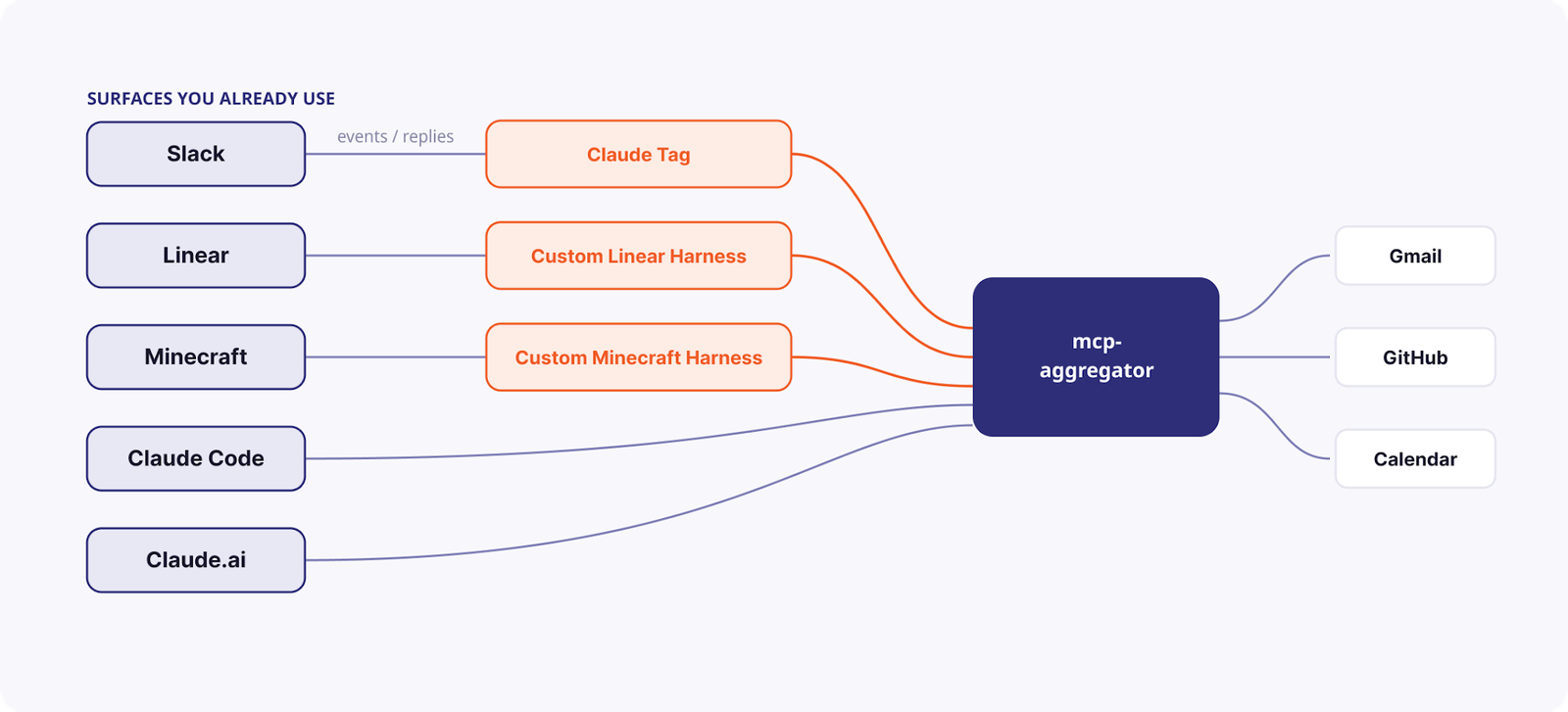
Going beyond Linear and task management, here’s a Claude Code-powered agent that lives inside Minecraft in a few hundred lines. In game, we ask it to:除了 Linear 和任务管理,这是一个由 Claude Code 驱动的代理,它在几百行代码内就存在于 Minecraft 中。在游戏中,我们要求它:
- Write a PR to edit itself编写一个 PR 来修改它自己
- Check the upcoming energy prices and put a calendar event in for when to run the washing machine检查即将到来的能源价格,并在日历中为运行洗衣机的时间添加一个事件
- Build a town-square notice board in-game with a sign that reminds us of that time在游戏中建立一个城镇广场公告板,并挂上一个提醒我们时间的牌子
It’s silly on purpose, but the point is that a fully capable agent—all our tools, all these patterns—can run anywhere with a little glue. And it’s all attainable today, for individuals, for teams, and for enterprises alike.这纯粹是为了好玩,但重点是,一个功能完备的代理——拥有我们所有的工具和所有这些模式——只要有一点胶水代码,就可以在任何地方运行。而且,对于个人、团队和企业来说,这一切在今天都是可以实现的。



