
How I Work With 5 Coding Agents Simultaneously我是如何同时使用 5 个编程智能体进行工作的

Originally posted in Obics.io最初发布于 Obics.io
In a world where writing code became as fast as your thought, you would think it would be an equalizer among software developers. Being a senior or a highly performant coder would be less relevant because so much of what they learned over years is no longer applicable. But it seems that 10x developers didn’t disappear, they just changed. The super-performers now are those that can spend more tokens, manage multiple agents, and still produce quality code.在一个编写代码的速度快如思维的世界里,你可能会认为这会让软件开发者之间的水平趋于平等。资深或高产的程序员将不再那么重要,因为他们多年来学习的许多知识已不再适用。但事实似乎是,10 倍速开发者并没有消失,他们只是发生了演变。现在的超级开发者是那些能够消耗更多 Token、管理多个智能体,并依然产出高质量代码的人。
While the number of developers that write code manually is getting smaller every day, many that do work with coding assistants run a single agent at a time. I was this way for a long time, being sceptical, and reviewing every line of code the AI produced. This is what I’ve been doing all of my career after all.虽然手动写代码的开发者人数每天都在减少,但许多使用编程助手的人一次只运行一个智能体。很长一段时间里我也是这样,持怀疑态度,并审查 AI 产出的每一行代码。毕竟,这是我整个职业生涯一直在做的事情。
But working on many agents simultaneously is just more productive, no two ways about it. I am probably producing 3 to 5 times more features and bug fixes now than ever before.但同时处理多个智能体效率确实更高,这一点毋庸置疑。我现在产出的功能和修复的 Bug 数量大概是以前的 3 到 5 倍。
Let me share 7 tips that allowed me to handle the context switches and overhead of juggling so many tasks all at once. Depending on where you are in the “spectrum” of agentic development, they might seem controversial. But if I told you one year ago that you wouldn’t be writing code in an IDE anymore, you probably wouldn’t believe me. And I promise you that 6 months or 2 years from now the following will be standard practice.让我分享 7 个技巧,它们让我能够应对同时处理这么多任务带来的上下文切换和额外开销。根据你所处的“智能体开发阶段”,这些建议可能看起来有些争议。但如果我一年前告诉你,你以后不再需要在 IDE 中写代码,你可能不会相信。我向你保证,6 个月或 2 年后,以下内容将成为标准做法。
1. Have the agent talk only in high level1. 让智能体只进行高层级交流
The only way to be able to work with multiple agents at a time is to reduce the amount of detail you process. That means you need less low-level context in your head and more high‑level context. A big first step to achieve this is simply asking the agent to stop showing code snippets, variable names, and function names. The lowest type of entity I allow the agent to mention is file names. Here are my specific instructions in CLAUDE.md:能够同时与多个智能体协作的唯一方法是减少你处理的细节量。这意味着你脑中需要更少的底层上下文,而需要更多的高层上下文。实现这一目标的一大步就是直接要求智能体停止显示代码片段、变量名和函数名。我允许智能体提及的最低级别实体是文件名。以下是我在 CLAUDE.md 中的具体指令:
## Audience: architect

I know the system design but not the code at a low level. Talk with me at a high, conceptual level, including when presenting a **plan** or a **code review** (findings, diffs, branch reviews):

- **Don't** name functions, variables, or other in-code identifiers — describe what the code *does* in plain language.
- **Don't** show code snippets and no SQL.
- **Do** name services, the messages/topics they exchange, and the transport between them (queue topic, HTTP endpoint, direct DB read, …).
- **Do** name database tables and columns explicitly.
- **Do** describe what a migration does (tables, columns, policies, purpose) instead of showing it.
- File names are fine to cite, but describe each file's role — what part of the system it is — rather than assuming I know it.
2. Talk to me in Tables2. 用表格与我交流
Once you’re juggling between different tasks, it’s really difficult to dive into the context of each one quickly, especially having to read a lot of text. I tried many things to simplify that, and one thing that worked for me is asking Claude to talk in tables.一旦你开始在不同任务间切换,想要快速深入了解每个任务的上下文就变得非常困难,尤其是还需要阅读大量文本时。我尝试过很多方法来简化这一点,其中一种对我有效的方法是要求 Claude 用表格进行交流。
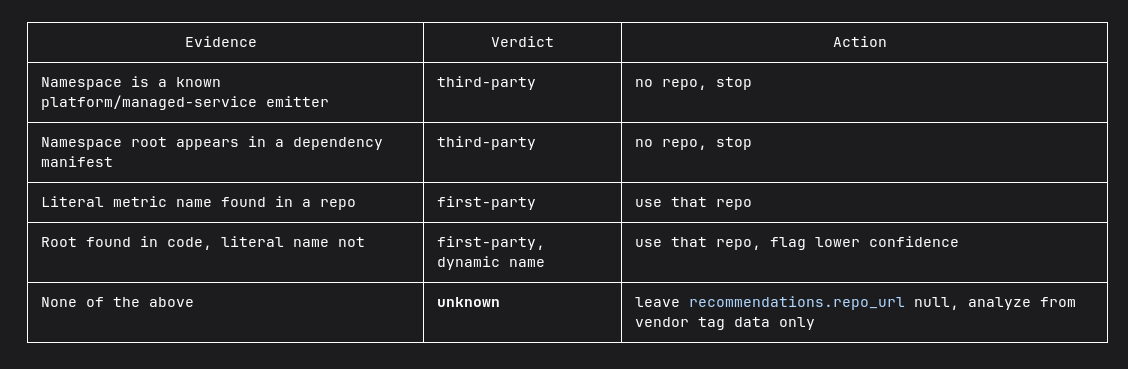
My instructions for this in CLAUDE.md are simply:我在 CLAUDE.md 中为此设置的指令非常简单:
... (continuing the audience section above)

Explain everything briefly, in simple words. Prefer explaining in tables or ASCII diagrams.
3. Short plans3. 简短的计划
I don’t know what instructions the Anthropic team put into plans, but they are excruciatingly long, very specific, and as a result difficult to read. They don’t leave much room for the implementation agent to think, which is a waste I think.我不知道 Anthropic 团队在计划中放入了什么指令,但它们长得离谱、非常具体,结果导致难以阅读。它们没有给实现智能体留下太多思考空间,我认为这是一种浪费。
The default plan in Claude Code is more of an “implementation preview” whereas I want a high level plan and I’ll trust the agent with the details in the implement phase.Claude Code 中的默认计划更像是“实现预览”,而我需要的是一个高层级的计划,至于实现阶段的细节,我会信任智能体。
The solution is a simple set of instructions that helps me understand the plan faster and saves on tokens.解决方案是一组简单的指令,它能帮我更快地理解计划并节省 Token。
In CLAUDE.md:在 CLAUDE.md 中:
### Plan format

Keep plans short — aim for under ~20 lines.

- Lead with a one-line goal, then numbered steps.
- Keep each step to a line or two.
- Skip alternatives, and risk sections unless I ask.
- Skip a verification/testing section unless I ask.
- Don't restate my request back to me.
- List only files that actually change, with a short note each.
- List migrations
The 20-line constraint can be a bit much, so I encourage you to adjust to what suits you.20 行的限制可能有点多,所以我建议你根据自己的情况进行调整。
4. Combine verification and code reviews into one script4. 将验证和代码审查合并为一个脚本
After the planning and implementation steps, I usually continue to verifying and to do a code review. Since I’m not looking at the details anymore, I need to be really sure everything was implemented well.在计划和实现步骤之后,我通常会继续进行验证和代码审查。由于我不再查看细节,我需要非常确定一切都已妥善实现。
I equipped my agent with browser access, database access, and logs access so it can do a full “manual” verification of anything.我为我的智能体配备了浏览器访问、数据库访问和日志访问权限,以便它可以对任何内容进行全面的“手动”验证。
I created a small script that does both verification and code review, and presents the findings together. The script does the following:我创建了一个小脚本,它同时执行验证和代码审查,并将结果汇总呈现。该脚本执行以下操作:
A. Write a brief summary of the changes in the feature branch - **The Intent**.
B. Given the intent, verify that the changes in this branch do what they were meant to do and prove with evidence (screenshots, videos, request responses, etc.). If you find small and obvious problems, auto-fix them (no need for confirmation).
C. Given the intent, do a code review of the changes in this branch. Don't show findings from changes not introduced in this branch. If you find small and obvious problems, auto-fix them (no need for confirmation).
It’s important to run the intent summary in a new session to avoid bias from the agent’s thoughts during the implementation and planning sessions.在新的会话中运行意图总结非常重要,以避免受到智能体在实现和计划会话期间产生的偏见影响。
Each of the steps A, B, C is a skill, but they are executed separately so that each session will have its own context. Steps A and B are executed with claude -p, which is a non-interactive execution mode. The output is saved and step C (also a skill) presents the findings and allows me to continue the interactive Claude session.步骤 A、B、C 中的每一项都是一项技能,但它们是分开执行的,以便每个会话都有其独立的上下文。步骤 A 和 B 使用 claude -p 执行,这是一种非交互式执行模式。输出会被保存,而步骤 C(也是一项技能)会呈现结果,并允许我继续进行交互式 Claude 会话。
Claude is really good at analyzing edge cases and finding a lot of bugs I never thought of. Maybe too good since a lot of the findings prove irrelevant or unlikely scenarios. But I prefer to be over-thorough than sorry later at this stage.Claude 非常擅长分析边缘情况并发现许多我从未想到的 Bug。也许太擅长了,因为很多发现的结果被证明是不相关的或不太可能发生的场景。但在现阶段,我宁愿过度谨慎,也不愿事后后悔。
The auto-fix-small-bugs instruction is very helpful here, but still this is the step where I spend most of my time. I’d say this is my “bottleneck” right now for even more velocity, though I’m not sure if I can or should optimize it. Many decisions that the agent recommends I have to disagree with because I still have much more domain context and product context than the agent does.自动修复小 Bug 的指令在这里非常有帮助,但这仍然是我花费最多时间的一步。我想说这是我目前提升速度的“瓶颈”,尽管我不确定是否可以或应该优化它。智能体建议的许多决策我都必须反对,因为我仍然比智能体拥有更多的领域上下文和产品上下文。
5. Adaptive end-to-end tests5. 自适应端到端测试
As much as I trust the agent, the best safety net is still tests. So much things can go wrong in a process where I didn’t see the source code and didn’t test the result in the app at this point.尽管我信任智能体,但最好的安全网仍然是测试。在一个我没有查看源代码、也没有在此时于应用中测试结果的过程中,很多事情都可能出错。
This might be opinionated, but I much prefer end-to-end tests to unit test. More often than not, when unit tests fail they need to change to adjust to the new behavior rather than they catching a bug. And the frontier agents are very good now, so they are much more likely to cause architectural problems than to break an algorithm or cause some logical bug.这可能是一家之言,但我更倾向于端到端测试而非单元测试。通常情况下,当单元测试失败时,它们需要为了适应新行为而修改,而不是为了捕获 Bug。现在的尖端智能体非常强大,所以它们更有可能导致架构问题,而不是破坏算法或引发逻辑 Bug。
Since e2e tests can be very long, I built a small script that looks at all the changes in the git branch and decides which end-to-end tests are relevant and which should run. This is partly heuristics — look at file names and folders, and if XXX changed then run YYY tests — and partly agentic.由于端到端测试可能非常耗时,我构建了一个小脚本,它会查看 git 分支中的所有更改,并决定哪些端到端测试是相关的以及应该运行哪些测试。这部分是基于启发式方法——查看文件名和文件夹,如果 XXX 改变了就运行 YYY 测试——另一部分则是智能化的。
6. Manual testing is still necessary, but as little as possible6. 手动测试仍然必要,但要尽可能少
Manual verification can take a long time, especially if it’s a complicated flow that can be error prone or take a long time to reproduce. And if you have to do it multiple times to verify the result, that can kill half a day’s work.手动验证可能需要很长时间,特别是如果涉及复杂的流程,容易出错或难以复现。如果你必须多次执行它来验证结果,那可能会浪费半天的工作时间。
My approach is to let the agent handle as much of that as possible. For simple tasks, I’ll ask the agent to run the app and save screenshots. For more complicated tasks, I’ll run the flow myself, doing old‑fashioned QA work. Since I’m still finding many bugs this way, it’s not something I can delegate to an agent anytime soon.我的方法是让智能体尽可能多地处理这些工作。对于简单的任务,我会要求智能体运行应用并保存截图。对于更复杂的任务,我会亲自运行流程,做些老式的 QA 工作。由于我仍然通过这种方式发现许多 Bug,所以这并不是我能很快委托给智能体的事情。
My tip is to do the manual testing step as late as possible to avoid doing it multiple times. That means after you’ve already: ran unit tests and e2e tests, asked the agent to verify the changes and looked at evidence, seen code review findings, and fixed all issues you can without actually opening the app.我的建议是尽可能晚地进行手动测试步骤,以避免重复操作。这意味着在你已经:运行了单元测试和端到端测试、要求智能体验证更改并查看证据、查看了代码审查结果,并修复了所有无需打开应用即可解决的问题之后。
7. Stop looking at code reviews7. 停止查看代码审查
I’ve been looking at code reviews for 15 years, so letting go of this part was really hard. For a long time, I felt compelled to at least sift through the code review, look at changed file names, or quickly scroll through all the changes. It was silly, but it takes time to trust the agent and the verification process. But I promise that once you get over it, your productivity will rise another level.我查看代码审查已经 15 年了,所以放弃这一部分真的很难。很长一段时间里,我总觉得至少得粗略浏览一下代码审查、看看更改的文件名,或者快速滚动查看所有更改。这很傻,但信任智能体和验证过程确实需要时间。但我保证,一旦你克服了这一点,你的生产力将提升到一个新的高度。
Final Thoughts结语
Agentic development isn’t about writing code faster anymore. It’s about becoming a better orchestrator.智能体开发不再是为了写代码更快,而是为了成为一名更好的指挥官。
The limiting factor has shifted from typing speed to attention management. The more agents you can supervise at once, the less low-level detail you can afford to keep in your head. That means changing how you communicate with agents, how you review their work, and how you build confidence that what they produced is correct.限制因素已从打字速度转变为注意力管理。你能同时监督的智能体越多,你脑中能容纳的底层细节就越少。这意味着你需要改变与智能体的沟通方式、审查它们工作的方式,以及建立对它们产出结果正确性的信心。
None of these ideas are mandatory if you’re happy working with a single coding agent. But for better or worse, if you want to advance in your career, the competitive landscape will push you to these practices. Might as well embrace them and be an early adopter.如果你乐于使用单个编程智能体,这些想法都不是强制性的。但无论好坏,如果你想在职业生涯中取得进步,竞争环境将推动你采用这些做法。不如拥抱它们,成为早期采用者。


