Maybe it’s just me, but it feels like most of the agentic coding tools out there are single-player. An individual developer engages in a coding session with one or more agents, and the non-code “exhaust” (scratch files, harness-generated session docs) stays on the local machine. Oh sure, the code gets checked into a team-visible repo, and git commit body should list all the key changes. But are teammates losing out on the “thinking” that went on during that individual coding session? Maybe those core details are in a requirements/design doc somewhere, assuming people still write those! But how are teams of developers collaborating nowadays with all this agentic coding going on? Are we sharing those session-level artifacts and creating a team “brain”?也许只是我个人的感觉,但目前市面上大多数智能编程工具似乎都是“单机版”的。开发者在与一个或多个智能体进行编程会话时,那些非代码类的“废料”(如草稿文件、工具生成的会话文档)都留在了本地机器上。当然,代码会被提交到团队可见的代码库中,Git 提交信息里也应该列出了所有关键变更。但团队成员是否错过了在个人编程会话中产生的那些“思考过程”呢?也许核心细节记录在某处的各种需求文档或设计文档中(前提是大家还在写这些文档!)。但在智能编程大行其道的今天,开发团队究竟该如何协作?我们是否在共享这些会话级的产物,并以此构建团队的“大脑”?
I wondered if there was an easy way to take my Google Antigravity session artifacts and make them part of my commits. By default, any session/conversation docs—implementation plans, walkthroughs, chat transcripts—live in a machine folder. But I want those dragged into my local project folder so that they’re automatically pulled into commits, and thus visible to teammates. Then, teammates can use their own harness to understand my thinking or how I arrived at a certain decision for my code contribution.我一直在想,有没有一种简单的方法可以将我的 Google Antigravity 会话产物纳入提交记录中。默认情况下,任何会话或对话文档(如实施计划、操作指南、聊天记录)都存放在机器的某个文件夹里。但我希望将它们拖入本地项目文件夹,这样它们就能自动被包含在提交中,从而让团队成员可见。这样一来,队友就可以利用他们自己的工具来理解我的思考过程,或者了解我是如何针对代码贡献做出特定决策的。
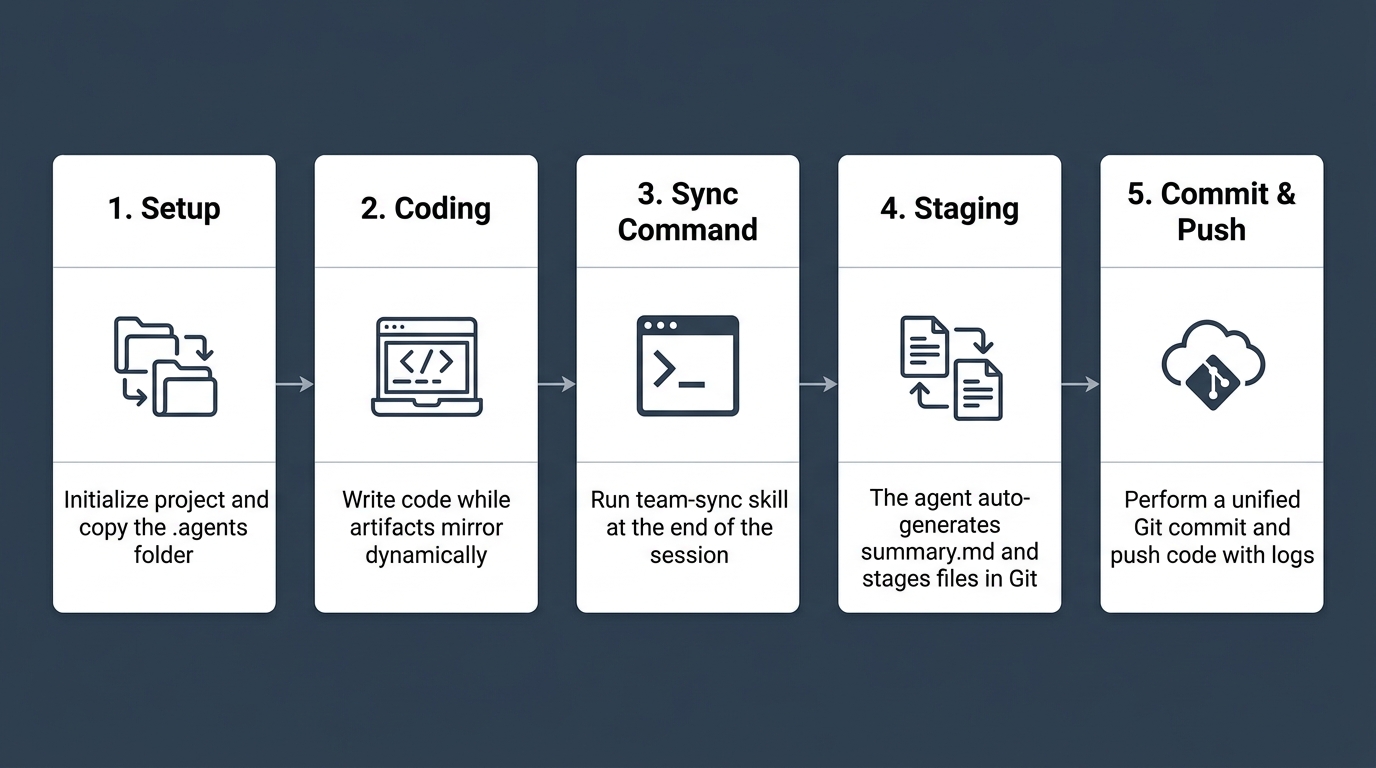
So I wrote an agent skill. It includes a Python script that explicitly moves the files when the coding session is done. The script does a git add of those files, including the full (and summary) session transcript. Specific to Antigravity, you might also build a sidecar, or something that runs in the background and continuously works. But this was a simpler choice.于是,我编写了一个智能体技能。它包含一个 Python 脚本,可以在编程会话结束后显式地移动这些文件。该脚本会对这些文件执行 git add 操作,包括完整(及摘要)的会话记录。针对 Antigravity,你也可以构建一个侧边工具,或者在后台持续运行的程序。但这种方式更简单直接。
Let’s walk through the key bits. And then I’ll show it in action.让我们来看看关键部分,稍后我将演示其实际操作。
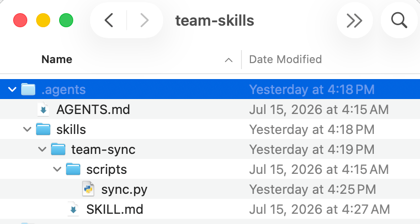
In a hidden .agents folder, I’ve got an AGENTS.md file, a skills folder that contains a skill named team-sync, and then a SKILL.md along with a Python script used by the skill.在一个隐藏的 .agents 文件夹中,我存放了一个 AGENTS.md 文件、一个名为 team-sync 的技能文件夹,以及一个 SKILL.md 文件和该技能所使用的 Python 脚本。
We’ll start with the SKILL.md. It fires up as the agent finishes artifacts, and when explicitly triggered by the user.我们先从 SKILL.md 开始。它会在智能体完成产物时启动,也可以由用户显式触发。
1 2 3 4 5 6 7 8 9 10 11 12 13 14 15 16 17 18 19 20 21 22 23 24 25 26 27 28 29 30 31 32 33 34 35 36 37 38 39 40 41 42 43 44 45 46 47 48 49 50 51 52 | ---name: team-syncdescription: Synchronizes local Antigravity conversation history, transcripts, and artifacts (including a light summary) to the project repository for team sharing.---# Team-Sync Custom SkillUse this skill to archive and upload your conversation's transcripts, artifacts, and a "light" human-readable summary into the Git repository, allowing other team members to quickly catch up on your agent steps, decisions, and outcomes.## When to Use* Call this skill when a coding task, implementation plan, or refactoring conversation has finished successfully.* Run it before opening a Pull Request so that reviewers can inspect the execution logs and the conversation summary.## Instructions for the Agent1. **Generate the Light Transcript (`summary.md`):** Create a file named `summary.md` in your local brain directory. The summary must follow this structure: ```markdown # Conversation Summary: [Objective/Topic] * **Date:** [Current Date] * **Conversation ID:** [ANTIGRAVITY_CONVERSATION_ID] ## TL;DR [A 1-2 sentence high-level summary of what was accomplished] ## Key Decisions & Rationale * **Decision:** [e.g., Using Python's shutil instead of bash commands] * **Why:** [e.g., Cross-platform safety and better permission handling] ## Most Interesting Event / "Aha" Moment [Capture any major back-and-forth conversation, user course corrections, pivot points, or model/user "aha" moments that defined the flow of this conversation.] ## Scope of Changes * **Files Modified/Created:** [List of files] * **Verification:** [How the changes were validated, command outputs, etc.] ## Learnings & Gotchas for the Team * [Any lessons learned about the API, codebase, or environment that others should know] ```2. **Verify Environment:** Ensure `ANTIGRAVITY_CONVERSATION_ID` is set in the environment.3. **Execute Sync Script:** Run the sync helper script: ```bash python3 .agents/skills/team-sync/scripts/sync.py ``` *Note: Because `sync.py` automatically copies all `.md` files, your newly created `summary.md` will be synced to the workspace repository automatically.*4. **Report Status:** Confirm to the user that the summary and files have been successfully synced. |
The Python script does the work of actually copying files from Antigravity’s “brain” folder into my local project folder.Python 脚本负责将文件从 Antigravity 的“大脑”文件夹实际复制到我的本地项目文件夹中。
1 2 3 4 5 6 7 8 9 10 11 12 13 14 15 16 17 18 19 20 21 22 23 24 25 26 27 28 29 30 31 32 33 34 35 36 37 38 39 40 41 42 43 44 45 46 47 48 49 50 51 52 53 54 55 56 57 58 59 60 61 62 63 64 65 66 67 68 69 70 71 72 73 74 75 76 77 78 79 80 81 82 83 84 85 86 87 88 89 90 91 92 93 94 95 96 97 98 99 100 101 102 103 104 105 106 107 108 109 110 111 112 113 114 115 116 117 118 119 120 121 122 123 124 125 126 127 128 129 130 131 132 133 134 135 136 137 138 139 | #!/usr/bin/env python3import osimport sysimport shutilimport subprocessfrom pathlib import Pathdef get_project_root() -> Path: # Find project root by looking for .agents or .git starting from CWD current = Path.cwd().resolve() for parent in [current] + list(current.parents): if (parent / ".agents").is_dir() or (parent / ".git").is_dir(): return parent return currentdef find_most_recent_conversation(brain_root: Path) -> str: """Finds the most recently modified conversation subdirectory in the brain cache.""" if not brain_root.is_dir(): return None subdirs = [] for p in brain_root.iterdir(): # Conversation directories are 36-char UUIDs (plus optional custom name directories) if p.is_dir() and p.name != "scratch": try: mtime = p.stat().st_mtime subdirs.append((mtime, p.name)) except OSError: continue if not subdirs: return None # Sort by modification time, newest first subdirs.sort(key=lambda x: x[0], reverse=True) return subdirs[0][1]def check_git_installed() -> bool: """Checks if git command-line tool is installed and available in PATH.""" return shutil.which("git") is not Nonedef main(): print("=== Antigravity Team Sync ===") home_dir = Path.home() brain_root = home_dir / ".gemini" / "antigravity" / "brain" # 1. Retrieve conversation ID from environment or fallback conv_id = os.environ.get("ANTIGRAVITY_CONVERSATION_ID") if not conv_id: print("Notice: ANTIGRAVITY_CONVERSATION_ID env variable is not set.", file=sys.stderr) print("Attempting to auto-detect the most recent local conversation...", file=sys.stderr) conv_id = find_most_recent_conversation(brain_root) if not conv_id: print("ERROR: Could not locate any local conversation histories.", file=sys.stderr) sys.exit(1) print(f"Auto-detected conversation: {conv_id}") else: print(f"Active Conversation ID: {conv_id}") # 2. Define source paths source_brain_dir = brain_root / conv_id if not source_brain_dir.is_dir(): print(f"ERROR: Local conversation directory not found at: {source_brain_dir}", file=sys.stderr) sys.exit(1) # 3. Define target paths proj_root = get_project_root() target_history_dir = proj_root / ".antigravity" / "history" / conv_id print(f"Source Directory: {source_brain_dir}") print(f"Target Directory: {target_history_dir}") # Create target directory try: target_history_dir.mkdir(parents=True, exist_ok=True) except PermissionError: print(f"ERROR: Permission denied. Cannot write to target directory: {target_history_dir}", file=sys.stderr) sys.exit(1) except Exception as e: print(f"ERROR: Failed to create target directory: {e}", file=sys.stderr) sys.exit(1) # 4. Copy Artifacts (markdown files and media in the main directory) copied_count = 0 for file_path in source_brain_dir.iterdir(): if file_path.is_file() and file_path.suffix in [".md", ".png", ".jpg", ".jpeg", ".gif", ".mp4", ".mov"]: try: shutil.copy2(file_path, target_history_dir / file_path.name) print(f"-> Copied file: {file_path.name}") copied_count += 1 except PermissionError: print(f"Warning: Permission denied copying file {file_path.name}") except Exception as e: print(f"Warning: Failed to copy {file_path.name}: {e}") # 5. Copy Transcripts logs_dir = source_brain_dir / ".system_generated" / "logs" transcript_copied = False if logs_dir.is_dir(): for log_file in ["transcript.jsonl", "transcript_full.jsonl"]: source_log = logs_dir / log_file if source_log.is_file(): try: shutil.copy2(source_log, target_history_dir / log_file) print(f"-> Copied log: {log_file}") transcript_copied = True except PermissionError: print(f"Warning: Permission denied copying log {log_file}") except Exception as e: print(f"Warning: Failed to copy log {log_file}: {e}") if not transcript_copied: print("Warning: No transcript files found in the conversation logs.") # 6. Git Synchronization git_dir = proj_root / ".git" if git_dir.is_dir(): if not check_git_installed(): print("\nWarning: Git repository detected, but git executable is not available in your PATH. Skipping Git commit.") print("Sync completed successfully!") return try: print("\nStaging files in Git...") subprocess.run(["git", "add", str(target_history_dir)], check=True, cwd=proj_root) print("Conversation history and transcripts staged in Git successfully!") print("You can now commit these staged history files together with your code updates.") except subprocess.CalledProcessError as e: print(f"\nWarning: Git command failed with error code {e.returncode}.", file=sys.stderr) print("Your files have been successfully copied locally, but could not be staged automatically in Git.", file=sys.stderr) else: print("\nNote: Not a Git repository (or .git not found). Skipping Git commit.") print("\nSync completed successfully!")if __name__ == "__main__": main() |
And finally, my AGENTS.md is quite simple and tells my harness when to mirror the core coding session artifacts.最后,我的 AGENTS.md 非常简单,它告诉我的工具何时同步核心编程会话产物。
1 2 3 4 5 6 7 8 9 10 11 12 13 | # Team Customization RulesThese rules govern how Antigravity agents operate within this project repository to facilitate seamless team collaboration.## 1. Artifact MirroringTo ensure that all design decisions, test verifications, and walkthroughs are visible to the team during code reviews:* **Mirroring Rule:** Whenever you create or modify an artifact (such as `implementation_plan.md`, `task.md`, or `walkthrough.md`) in the local user cache directory (`~/.gemini/antigravity/brain/<conversation-id>`), you MUST copy or write a duplicate version of that file to the workspace under `.antigravity/history/<conversation-id>/`.* **Git Commits:** These mirrored documents should be staged and committed to Git alongside the source code changes.## 2. Conversation Telemetry & Syncing* If the user or agent needs to share the raw execution logs, terminal outputs, and thinking transcripts of a conversation: * Run the `team-sync` skill at the end of the session. * This will execute the `sync.py` script to collect the finalized `transcript.jsonl` and copy it to the same `.antigravity/history/<conversation-id>/` directory. |
This .agents folder could be part of some shared Git project or project-bootstrapping script. Here’s an example of how to use it.这个 .agents 文件夹可以作为共享 Git 项目或项目引导脚本的一部分。以下是如何使用它的示例。
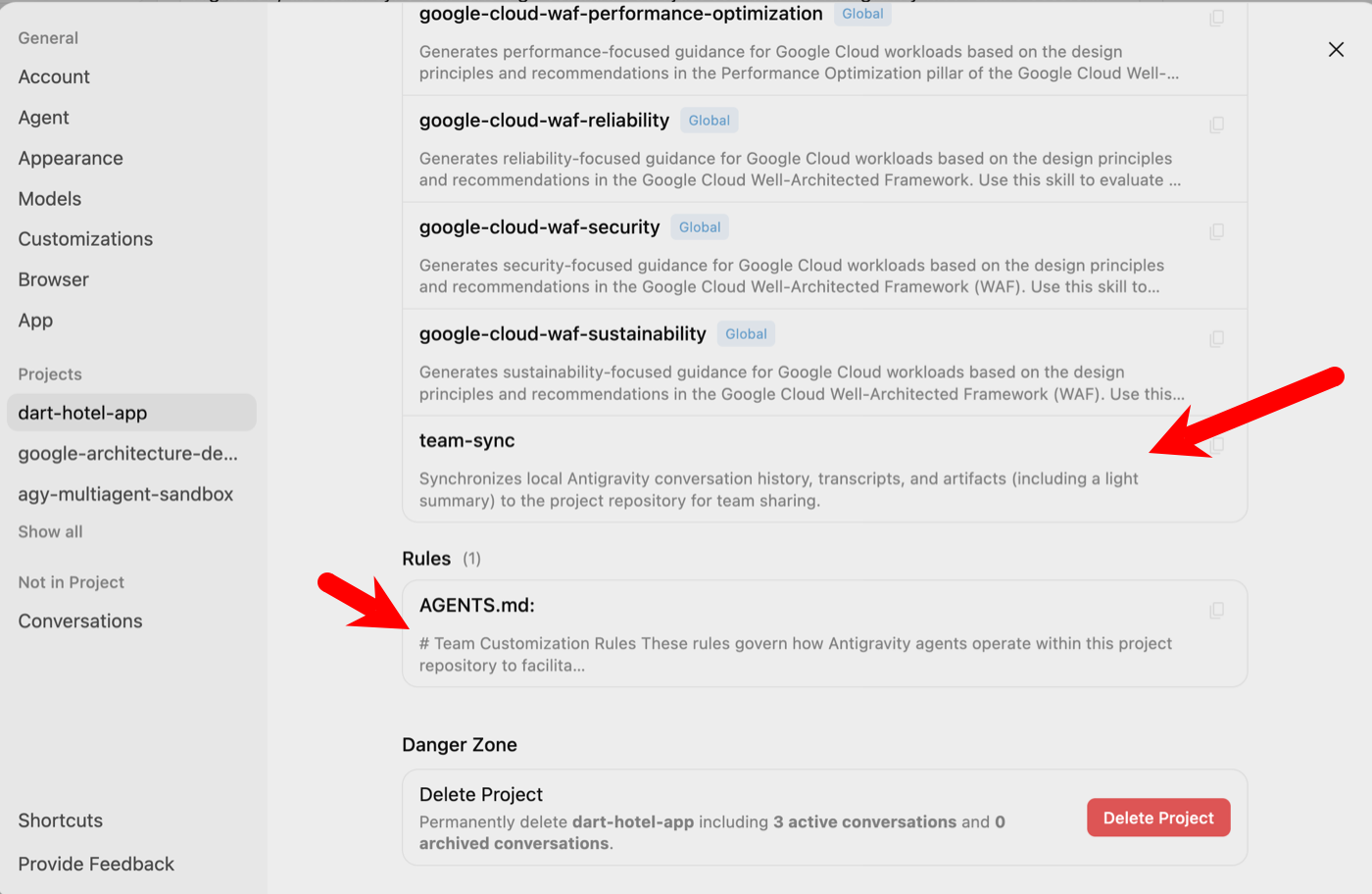
I created a local directory for my new coding project. Maybe I’m the first one on my team working on it. After copying the .agents folder into that directory, and running a git init, I opened Google Antigravity and started a new session/conversation. Notice that my Antigravity settings for this project shows the skill and agent rules loaded up automatically.我为我的新编程项目创建了一个本地目录。假设我是团队中第一个负责该项目的人。在将 .agents 文件夹复制到该目录并运行 git init 后,我打开 Google Antigravity 并开始了一个新的会话/对话。请注意,我的 Antigravity 设置中已经自动加载了该项目的技能和智能体规则。
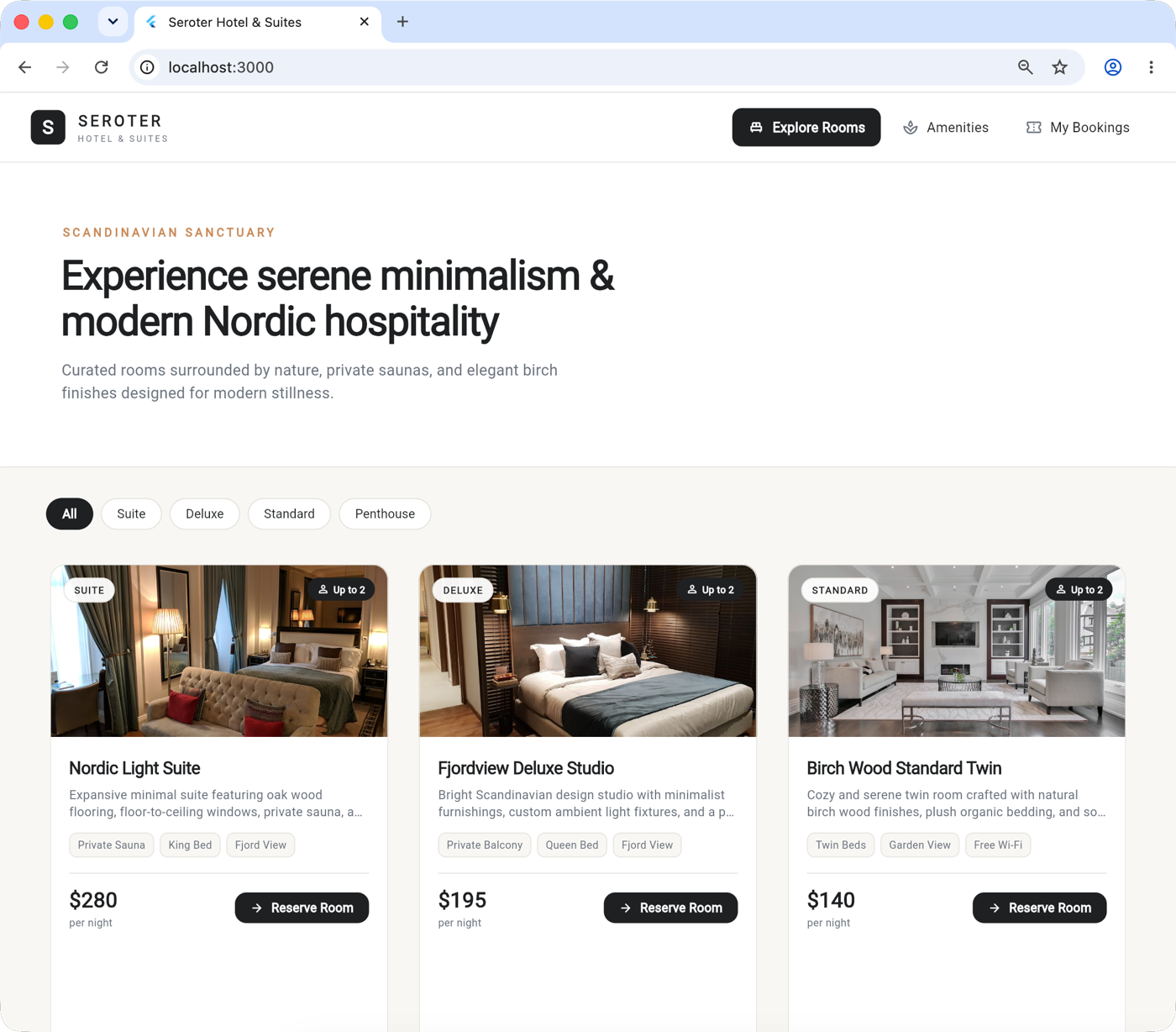
At this point, I just did my work like always. I used Antigravity to build a Dart and Flutter-based web app for my fictitious hotel chain. I built this (and packaged it) over three distinct coding sessions.接下来,我像往常一样进行工作。我利用 Antigravity 为我虚构的连锁酒店构建了一个基于 Dart 和 Flutter 的 Web 应用。我通过三个不同的编程会话完成了构建(并打包)。
As each session went along, I noticed the session artifacts (like implementation plans and walkthroughs) showing up in the .antigravity folder within my project directory. And I ended each session with a request to run the team-sync skill. That ensured that my final chat transcript(s) showed up too.随着每个会话的进行,我注意到会话产物(如实施计划和操作指南)都出现在项目目录下的 .antigravity 文件夹中。我在每个会话结束时都会请求运行 team-sync 技能,这确保了最终的聊天记录也能被同步。
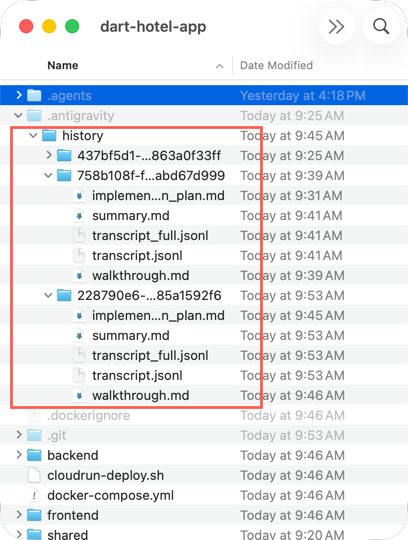
Let’s imagine that I’ve pushed all my changes into a team-shared repo. The next developer(s) can pull down the app code, along with the session history. Maybe they’re curious about how we arrived at our deployment choice. For example:设想一下,我已经将所有更改推送到团队共享的代码库中。其他开发者可以拉取应用代码以及会话历史记录。也许他们会对我们为何做出某种部署选择感到好奇。例如:
1 | Review the summary transcripts in this project and help me understand how the team decided to deploy to Cloud Run instead of Kubernetes. |
The result? The transcript summary is consulted and the developer sees the results of the conversation and trade-offs factored in.结果如何?开发者查阅了对话摘要,看到了对话的结果以及其中考量的权衡因素。
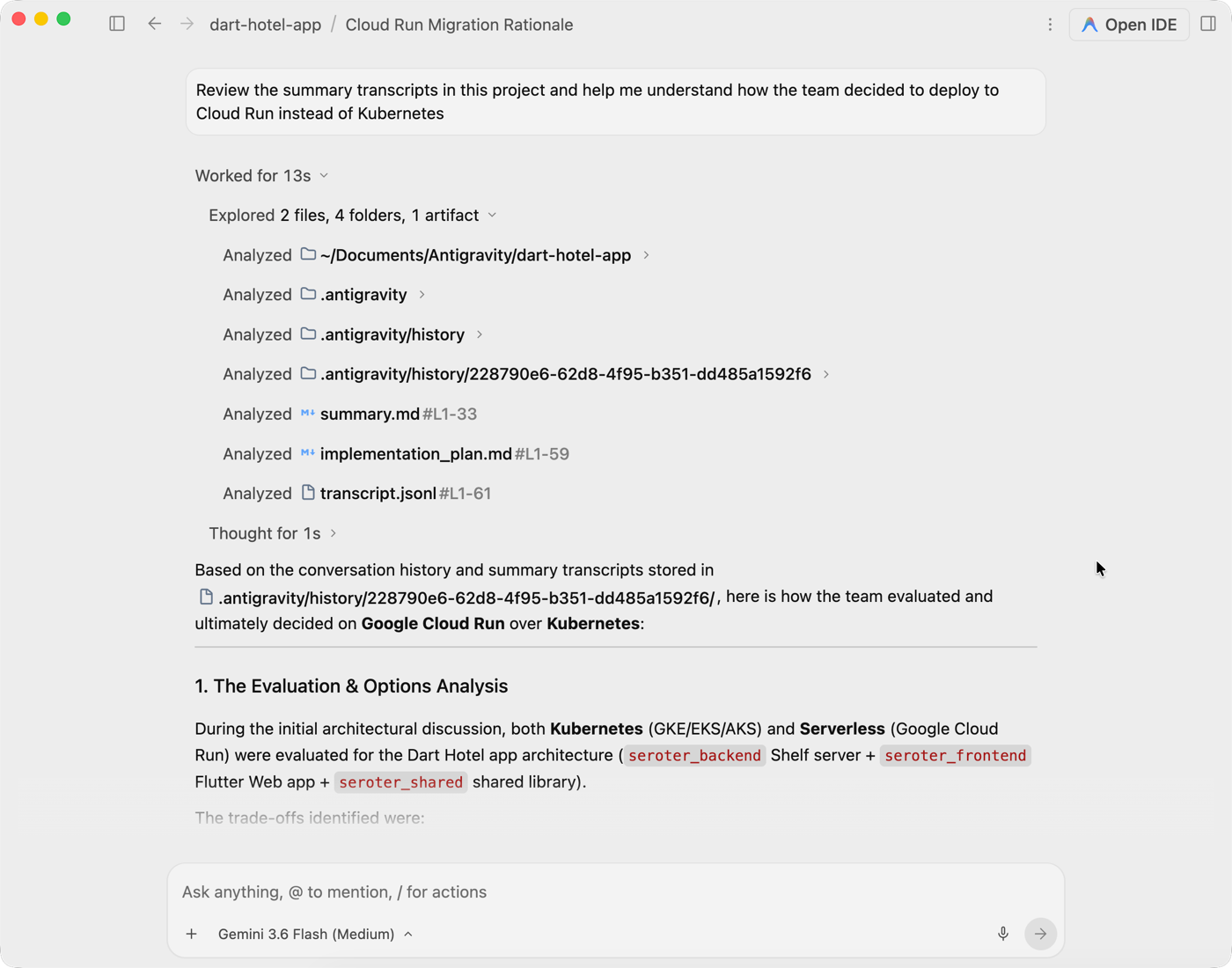
These key architectural decisions should be in other stateful artifacts like design docs. But given how fast teams are running now, the “requirements” are sprinkled throughout the code, test plans, session artifacts, and upfront docs. 这些关键的架构决策本应存在于设计文档等其他状态化产物中。但考虑到团队目前的开发节奏,这些“需求”往往分散在代码、测试计划、会话产物和前期文档中。
Maybe I’m solving a temporary problem and within weeks, all these coding tools will make it super easy to create a shared “brain” for software teams. But for now, I like that agent skills make it easy to extend Antigravity this way. How are you thinking about sharing “thinking” among your developers?也许我只是在解决一个暂时性的问题,几周后,所有的编程工具都能轻松地为软件团队创建共享“大脑”。但目前,我很高兴智能体技能能让我如此轻松地扩展 Antigravity。你是如何思考在开发者之间共享“思考过程”的?
 Richard Seroter's Architecture Musings

Leave a comment