Try it out yourself using GitHub Copilot code review.自己尝试使用 GitHub Copilot 代码审查。
Better tools made Copilot code review worse. Here’s how we actually improved it.
How migrating Copilot code review to shared Unix-style code exploration tools reduced review cost by reshaping agent workflows around pull request evidence.

|
9 minutes
Give an agent better tools and it should do better work. That’s the instinct, anyway.给智能体更好的工具,它就应该做得更好。这至少是直觉。
When you open a pull request, Copilot code review reads the diff and explores the surrounding code to find the problems that matter before they ship. To do that, it used its own code exploration tools. So when we swapped in the better-maintained, shared tools that power the Copilot CLI, grep, glob, and view, we expected a clean upgrade.当你打开一个拉取请求时,Copilot 代码审查会读取差异并探索周围代码,以在问题发布前发现关键问题。为此,它使用了自有的代码探索工具。因此,当我们替换为维护更好、共享的工具——即支撑 Copilot CLI 的 grep、glob 和 view 时,我们预期会是一次干净升级。
Instead, in our benchmarks, we found that the cost of reviews was higher and fewer issues were being caught.然而,在我们的基准测试中,我们发现审查成本更高,且发现的问题更少。
But the tools weren’t the problem. The instructions were. Once we rewrote them for the way a reviewer actually reads a pull request, the regression flipped into a win: roughly 20% lower average review cost, while maintaining the same review quality.但问题不在工具,而在指令。当我们根据审查者实际阅读拉取请求的方式重写指令后,性能退步变成了进步:平均审查成本降低了约 20%,同时保持了相同的审查质量。
This is the story of how adjusting the workflows around the tools led us to a fix.这就是如何通过调整工具周围的工作流程找到解决方案的故事。
Same tools, wrong instincts相同的工具,错误的直觉
If you’ve built on top of an agent framework, you’ve probably inherited its tools too. They work, so you keep them, until the day your use case drifts far enough from what they were designed for that they quietly start working against you. That’s the situation we were in. Before trying to use the shared CLI tools, Copilot code review used its own code exploration tools. That tool layer was inspired by earlier agentic systems, including ideas from SWE-agent-style repository navigation and GitHub Copilot Autofix: list directories, search files, search directories, and read code. Those tools worked, but they were specific to Copilot code review, and they were designed for how models behaved at the time. Earlier agentic coding models made fewer tool calls and were worse at automatically pulling in necessary context. This meant it was more important to include all relevant information in the few tool calls that the model made.如果你基于智能体框架搭建,你可能也继承了它的工具。它们能用,所以你就留着,直到有一天你的用例远离了它们的设计初衷,它们开始悄悄与你作对。这正是我们当时的情况。在尝试使用共享的 CLI 工具之前,Copilot 代码审查使用自有的代码探索工具。那一层工具受早期智能体系统启发,包括 SWE-agent 风格的仓库导航和 GitHub Copilot Autofix 的想法:列出目录、搜索文件、搜索目录和读取代码。这些工具能用,但它们是 Copilot 代码审查特有的,专为当时模型的行为方式设计。早期的智能体编码模型调用工具较少,且自动拉取必要上下文的能力较差。这意味着在模型进行的少数工具调用中,包含所有相关信息更为重要。
Meanwhile, the Copilot CLI harness has a shared set of Unix-inspired code exploration tools: grep, glob, and view. That harness is also used by a growing number of Copilot agent products, including GitHub Copilot cloud agent, so harness improvements can benefit more than one product. We wanted to clean up and share infrastructure where possible, so we experimented with using the tools from the Copilot CLI harness in Copilot code review. The goal was to reduce duplicated tool implementations, create one shared place to improve code exploration tools, and make it easier to carry those improvements across Copilot products.与此同时,Copilot CLI 框架拥有一套共享的 Unix 风格代码探索工具:grep、glob 和 view。该框架还被越来越多的 Copilot 智能体产品使用,包括 GitHub Copilot 云端代理,因此框架改进可以使多个产品受益。我们希望尽可能清理和共享基础设施,因此我们尝试在 Copilot 代码审查中使用 Copilot CLI 框架的工具。目标是减少重复的工具实现,创建一个共享的地方来改进代码探索工具,并使这些改进更容易在 Copilot 产品间传递。
On paper, the migration looked simple:按理说,迁移看起来很简单:
| Old Copilot code review | GitHub Copilot CLI | Purpose |
|---|---|---|
| list_dir | glob | Discover candidate files and directories before opening code. |
| search_file and search_dir | grep | Search code for matching text, symbols, or call sites. |
| read_code | view | Read the relevant file contents once a path or range is known. |
The existing review tools were not thin wrappers. When searching for a directory or reading a code range, they could return the matched or requested lines plus extra surrounding code context. That added token cost, but it also matched how earlier models often benefited from having nearby context included automatically.现有的审查工具并非简单的封装。在搜索目录或读取代码范围时,它们可以返回匹配或请求的行以及额外的周围代码上下文。这增加了令牌成本,但也符合早期模型通常从自动包含上下文附近内容中受益的方式。
Initially, we hoped this would be a simple migration: swap one set of tools for another. But when we tested the shared tools in offline benchmarks, the review agent became less efficient and less effective. Average cost increased, and the number of useful comments dropped.最初,我们希望这只是一次简单迁移:用一组工具替换另一组。但当我们在离线基准测试中测试共享工具时,审查智能体变得效率更低、效果更差。平均成本增加,有用评论数量下降。
The trace revealed a browsing loop追踪揭示了一个浏览循环
Our internal Copilot code review benchmarks were useful because they show more than a final score. They show the path the agent took, including which tools it called, how much output came back, where errors happened, and whether it was narrowing toward evidence or widening the search.我们内部的 Copilot 代码审查基准测试很有用,因为它们展示的不仅仅是一个最终分数。它们展示了智能体所走的路径,包括它调用了哪些工具、返回了多少输出、错误发生在哪里、以及它是在缩小证据范围还是扩大搜索。
When we first tried the shared Copilot CLI tools in offline benchmarks, the agent often behaved as if it was browsing a repository instead of investigating a pull request. It would search broadly, guess likely paths, read broadly, find more things to search, and carry that extra context forward.当我们首次在离线基准测试中尝试共享的 Copilot CLI 工具时,智能体常常表现得像是在浏览仓库,而不是调查一个拉取请求。它会广泛搜索、猜测可能的路径、广泛阅读、找到更多要搜索的东西,并将多余的上下文向前传递。
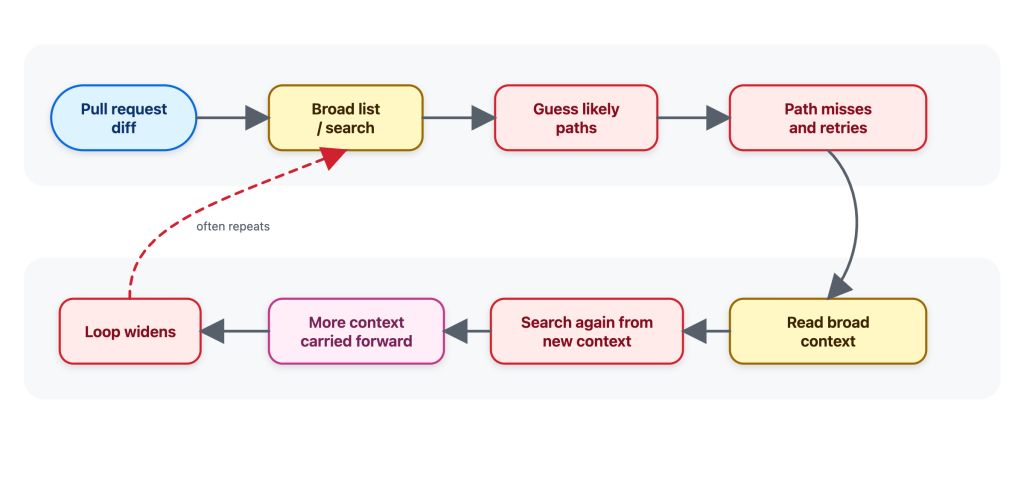
That pattern is understandable. Broad exploration can be useful when the task is “understand this repo.” But it’s not how a reviewer would usually review a pull request.这种模式可以理解。当任务是“理解这个仓库”时,广泛探索可能有用。但这不是审查者通常审查拉取请求的方式。
When I review a pull request, I start from the diff and ask targeted questions:当我审查一个拉取请求时,我从差异开始,并提出有针对性的问题:
- Where is this function called?这个函数在哪里被调用?这个配置键在其他地方有使用吗?是否有相同模式的测试或辅助函数?
- Is this config key used anywhere else?
- Is there a test or helper with the same pattern?
- What is the smallest nearby code range that explains this behavior?解释这种行为的最小附近代码范围是什么?
I do not want to open a large part of the repository before I know what I am looking for. I want the minimal context needed to answer the question, without overloading the review with unrelated code.在我知道要找什么之前,我不想打开仓库的大部分内容。我想要回答问题所需的最小上下文,而不让无关代码过载审查。
That matters because every tool result becomes part of the agent’s working context. Extra file contents can be carried forward into later reasoning, increasing cost and sometimes making the review less focused. A tool result is not a disposable printout; for an agent, it’s extra tokens that stay in the context window.这很重要,因为每个工具结果都会成为智能体工作上下文的一部分。多余的文件内容会被带入后续推理,增加成本,有时还会使审查失去焦点。工具结果不是一次性打印输出;对于智能体来说,它是留在上下文窗口中的额外令牌。
The traces made that difference visible. The shared tools were not the problem. The instructions were giving the agent the wrong instincts to do an efficient and effective review.追踪使这一差异变得可见。共享工具不是问题。指令给了智能体错误的直觉,使其无法进行高效有效的审查。
The tools themselves worked, but their instructions were tuned for their use within the Copilot CLI and implied the wrong workflow: the agent used grep, glob, and view like a broad coding assistant instead of a reviewer. A coding assistant may map a whole area before making a change to ensure it doesn’t break some other corner of the code. On the other hand, a reviewer usually starts from the diff, asks whether the change introduced a problem, and then looks for the narrowest nearby evidence required to confirm or dismiss it.工具本身能用,但它们的指令是针对在 Copilot CLI 中的使用而调整的,并暗示了错误的工作流程:智能体像广泛的编码助手而不是审查者一样使用 grep、glob 和 view。编码助手可能在做出更改之前映射整个区域,以确保不会破坏代码的其他角落。另一方面,审查者通常从差异开始,询问变更是否引入了问题,然后寻找所需的最窄附近证据来确认或排除它。
General coding-assistant tool instructions, like the ones used by Copilot CLI or Copilot cloud agent, make sense for an interactive assistant. A developer may ask it to understand a repository, plan a change, edit files, and continue over multiple turns.通用的编码助手工具指令,比如 Copilot CLI 或 Copilot 云端代理所用的,对于交互式助手是有意义的。开发者可能会要求它理解仓库、计划变更、编辑文件,并在多个回合中继续。
Copilot code review has a narrower job: start from a pull request diff, gather enough surrounding evidence to decide whether a change introduces a real issue, and avoid loading context that is not needed for that review question.Copilot 代码审查的工作范围更窄:从拉取请求差异开始,收集足够的周围证据来判断变更是否引入了真正的问题,并避免加载该审查问题不需要的上下文。
It was therefore clear that we couldn’t simply replace the previous Copilot code review tools with the tools from the Copilot CLI without additional prompting work. The problem became: how do we design tool instructions that use these shared tools effectively in a code review setting?因此很明显,我们不能简单地将以前的 Copilot 代码审查工具替换为 Copilot CLI 的工具,而不进行额外的提示工作。问题变成了:我们如何设计在代码审查环境中有效使用这些共享工具的工具指令?
Rewriting the tool instructions for a reviewer’s workflow为审查者的工作流程重写工具指令
The next iterations made the guidance specific to code review. The workflow we wanted Copilot code review to follow was:接下来的迭代使指导专门针对代码审查。我们希望 Copilot 代码审查遵循的工作流程是:
- Start from the diff and form specific review questions.从差异开始,形成具体的审查问题。
- Use
globwhen the path is uncertain andgrepto find candidate files, symbols, and call sites.在路径不确定时使用 glob,用 grep 查找候选文件、符号和调用点。 - Batch cheap discovery before reading files.在读取文件之前批量进行低成本发现。
- Use
viewonly when the agent knows which file or line range it needs.仅在智能体知道需要哪个文件或行范围时使用 view。 - Batch focused reads instead of alternating between one search and one read.批量进行针对性的读取,而不是在单次搜索和单次读取之间交替。
In oversimplified form, this was the behavior we encoded:过于简化地说,这是我们编码的行为:
Generic posture: Use the available tools to inspect repository context that may be relevant.通用姿态:使用可用工具检查可能相关的仓库上下文。
Review-shaped guidance: Start from the diff. Narrow first with grep and glob; read exact evidence with view. If grep fails to find relevant context, retry with a simpler escaped search. If a path is wrong, pivot to glob instead of guessing nearby paths.审查形指导:从差异开始。先用 grep 和 glob 缩小范围;用 view 读取精确证据。如果 grep 未能找到相关上下文,使用更简单的转义搜索重试。如果路径错误,转向 glob,而不是猜测附近路径。
For example, imagine the diff changes an authorization helper that decides whether an operation is allowed. A relevant review question is not “show me the full contents of every file that calls this helper.” It could instead be the narrower: “are any request-handling callers relying on the old behavior?”例如,想象差异更改了一个决定操作是否被允许的授权辅助函数。一个相关的审查问题不是“显示调用此辅助函数的每个文件的全部内容”。而可能是更窄的:“是否有任何请求处理的调用者依赖旧行为?”
The intended path is short:预期的路径很短:
start from the helper changed in the diff
grep for callers of that helper
glob for likely route, handler, or controller files
view the most relevant caller ranges
decide whether any caller changes the risk
The guidance also changed how the agent recovered from failed searches. If an input made grep fail, the better next step was one simpler, corrected search. If a path was wrong, the better next step was glob, not guessing neighboring paths and reading whatever happened to exist. That nudged the agent away from letting a small tool failure turn into a larger exploration loop.指导还改变了智能体从失败搜索中恢复的方式。如果某个输入导致 grep 失败,更好的下一步是进行一个更简单、更正的搜索。如果路径错误,更好的下一步是使用 glob,而不是猜测相邻路径并读取任何存在的内容。这促使智能体避免让小的工具失败演变成更大的探索循环。
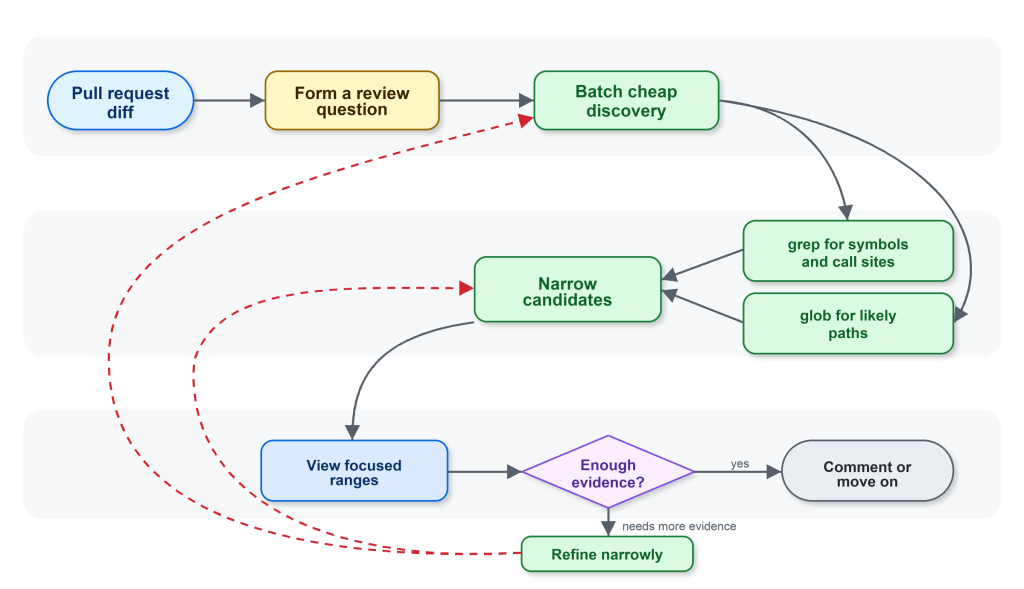
The change was small in wording and large in effect. It changed the rhythm of the agent from “browse, read, search again” to “ask, narrow, read, decide.”措辞上的改变虽小,但效果显著。它将智能体的节奏从“浏览、读取、再次搜索”转变为“提问、缩小、读取、决定”。
Benchmarks let us debug behavior, not just scores基准测试让我们调试行为,而不仅仅是分数
The shared harness gave us the tools. The internal Copilot code review benchmarks gave us the feedback loop.共享框架给了我们工具。内部的 Copilot 代码审查基准测试给了我们反馈循环。
We could run the same review examples, compare tool traces, update the instructions, and run again. That let us ask concrete questions:我们可以运行相同的审查示例,比较工具追踪,更新指令,然后再次运行。这让我们能够提出具体问题:
- Did the agent narrow first, or read broadly first?智能体是先缩小范围,还是先广泛阅读?它是否批量进行独立搜索?它是否仅在有理有据时才调用 view?
- Did it batch independent searches?
- Did it call
viewonly when it had a reason? - Did a tool-instruction change reduce tool errors, or just move them somewhere else?工具指令的更改是否减少了工具错误,还是仅仅将错误转移到了别处?
- Did the trace stay focused on evidence from the diff?追踪是否始终聚焦于来自差异的证据?
- Did the review still preserve the quality metrics we cared about?审查是否仍然保留了我们在意的质量指标?
The most useful signal was not “the instructions are better.” It was more concrete. The agent was making a similar number of tool calls, but spending more of them on relevant evidence instead of repeatedly expanding the search.最有用的信号不是“指令更好了”。它更具体。智能体进行了相似数量的工具调用,但将更多调用花在了相关证据上,而不是反复扩大搜索。
That connected product-level outcomes to understandable engineering behavior. Instead of guessing why a score moved, we could inspect the workflow that produced it.这连接了产品级结果与可理解的工程行为。我们不再猜测分数为何变动,而是可以检查产生它的工作流程。
The result: roughly 20% lower average review cost结果:平均审查成本降低约 20%
In production, the tuned behavior showed roughly 20% lower average review cost compared with the control. Importantly, it did not show a quality signal that could block shipping.在生产环境中,调整后的行为相比对照组显示平均审查成本降低约 20%。重要的是,它没有显示可能阻止发布的任何质量信号。
The reduction did not come from the tools by themselves, it came from the workflow around them. Shared code exploration tools, Copilot code review custom tool instructions, and internal benchmarks made the agent’s behavior visible enough to tune.成本的降低并非来自工具本身,而是来自它们周围的工作流程。共享的代码探索工具、Copilot 代码审查自定义工具指令和内部基准测试使智能体的行为足够可见,从而得以调整。
That framing matters when building with agents. It can be tempting to treat tools as implementation details by swapping one tool for another, then comparing the final answer. But for an agent, the tool surface is part of the product experience. It changes what the agent notices, how it searches, how much context it carries forward, and when it decides it has enough evidence.在使用智能体构建时,这种框架很重要。人们可能会倾向于将工具视为实现细节,将一个工具替换为另一个,然后比较最终答案。但对于智能体来说,工具界面是产品体验的一部分。它改变了智能体注意什么、如何搜索、携带多少上下文向前,以及何时决定有足够证据。
Tool descriptions and system instructions are closer to API documentation. Unclear API docs can leave a developer confused and lead to inefficient or wrong decisions. Unclear tool prompting can do the same for an LLM; a small wording change can affect cost, quality, and the shape of the investigation because it changes how the agent spends its attention.工具描述和系统指令更接近 API 文档。不清晰的 API 文档会让开发者困惑,导致低效或错误的决策。不清晰的工具提示也会对 LLM 产生类似影响;一个小小的措辞更改可以影响成本、质量和调查的形态,因为它改变了智能体注意力的分配方式。
Same tools, different job相同的工具,不同的任务
We also tried to apply the same kind of focused tool instructions in the CLI, where it did not produce the same kind of win. That is a useful counterexample, and an important guardrail for the lesson.我们也尝试在 CLI 中应用同样聚焦的工具指令,但并未产生同样的收益。这是一个有用的反例,也是这个教训的重要护栏。
Copilot code review is anchored to a diff and a review question. Copilot CLI handles broader, interactive coding tasks where exploration can be part of the job. There may be no single diff anchor, the user may change direction over multiple turns, and the right context may not be obvious at the start. The same grep, glob, and view tools can support both products, but the workflow around those tools has to match the product.Copilot 代码审查以差异和审查问题为锚点。Copilot CLI 处理更广泛的交互式编码任务,探索可能是工作的一部分。可能没有单一的差异锚点,用户可能在多个回合中改变方向,正确的上下文可能一开始并不明显。相同的 grep、glob 和 view 工具可以支持两个产品,但围绕这些工具的工作流程必须与产品匹配。
The takeaway is that shared tools scale when the instructions and benchmarks match the job.要点是,当指令和基准测试与任务匹配时,共享工具才能扩展。
Tags:标签:
Written by 作者

Related posts

Automating cross-repo documentation with GitHub Agentic Workflows
Explore how the Aspire team turns merged product changes into SME-reviewed docs pull requests, closing the gap between release and documentation.

How GitHub Copilot enables zero DNS configuration for GitHub Pages
Go from an empty repository to a live custom domain with HTTPS in about 14 minutes, without manually editing a single DNS record.

Evaluating performance and efficiency of the GitHub Copilot agentic harness across models and tasks
Explore how the GitHub Copilot agentic harness delivers strong results across multiple benchmarks and leading token efficiency, while maintaining flexibility to choose among more than 20 models.