Snowflake CoCo Architecture: A Complete Guide to Tools, Plugins, Agents, MCP Servers, Profiles, Hooks, and SkillsSnowflake CoCo 架构:工具、插件、智能体、MCP 服务器、配置文件、钩子 (Hooks) 与技能 (Skills) 全面指南

The landscape of software development and data engineering is undergoing a massive paradigm shift. We have rapidly evolved from basic syntax autocomplete to interactive AI chat windows. Today, we are entering the era of the Agentic IDE — and at the forefront of this evolution is Snowflake’s CoCo.软件开发和数据工程领域正在经历一场巨大的范式转移。我们已经从基础的语法自动补全迅速演进到了交互式 AI 聊天窗口。今天,我们正迈入“智能体 IDE”(Agentic IDE)时代,而 Snowflake 的 CoCo 正处于这场演进的最前沿。
Far from being just another simple chatbot slapped onto a text editor, CoCo is a highly sophisticated, composable, and extensible system. It doesn’t just answer questions; it understands context, reasons through complex data problems, and executes workflows autonomously.CoCo 绝非仅仅是附加在文本编辑器上的简单聊天机器人,它是一个高度复杂、可组合且可扩展的系统。它不仅能回答问题,还能理解上下文、针对复杂数据问题进行推理,并能自主执行工作流。
To truly unlock CoCo’s disruptive potential, you have to look past the chat interface and understand the distinct building blocks that power its engine. In this comprehensive guide, we will break down the CoCo ecosystem end-to-end — complete with architectural insights, practical analogies, and real-world strategies — to transform how you build, optimize, and scale on the Snowflake Data Cloud.要真正释放 CoCo 的颠覆性潜力,你必须跳出聊天界面,理解支撑其引擎的核心构建模块。在这份综合指南中,我们将从架构洞察、实际类比和实战策略等方面,全面解析 CoCo 生态系统,从而改变你在 Snowflake 数据云上构建、优化和扩展应用的方式。
This article explains each concept end-to-end with architecture diagrams, analogies, and practical examples.本文通过架构图、类比和实用示例,对每个概念进行了全面深入的讲解。
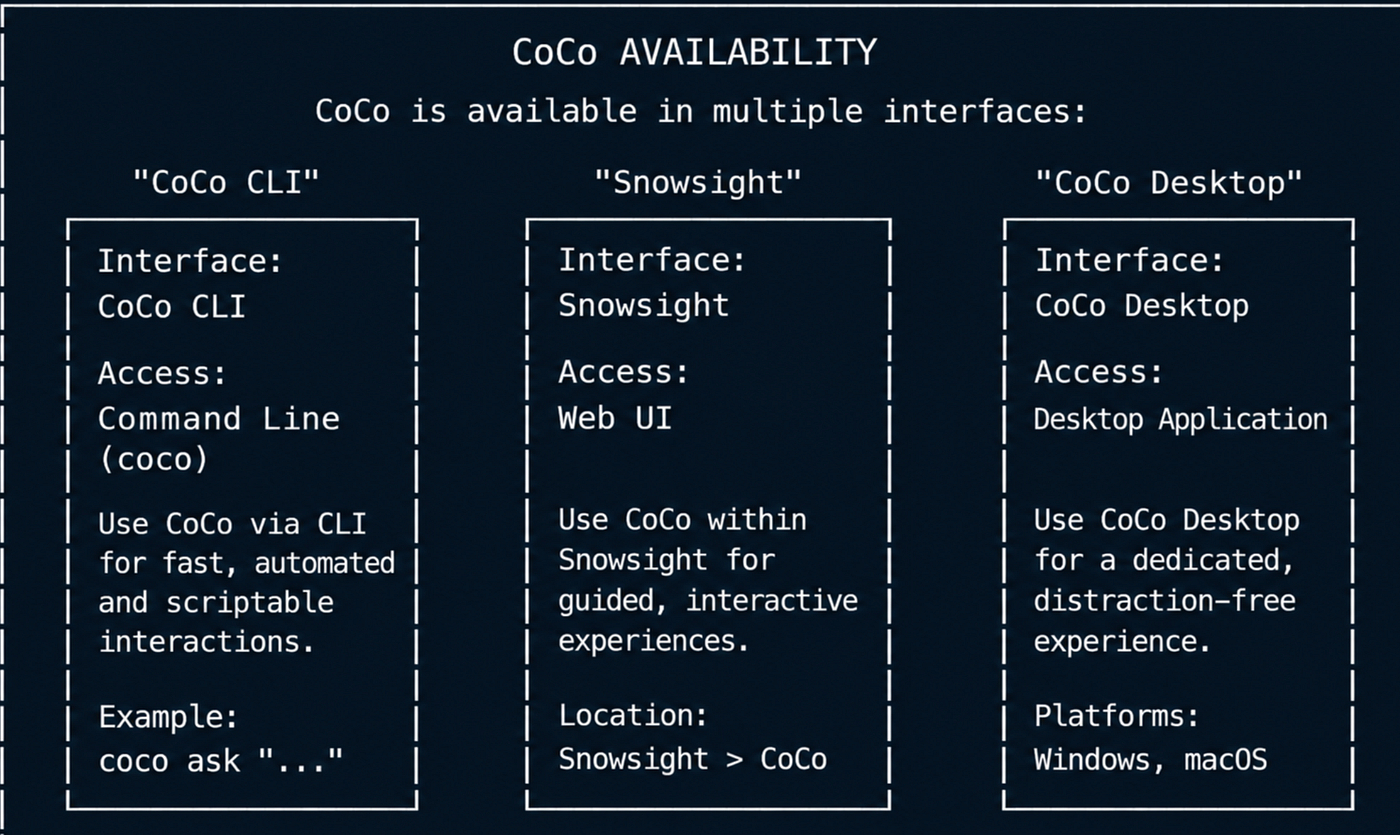
CoCo is available in Snowsight, CLI and CoCo Desktop (CoCo Desktop currently in Preview)CoCo 可在 Snowsight、CLI 和 CoCo Desktop 中使用(CoCo Desktop 目前处于预览阶段)
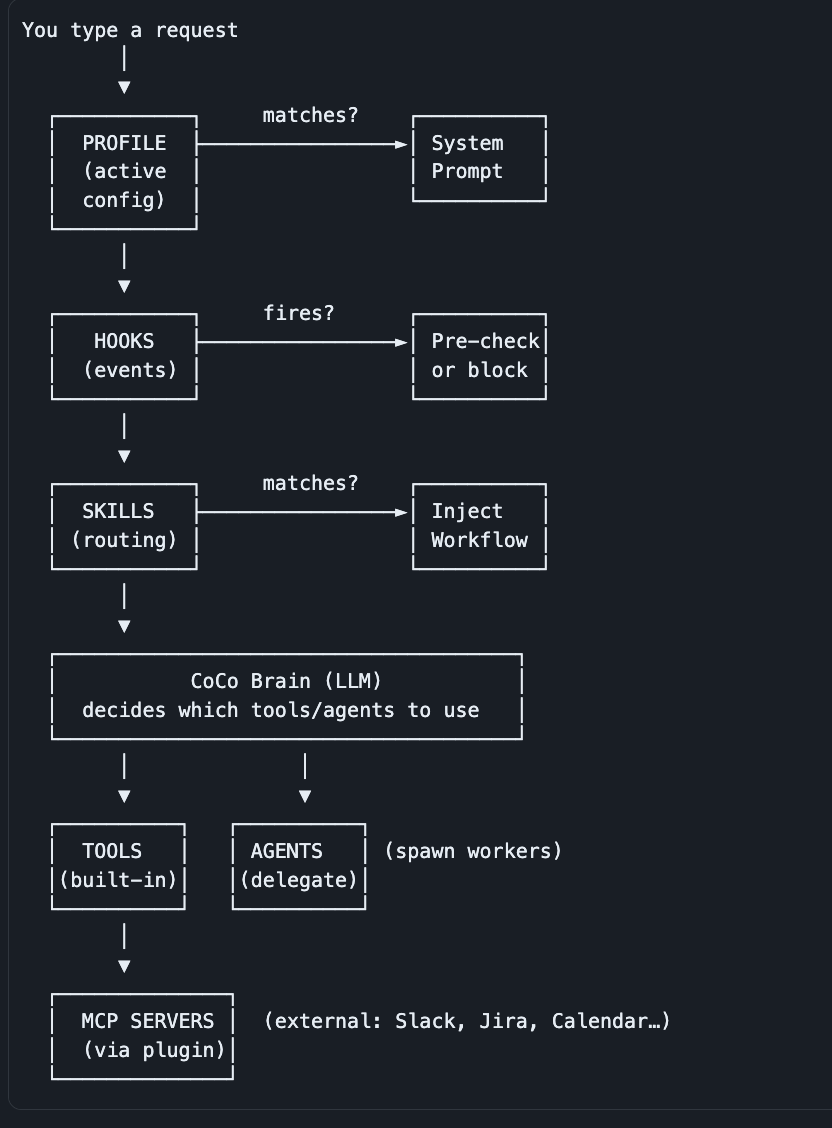
ARCHITECTURE OVERVIEW
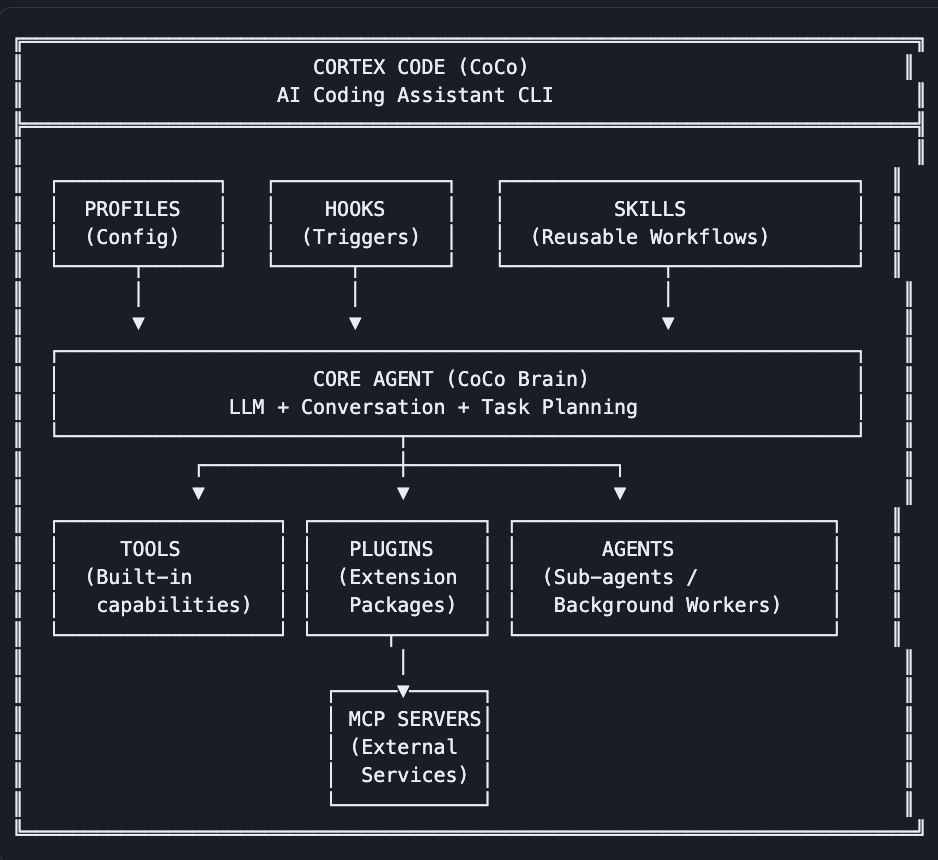
Detailed Breakdown of Each Concept各概念详细解析
1. Tools1. 工具 (Tools)
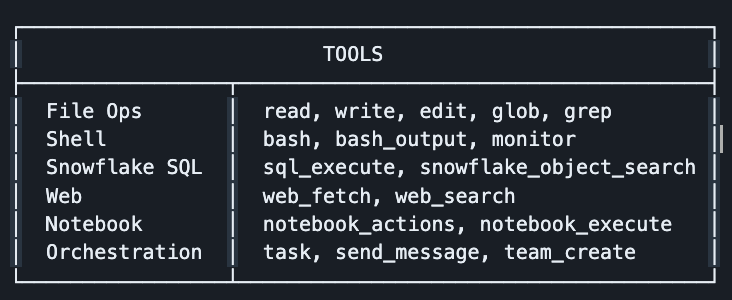
What: The most fundamental unit — built-in capabilities the AI agent can call directly.定义:最基础的单元,即 AI 智能体可以直接调用的内置功能。
Think of them as: Functions/methods the AI has access to natively.类比:AI 原生可访问的函数/方法。
Key traits:主要特征:
- Always available — no installation needed始终可用,无需安装
- CoCo calls them automatically based on your requestCoCo 会根据你的请求自动调用它们
- They are the actual “hands” of the agent (read files, run SQL, search web)它们是智能体的“双手”(用于读取文件、运行 SQL、搜索网络等)
2. Plugins2. 插件 (Plugins)
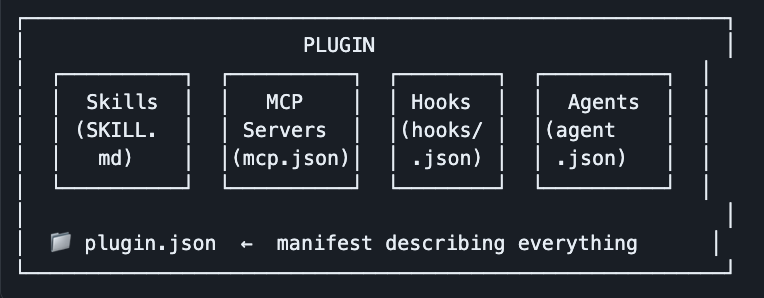
What: Extension packages that bundle together Skills, MCP Servers, Hooks, and Agents into one installable unit.定义:将技能 (Skills)、MCP 服务器、钩子 (Hooks) 和智能体打包成一个可安装单元的扩展包。
Think of them as: npm packages / VS Code extensions for CoCo.类比:CoCo 的 npm 包或 VS Code 扩展。
Key traits:
- Installed from GitHub, local path, or Snowflake marketplace可通过 GitHub、本地路径或 Snowflake 市场安装
- Managed via
/plugincommand通过 /plugin 命令管理 - One plugin can contribute multiple skills, MCP servers, and hooks一个插件可以包含多个技能、MCP 服务器和钩子
3. Agents (Sub-agents)3. 智能体 (Agents/Sub-agents)
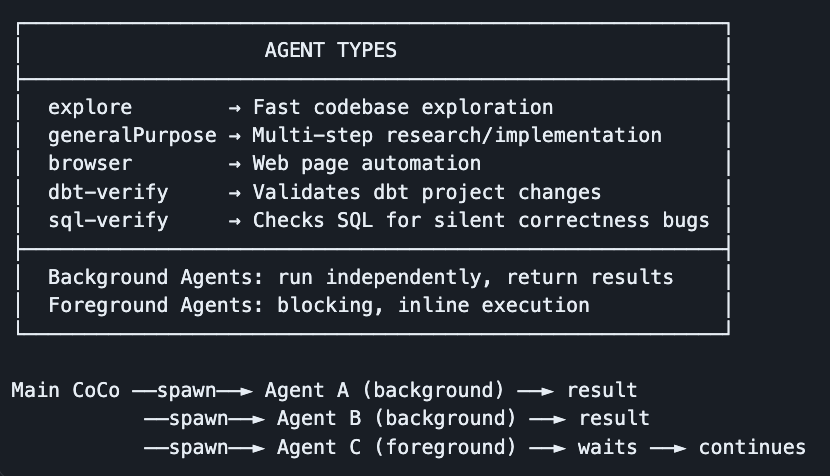
What: Specialized AI workers that CoCo can spawn to handle complex tasks independently, in parallel or sequentially.定义:专门的 AI 工作者,CoCo 可以生成它们来独立、并行或按顺序处理复杂任务。
Think of them as: Employees you delegate work to.类比:你委派工作的员工。
Key traits:
- Launched via the
task()tool or natural language request; monitored via/agentsor Ctrl-B.通过 task() 工具或自然语言请求启动;通过 /agents 或 Ctrl-B 进行监控。 - Can run in parallel — great for independent tasks支持并行运行,非常适合处理独立任务
- Each agent is stateless (no memory between spawns)每个智能体都是无状态的(生成之间没有记忆)
4. MCP Servers4. MCP 服务器 (MCP Servers)
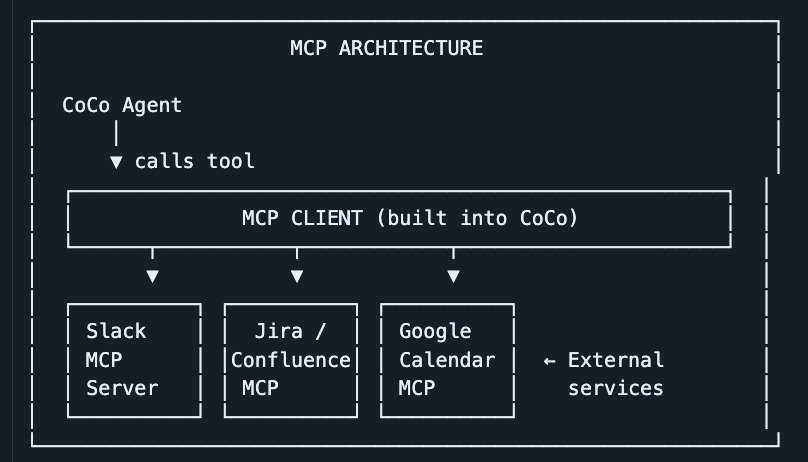
What: External services that expose additional tools to CoCo via the Model Context Protocol (MCP) standard.定义:通过模型上下文协议 (Model Context Protocol, MCP) 标准向 CoCo 提供额外工具的外部服务。
Think of them as: API integrations — Slack, Jira, Google Calendar, Salesforce, etc类比:API 集成,如 Slack、Jira、Google 日历、Salesforce 等。
Key traits:
- Defined in
mcp.jsoninside a plugin or configured via/mcp在插件内的 mcp.json 中定义,或通过 /mcp 配置 - Follow the open MCP standard (usable across different AI tools)遵循开放的 MCP 标准(可在不同 AI 工具间通用)
- Every tool you see like
mcp_slack-snow_*,mcp_gcalendar-*= MCP server tools你看到的类似 mcp_slack-snow_*、mcp_gcalendar-* 的工具均为 MCP 服务器工具 - Can be
stdio(local process),http(web service), orsse(real-time/streaming service).可以是 stdio(本地进程)、http(Web 服务)或 sse(实时/流式服务)。
5. Profiles5. 配置文件 (Profiles)
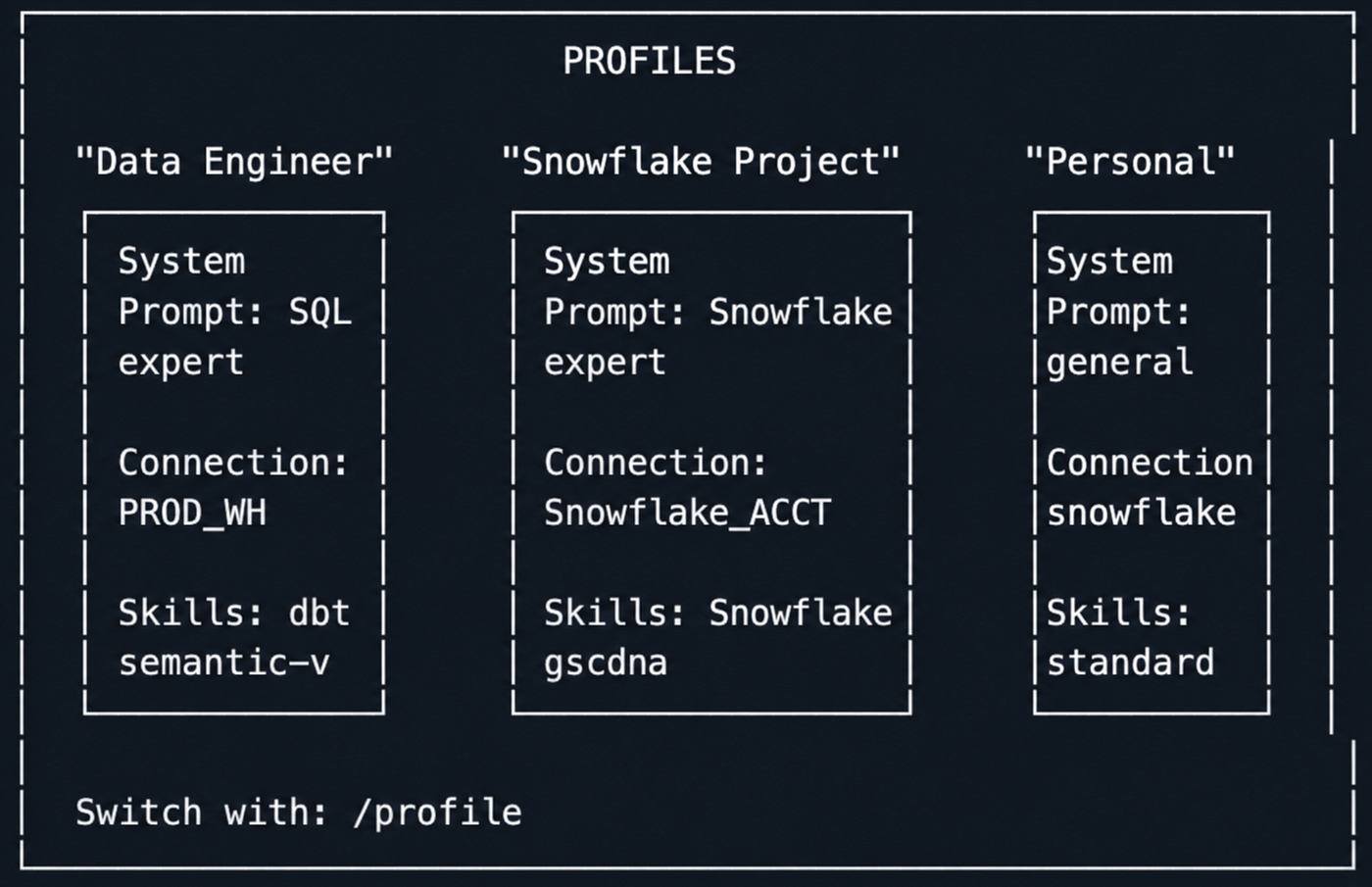
What: Saved configuration snapshots — a combination of system prompt, settings, and active connections you can switch between instantly.定义:已保存的配置快照,包含系统提示词、设置和活动连接,可随时切换。
Get Dipal Mahajan’s stories in your inbox将 Dipal Mahajan 的文章发送到你的收件箱
Join Medium for free to get updates from this writer.免费加入 Medium 以获取该作者的更新。
Think of them as: Browser profiles or VS Code workspaces.类比:浏览器配置文件或 VS Code 工作区。
Key traits:
- Managed via
/profilecommand通过 /profile 命令管理 - Include custom system prompts, preferred connections, enabled skills包含自定义系统提示词、首选连接、已启用的技能
- Allow you to have different “modes” for different projects or roles允许你针对不同项目或角色设置不同的“模式”
6. Hooks6. 钩子 (Hooks)
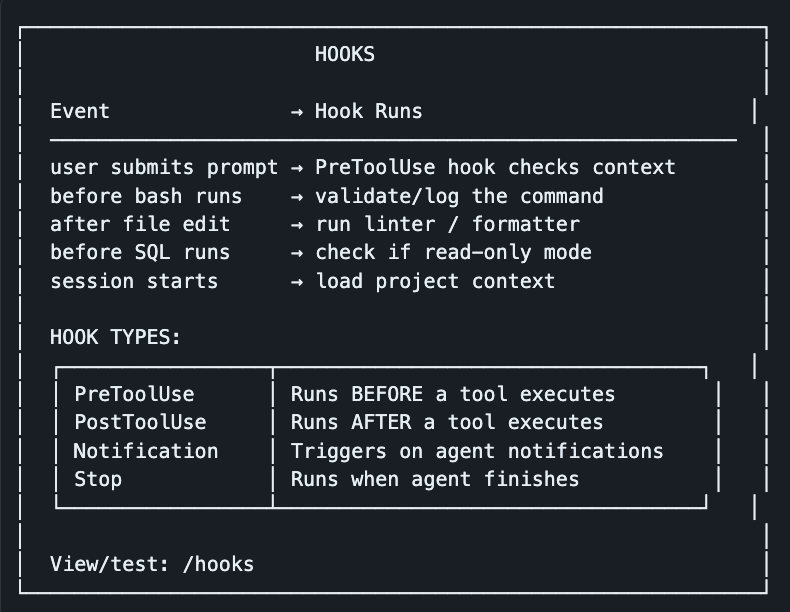
What: Shell commands that automatically execute when specific events occur in CoCo (before/after tool use, on session start, etc.).定义:当 CoCo 中发生特定事件(工具使用前后、会话开始等)时自动执行的 Shell 命令。
Think of them as: Git hooks or event listeners — automated side effects.类比:Git 钩子或事件监听器,即自动触发的副作用。
Key traits:
- Defined as shell commands in config在配置中定义为 Shell 命令
- Can block tool execution (exit code 2 = blocked; exit code 0 = allowed).可以阻止工具执行(退出代码 2 = 阻止;退出代码 0 = 允许)。
- Can inject context back into the agent’s conversation可以将上下文注入回智能体的对话中
- Used for: auto-formatting, security checks, logging, project tagging用途:自动格式化、安全检查、日志记录、项目标记
7. Skills7. 技能 (Skills)
What: Reusable, domain-specific instruction sets (markdown files) that inject expert workflows and knowledge into CoCo on demand.定义:可重用的、特定领域的指令集(Markdown 文件),可按需向 CoCo 注入专家工作流和知识。
Think of them as: Playbooks or SOPs — step-by-step expert guides the AI follows.类比:行动手册或标准作业程序 (SOP),即 AI 遵循的分步专家指南。
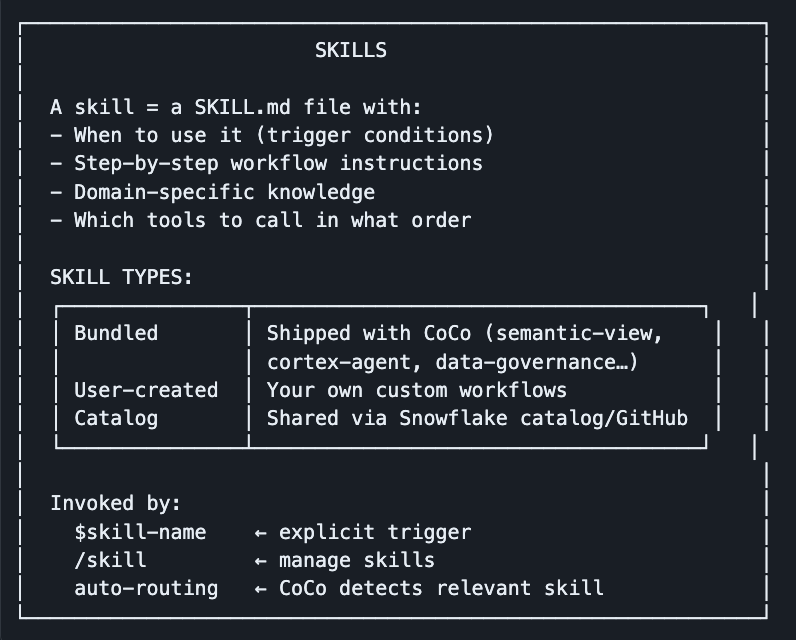
Key traits:
- Plain markdown files — human-readable and editable纯 Markdown 文件,易于阅读和编辑
- Injected into the agent’s context when triggered触发时注入智能体的上下文中
- Can call other tools, MCP servers, and even spawn agents可以调用其他工具、MCP 服务器,甚至生成智能体
- Created/managed via the
/skillcommand (CLI) or Agent Settings panel (Desktop)通过 /skill 命令(CLI)或智能体设置面板(Desktop)创建/管理
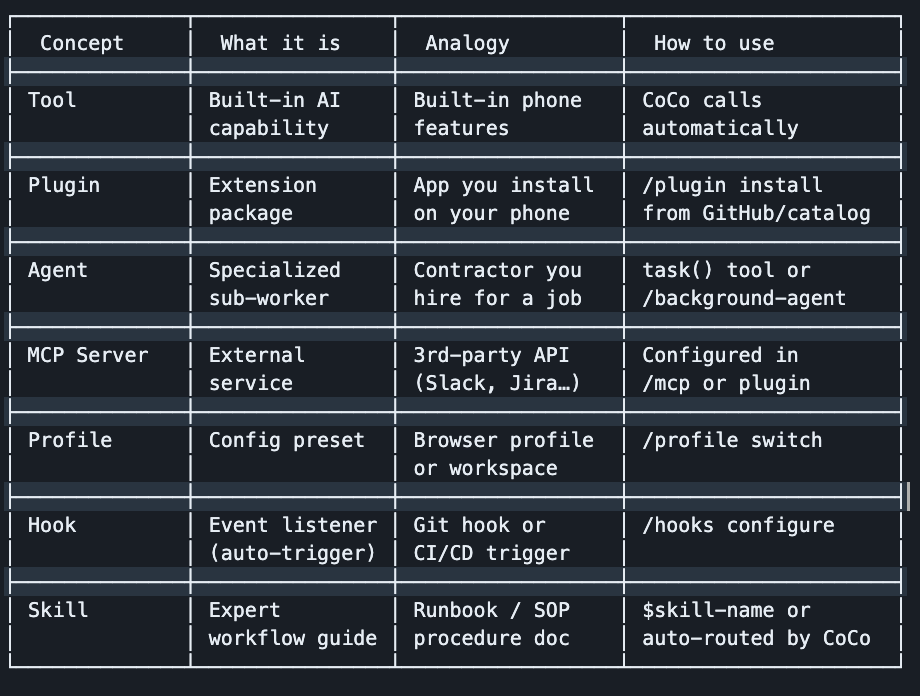
Side-by-Side Comparison并排对比
How They All Connect它们是如何关联的
In one sentence each:用一句话概括:
- Tool — what CoCo can do (read files, run SQL, search web)工具 (Tool) — CoCo 能做什么(读取文件、运行 SQL、搜索网络)
- Plugin — a package bundling skills + MCP servers + hooks together插件 (Plugin) — 将技能 + MCP 服务器 + 钩子打包在一起的集合
- Agent — a sub-worker CoCo delegates complex tasks to智能体 (Agent) — CoCo 委派复杂任务的子工作者
- MCP Server — an external service (Slack, Jira, etc.) CoCo can talk toMCP 服务器 (MCP Server) — CoCo 可以交互的外部服务(Slack、Jira 等)
- Profile — a configuration preset for different projects/roles配置文件 (Profile) — 针对不同项目/角色的配置预设
- Hook — an automatic trigger that runs shell commands on events钩子 (Hook) — 在事件发生时运行 Shell 命令的自动触发器
- Skill — a domain expert playbook that tells CoCo exactly how to handle a specific task技能 (Skill) — 告诉 CoCo 如何处理特定任务的领域专家手册
References:参考资料:
ABOUT THE AUTHOR
Dipal Mahajan is a Sr. Technical Architect at Snowflake, specializing in solving business problems. He focuses on platform architecture, scalable data cost effective solutions, and AI-powered workflows, helping enterprise teams extract maximum value from the Data Cloud.Dipal Mahajan 是 Snowflake 的高级技术架构师,专注于解决商业问题。他专注于平台架构、可扩展且具成本效益的数据解决方案以及 AI 驱动的工作流,帮助企业团队从数据云中获取最大价值。