


Today we are proud to announce the availability of TypeScript 7, a 10x faster native port of TypeScript!今天,我们非常自豪地宣布 TypeScript 7 正式发布!这是 TypeScript 的原生移植版本,速度提升了 10 倍。
Since its early days, TypeScript has promised to deliver on JavaScript that scales. By bringing strong type-checking and rich tooling to the world of JavaScript, TypeScript made it possible to build non-trivial high-quality apps across platforms.自诞生之初,TypeScript 就致力于提供可扩展的 JavaScript 开发体验。通过为 JavaScript 世界引入强大的类型检查和丰富的工具支持,TypeScript 让构建高质量、大规模的跨平台应用成为可能。
Last year, our team unveiled TypeScript’s next step in scaling: making every part of the toolset an order of magnitude faster. The mission was a native port of TypeScript built in Go that could make the most of modern hardware. This port was done as faithfully as possible, writing new code while maintaining the structure and logic of the original codebase to keep results consistent and compatible between the two compilers. The key difference is that with this new codebase, TypeScript 7 brings native code speed, shared memory multithreading, and a number of new optimizations that typically yield speedups between 8x and 12x on full builds.去年,我们的团队公布了 TypeScript 扩展能力的下一步计划:将工具链的每个部分性能提升一个数量级。我们的使命是使用 Go 语言对 TypeScript 进行原生移植,以充分利用现代硬件的性能。在移植过程中,我们尽可能保持忠实,在编写新代码的同时保留了原始代码库的结构和逻辑,从而确保两个编译器之间的结果保持一致且兼容。最关键的区别在于,凭借这一全新的代码库,TypeScript 7 带来了原生代码级的速度、共享内存多线程支持,以及多项新优化,通常能使完整构建速度提升 8 到 12 倍。
Just as with any other release, TypeScript 7 is available via npm:与以往的任何版本一样,TypeScript 7 可通过 npm 获取:
npm install -D typescript
That will get you the new tsc executable in your workspace (which you can run via npx tsc).
Of course, a big part of the TypeScript experience is also about editor support.
Your favorite code editor should easily support TypeScript 7 with its new support for the language server protocol (LSP), and its new speed and multithreading improvements.
Whether you’re using something like VS Code, Visual Studio, WebStorm, or any other modern editor, TypeScript 7 should work great.
Just check your editor’s documentation – for example, VS Code has a dedicated extension for TypeScript 7 that you can use today, and Visual Studio will automatically enable TypeScript 7 based on your workspace.这将在你的工作区中获取新的 tsc 可执行文件(你可以通过 npx tsc 运行它)。当然,TypeScript 体验的重要组成部分还包括编辑器支持。你最喜爱的代码编辑器应该能通过对语言服务器协议 (LSP) 的新支持,以及 TypeScript 7 的速度和多线程改进,轻松实现对它的支持。无论你使用的是 VS Code、Visual Studio、WebStorm 还是其他任何现代编辑器,TypeScript 7 都应该能完美运行。只需查看编辑器的文档即可——例如,VS Code 有一个专门的 TypeScript 7 扩展插件,你可以立即使用;而 Visual Studio 将根据你的工作区自动启用 TypeScript 7。
What Does A Faster TypeScript Mean?更快的 TypeScript 意味着什么? 复制链接
A faster TypeScript sounds great on paper, but what does it mean in practice? Maybe it helps to think about where TypeScript comes up at every stage of development.更快的 TypeScript 在理论上听起来很棒,但在实践中意味着什么呢?或许可以从 TypeScript 在开发各个阶段的作用来思考。
A typical day of development might involve opening your editor, opening a TypeScript file, and running an operation like find-all-references across your projects.
Then as you’d start to make edits, maybe you’d expect auto-completions to pop up, and get red squiggles on the fly as you’d make edits.
When you (and more recently, perhaps an AI agent) were ready to build your project, you’d run tsc, check the output for errors, and then run your generated code somehow.在日常开发中,你可能会打开编辑器、打开一个 TypeScript 文件,并运行诸如“查找所有引用 (find-all-references)”之类的操作。当你开始编辑时,你可能希望自动补全功能能够即时弹出,并在编辑时实时看到红色波浪线提示。当你(或者最近可能出现的 AI 代理)准备构建项目时,你会运行 tsc,检查输出的错误,然后以某种方式运行生成的代码。
A faster TypeScript means every part above is streamlined.
Waiting for your editor to fully load your project will feel instantaneous.
Delays on find-all-references, auto-completion, and diagnostics should take a fraction of the time they used to.
And when you run tsc, maybe in --watch mode, you’ll be able to tighten your feedback loop and iterate faster than ever before.更快的 TypeScript 意味着上述每个环节都得到了精简。等待编辑器完全加载项目的感觉将变得瞬时完成。查找所有引用、自动补全和诊断的延迟将缩短至原来的几分之一。当你运行 tsc(或许是在 --watch 模式下)时,你将能够缩短反馈循环,比以往任何时候都更快地进行迭代。
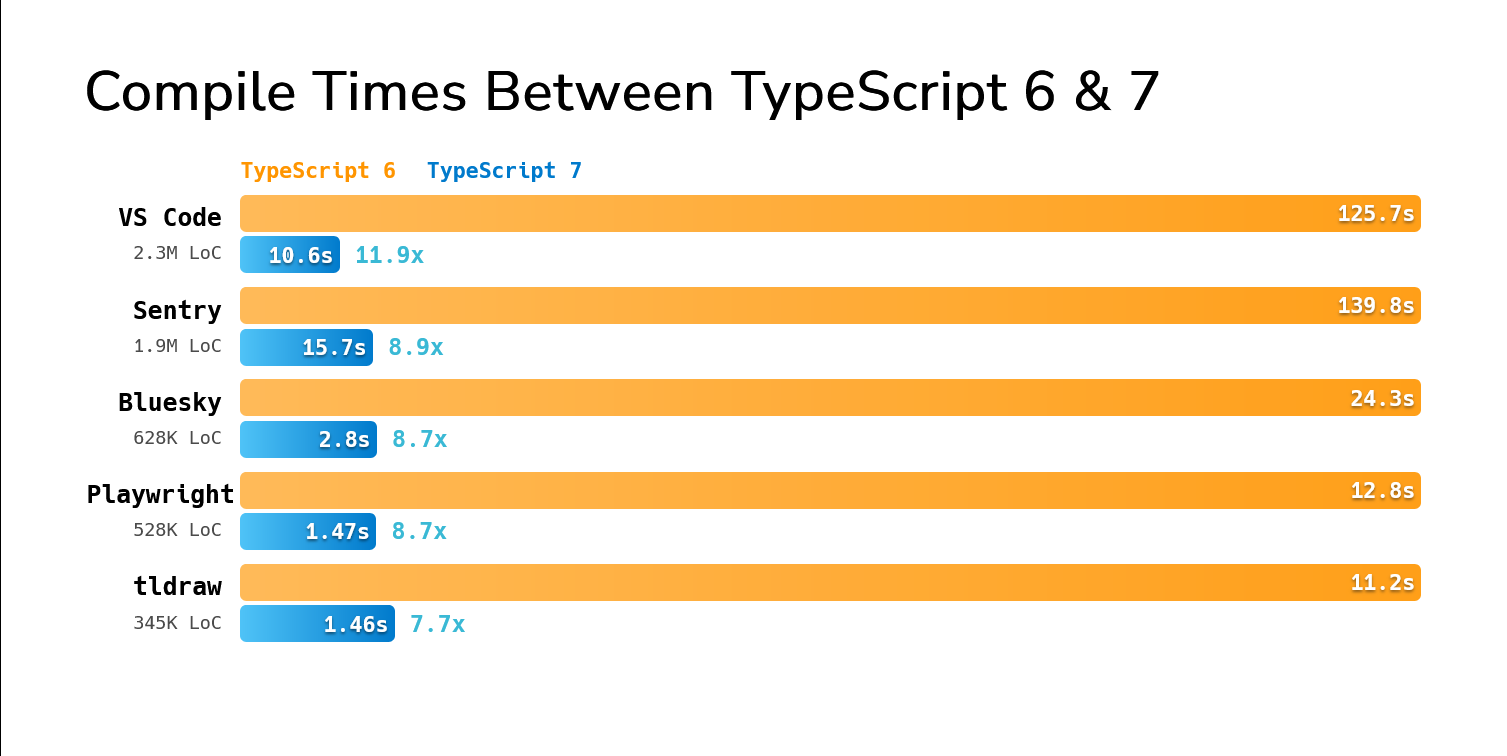
You can see this on real-world projects. In fact, you can try comparing on a few open-source projects yourself. Here are the build times of running TypeScript 6 and 7 on some fairly large open source codebases.你可以在真实世界的项目中看到这一点。事实上,你可以尝试在一些开源项目上亲自对比一下。以下是在一些相当大的开源代码库上运行 TypeScript 6 和 7 的构建时间对比。
| Codebase | TypeScript 6 | TypeScript 7 | Speedup |
|---|---|---|---|
| vscode | 125.7s | 10.6s | 11.9x |
| sentry | 139.8s | 15.7s | 8.9x |
| bluesky | 24.3s | 2.8s | 8.7x |
| playwright | 12.8s | 1.47s | 8.7x |
| tldraw | 11.2s | 1.46s | 7.7x |
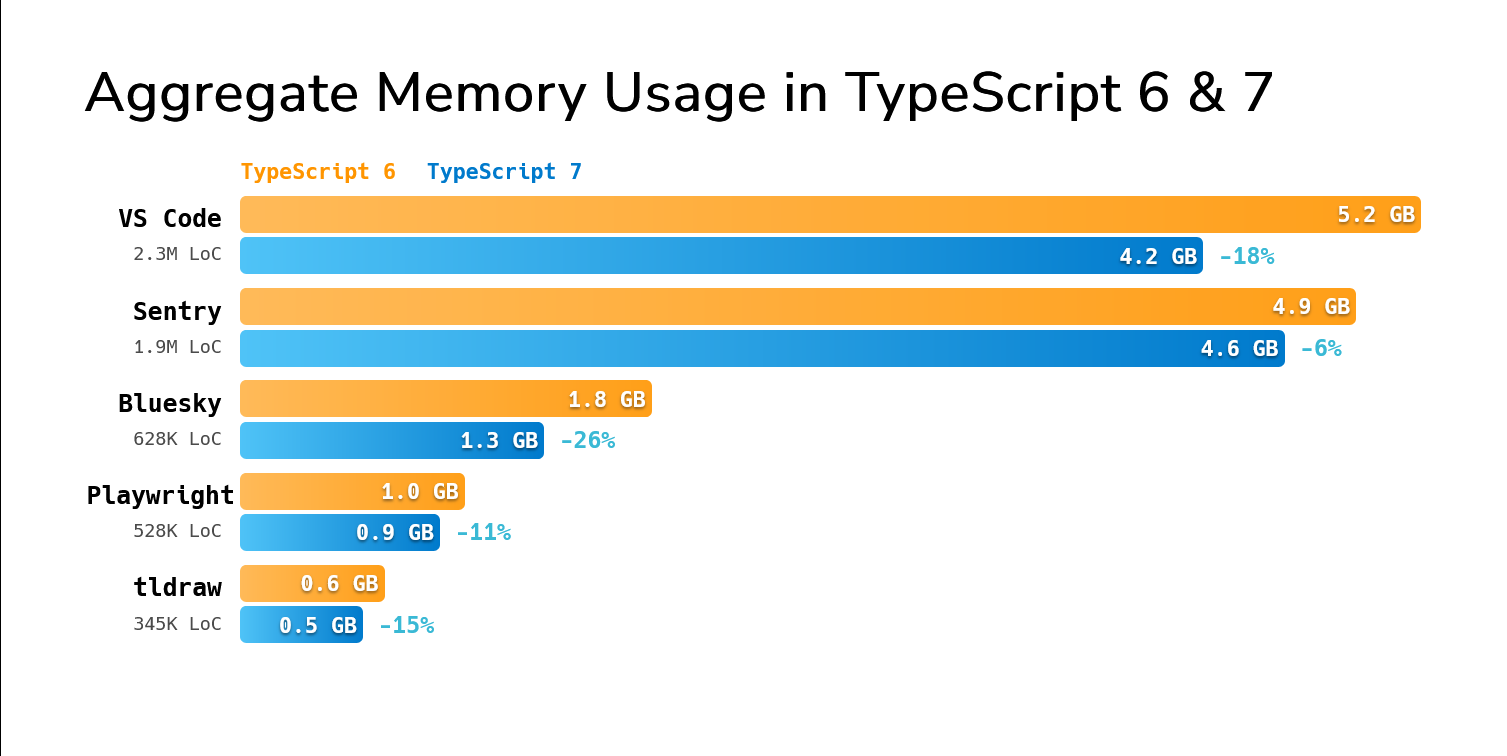
TypeScript 7 also typically does better while asking for less aggregate memory over the span of a build.TypeScript 7 在构建过程中通常表现更好,且占用的内存总量也更少。
| Codebase | TypeScript 6 | TypeScript 7 | Memory Delta |
|---|---|---|---|
| vscode | 5.2GB | 4.2GB | -18% |
| sentry | 4.9GB | 4.6GB | -6% |
| bluesky | 1.8GB | 1.3GB | -26% |
| playwright | 1.0GB | 0.9GB | -11% |
| tldraw | 0.6GB | 0.5GB | -15% |
Of course, there’s more to the experience than the full build. On the same computer, opening a file with an error in the VS Code codebase would previously take about 17.5 seconds from the time you opened the editor to the time you saw the first error. With TypeScript 7, it’s under 1.3 seconds – over 13x faster.当然,完整的构建体验远不止这些。在同一台计算机上,在 VS Code 代码库中打开一个包含错误的文件,以前从打开编辑器到看到第一个错误大约需要 17.5 秒。而使用 TypeScript 7,这个时间缩短到了 1.3 秒以内——速度提升了 13 倍以上。
Battle-Tested and Ready for Production久经考验,可用于生产环境 复制链接
The TypeScript project contains tens of thousands of tests built over more than a decade that run on every commit on our main branch.
They’ve ensured every one of our releases is stable and reliable.TypeScript 项目包含数万个在过去十多年间构建的测试用例,这些测试在主分支的每次提交时都会运行。它们确保了我们每一个版本的稳定性和可靠性。
But TypeScript 7 is no ordinary release. Beyond our test suite, we’ve leveraged a number of different resources to make sure TypeScript 7 is solid for production use.但 TypeScript 7 并非普通版本。除了我们的测试套件外,我们还利用了许多不同的资源来确保 TypeScript 7 在生产环境中使用时足够稳健。
Over the last year we’ve worked with many large teams internally and externally to test TypeScript 7 on real-world codebases. The results have been overwhelmingly positive, with entire companies reporting that TypeScript 7 has been stable, fast, and easy to adopt. For example, the VS Code team recently highlighted their experience with TypeScript 7’s preview releases to move faster in their development cycle. We’ve also worked with Microsoft teams like Loop, Office, PowerBI, Teams, and Xbox to ensure that TypeScript is ready for the largest of codebases. Likewise, companies like Bloomberg, Canva, Figma, Google, Lattice, Linear, Miro, Notion, Sentry, Slack, Vanta, Vercel, VoidZero, and more have worked with us to test TypeScript 7 on their codebases and given us feedback to make it better.在过去的一年里,我们与内部和外部的许多大型团队合作,在真实世界的代码库上测试了 TypeScript 7。结果非常积极,整个公司都反馈称 TypeScript 7 稳定、快速且易于采用。例如,VS Code 团队最近强调了他们使用 TypeScript 7 预览版的体验,这使他们的开发周期得以加快。我们还与微软内部的 Loop、Office、PowerBI、Teams 和 Xbox 等团队合作,确保 TypeScript 能够胜任最庞大的代码库。同样,Bloomberg、Canva、Figma、Google、Lattice、Linear、Miro、Notion、Sentry、Slack、Vanta、Vercel、VoidZero 等公司也与我们合作,在他们的代码库上测试了 TypeScript 7,并提供了反馈以帮助我们改进。
Additionally, we’ve rebuilt much of our broader test infrastructure to run on TypeScript 7. TypeScript 6 and earlier had automated and on-demand testing for TypeScript and JavaScript projects on GitHub to detect regressions in the compiler and language service. The same testing is back, and running against TypeScript 7, finding issues in real codebases so we can find gaps in our core test suite and ship a better experience.此外,我们重构了大部分更广泛的测试基础设施,以在 TypeScript 7 上运行。TypeScript 6 及更早版本在 GitHub 上为 TypeScript 和 JavaScript 项目提供了自动化和按需测试,以检测编译器和语言服务中的回归问题。同样的测试已经回归,并针对 TypeScript 7 运行,在真实代码库中发现问题,从而帮助我们找出核心测试套件中的漏洞并提供更好的体验。
The combination of explicit feedback, automated crash reports, and aggressive testing has made a measurable difference in quality. In fact, our data insights have shown us that TypeScript 7.0’s new language server has actually reduced failing language server commands by over 80%, and reduced server crashes by over 60% compared to that of TypeScript 6.0.明确的反馈、自动崩溃报告和积极的测试相结合,带来了可衡量的质量提升。事实上,我们的数据洞察显示,与 TypeScript 6.0 相比,TypeScript 7.0 的新语言服务器将失败的语言服务器命令减少了 80% 以上,将服务器崩溃次数减少了 60% 以上。
We’ve also heard some incredible feedback from teams at scale:我们也收到了一些来自大规模团队的惊人反馈:
- Slack engineers have told us that TypeScript 7 eliminated 40% of their merge queue time and brought type-checking time in CI from about 7.5 minutes to 1.25 minutes. Local development in the editor was previously almost “unusable” due to language server load times and engineers would typically let CI do a full type-check. TypeScript 7 has been able to load the same codebase in a few seconds and made local type-checking feasible again.Slack 的工程师告诉我们,TypeScript 7 消除了他们 40% 的合并队列时间,并将 CI 中的类型检查时间从约 7.5 分钟缩短至 1.25 分钟。由于语言服务器加载时间过长,编辑器中的本地开发以前几乎“无法使用”,工程师通常会让 CI 进行完整的类型检查。TypeScript 7 能够在几秒钟内加载同一个代码库,使得本地类型检查再次变得可行。
- Builds at Vanta have dramatically improved, showing a speedup of up to 9x faster on one of their biggest projects.Vanta 的构建速度得到了显著改善,在他们最大的项目之一上,速度提升了高达 9 倍。
- Similarly, the News Services team at Microsoft told us that adopting TypeScript 7 saved them 400 hours a month waiting for CI builds.同样,微软新闻服务团队告诉我们,采用 TypeScript 7 每月为他们节省了 400 小时的 CI 构建等待时间。
- Last year, engineers working on PowerBI described TypeScript 7 in the editor as “life-saving” for working on their codebase. They adopted the experience as a default even before TypeScript 7 supported rename functionality in VS Code.去年,负责 PowerBI 的工程师形容编辑器中的 TypeScript 7 对他们的代码库工作来说是“救命稻草”。甚至在 TypeScript 7 支持 VS Code 中的重命名功能之前,他们就已经将其作为默认体验。
- Developers working on Loop’s monorepo were also ecstatic. The previous editor experience was described as unusable at their scale, whereas the TypeScript 7 experience has been “amazing” to use.在 Loop 的单体仓库中工作的开发人员也感到非常兴奋。他们形容以前的编辑器体验在他们的规模下无法使用,而 TypeScript 7 的体验则“令人惊叹”。
- Canva developers have told us that TypeScript 7’s language service shows dramatic speedups, going from about 58 seconds to seeing the first error in their editors to about 4.8 seconds.Canva 的开发人员告诉我们,TypeScript 7 的语言服务显示出巨大的速度提升,在编辑器中看到第一个错误的时间从约 58 秒缩短到了约 4.8 秒。
Running Side-by-Side with TypeScript 6.0与 TypeScript 6.0 并行运行 复制链接
While TypeScript 7.0 is here, it does not ship with an API. We expect TypeScript 7.1 to ship with a new (and different) API, but until then we have made it a priority to ensure TypeScript can be run side-by-side with TypeScript 6.0 for utilities that still need some programmatic access to the compiler (such as typescript-eslint).虽然 TypeScript 7.0 已经发布,但它目前不附带 API。我们预计 TypeScript 7.1 将发布一个新的(且不同的)API,但在那之前,我们优先确保 TypeScript 可以与 TypeScript 6.0 并行运行,以支持那些仍需要以编程方式访问编译器的工具(例如 typescript-eslint)。
As part of the 6.0/7.0 transition process, we’ve published a new compatibility package, @typescript/typescript6.
This package provides an executable named tsc6, so that if needed, you can install TypeScript 7.0 (which ships its own tsc binary) side-by-side without naming conflicts.
The new package also re-exports the TypeScript 6.0 API, so that you can use tsc for TypeScript 7, while other tooling can continue to rely on 6.0.作为 6.0/7.0 过渡过程的一部分,我们发布了一个新的兼容性包 @typescript/typescript6。该包提供了一个名为 tsc6 的可执行文件,因此如果需要,你可以并行安装 TypeScript 7.0(它自带 tsc 二进制文件),而不会出现命名冲突。新包还重新导出了 TypeScript 6.0 API,这样你就可以将 tsc 用于 TypeScript 7,同时其他工具可以继续依赖 6.0 版本。
Because some tools like typescript-eslint expect to import from typescript directly via peer dependencies, we recommend achieving this via npm aliases.
You should be able to run the following command由于某些工具(如 typescript-eslint)期望通过对等依赖项直接从 typescript 导入,我们建议通过 npm 别名来实现这一点。你应该能够运行以下命令
npm install -D typescript@npm:@typescript/typescript6
or modify your package.json as follows:或者按如下方式修改你的 package.json:
{
  "devDependencies": {
    "typescript": "npm:@typescript/typescript6@^6.0.2",
  }
}
Note that doing this will leave you only with a tsc6 executable.
To get 7.0’s tsc, you can add another alias for TypeScript 7 and npx tsc will just work with 7.0:请注意,这样做只会留下一个 tsc6 可执行文件。要获取 7.0 的 tsc,你可以为 TypeScript 7 添加另一个别名,这样 npx tsc 就能直接与 7.0 配合使用:
{
  "devDependencies": {
    "@typescript/native": "npm:typescript@^7.0.2",
    "typescript": "npm:@typescript/typescript6@^6.0.2"
  }
}
Nightly Builds and @typescript/native-preview每日构建版本与 @typescript/native-preview
复制链接
Until now, most developers have installed TypeScript 7 via the @typescript/native-preview package.
This package shipped nightly builds of the new codebase, and has served the community well with over 8.5 million weekly downloads!到目前为止,大多数开发人员是通过 @typescript/native-preview 包安装 TypeScript 7 的。该包发布了新代码库的每日构建版本,并且每周下载量超过 850 万次,为社区提供了很好的服务!
However, going forward, nightly builds will soon resume under the standard typescript package with the next tag.
You can install it with:然而,展望未来,每日构建版本很快将恢复到标准的 typescript 包下,并使用 next 标签。你可以通过以下命令安装它:
npm install -D typescript@next
Custom Scaling: Parallelization and Controls自定义扩展:并行化与控制 复制链接
TypeScript 7.0 now performs many steps in parallel, including parsing, type-checking, and emitting. Some of these steps, like parsing and emitting can mostly be done independently across files. As such, parallelization automatically scales well with larger codebases with relatively little overhead. But not every step in a TypeScript build is easily parallelizable.TypeScript 7.0 现在可以并行执行许多步骤,包括解析、类型检查和生成代码。其中一些步骤(如解析和生成)大多可以在文件之间独立完成。因此,并行化可以随着代码库的增大而自动扩展,且开销相对较小。但 TypeScript 构建中的并非每个步骤都能轻易并行化。
TypeScript 7 introduces the experimental --checkers and --builders flags to fine-tune the parallelization behavior for less-trivial steps like type-checking and project reference building.
It also introduces a --singleThreaded flag to disable parallelization entirely, which can be useful for debugging or running in environments with limited resources.TypeScript 7 引入了实验性的 --checkers 和 --builders 标志,用于微调类型检查和项目引用构建等非平凡步骤的并行化行为。它还引入了一个 --singleThreaded 标志来完全禁用并行化,这对于调试或在资源受限的环境中运行非常有用。
Type-Checker Parallelization类型检查器并行化 复制链接
Other steps, like type-checking, have more complex dependencies across files. Most files end up relying on the same type information from their dependencies and the global scope, and so running type-checkers completely independently would be wasteful – both in computation and memory. On the other hand, type-checking occasionally relies on the relative ordering of information in a program, and so type-checking from scratch must always check the same files in an identical order to ensure the same results.其他步骤(如类型检查)在文件之间有更复杂的依赖关系。大多数文件最终都依赖于来自其依赖项和全局作用域的相同类型信息,因此完全独立地运行类型检查器将是浪费——无论是在计算还是内存方面。另一方面,类型检查有时依赖于程序中信息的相对顺序,因此从头开始进行类型检查时,必须始终以相同的顺序检查相同的文件,以确保结果一致。
To enable parallelization while avoiding these pitfalls, TypeScript 7.0 creates a fixed number of type-checker workers with their own view of the world. These type-checking workers may end up duplicating some common work, but given the same input files, they will always divide them identically and produce the same results.为了在避免这些陷阱的同时实现并行化,TypeScript 7.0 创建了固定数量的类型检查工作进程,它们拥有各自的视图。这些类型检查工作进程最终可能会重复一些常见的工作,但给定相同的输入文件,它们总是会以相同的方式划分并产生相同的结果。
The default number of type-checking workers is 4, but it can be configured with the new --checkers flag.
You may find that increasing this number can further speed up builds on larger codebases where typical machines have more CPU cores, but will typically come at the cost of increased memory usage.
For example, in the table above, we ran TypeScript 7 with its default of --checkers 4.
Here’s what the results look like on the same machine with --checkers 8.类型检查工作进程的默认数量为 4,但可以通过新的 --checkers 标志进行配置。你可能会发现,在典型机器拥有更多 CPU 核心的大型代码库上,增加此数字可以进一步加快构建速度,但通常会以增加内存使用量为代价。例如,在上面的表格中,我们使用默认的 --checkers 4 运行了 TypeScript 7。以下是在同一台机器上使用 --checkers 8 时的结果。
| Codebase | TypeScript 6 | TypeScript 7
(--checkers 8) |
Speedup |
|---|---|---|---|
| vscode | 125.7s | 7.51s | 16.7x |
| sentry | 139.8s | 12.08s | 11.6x |
| bluesky | 24.3s | 2.01s | 12.1x |
| playwright | 12.8s | 1.16s | 11x |
| tldraw | 11.2s | 1.06s | 10.6x |
As you can see, these codebases get a better speedup from dedicating more cores, but results will differ across projects and underlying machines.如你所见,这些代码库通过分配更多的核心获得了更好的速度提升,但结果会因项目和底层机器的不同而有所差异。
On the other hand, on machines with fewer CPU cores and less memory (e.g. CI runners) you may want to decrease this number to avoid unnecessary or incidental overhead.
You can specify a value as low as --checkers 1, effectively making type-checking single-threaded and eliminating duplicate work.另一方面,在 CPU 核心和内存较少的机器上(例如 CI 运行器),你可能希望减少此数字以避免不必要或附带的开销。你可以指定低至 --checkers 1 的值,从而有效地使类型检查变为单线程,并消除重复工作。
In rare cases, varying the number of --checkers may surface order-dependent results.
Specifying a fixed number of checkers across build environments can help ensure everyone is getting the same results, but is up to the discretion of your team.在极少数情况下,改变 --checkers 的数量可能会导致依赖顺序的结果。在构建环境中指定固定数量的检查器有助于确保每个人都能得到相同的结果,但这取决于你们团队的决定。
Project Reference Builder Parallelization项目引用构建器并行化 复制链接
TypeScript 7.0 can parallelize builds within a project, but it can now also build multiple projects at once as well.
This behavior can be configured with the new --builders flag, which controls the number of parallel project reference builders that can run at once when running under --build.
This can be particularly helpful for monorepos with many projects.TypeScript 7.0 不仅可以并行化项目内的构建,现在还可以同时构建多个项目。此行为可以通过新的 --builders 标志进行配置,该标志控制在 --build 模式下运行时可以同时运行的并行项目引用构建器的数量。这对于拥有许多项目的单体仓库特别有用。
Like --checkers, increasing the number of builders can speed up builds, but may come at the cost of increased memory usage.
It also has a multiplicative effect with --checkers, so it’s important to find the right balance for your machine and codebase.
For example, building with --checkers 4 --builders 4 allows up to 16 type-checkers to run at once, which may be excessive.与 --checkers 一样,增加构建器的数量可以加快构建速度,但也可能以增加内存使用量为代价。它与 --checkers 也有乘法效应,因此为你的机器和代码库找到合适的平衡点非常重要。例如,使用 --checkers 4 --builders 4 进行构建允许同时运行多达 16 个类型检查器,这可能有些过头了。
Unlike --checkers, varying the number of builders should not produce different results;
however, building project references is fundamentally bottlenecked by the dependency graph of projects (with the exception of type-checking on codebases that leverage --isolatedDeclarations and separate syntactic declaration file emit).与 --checkers 不同,改变构建器的数量不应产生不同的结果;然而,项目引用构建从根本上受到项目依赖图的瓶颈限制(在使用 --isolatedDeclarations 和单独的语法声明文件生成代码库进行类型检查时除外)。
Single-Threaded Mode单线程模式 复制链接
In some cases, it can be helpful to enforce single-threaded operation throughout the compiler.
This may be useful for debugging, comparing performance with TypeScript 6 and 7, when orchestrating parallel builds externally, or for running in environments with very limited resources.
To enable single-threaded mode, you can use the new --singleThreaded flag.
This will not only cap the number of type-checking workers to 1, but also ensure parsing and emitting are done in a single thread.在某些情况下,强制整个编译器以单线程运行会很有帮助。这对于调试、对比 TypeScript 6 和 7 的性能、在外部协调并行构建,或者在资源非常有限的环境中运行非常有用。要启用单线程模式,你可以使用新的 --singleThreaded 标志。这不仅会将类型检查工作进程的数量限制为 1,还会确保解析和生成代码都在单个线程中完成。
Improved --watch Mode改进的 --watch 模式
复制链接
TypeScript 7 ships with a completely rebuilt --watch mode.
--watch is now powered by a new foundation based on the Parcel bundler’s file-watcher that provides efficient and stable cross-platform file watching capabilities.TypeScript 7 附带了一个完全重构的 --watch 模式。--watch 现在由基于 Parcel 打包器文件监视器的新基础架构提供支持,该架构提供了高效且稳定的跨平台文件监视功能。
When our team set out to port our file watching logic, we encountered a few challenges with cross-platform file watching in Go.
The standard library doesn’t provide a built-in file watching API, and existing third-party libraries we explored had various issues with stability, performance, cross-platform support, or issues with build tooling integration.
We were able to build solutions around polling periodically to check for file changes, and this worked broadly across operating systems;
however it was computationally expensive, especially at larger-scale projects with many dependencies in node_modules.
Even with dynamic scheduling strategies, we found that pure-polling solutions were too taxing for general use.当我们的团队着手移植文件监视逻辑时,我们在 Go 语言的跨平台文件监视方面遇到了一些挑战。标准库没有提供内置的文件监视 API,而我们探索的现有第三方库在稳定性、性能、跨平台支持或与构建工具集成方面存在各种问题。我们能够通过定期轮询来检查文件更改来构建解决方案,这在各个操作系统上都能广泛工作;然而,它的计算成本很高,特别是在 node_modules 中有许多依赖项的大型项目中。即使采用了动态调度策略,我们也发现纯轮询解决方案对于通用场景来说负担太重。
For many years, Visual Studio Code has relied on @parcel/watcher, and in recent years TypeScript in VS Code has relied on its file watching capabilities indirectly.
While it seemed promising, one of the problems for us with Parcel’s watcher is that it’s written in C++, and in turn requires a full C++ toolchain to build.
Given our positive experience with Parcel’s watcher in VS Code, we explored porting it to Go with a few minimal assembly shims to avoid introducing a new toolchain dependency.多年来,Visual Studio Code 一直依赖 @parcel/watcher,近年来 VS Code 中的 TypeScript 也间接依赖了它的文件监视功能。虽然这看起来很有前景,但 Parcel 监视器对我们来说的一个问题是它是用 C++ 编写的,因此需要完整的 C++ 工具链来构建。鉴于我们在 VS Code 中使用 Parcel 监视器的积极体验,我们探索了将其移植到 Go 语言,并使用了一些最小的汇编垫片,以避免引入新的工具链依赖。
The exploration has been a success – what started as a very direct translation from C++ to Go was further refined into idiomatic Go that still passes the ported test suite.
The watcher is a self-contained package that has allowed us to keep a clean separation of concerns between what we care to watch and why.
We are now seeing significant resource improvements in --watch mode across platforms, and have been hearing positive feedback from earlier users of TypeScript 7.这次探索取得了成功——最初是从 C++ 到 Go 的直接翻译,后来被进一步优化为惯用的 Go 代码,并且仍然通过了移植的测试套件。该监视器是一个独立的包,使我们能够保持对“监视什么”和“为什么监视”的清晰关注点分离。我们现在看到 --watch 模式在各个平台上的资源占用都有显著改善,并且已经收到了 TypeScript 7 早期用户的积极反馈。
We’d like to extend our thanks to Devon Govett whose work on Parcel has provided immense benefits to both the Visual Studio Code and TypeScript projects. We hope this port will provide opportunities and insights for the original Parcel watcher codebase over time.我们要向 Devon Govett 表示感谢,他在 Parcel 上的工作为 Visual Studio Code 和 TypeScript 项目都带来了巨大的好处。我们希望这次移植能随着时间的推移为原始的 Parcel 监视器代码库提供机会和见解。
Updates Since 5.x, and New Behaviors from 6.05.x 以来的更新以及 6.0 的新行为 复制链接
TypeScript 7.0 is made to be compatible with TypeScript 6.0’s type-checking and command-line behavior.
Practically any TypeScript code that compiles cleanly with TypeScript 6.0 (with the stableTypeOrdering flag on, and without any ignoreDeprecations flag set) should compile identically in TypeScript 7.0.TypeScript 7.0 旨在与 TypeScript 6.0 的类型检查和命令行行为兼容。实际上,任何在 TypeScript 6.0 中能干净编译(开启 stableTypeOrdering 标志,且未设置任何 ignoreDeprecations 标志)的 TypeScript 代码,在 TypeScript 7.0 中都应该能以相同的方式编译。
With that said, TypeScript 7.0 adopts 6.0’s new defaults, and provides hard errors in the face of any flags and constructs deprecated in TypeScript 6.0. This is notable as 6.0 is still relatively new, and many projects will need to adapt to its new behaviors. We encourage developers to adopt TypeScript 6.0 to make the transition to TypeScript 7.0 easier, and you can also read the TypeScript 6.0 release blog post for more details on these deprecations.话虽如此,TypeScript 7.0 采用了 6.0 的新默认设置,并对 TypeScript 6.0 中弃用的任何标志和构造提供强制错误。这一点值得注意,因为 6.0 仍然相对较新,许多项目将需要适应其新行为。我们鼓励开发人员采用 TypeScript 6.0 以使向 TypeScript 7.0 的过渡更容易,你也可以阅读 TypeScript 6.0 的发布博客文章以了解有关这些弃用内容的更多详细信息。
At a glance, the notable default changes to configuration are:概括来说,配置方面值得注意的默认更改包括:
strictistrueby default.strict 默认为 true。moduledefaults toesnext.module 默认为 esnext。targetdefaults to the current stable ECMAScript version immediately precedingesnext.target 默认为紧接在 esnext 之前的当前稳定 ECMAScript 版本。noUncheckedSideEffectImportsistrueby default.noUncheckedSideEffectImports 默认为 true。libReplacementisfalseby default.libReplacement 默认为 false。stableTypeOrderingistrueby default, and cannot be turned off.stableTypeOrdering 默认为 true,且无法关闭。rootDirnow defaults to./, and inner source directories must be explicitly set.rootDir 现在默认为 ./,内部源目录必须显式设置。typesnow defaults to[], and the old behavior can be restored by setting it to["*"].types 现在默认为 [],可以通过将其设置为 ["*"] 来恢复旧行为。
We believe the rootDir and types changes may be the most “surprising” changes, but they can be mitigated easily.
Projects where the tsconfig.json sits outside of a directory like src will simply need to include rootDir to preserve the same directory structure.我们认为 rootDir 和 types 的更改可能是最“令人惊讶”的,但它们很容易缓解。tsconfig.json 位于 src 等目录之外的项目只需包含 rootDir 即可保持相同的目录结构。
  {
      "compilerOptions": {
          // ...
+         "rootDir": "./src"
      },
      "include": ["./src"]
  }
For the types change, projects that depend on specific global declarations will need to list them explicitly. For example,对于 types 的更改,依赖特定全局声明的项目需要显式列出它们。例如,
  {
      "compilerOptions": {
          // Explicitly list the @types packages you need (e.g. bun, mocha, jasmine, etc.)
+         "types": ["node", "jest"]
      }
  }
The deprecations that have turned into hard errors with no-op behavior are:已转变为强制错误且无操作行为的弃用内容包括:
target: es5is no longer supported.target: es5 不再受支持。downlevelIterationis no longer supported.downlevelIteration 不再受支持。moduleResolution: node/node10are no longer supported, withnodenextandbundlerbeing recommended instead.moduleResolution: node/node10 不再受支持,建议改用 nodenext 和 bundler。module: amd, umd, systemjs, noneare no longer supported, withesnextorpreservebeing recommended in conjunction with bundlers or browser-based module resolution.module: amd, umd, systemjs, none 不再受支持,建议结合打包器或基于浏览器的模块解析使用 esnext 或 preserve。baseUrlis no longer supported, andpathscan be updated to be relative to the project root instead ofbaseUrl.baseUrl 不再受支持,路径可以更新为相对于项目根目录,而不是 baseUrl。moduleResolution: classicis no longer supported, andbundlerornodenextare the recommended replacements.moduleResolution: classic 不再受支持,建议改用 bundler 或 nodenext。esModuleInteropandallowSyntheticDefaultImportscannot be set tofalse.esModuleInterop 和 allowSyntheticDefaultImports 不能设置为 false。alwaysStrictis assumed to betrueand can no longer be set tofalse.alwaysStrict 被假定为 true,且不能再设置为 false。- The
modulekeyword cannot be used in namespace declarations.module 关键字不能用于命名空间声明中。 - The
assertskeyword cannot be used on imports, and must use thewithkeyword instead (to align with developments on ECMAScript’s import attribute syntax).asserts 关键字不能用于导入,必须改用 with 关键字(以符合 ECMAScript 导入属性语法的进展)。 /// <reference no-default-lib />directives are no longer respected underskipDefaultLibCheck./// <reference no-default-lib /> 指令在 skipDefaultLibCheck 下不再被尊重。- Command line builds cannot take file paths when the current directory contains a
tsconfig.jsonfile unless passed an explicit--ignoreConfigflag.当当前目录包含 tsconfig.json 文件时,除非传递显式的 --ignoreConfig 标志,否则命令行构建不能接受文件路径。
Template Literal Types Now Preserve Unicode Code Points模板字面量类型现在保留 Unicode 码位 复制链接
TypeScript 7.0 now treats Unicode code points more naturally when inferring from template literal types. For example:TypeScript 7.0 现在在从模板字面量类型进行推断时,能更自然地处理 Unicode 码位。例如:
type HeadTail<S> = S extends `${infer Head}${infer Tail}` ? [Head, Tail] : never;

type Result = HeadTail<"😀abc">;
//   ^
// In 7.0: ["😀", "abc"]
// Previously: ["\ud83d", "\ude00abc"]
Previously, TypeScript followed JavaScript’s UTF-16 indexing behavior here and split "😀" into two halves of a surrogate pair (\ud83d and \ude00).
That was technically consistent with indexing in JavaScript (e.g. the inferred Head type was equal to "😀abc"[0]), but it usually wasn’t what people intended, and could produce string literal types containing unpaired surrogates that aren’t semantically meaningful.以前,TypeScript 在这里遵循 JavaScript 的 UTF-16 索引行为,并将 "😀" 拆分为代理对的两半(\ud83d 和 \ude00)。这在技术上与 JavaScript 中的索引是一致的(例如,推断出的 Head 类型等于 "😀abc"[0]),但通常不是人们想要的,并且可能会产生包含在语义上无意义的未配对代理的字符串字面量类型。
This is a breaking change for type-level string manipulation that intentionally modeled UTF-16 code units, such as some string Length utilities.
In practice, we expect the new behavior to be more useful and less surprising: template literal inference now follows the same intuition as iterating a string with for...of or spreading it with [...str], where "😀" is treated as one unit.对于有意模拟 UTF-16 代码单元的类型级字符串操作(例如某些字符串长度工具),这是一个破坏性更改。在实践中,我们预计新行为将更有用且更少令人惊讶:模板字面量推断现在遵循与使用 for...of 迭代字符串或使用 [...str] 展开字符串相同的直觉,其中 "😀" 被视为一个单元。
JavaScript DifferencesJavaScript 差异 复制链接
As we ported the existing codebase, we also took the opportunity to revisit how our JavaScript support works.在移植现有代码库时,我们也借此机会重新审视了我们的 JavaScript 支持是如何工作的。
TypeScript originally supported JavaScript files by using JSDoc comments and recognizing certain code patterns for analysis and type inference.
Lots of the time, this was based on popular coding patterns, but occasionally it was based on whatever people might be writing that Closure and the JSDoc doc generating tool might understand.
While this approach was helpful for developers with loosely-written JSDoc codebases, it required a number of compromises and special cases to work well, and diverged in a number of ways from TypeScript’s analysis in .ts files.TypeScript 最初通过使用 JSDoc 注释并识别某些代码模式来进行分析和类型推断,从而支持 JavaScript 文件。很多时候,这是基于流行的编码模式,但有时也基于人们可能编写的、Closure 和 JSDoc 文档生成工具可能理解的任何内容。虽然这种方法对使用松散编写的 JSDoc 代码库的开发人员很有帮助,但它需要进行多次妥协和特殊处理才能良好工作,并且在许多方面与 TypeScript 在 .ts 文件中的分析方式存在分歧。
In TypeScript 7.0, we have reworked our JavaScript support to be more consistent with how we analyze TypeScript files. Some of the differences include:在 TypeScript 7.0 中,我们重构了 JavaScript 支持,使其与我们分析 TypeScript 文件的方式更加一致。一些差异包括:
- Values cannot be used where types are expected – instead, write
typeof someValue值不能在期望类型的地方使用——请改用 typeof someValue @enumis not specially recognized anymore – create a@typedefon(typeof YourEnumDeclaration)[keyof typeof YourEnumDeclaration].@enum 不再被特殊识别——请在 (typeof YourEnumDeclaration)[keyof typeof YourEnumDeclaration] 上创建一个 @typedef。- A standalone
?is no longer usable as a type – useanyinstead.独立的 ? 不再可用作类型——请改用 any。 @classdoes not make a function a constructor – use aclassdeclaration instead.@class 不会使函数成为构造函数——请改用类声明。- Postfix
!is not supported – just useT.后缀 ! 不受支持——只需使用 T。 - Type names must be defined within a
@typedeftag (i.e./** @typedef {T} TypeAliasName */), not adjacent to an identifier (i.e./** @typedef {T} */ TypeAliasName;).类型名称必须定义在 @typedef 标签内(即 /** @typedef {T} TypeAliasName */),而不是与标识符相邻(即 /** @typedef {T} */ TypeAliasName;)。 - Closure-style function syntax (e.g.
function(string): void) is no longer supported – use TypeScript shorthands instead (e.g.(s: string) => void).Closure 风格的函数语法(例如 function(string): void)不再受支持——请改用 TypeScript 的简写(例如 (s: string) => void)。
Additionally, some JavaScript patterns, like aliasing this and reassigning the entirety of a function’s prototype are no longer specially treated.此外,某些 JavaScript 模式,如别名 this 和重新分配函数的整个原型,也不再进行特殊处理。
While some of our JS support is in flux, we have been updating this CHANGES.md file to capture the differences between TypeScript 6.0 and 7.0 in more detail.虽然我们的 JS 支持仍在变动中,但我们一直在更新此 CHANGES.md 文件,以更详细地记录 TypeScript 6.0 和 7.0 之间的差异。
Editor Experience编辑器体验 复制链接
As we mentioned above, TypeScript 7.0’s performance improvements are not limited to the command line experience – they also extend to the editor experience too. For VS Code users, we have a dedicated extension for TypeScript 7. When you install this extension, it will automatically become the default experience. You can disable and re-enable it at any time with the “Disable TypeScript 7 Language Server” and “Enable TypeScript 7 Language Server” commands from the command palette. In the coming weeks support for TypeScript 7 will ship as part of VS Code itself.正如我们上面提到的,TypeScript 7.0 的性能改进不仅限于命令行体验,它们也扩展到了编辑器体验。对于 VS Code 用户,我们有一个专用的 TypeScript 7 扩展。当你安装此扩展时,它将自动成为默认体验。你可以随时通过命令面板中的“禁用 TypeScript 7 语言服务器”和“启用 TypeScript 7 语言服务器”命令来禁用和重新启用它。在接下来的几周内,对 TypeScript 7 的支持将作为 VS Code 本身的一部分发布。
For Visual Studio users, the latest version of the IDE will automatically enable TypeScript 7 based on your workspace. You won’t need to do anything differently.对于 Visual Studio 用户,最新版本的 IDE 将根据你的工作区自动启用 TypeScript 7。你不需要做任何不同的操作。
Of course, TypeScript 7 should work great in any editor of your choosing. The new foundation is built on the Language Server Protocol (LSP) and is able to leverage multiple threads to serve simultaneous requests as quickly as possible.当然,TypeScript 7 应该在你选择的任何编辑器中都能完美运行。新基础架构构建在语言服务器协议 (LSP) 之上,并能够利用多个线程尽可能快地处理并发请求。
Since it first debuted, we’ve added in missing functionality like auto-imports, expandable hovers, inlay hints, code lenses, go-to-source-definition, JSX linked editing and tag completions, and more. Missing features from TypeScript 7.0 beta, such as semantic highlighting, “sort imports”, “remove unused imports”, and more are now in.自首次亮相以来,我们添加了缺失的功能,如自动导入、可扩展悬停提示、内嵌提示、代码透镜、转到源定义、JSX 链接编辑和标签补全等。TypeScript 7.0 测试版中缺失的功能,如语义高亮、“排序导入”、“移除未使用的导入”等,现在都已包含在内。
Additionally, we’ve continued to drive performance and stability in the past few months. We’ve rebuilt much of our testing and diagnostics infrastructure to make sure the quality bar is high, in which we are able to fuzz-test the language server against the top TypeScript and JavaScript codebases on GitHub. As we’ve mentioned above, TypeScript 7’s new language server is significantly more stable than TypeScript 6’s.此外,在过去的几个月里,我们继续推动性能和稳定性。我们重构了大部分测试和诊断基础设施以确保高质量标准,并能够针对 GitHub 上顶级的 TypeScript 和 JavaScript 代码库对语言服务器进行模糊测试。正如我们上面提到的,TypeScript 7 的新语言服务器比 TypeScript 6 的要稳定得多。
TypeScript and Embedded LanguagesTypeScript 与嵌入式语言 复制链接
It’s worth calling out that workflows that use Vue, MDX, Astro, Svelte, and others will likely not yet be able to leverage TypeScript 7. Similarly, specialized type-checking within templates like Angular will also likely not use TypeScript 7. This is mainly because TypeScript 7 does not yet expose a stable programmatic API, and so tools (such as Volar) which embed TypeScript into their own compilers and language services can only currently rely on TypeScript 6.0. We expect this to be a point-in-time issue, as we are committed to providing a solution here. We will be actively working with the maintainers of these projects to ensure TypeScript 7 supports these workflows.值得一提的是,使用 Vue、MDX、Astro、Svelte 等的工作流目前可能还无法利用 TypeScript 7。同样,Angular 模板内的专用类型检查也可能不会使用 TypeScript 7。这主要是因为 TypeScript 7 尚未公开稳定的编程 API,因此将 TypeScript 嵌入到其自身编译器和语言服务中的工具(如 Volar)目前只能依赖 TypeScript 6.0。我们预计这是一个阶段性的问题,因为我们致力于在此提供解决方案。我们将与这些项目的维护者积极合作,确保 TypeScript 7 支持这些工作流。
Until then, we recommend that teams use TypeScript 7 in scenarios where language server plugins are not required.
Projects using Angular can use a combination of TypeScript 7 to get fast project-wide error detection at the CLI with tsc, and TypeScript 6.0 for editor support.
Projects using Vue, MDX, Astro, Svelte, and others will need to continue using TypeScript 6.0 for now.
In VS Code, users can simply run the “Disable TypeScript 7 Language Server” command to revert to TypeScript 6.0.在此之前,我们建议团队在不需要语言服务器插件的场景中使用 TypeScript 7。使用 Angular 的项目可以结合使用 TypeScript 7(通过 tsc 在 CLI 中实现快速的项目级错误检测)和 TypeScript 6.0(用于编辑器支持)。使用 Vue、MDX、Astro、Svelte 等的项目目前需要继续使用 TypeScript 6.0。在 VS Code 中,用户只需运行“禁用 TypeScript 7 语言服务器”命令即可恢复到 TypeScript 6.0。
The Road Forward前进之路 复制链接
TypeScript 7.0 is a major milestone in the TypeScript project. This port has been the primary focus of our team for over a year, and with 7.0 out, we will be returning to new feature work, ergonomic improvements, more performance wins, and implementing a new API for the broader ecosystem. While that seems major, we expect a fairly similar timeline to releases prior to TypeScript 7.0, with new featureful versions published every 3-4 months. With TypeScript 7.1 on the horizon, we hope to bridge any gaps to help bring the community forward.TypeScript 7.0 是 TypeScript 项目的一个重要里程碑。这次移植是过去一年多来我们团队的主要工作重点,随着 7.0 的发布,我们将回归到新功能开发、人体工程学改进、更多的性能提升,并为更广泛的生态系统实现一个新的 API。虽然这看起来很重大,但我们预计时间表与 TypeScript 7.0 之前的版本相当,每 3-4 个月发布一次具有新功能的版本。随着 TypeScript 7.1 的临近,我们希望弥合任何差距,以帮助推动社区向前发展。
We also encourage you to share your experience using TypeScript 7.0 online. Feel free to follow and tag @typescriptlang.org on Bluesky or @typescript@fosstodon.org on Mastodon, or @typescript on Twitter, and let us and others know what you think of TypeScript 7.我们也鼓励你在网上分享使用 TypeScript 7.0 的体验。欢迎在 Bluesky 上关注并标记 @typescriptlang.org,或者在 Mastodon 上关注 @typescript@fosstodon.org,或者在 Twitter 上关注 @typescript,让我们和其他人知道你对 TypeScript 7 的看法。
We know this new release will be incredibly valuable for the TypeScript ecosystem. We hope that it makes your day-to-day coding experience more fast, fun, productive, and joyful.我们知道这个新版本对 TypeScript 生态系统将非常有价值。我们希望它能让你的日常编码体验更快捷、更有趣、更高效、更愉快。
Welcome to the native era of the TypeScript toolset.欢迎来到 TypeScript 工具链的原生时代。
Happy Hacking!Happy Hacking!
– The TypeScript Team– TypeScript 团队

Magnifique
How about the TypeScript ESLint updates? Is there any updates?
🔥🔥🔥
Let us go. making the language server api stable would have huge impact on the wider ecosystems.