


MCP Code Mode: Context Engineering for Efficient Tool Execution in LLM AgentsMCP Code Mode:通过上下文工程实现 LLM Agent 的高效工具调用

How to reduce agent context usage by 94% by treating tools as discoverable code rather than static JSON definitions.将工具视为可发现的代码,而非静态的 JSON 定义,能让 Agent 的上下文占用率降低 94%。
If you’ve been working with LLM agents, you’ve probably run into this frustration: your agent has dozens of tools available, but it only needs two or three for a specific task. Yet, all those tool definitions — names, parameters, descriptions, types — get dumped into the system prompt anyway, eating up precious context window space. Even worse, when tools need to chain together and pass large intermediate results, you’re basically paying an expensive autoregressive model to act as a glorified copy-paste machine.如果你用过 LLM Agent,大概会遇到这种烦心事:手头有一堆工具,但完成当前任务只需要其中两三个。可偏偏所有的工具定义——名字、参数、描述、类型——全被塞进了系统提示词里,白白占用了宝贵的上下文空间。更糟的是,当工具需要串联并传递大量中间数据时,你本质上是在花大价钱,让一个复杂的自回归模型去干“复制粘贴”的体力活。
There’s a better way. Let’s talk about executing MCP tools as code.其实有更好的法子。我们来聊聊如何以代码形式运行 MCP 工具。
How Traditional Tool Calling Works (And Why It’s Problematic)传统的工具调用是怎么运作的(以及为什么会有问题)
In the standard approach, when you give an LLM agent a toolkit or MCP server, here’s what happens:在标准流程中,当你给 LLM Agent 提供工具包或 MCP 服务器时,情况是这样的:
1. Tool Discovery Upfront: Every single tool’s metadata (name, description, parameter schemas, return types) gets injected into the LLM’s system prompt before it even starts working1. 预先发现工具:在 Agent 开始干活前,所有工具的元数据(名称、描述、参数结构、返回类型)都会被注入到系统提示词中。
2. JSON-Based Invocation: The LLM generates tool calls in a specific JSON format2. 基于 JSON 的调用:LLM 生成特定 JSON 格式的工具调用指令。
3. Host Execution: Your application parses those JSON calls, executes them, and returns results3. 主机执行:应用程序解析这些 JSON,执行对应的函数,并返回结果。
4. Repeat: The LLM sees the results and decides what to do next4. 循环:LLM 查看结果,决定下一步做什么。
This works, but it has two major problems.这套流程能跑通,但有两个大毛病。
Problem 1: Context Pollution问题一:上下文污染
Imagine you have two MCP servers: one for Microsoft Teams with 10 tools, and one for Google Drive with another 10 tools. Your user just wants to download a meeting summary and upload it to Drive — that’s 2 tools out of 20. But guess what? All 20 tool definitions are sitting there in your system prompt, taking up tokens, reducing your available context for actual reasoning.假设你有两个 MCP 服务器:一个微软 Teams 有 10 个工具,一个 Google Drive 也有 10 个。用户只想下载会议纪要并上传到 Drive——20 个工具里只用得到 2 个。但你猜怎么着?全部 20 个工具的定义都堆在系统提示词里,占着 Token,挤占了 Agent 本该用于推理的上下文空间。
When you’re working with limited context windows (even “large” ones fill up fast with real-world applications), this is wasteful. You’re basically asking the LLM to memorize an entire manual when it only needs to read two pages.在上下文窗口有限的情况下(哪怕是“大”窗口,在实际应用中也很快会满),这纯属浪费。这就像是让 LLM 去背整本操作手册,而它其实只需要读其中两页。
Problem 2: Expensive Data Transfer问题二:昂贵的数据搬运
Here’s where it gets really dumb. Say your first tool returns a massive meeting summary — 8,000 tokens of text. The standard flow forces the LLM to:这才是最蠢的地方。假设第一个工具返回了一份超长的会议纪要——8000 个 Token 的文本。标准流程会强迫 LLM:
1. Receive that entire 8KB result in its context1. 在上下文中接收这整整 8KB 的结果。
2. Decide to pass it to the next tool2. 决定把它传给下一个工具。
3. Regenerate or reference that same 8KB as input to the next tool call3. 重新生成或引用这 8KB 数据作为下一个工具调用的输入。
You’re using an expensive autoregressive model — designed for high-variance reasoning tasks — to basically pipe data from one function to another. That’s like hiring a PhD to photocopy documents. Operating systems already do this efficiently. Why involve the LLM at all?你花大价钱请来的自回归模型,本该负责高难度的推理,结果却被当成了搬运数据的管道。这就像雇个博士生去复印文档。操作系统本来就能高效处理这些,何必非要让 LLM 掺和进来?

The Solution: Tools as Code解决方案:工具即代码
Companies like Anthropic and Cloudflare have pioneered a different approach: represent your tools as executable code in the filesystem, and give the LLM the ability to discover and write code that calls those tools.Anthropic 和 Cloudflare 等公司开辟了另一条路:将工具表示为文件系统中的可执行代码,让 LLM 能够自行发现并编写调用这些工具的代码。
Here’s how it works:具体做法如下:
Step 1: Organize Tools as a Filesystem第一步:将工具组织为文件系统
Instead of registering 20 tools upfront, you create a filesystem structure like:不再预先注册 20 个工具,而是建立一个类似这样的结构:
agent_filesystem/
├── servers/
│   ├── teams/
│   │   ├── download_meeting_summary.ts
│   │   ├── list_meetings.ts
│   │   └── ... (other files)
│   └── drive/
│       ├── upload_file.ts
│       ├── create_folder.ts
│       └── ... (other files)
Each file is a simple, well-documented function. The LLM doesn’t see all of these upfront — they’re just sitting there on disk.每个文件都是一个简单、文档完备的函数。LLM 不会预先看到所有工具——它们只是静静地待在磁盘上。
Step 2: Give the LLM Filesystem Access第二步:给 LLM 文件系统访问权限
Instead of 20 tool definitions in the system prompt, you give the LLM just two generic tools:不再把 20 个工具定义塞进系统提示词,只给 LLM 两个通用工具:
- A filesystem tool to explore and read files- 一个用于浏览和读取文件的文件系统工具
- A shell tool to execute TypeScript/Python/whatever- 一个用于执行 TypeScript/Python 等代码的 Shell 工具
That’s it. Two tools instead of 20+.就这两个,而不是 20 多个。
Step 3: Let the LLM Discover and Execute第三步:让 LLM 自行发现并执行
When the user asks to “download the meeting summary and upload it to Drive,” the LLM:当用户要求“下载会议纪要并上传到 Drive”时,LLM 会:
1. Uses the filesystem tool to explore: “Let me check what’s available in the servers folder”1. 使用文件系统工具进行探索:“让我看看服务器文件夹里有什么。”
2. Finds and reads the relevant tool implementations2. 找到并读取相关的工具实现。
3. Writes a simple script:3. 编写一个简单的脚本。
import { download_meeting_summary } from './servers/teams/download_meeting_summary';
import { upload_file } from './servers/drive/upload_file';
const summary = await download_meeting_summary();
await upload_file(summary);
4. Executes it with the shell tool4. 用 Shell 工具执行它。
Notice what just happened: the massive meeting summary never touched the LLM’s context. It went straight from the Teams tool output to the Drive tool input, mediated by the operating system, not by expensive token generation.注意看:那份超长的会议纪要从头到尾没进过 LLM 的上下文。它直接从 Teams 工具的输出流向 Drive 工具的输入,中间由操作系统处理,没经过昂贵的 Token 生成环节。
Real-World Comparison实际对比
We compared both approaches on a realistic task: downloading a large meeting summary from Microsoft Teams and uploading it to Google Drive, with 20 total tools available in the environment. The results below clearly demonstrate the efficiency gains of the Code Execution Approach.我们在一个实际任务上对比了两种方案:从 Microsoft Teams 下载一份大型会议纪要并上传到 Google Drive,环境中总共有 20 个工具。以下结果清晰地展示了代码执行方案的效率优势。
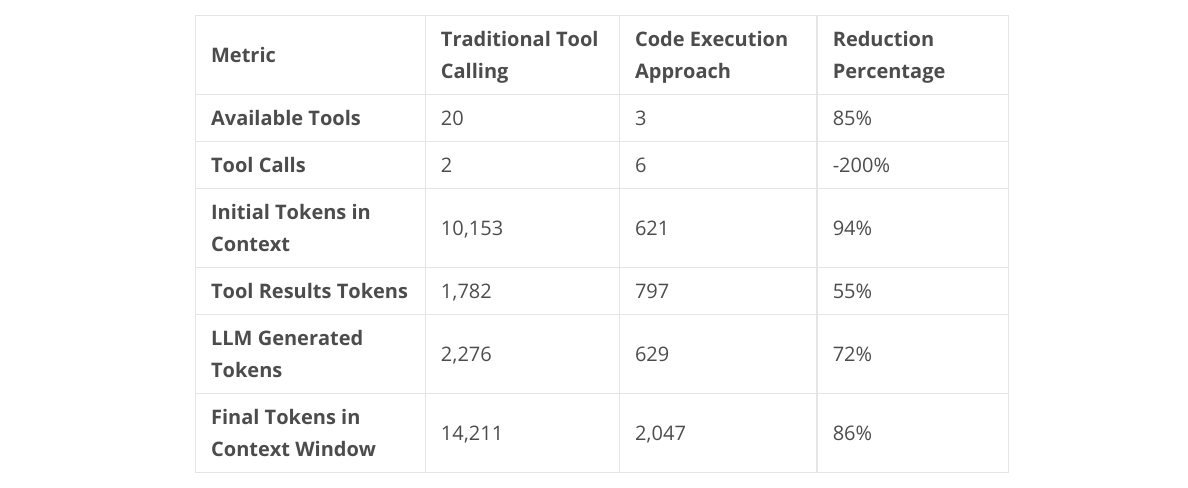
Key Takeaways:关键结论:
~86% Reduction in Final Context: Because large data (the meeting summary) flowed through the code execution environment, not the LLM’s context window.最终上下文减少约 86%:因为大数据(会议纪要)是通过代码执行环境流转的,而不是通过 LLM 的上下文窗口。
More Efficient Generation: The agent wrote a concise script instead of generating verbose tool calls and processing massive string outputs.生成效率更高:Agent 编写的是简洁的脚本,而不是生成冗长的工具调用指令并处理海量的字符串输出。
You can find the experiment codes here.你可以在这里找到实验代码。
Why This Works Better为什么这样更好
Benefit 1: Efficient Context Management优势一:高效的上下文管理
The LLM only loads the tool definitions it actually needs. If you have 100 tools available but only use 3, those other 97 don’t pollute your context. This is just good context engineering — use your limited token budget for reasoning, not for tool catalogs. Additionally, you can easily cleanup or summarize the context whenever it is filled or overflown, since you are confident that the agent can discover the tools again whenever it wants to!LLM 只加载它真正需要的工具定义。哪怕你有 100 个工具,只用了 3 个,剩下的 97 个也不会污染上下文。这就是上下文工程——把有限的 Token 预算花在推理上,而不是花在工具目录上。此外,当上下文满了,你可以随时清理或总结,因为你知道 Agent 随时能重新发现这些工具。
Benefit 2: Direct Data Flow优势二:直接的数据流
Intermediate results flow through code, not through the LLM. A 10MB file? No problem. The LLM just writes `const data = await tool1(); await tool2(data);` and lets the OS handle the actual data movement.中间结果流经代码,而不是流经 LLM。10MB 的文件?没问题。LLM 只需要写 `const data = await tool1(); await tool2(data);`,剩下的让操作系统去搬运数据就行了。
Benefit 3: Playing to LLM Strengths优势三:发挥 LLM 的长处
Here’s something interesting: these models have been trained on vastly more TypeScript/Python code than they have on tool-calling JSON formats. Tool calling as a formalized pattern has only really existed for 2–3 years. TypeScript has been around since 2012, in millions of repositories, tutorials, Stack Overflow answers, documentation sites.有趣的是,模型在 TypeScript/Python 代码上的训练量,远超工具调用 JSON 格式。工具调用作为一种模式才存在了 2-3 年。而 TypeScript 自 2012 年起就存在于数百万个代码库、教程、Stack Overflow 问答和文档中。
Now, we don’t have rigorous empirical studies proving that LLMs are better at generating TypeScript than tool-call JSON (someone should run those experiments!). But theoretically, it makes sense: the training data distribution heavily favors code. You’re asking the model to do something it’s seen millions more examples of.虽然目前还没有严谨的实证研究证明 LLM 写 TypeScript 比写 JSON 工具调用更强,但从理论上讲,训练数据分布明显偏向代码。你让模型干它见过几百万次的事,自然更顺手。
When Does This Matter?什么时候用这种方法?
This approach shines when:这种方法在以下场景表现出色:
- You have many tools but use few per task (high tool count, low utilization)工具很多,但单次任务用到的很少(高工具数,低利用率)。
- Tools need to pass large intermediate results (chaining with big data)工具需要传递大型中间结果(大数据链式调用)。
- You want to minimize context usage (who doesn’t?)你想尽可能减少上下文占用(谁不想呢?)。
- You’re building agentic systems that need to discover and compose tools dynamically你正在构建需要动态发现和组合工具的 Agent 系统。
It’s not a silver bullet — if you only have 3–4 tools total and they never chain, the traditional approach works fine. But as your toolkits grow and your use cases get more complex (such as using multiple MCP Servers), code execution mode becomes increasingly attractive.这当然不是万能药——如果你一共就 3-4 个工具,且从不链式调用,传统方案足够了。但随着工具包变大、场景变复杂(比如使用多个 MCP 服务器),代码执行模式的吸引力会越来越大。
Is This Something Totally New?这是全新的东西吗?
Absolutely NOT! It is very similar to CodeAct, an agent that plans and acts in code (python code) instead of natural language, which is different than conventional ReAct agent we are used to. The Hugging Face smolagents library already provides first-class support for this type of agents.绝对不是!它和 CodeAct 非常像,CodeAct 是一种通过代码(Python)进行规划和行动的 Agent,与我们习惯的传统 ReAct Agent 不同。Hugging Face 的 smolagents 库已经对这类 Agent 提供了原生支持。
HOWEVER there is an important difference between our approach and CodeAct: In CodeAct the tool metadata is added upfront to the system prompt by default, similar to ReAct agent, while in our approach we “lazy load” the tools.不过,我们的方法和 CodeAct 有个重要区别:在 CodeAct 中,工具元数据默认会像 ReAct Agent 一样预先添加到系统提示词中,而我们采用的是“懒加载”策略。
Wrapping Up总结
The shift from “tools as LLM-visible primitives” to “tools as discoverable code” is fundamentally about better context engineering. We’re recognizing that:从“作为 LLM 可见原语的工具”到“作为可发现代码的工具”,这种转变本质上是更好的上下文工程。我们意识到:
1. Not all tool metadata needs to be in context upfront— lazy loading is good actually1. 并非所有工具元数据都需要预先放入上下文——懒加载其实更好。
2. LLMs should reason about what to do, not move data around — use the right tool for the job2. LLM 应该负责推理,而不是搬运数据——让合适的工具干合适的事。
3. Code is a lingua franca these models understand deeply — leverage training distribution3. 代码是模型深度理解的通用语言——要利用好训练分布。
The examples in this repository demonstrate both approaches side-by-side, showing how the same task (download meeting summary, upload to Drive) can be solved with traditional tool calling versus code execution mode. The difference in context usage and efficiency is striking.仓库中的示例对比了两种方法,展示了同一个任务(下载会议纪要,上传到 Drive)在传统调用和代码执行模式下的不同。上下文占用和效率的差异非常显著。
As we build more sophisticated AI agents, thinking carefully about how we present tools — and how we let agents discover and compose them — will be just as important as the tools themselves. Code execution mode is one compelling answer to that challenge.随着 AI Agent 变得越来越复杂,如何呈现工具、如何让 Agent 发现并组合工具,将变得和工具本身一样重要。代码执行模式是应对这一挑战的有力答案。
Example Code示例代码
This article is accompanied by working code examples comparing both approaches. Check out `agent_example_1.py` for traditional tool calling and `agent_example_2.py` for the code execution approach.本文附带了两种方法的对比代码。查看 `agent_example_1.py` 了解传统工具调用,查看 `agent_example_2.py` 了解代码执行方案。
- Example Code in GithubGitHub 示例代码
References参考资料
- Anthropic’s Approach to Code Execution with MCPAnthropic 关于 MCP 代码执行的方法
- Cloudflare’s Code Mode ImplementationCloudflare 的代码模式实现
About The Author关于作者
- LinkedIn / GitHub / Google Scholar / WebsiteLinkedIn / GitHub / Google Scholar / 网站

