Loop Engineering in Snowflake CoCoSnowflake CoCo 之循环工程
Building Autonomous AI Development Loops构建自主 AI 开发循环

How We Got Here我们如何走到这一步
Three years of working with AI coding tools have produced a clear progression, where each stage solved a problem the previous one couldn’t.与 AI 编码工具共事三年,其演进脉络清晰可辨:每一阶段皆能解决前一阶段无法应对之难题。
- Prompt engineering focused on writing the perfect instruction. You’d refine wording, add examples, specify formats. One request in, one response out. If the output was wrong, you rewrote the prompt.提示工程专注于撰写完美指令。你精雕细琢措辞,添加示例,指定格式。一次请求,一次响应。若输出有误,便重写提示。
- Context engineering addressed a limitation of prompts alone: the model didn’t know enough. RAG pipelines, file references, semantic search, conversation history. The realization was that a mediocre prompt with strong context outperforms a polished prompt with none.上下文工程则弥补了提示的局限:模型所知不足。RAG 管道、文件引用、语义搜索、对话历史。其真谛在于:平庸的提示配上强大的上下文,远胜于精雕细琢却无上下文的提示。
- Harness engineering moved the focus to infrastructure. Tool calling, multi-step chains, agent frameworks. The model stopped being a text generator and became an actor in a system, taking actions and observing their results.工具工程将重心转向基础设施。工具调用、多步链、智能体框架。模型不再是文本生成器,而是系统中的行动者,执行动作并观察结果。
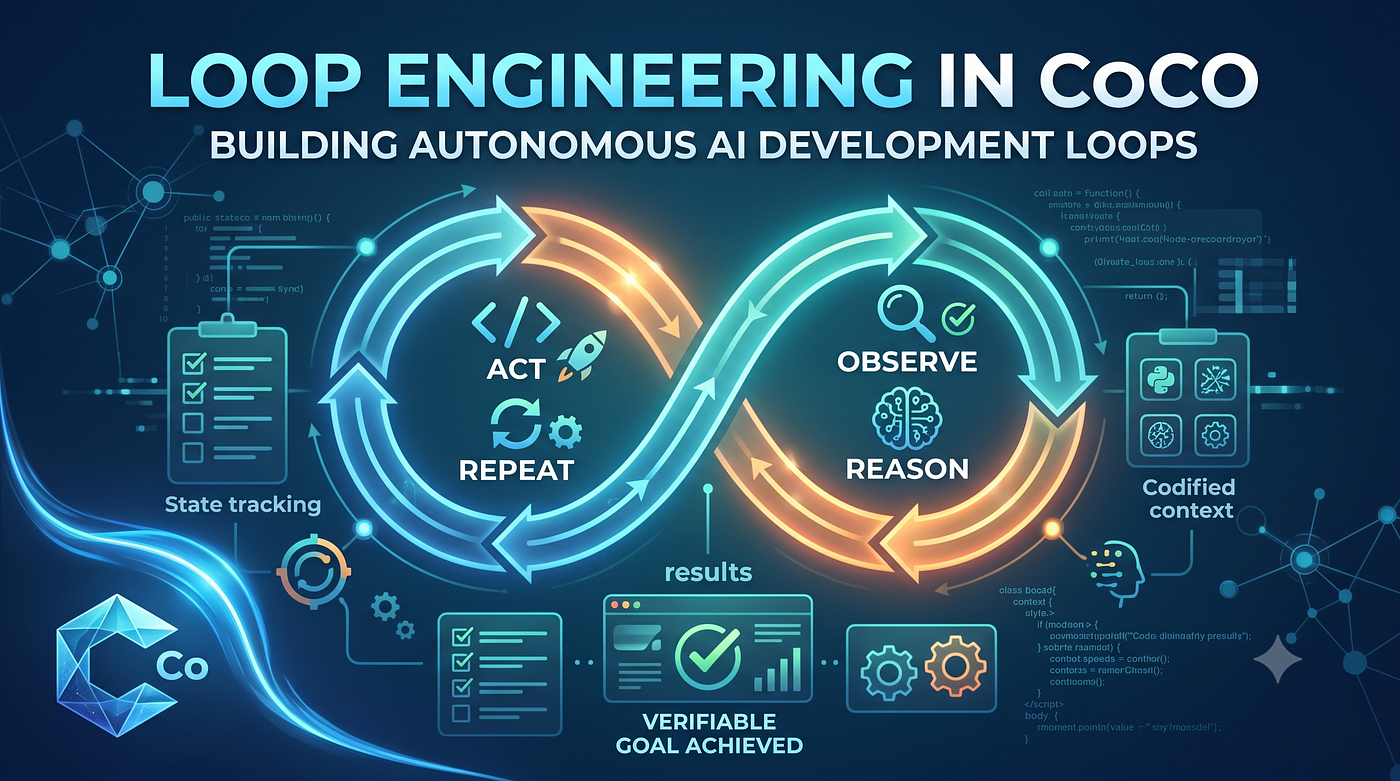
- Loop engineering is what comes next. You stop designing individual interactions and start designing autonomous systems that cycle through Act, Observe, Reason, Repeat until an objective goal is verified.循环工程是下一步。你不再设计单个交互,而是设计自主系统,使其循环执行“行动、观察、推理、重复”,直至客观目标得到验证。
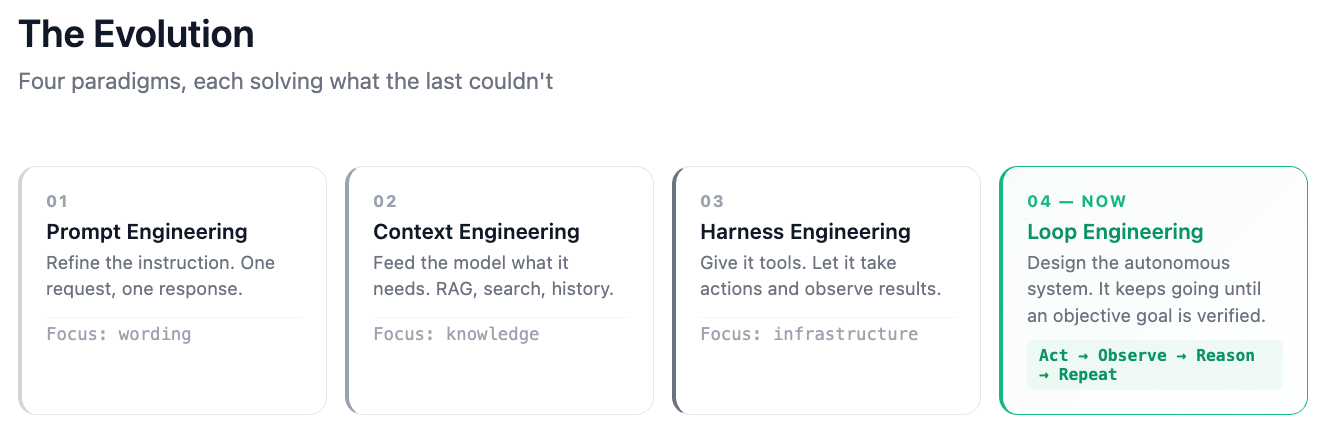
The difference matters. You’re no longer engineering what the AI does. You’re engineering the system that keeps it going until the work is actually done.此中差异至关重要。你不再设计 AI 做什么,而是设计一个系统,让它持续运转,直至工作真正完成。
Defining Loop Engineering定义循环工程
A loop engineering system has four structural requirements:循环工程系统需满足四项结构要求:
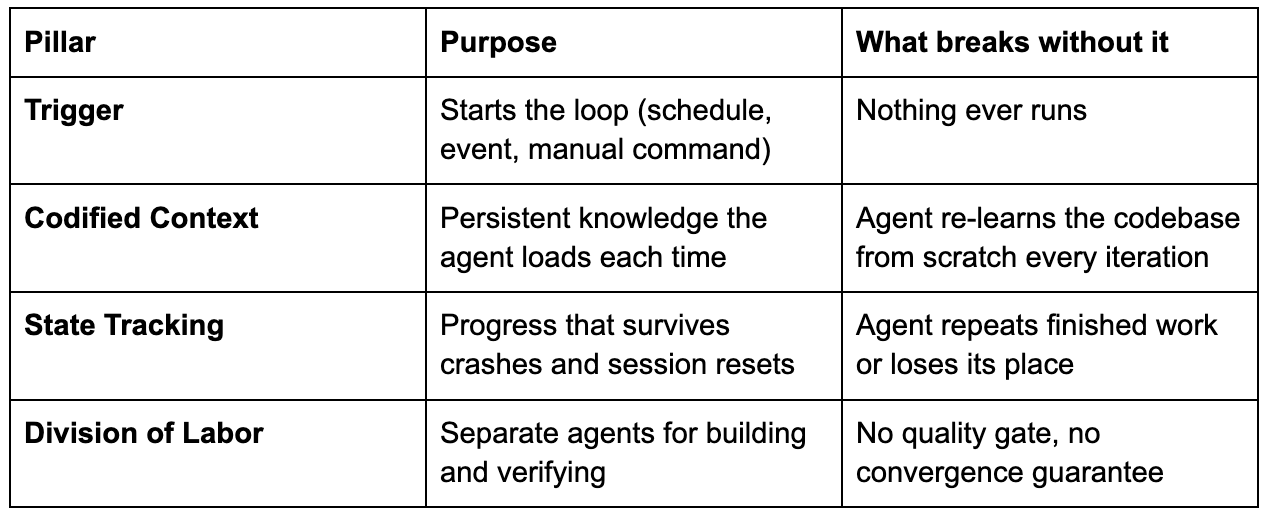
The loop doesn’t stop when the model thinks it’s done. It stops when an objective check passes: tests green, linter clean, deployment successful. That distinction is the whole point.循环不会因模型自认为完成而停止。它会在客观检查通过时停止:测试通过、代码检查无误、部署成功。此区别正是关键所在。
How CoCo Supports ThisCoCo 如何支持此架构
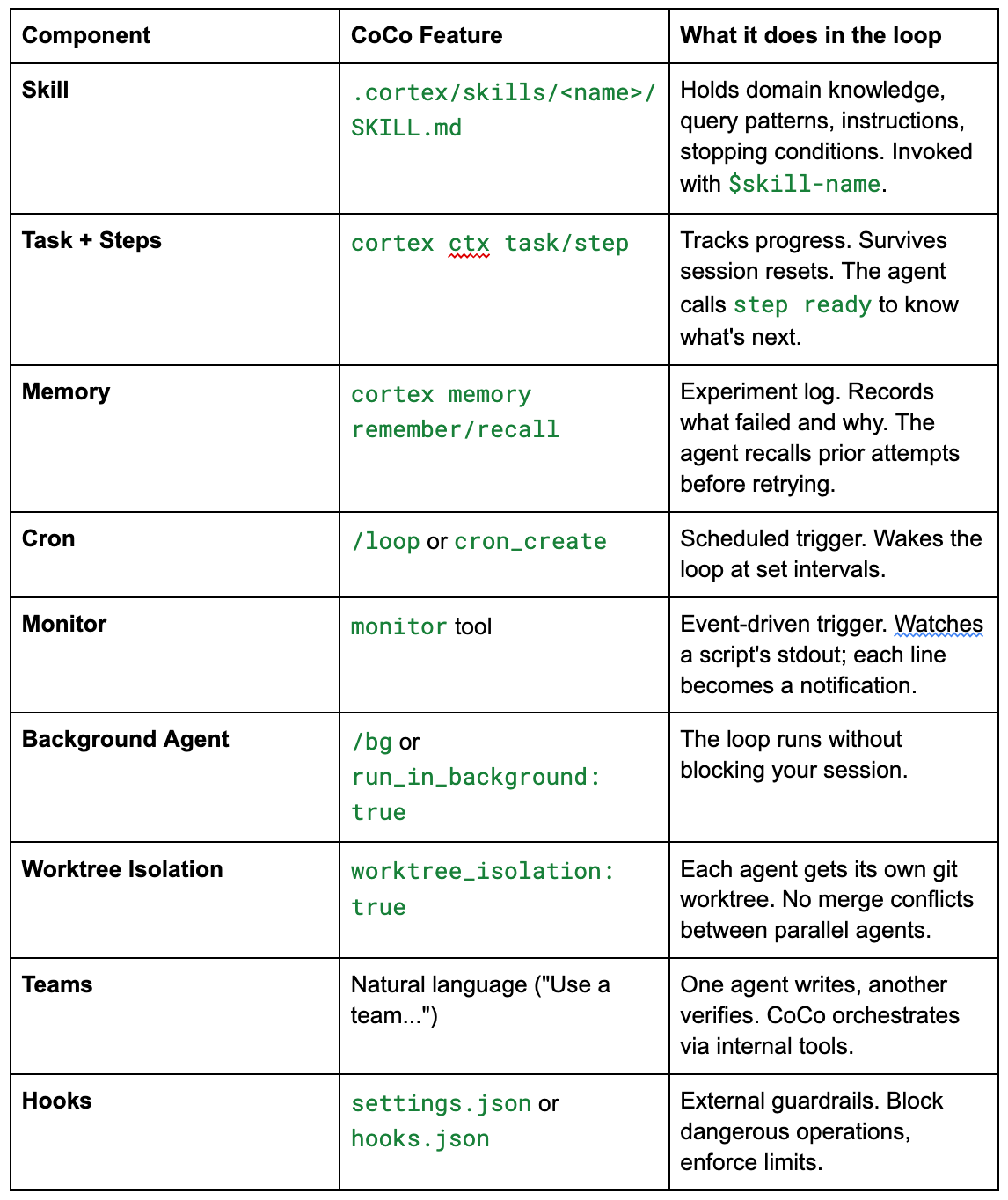
CoCo has native primitives for each pillar. Here’s the architecture:CoCo 为每个支柱提供了原生原语。其架构如下:
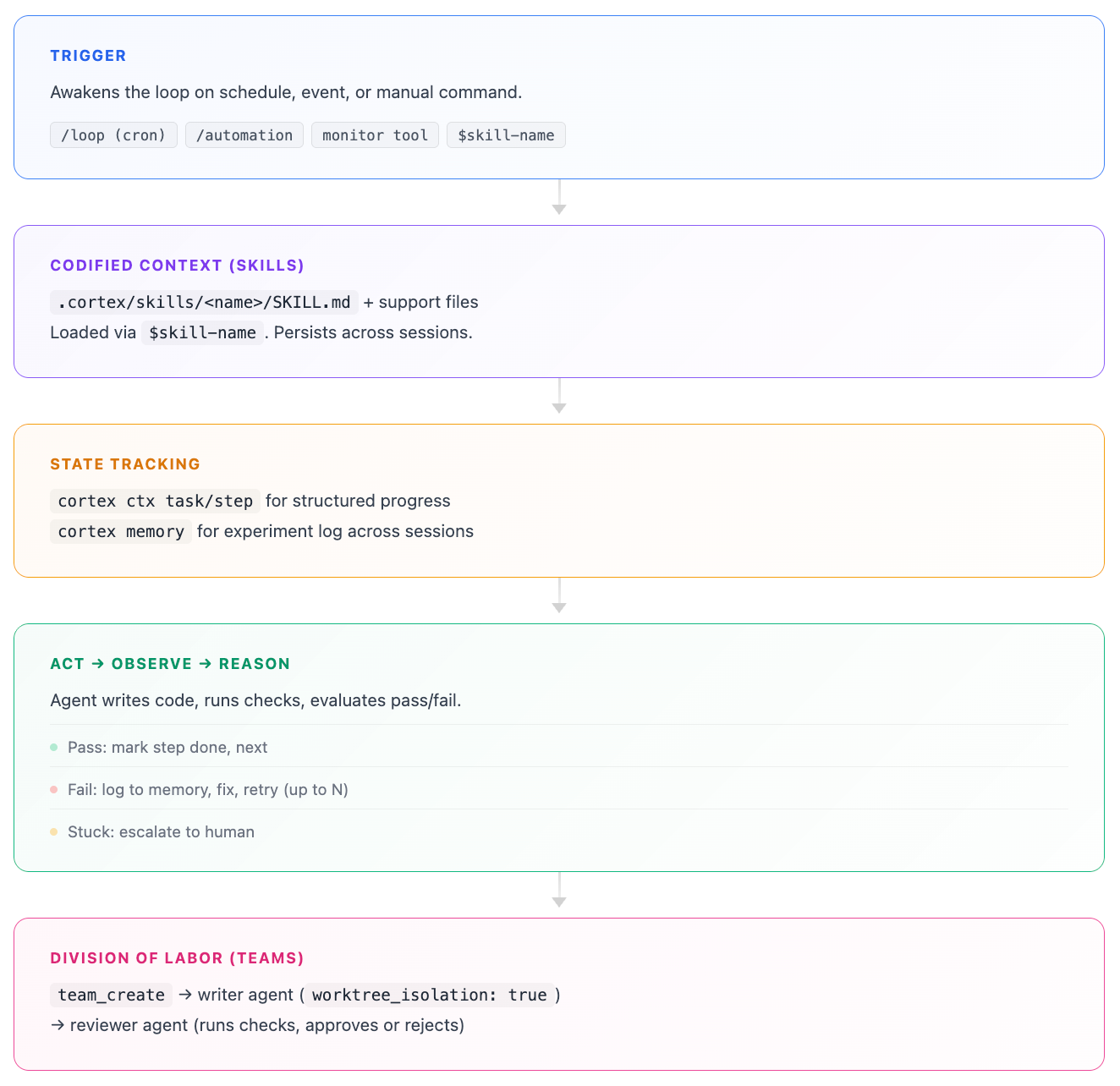
The relevant components:相关组件包括:
A Real Example: Building a Stock Analytics App真实案例:构建股票分析应用
I built a multi-page Streamlit analytics app from an empty directory using this approach. Here’s what happened.我从空目录出发,采用此方法构建了一个多页面 Streamlit 分析应用。以下是过程。
Defining the goal定义目标
I wrote an APP_SPEC.md with acceptance criteria the loop could check programmatically:我编写了 APP_SPEC.md,其中包含循环可程序化检查的验收标准:
## Acceptance Criteria
- [ ] Streamlit app runs locally without errors
- [ ] Snowflake connection works (queries return data)
- [ ] Page 1: Market Overview, Dow 30 heatmap, sector performance
- [ ] Page 2: Stock Deep Dive, candlestick chart, volume, moving averages
- [ ] Page 3: Comparison, normalized returns, correlation matrix
- [ ] Page 4: Macro Overlay, stock vs CPI dual-axis chart
- [ ] Passes ruff check (no lint errors)
- [ ] Passes streamlit run - server.headless true (no crash)
- [ ] Deploys to Snowflake successfully
Every criterion maps to an automatable check. “Done” is a boolean, not a judgment call.每条标准都对应一个可自动化的检查。“完成”是一个布尔值,而非主观判断。
Writing the skill编写技能
The skill tells the agent what data exists, how to query it, and what to do when things go wrong:技能告知智能体存在哪些数据、如何查询以及出错时如何处理:
# Skill: Stock App Builder Loop
## Data Context
- Stock Prices: FINANCE__ECONOMICS.CYBERSYN.STOCK_PRICE_TIMESERIES
- Variables: pre-market_open, post-market_close, all-day_high, all-day_low, nasdaq_volume
- Range: 2018 to present, 23,062 tickers
- Companies: DB_STOCK.CURATED.COMPANIES (TICKER, COMPANY_NAME)
## Loop Instructions
1. Run `cortex memory recall "stock-app-builder"` for prior state.
2. Run `cortex ctx step ready` to find next uncompleted step.
3. Implement the next failing criterion.
4. Run the relevant check.
5. Pass → `cortex ctx step done <id>`, move to next.
6. Fail → `cortex memory remember "stock-app-builder: <error>"`, fix and retry.
7. Max 5 retries per step. If stuck, ask user.
I invoke this with $stock-app-builder. CoCo loads it and runs autonomously.我通过 $stock-app-builder 调用它。CoCo 加载技能并自主运行。
Setting up state设置状态
cortex ctx task add "Build stock analytics Streamlit app"
cortex ctx task start task-ff742cc1
cortex ctx step add "Scaffold: snowflake.yml, environment.yml, streamlit_app.py"
cortex ctx step add "Implement sidebar: date range + ticker autocomplete"
cortex ctx step add "Page 1: Market Overview"
cortex ctx step add "Page 2: Stock Deep Dive"
cortex ctx step add "Page 3: Comparison"
cortex ctx step add "Page 4: Macro Overlay"
cortex ctx step add "Pass lint: ruff check ."
cortex ctx step add "Pass runtime: streamlit run - server.headless true"
cortex ctx step add "Deploy: snow streamlit deploy"
After each step, cortex ctx step ready returns the next one. If the session crashes mid-build, the agent picks up where it left off.每一步之后,cortex ctx step ready 返回下一步。若会话在构建中途崩溃,智能体可从断点处继续。
Watching the loop run观察循环运行
I typed $stock-app-builder. The agent built all project files, marking steps done as it went. Then it hit the verification gates:我输入 $stock-app-builder。智能体构建了所有项目文件,并逐一标记步骤完成。随后进入验证关卡:
Lint check:代码检查:
$ ruff check .
All checks passed!
Runtime check:运行时检查:
$ streamlit run streamlit_app.py - server.headless true
→ HTTP 200 on localhost:8599Deploy:部署:
PUT file://streamlit_app.py @DB_STOCK.PUBLIC.STOCK_ANALYTICS_STAGE/
CREATE OR REPLACE STREAMLIT DB_STOCK.PUBLIC.STOCK_ANALYTICS_APP …
→ "Streamlit STOCK_ANALYTICS_APP successfully created."
Ten steps, all verified, autonomous completion.十步,全部验证,自主完成。
The fix cycle in action修复循环实战
Later I added a feature:随后我添加了一个功能:
$stock-app-builder "Add top gainers/losers page"The agent created pages/5_Top_Movers.py, then ran lint. It failed: unused import and an f-string with no placeholders. The agent identified both issues, fixed them, re-ran lint (passed), ran the runtime check (HTTP 200), deployed. No human intervention needed.智能体创建了 pages/5_Top_Movers.py,然后运行代码检查。检查失败:存在未使用的导入和一个无占位符的 f-string。智能体识别出这两个问题,修复它们,重新运行代码检查(通过),运行运行时检查(HTTP 200),部署。无需人工干预。
That sequence is the core pattern: build, check, fail, reason about the failure, fix, re-check, pass, move on.这一序列正是核心模式:构建、检查、失败、推理失败原因、修复、重新检查、通过、继续。
Adding technical indicators添加技术指标
$stock-app-builder "Add RSI and MACD indicators to deep dive"The agent created the task, added steps, implemented 14-period RSI and MACD (12/26/9) with plotly charts, ran lint (passed first try), ran the runtime check, deployed. Five steps, zero failures.智能体创建了任务,添加了步骤,实现了 14 周期 RSI 和 MACD(12/26/9)并附带 plotly 图表,运行代码检查(首次通过),运行运行时检查,部署。五步,零失败。
The Workflow in Short工作流程简述
1. Define goal → APP_SPEC.md (verifiable checks)
2. Create skill → .cortex/skills/<name>/SKILL.md (persistent context)
3. Set up state → cortex ctx task + steps (progress tracking)
4. Invoke the loop → $skill-name (or /loop for scheduled, /bg for background)
5. Loop executes → Act → Check → Pass/Fail → Next/Retry
6. Iterate on skill → When the loop fails systematically, update the skill
Things I’ve Learned经验之谈
- Start cheap. The first action in any loop iteration should be lightweight: is there work to do? If cortex ctx step ready returns nothing, exit. Don’t spend tokens discovering the queue is empty.从轻量开始。循环迭代中的第一个动作应轻量:是否有工作要做?若 cortex ctx step ready 返回空,则退出。不要浪费令牌去发现队列为空。
- Fix the skill, not the prompt. When the loop fails on a class of problem, the instinct is to rewrite the prompt. Resist that. Update SKILL.md with the missing pattern, or add a support script. Skills persist across sessions. Prompts don’t.修复技能,而非提示。当循环在某类问题上失败时,本能是重写提示。请克制。更新 SKILL.md 以补充缺失的模式,或添加支持脚本。技能跨会话持久存在,而提示则不然。
- Give the loop clean signals. Don’t feed raw 500-line stack traces back into the loop. Have the skill instruct the agent to extract the failing line, the file, and the error message. Cleaner signal means faster convergence.给循环提供清晰的信号。不要将原始的 500 行堆栈跟踪直接喂给循环。让技能指示智能体提取失败行、文件名和错误消息。信号越清晰,收敛越快。
- Log experiments to memory. cortex memory remember “Attempt 2: null check added, tests pass locally but fail in CI” prevents the loop from trying the same approach twice.将实验记录到记忆中。cortex memory remember “尝试 2:添加空值检查,本地测试通过但 CI 失败” 可防止循环重复尝试相同方法。
- Set hard limits. Every loop needs a maximum: retries per step, total iterations, and a point where it hands off to a human. Without a floor, you get an expensive infinite loop that produces nothing.设置硬性限制。每个循环都需要最大值:每步重试次数、总迭代次数,以及移交给人手的节点。没有底线,你将得到一个昂贵且毫无产出的无限循环。
- Use objective checks, not self-assessment. The agent saying “this looks correct” is not a stopping condition. ruff check . → All checks passed! is a stopping condition. curl localhost:8599 → 200 is a stopping condition.使用客观检查,而非自我评估。智能体说“这看起来正确”不是停止条件。ruff check . → 所有检查通过!才是停止条件。curl localhost:8599 → 200 才是停止条件。
Where This Leads未来方向
The interesting thing about loop engineering is that you spend your time on system design rather than individual instructions. You define what “done” looks like, encode the domain knowledge once, set up the verification checks, and let the loop run.循环工程的有趣之处在于,你将时间花在系统设计上,而非单个指令。你定义“完成”的样子,一次性编码领域知识,设置验证检查,然后让循环运行。
The prompt shrinks to a single line: $stock-app-builder. Everything else is structure.提示缩减为一行:$stock-app-builder。其余皆为结构。
Appendix: The One Prompt That Builds It All附录:构建一切的单一提示
Below is a single prompt, written by CoCo itself during the build session described in this post, that triggers the entire loop engineering workflow from scratch. Give it to CoCo and it scaffolds the project, creates the skill, sets up task tracking, builds every page, runs all checks, and deploys. No further input required unless a check fails beyond the retry budget.以下是一个单一提示,由 CoCo 在本文所述的构建会话中自行编写,它从零触发整个循环工程工作流。将其交给 CoCo,它会搭建项目、创建技能、设置任务跟踪、构建每个页面、运行所有检查并部署。除非检查失败超出重试预算,否则无需进一步输入。
Build me a stock analytics Streamlit app using loop engineering. Follow these steps exactly:

## Step 1: Scaffold the Project

```bash
mkdir stock-analytics-app && cd stock-analytics-app
cortex ctx init
```

## Step 2: Create APP_SPEC.md (Verifiable Goal)

```markdown
# Stock Analytics App — Acceptance Criteria

## Data Source
Database: DB_STOCK.CURATED
Key tables:
- DAILY_STOCK_PRICES (8.3M rows) — OHLCV by ticker × date
- COMPANIES_ENRICHED — company reference
- DOW30_REFERENCE — Dow 30 components + sectors
- MACRO_ECONOMIC_INDICATORS — macro time series
- SECURITIES — security metadata

## App Requirements
- [ ] Streamlit app runs locally without errors
- [ ] Snowflake connection works (queries return data)
- [ ] Page 1: Market Overview — Dow 30 heatmap (daily % change), sector performance bar chart
- [ ] Page 2: Stock Deep Dive — ticker selector, candlestick chart, volume overlay, moving averages (20/50/200 day)
- [ ] Page 3: Comparison — multi-ticker line chart (normalized returns), correlation matrix
- [ ] Page 4: Macro Overlay — plot stock vs. macro indicator (e.g., S&P vs. CPI/unemployment)
- [ ] Sidebar: date range picker, ticker search/autocomplete
- [ ] Passes ruff check (no lint errors)
- [ ] Passes streamlit run --server.headless true (no runtime crash)
- [ ] Deploys to Snowflake: snow streamlit deploy succeeds

## Tech
- Streamlit 1.35+
- snowflake-snowpark-python
- plotly for charts
- Target: DB_STOCK schema, container runtime
```

## Step 3: Create the Builder Skill

Create `.cortex/skills/stock-app-builder/SKILL.md`:

```markdown
# Skill: Stock Analytics App Builder

## When to Use
Building or iterating on the DB_STOCK analytics Streamlit app.

## Data Context
- Prices: DB_STOCK.CURATED.DAILY_STOCK_PRICES (DATE, TICKER, OPEN/CLOSE/HIGH/LOW_PRICE, VOLUME)
- Companies: DB_STOCK.CURATED.COMPANIES_ENRICHED (TICKER, COMPANY_NAME, PRIMARY_EXCHANGE_NAME)
- Dow 30: DB_STOCK.CURATED.DOW30_REFERENCE (TICKER, COMPANY_NAME, SECTOR, INDUSTRY)
- Macro: DB_STOCK.CURATED.MACRO_ECONOMIC_INDICATORS (DATE, VARIABLE_NAME, VALUE, GEO_NAME)
- Securities: DB_STOCK.CURATED.SECURITIES (TICKER, ASSET_CLASS, SECURITY_NAME)

## Loop Instructions
1. Read APP_SPEC.md for acceptance criteria.
2. Run `cortex memory recall "stock-app-builder"` for prior state.
3. Run `cortex ctx step ready` to find next uncompleted step.
4. Implement the next failing criterion.
5. Run the relevant check:
   - Code: `ruff check .`
   - Runtime: `timeout 30 streamlit run streamlit_app.py --server.headless true`
   - Deploy: `snow streamlit deploy --replace`
6. Pass → `cortex ctx step done <id>`, move to next.
7. Fail → `cortex memory remember "stock-app-builder: <error>"`, fix and retry.
8. Max 5 retries per step. If stuck, ask user.

## Query Patterns
-- Daily returns for heatmap
SELECT TICKER, DATE,
  (CLOSE_PRICE - LAG(CLOSE_PRICE) OVER (PARTITION BY TICKER ORDER BY DATE))
  / LAG(CLOSE_PRICE) OVER (PARTITION BY TICKER ORDER BY DATE) AS DAILY_RETURN
FROM DB_STOCK.CURATED.DAILY_STOCK_PRICES
WHERE TICKER IN (SELECT TICKER FROM DB_STOCK.CURATED.DOW30_REFERENCE)
  AND DATE >= DATEADD('month', -1, CURRENT_DATE());

-- Moving averages
SELECT DATE, TICKER, CLOSE_PRICE,
  AVG(CLOSE_PRICE) OVER (PARTITION BY TICKER ORDER BY DATE ROWS 19 PRECEDING) AS MA_20,
  AVG(CLOSE_PRICE) OVER (PARTITION BY TICKER ORDER BY DATE ROWS 49 PRECEDING) AS MA_50,
  AVG(CLOSE_PRICE) OVER (PARTITION BY TICKER ORDER BY DATE ROWS 199 PRECEDING) AS MA_200
FROM DB_STOCK.CURATED.DAILY_STOCK_PRICES
WHERE TICKER = :selected_ticker AND DATE >= DATEADD('year', -2, CURRENT_DATE());
```

## File Structure

```
stock-analytics-app/
├── APP_SPEC.md
├── snowflake.yml
├── environment.yml
├── streamlit_app.py        (main + sidebar)
├── pages/
│   ├── 1_Market_Overview.py
│   ├── 2_Stock_Deep_Dive.py
│   ├── 3_Comparison.py
│   └── 4_Macro_Overlay.py
└── .cortex/skills/stock-app-builder/SKILL.md
```

## Step 4: Set Up Task + Steps

```bash
cortex ctx task add "Build stock analytics Streamlit app"
cortex ctx task start task-001

cortex ctx step add "Scaffold: snowflake.yml, environment.yml, streamlit_app.py, pages/" -t task-001
cortex ctx step add "Implement sidebar: date range picker + ticker autocomplete" -t task-001
cortex ctx step add "Page 1: Market Overview — Dow 30 heatmap + sector bar chart" -t task-001
cortex ctx step add "Page 2: Stock Deep Dive — candlestick + volume + moving averages" -t task-001
cortex ctx step add "Page 3: Comparison — normalized returns + correlation matrix" -t task-001
cortex ctx step add "Page 4: Macro Overlay — stock vs macro indicator chart" -t task-001
cortex ctx step add "Pass lint: ruff check ." -t task-001
cortex ctx step add "Pass runtime: streamlit run --server.headless true" -t task-001
cortex ctx step add "Deploy: snow streamlit deploy" -t task-001
```

## Step 5: Launch the Loop

**Option A: Interactive (watch it build)**
```
$stock-app-builder
```

**Option B: Background (keep working on other things)**
```
/bg Build the stock analytics app using $stock-app-builder. Complete all steps in order. Deploy when all checks pass.
```

**Option C: Incremental (one step per session)**
```
/loop
→ cron: "0 9 * * *"
→ prompt: "$stock-app-builder — complete the next ready step, then stop"
→ recurring: true
```

## Step 6: Writer/Reviewer for Quality

Tell CoCo in natural language: "Use a team. Writer builds each page, reviewer runs the checks."

CoCo internally orchestrates this using its agent tools (you don't write this syntax yourself):
```
# What CoCo does behind the scenes:

team_create: "stock-app"

# Writer — builds code in isolated worktree
task(subagent_type: "general-purpose", team_name: "stock-app",
     name: "builder", worktree_isolation: true,
     prompt: "Load $stock-app-builder. Build the next uncompleted page.
              Query DB_STOCK.CURATED tables. Use plotly for all charts.
              Commit after each page passes lint.")

# Reviewer — validates after builder finishes
task(subagent_type: "general-purpose", team_name: "stock-app",
     name: "reviewer",
     prompt: "Review builder's code:
       1. ruff check .
       2. streamlit run --server.headless true (timeout 30s)
       3. Verify SQL queries return non-empty data
       4. If fail, create fix task with exact error.
       5. If pass, mark step done.")
```

## Step 7: Stopping Conditions

In the skill, these are already encoded. Additionally:

```bash
# Global guardrail — no single command runs more than 3 minutes
/settings → bashMaxTimeoutMs: 180000
```

```json
// hooks.json — prevent accidental writes to production tables
// Hook receives tool_input via stdin as JSON; exit code 2 blocks the operation.
{
  "hooks": {
    "PreToolUse": [
      {
        "matcher": "sql_execute",
        "hooks": [
          {
            "type": "command",
            "command": "./block-writes.sh",
            "timeout": 5
          }
        ]
      }
    ]
  }
}
```

Where `block-writes.sh` reads stdin and blocks DML:
```bash
#!/bin/bash
INPUT=$(cat)
SQL=$(echo "$INPUT" | jq -r '.tool_input.sql // empty')
if echo "$SQL" | grep -qi 'INSERT\|UPDATE\|DELETE\|DROP'; then
  echo "Blocked: read-only on DB_STOCK" >&2
  exit 2
fi
```

## Step 8: Post-Deploy Monitoring Loop

After the app is deployed:
```
/loop
→ cron: "0 */6 * * *"  (every 6 hours)
→ prompt: "Check stock app health:
    1. SHOW STREAMLITS LIKE 'stock_analytics' IN SCHEMA DB_STOCK.PUBLIC
    2. If status != ACTIVE, diagnose and alert me.
    3. Query DAILY_STOCK_PRICES for latest date — if >2 days stale, alert.
    Otherwise exit immediately."
→ recurring: true
```

---

### What the Loop Looks Like in Practice

```
[Cron fires at 9:00 AM]
  → Agent loads $stock-app-builder skill
  → Recalls memory: "stock-app-builder: Page 2 candlestick done, starting Page 3"
  → Checks: cortex ctx step ready → "Page 3: Comparison"
  → Writes pages/3_Comparison.py
  → Queries DB_STOCK.CURATED.DAILY_STOCK_PRICES for multi-ticker data
  → Builds normalized returns chart + correlation heatmap
  → Runs ruff check . → passes
  → Runs streamlit locally → passes
  → cortex ctx step done step-005
  → Checks next: "Page 4: Macro Overlay"
  → [budget reached for this session] → exits
  → Memory: "stock-app-builder: Pages 1-3 complete, Page 4 next"

[Next day, cron fires again]
  → Picks up at Page 4...
```

APP_SPEC.md defines "done." The skill encodes how to iterate. The ctx steps track progress across sessions. Memory preserves experiment results. The loop runs until all acceptance criteria pass.
This prompt was written by CoCo during the build session documented above. It contains everything needed to trigger the full workflow, from project scaffold through deployment, with no additional input.此提示由 CoCo 在上述构建会话期间编写。它包含触发完整工作流所需的一切,从项目搭建到部署,无需额外输入。
Note: Some CoCo features referenced in this post (including certain agent capabilities) are in Preview. Feature availability and syntax may change. The CLI commands shown (cortex ctx, cortex memory, /loop, /bg) are functional in the current CoCo CLI release but may not yet appear in the public documentation site.注意:本文引用的某些 CoCo 功能(包括某些智能体能力)处于预览阶段。功能可用性和语法可能发生变化。所示的 CLI 命令(cortex ctx、cortex memory、/loop、/bg)在当前 CoCo CLI 版本中可用,但可能尚未出现在公共文档站点中。
Reference参考
Snowflake CoCoSnowflake CoCo
About the Author: Tianxia Jia is an AI and Cloud expert, specializing in architecting cutting-edge AI/ML solutions on Snowflake and AWS.关于作者:Tianxia Jia 是 AI 和云专家,专精于在 Snowflake 和 AWS 上架构前沿 AI/ML 解决方案。