
- DateJune 18, 2026
- Reading time5min
- ShareCopy link
Claude is built to work the way you work, and in Claude Code you can customize it. Claude 的构建方式旨在配合你的工作方式,在 Claude Code 中你可以对其进行自定义。
There are seven methods for instructing Claude's behavior: CLAUDE.md files, rules, skills, subagents, hooks, output styles, and appending the system prompt.有七种方法可以指示 Claude 的行为:CLAUDE.md 文件、规则、技能、子代理、钩子、输出样式以及追加系统提示。
Each method controls:每种方法控制:
- When an instruction loads into context; 指令何时加载到上下文中;
- Whether it persists through long sessions (compaction behavior); and 它是否在长会话中持久存在(压缩行为);以及
- How much authority it carries.它携带的权威程度。
The table below provides a quick summary of key differences across each method while the post provides additional detail and decision framework for determining where each of your Claude instructions belongs.下表提供了每种方法关键差异的快速概览,正文则提供了更多细节以及决定每条 Claude 指令应放置位置的决策框架。
The seven methods for delivering instructions传递指令的七种方法
CLAUDE.md filesCLAUDE.md 文件
CLAUDE.md is a markdown file at the root of your project. It loads into context at session start and stays there for the entire session. CLAUDE.md 是位于项目根目录的 markdown 文件。它在会话开始时加载到上下文,并在整个会话期间保持。
Build commands, directory layout, monorepo structure, coding conventions, and team norms all fit naturally here.构建命令、目录布局、单体仓库结构、编码约定以及团队规范都自然地适合放在这里。
There are two types, and they load differently: 有两种类型,加载方式不同:
- Always loaded: The first type is a root CLAUDE.md file, either in a shared repository and/or saved locally for your personal preferences specific to a project. All these files load at session start, and won’t get lost or degraded across long sessions. When Claude Code compacts the conversation, it re-reads these files.始终加载:第一种类型是根目录下的 CLAUDE.md 文件,可能位于共享仓库中,也可能本地保存用于你对特定项目的个人偏好。所有这些文件在会话开始时加载,并且在长会话中不会丢失或降级。当 Claude Code 压缩对话时,它会重新读取这些文件。
- On-demand: CLAUDE.md files in subdirectories below the folder where you initialized the session. For example,
app/api/CLAUDE.mdloads when Claude reads a file underapp/api, not at session start. It shares the compaction behavior of path-scoped rules: gone until that subdirectory is touched again. 按需加载:位于你初始化会话的文件夹以下子目录中的 CLAUDE.md 文件。例如,app/api/CLAUDE.md 会在 Claude 读取 app/api 下的文件时加载,而不是在会话开始时加载。它具有路径作用域规则的压缩行为:在该子目录再次被触及之前会消失。
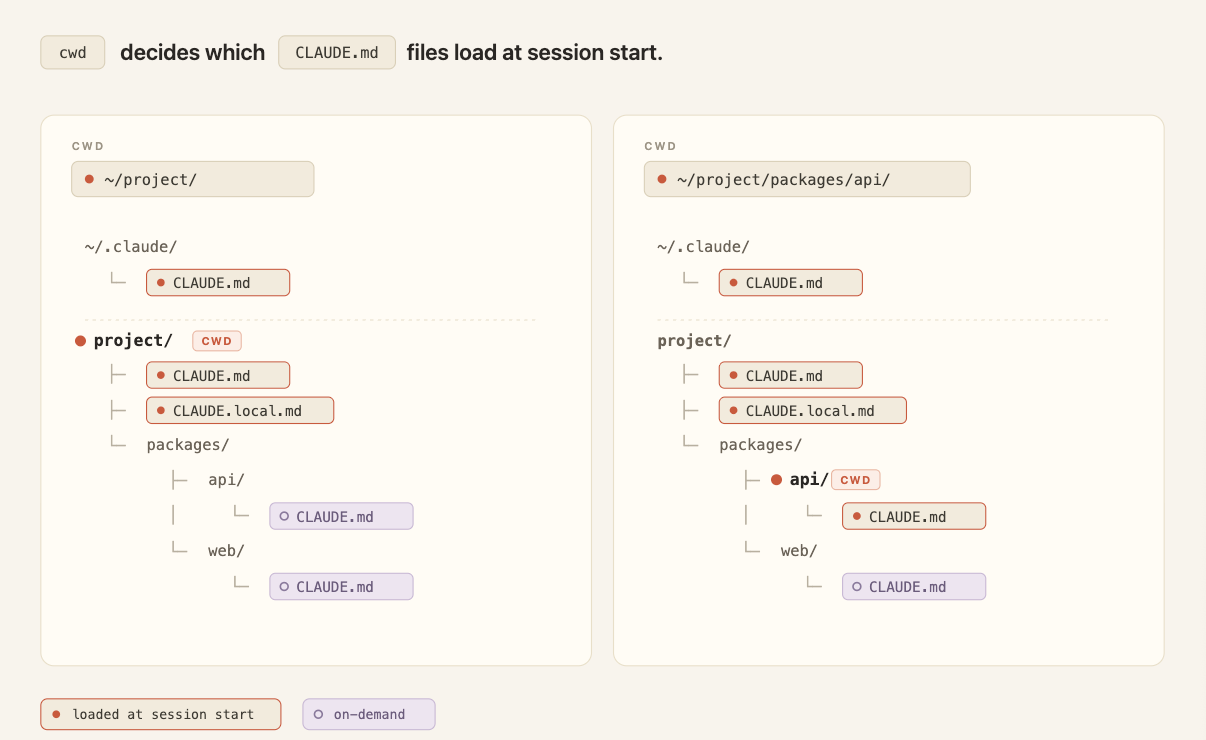
In a shared repository, CLAUDE.md grows the way any unowned config file does: every team appends its own instructions and nothing gets deleted. The cost compounds at scale. 在共享仓库中,CLAUDE.md 的增长方式与任何无主配置文件相同:每个团队都会追加自己的指令,且不会被删除。成本会随规模叠加。
Every line loads into every session for every engineer working in the repo, whether it's relevant to their task or not. This consumes tokens and dilutes adherence to the instructions that actually matter. As the file grows, push team-specific conventions into path-scoped rules and procedures into skills, where they load only when relevant.每一行都会加载到每个工程师在仓库中的每个会话里,无论它是否与他们的任务相关。这会消耗 token 并稀释对真正重要指令的遵循。随着文件增长,请将团队特定的约定推入路径作用域规则,将流程推入技能,这样只有在相关时才会加载。
Tip: Keep CLAUDE.md under 200 lines, give it an owner, and review changes to it like code. Think of this file as giving Claude an overview of your codebase, or as an index pointing to other files where Claude can find more information as needed.提示:保持 CLAUDE.md 在 200 行以内,指定所有者,并像代码一样审查更改。把这个文件视为向 Claude 提供代码库概览的文件,或作为指向其他文件的索引,Claude 可以根据需要在这些文件中找到更多信息。
In monorepos, give each team's directory its own subdirectory CLAUDE.md so teams only load their own conventions, and developers can use the claudeMdExcludes setting to skip files from teams whose code they never touch. 在单体仓库中,为每个团队的目录提供自己的子目录 CLAUDE.md,这样团队只会加载自己的约定,开发者可以使用 claudeMdExcludes 设置跳过他们从未触及的团队代码文件。
For standards that must apply to every repository in the organization — security policies, compliance requirements — a centrally managed CLAUDE.md can be deployed to developer machines via MDM or config management, and it can't be excluded by individual settings.对于必须适用于组织中每个仓库的标准——安全策略、合规要求——可以通过 MDM 或配置管理将中心化管理的 CLAUDE.md 部署到开发者机器上,且个人设置无法将其排除。
More on setting up CLAUDE.md in our blog post, CLAUDE.md files: Customizing Claude Code for your codebase.更多关于设置 CLAUDE.md 的信息,请参阅我们的博客文章《CLAUDE.md 文件:为你的代码库定制 Claude Code》。

Rules规则
Rules are markdown files in .claude/rules/ that give Claude specific constraints or conventions. 规则是位于 .claude/rules/ 中的 markdown 文件,用于给 Claude 设定特定约束或约定。
Unscoped rules behave like CLAUDE.md in that they are always loaded at session start and get re-injected on compaction. This can waste tokens by loading context even when it's not relevant for the task at hand.未限定的规则行为类似于 CLAUDE.md,即它们始终在会话开始时加载,并在压缩时重新注入。这可能会在任务不相关时浪费 token。
Path-scoped rules allow you to load rule instructions only when they are relevant by adding a paths field that controls when they load. 路径作用域规则允许你仅在相关时加载规则指令,只需添加一个 paths 字段来控制加载时机。
For example: a rule scoped to src/api/** stays out of context during a docs-only session. It would only be loaded whenever Claude reads files within that src/api/ directory.例如:作用域为 src/api/** 的规则在仅文档会话期间不会进入上下文。只有当 Claude 读取 src/api/ 目录下的文件时才会加载。
Here’s what that looks like:下面是示例:
---
paths:
  - "src/api/**"
  - "**/*.handler.ts"
---
All API handlers must validate input with Zod before processing.Tip: A file-specific constraint, like "migrations are append-only," fits best as a rule placed in your paths: frontmatter. Reach for a path scoped rule over a nested CLAUDE.md file when the instruction regards a cross-cutting concern or file that appears in multiple (but not all) corners of the codebase.提示:像“迁移只能追加”这样的文件特定约束最适合作为放在 paths frontmatter 中的规则。当指令涉及跨切关注点或出现在代码库多个(但不是全部)位置的文件时,使用路径作用域规则而不是嵌套的 CLAUDE.md 文件。
Skills技能
Skills live in .claude/skills/ as folders of instructions, scripts, and resources that Claude loads dynamically. Each skill has a SKILL.md file with a name, description, and body. 技能位于 .claude/skills/ 中,作为指令、脚本和资源的文件夹,Claude 会动态加载。每个技能都有一个包含名称、描述和主体的 SKILL.md 文件。
Only the name and description load at session start; the full body loads when Claude invokes the skill, either through a slash command (/code-review) or by auto-matching the task.只有名称和描述在会话开始时加载;完整主体在 Claude 调用技能时加载,无论是通过斜杠命令(/code-review)还是自动匹配任务。
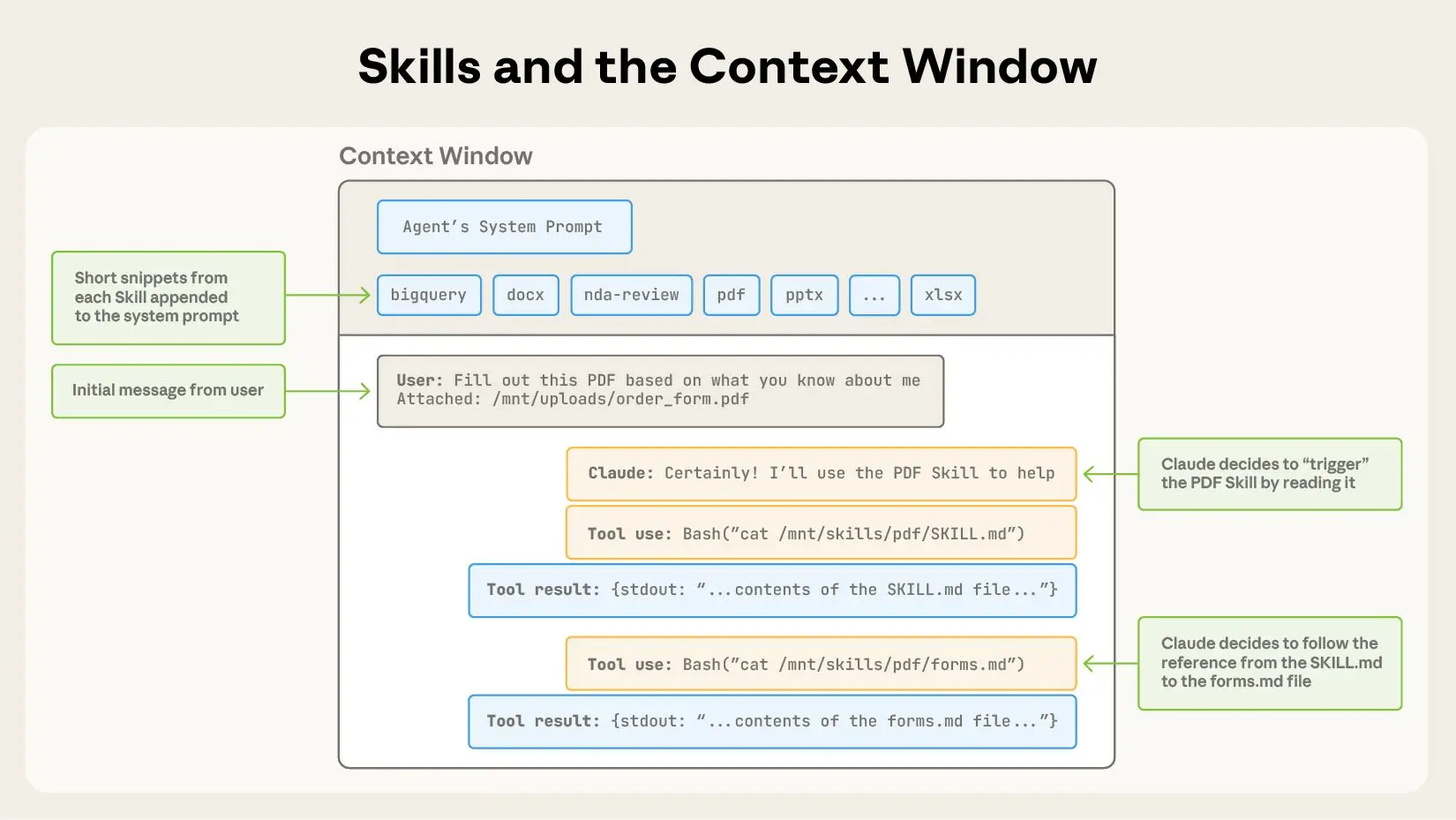
For example, /code-review is a built-in skill that reviews your current diff and reports its findings without editing files. The skill defines the playbook so Claude follows the same structured approach every time you invoke it.例如,/code-review 是内置技能,可审查当前差异并报告结果而不编辑文件。该技能定义了剧本,使 Claude 每次调用时都遵循相同的结构化方法。
On compaction, Claude Code re-injects invoked skills up to a total budget across all invoked skills. If you’ve invoked many skills during a session, the oldest ones drop first. 在压缩时,Claude Code 会重新注入已调用的技能,直至所有已调用技能的总预算耗尽。如果会话中调用了许多技能,最早的会先被丢弃。
Tip: Instructions that are procedural, like deploy workflows, release checklists, or review processes, belong in a skill rather than in CLAUDE.md.提示:程序化的指令,如部署工作流、发布清单或审查流程,应该放在技能中,而不是 CLAUDE.md。
Claude Code ships with skills, but you can also write your own custom skills. Our complete guide to building skills for Claude shows you how.Claude Code 附带了一些技能,你也可以编写自己的自定义技能。我们的完整指南《为 Claude 构建技能》将教你如何操作。
Subagents子代理
Subagents are markdown files in .claude/agents/ that define isolated assistants for specific side tasks. Each file uses YAML frontmatter (name, description, plus optional fields for model and tool access) followed by a body that becomes that subagent's system prompt.子代理是位于 .claude/agents/ 中的 markdown 文件,用于定义特定侧任务的隔离助手。每个文件使用 YAML frontmatter(名称、描述,以及可选的模型和工具访问字段),随后是成为该子代理系统提示的主体。
Subagents are similar to skills in that the name, description, and tool list load at session start, but the larger context within the body of the agent doesn’t auto-invoke. Claude calls them via the Agent tool, passing in a prompt string. 子代理类似于技能,名称、描述和工具列表在会话开始时加载,但主体中的更大上下文不会自动调用。Claude 通过 Agent 工具调用它们,并传入提示字符串。
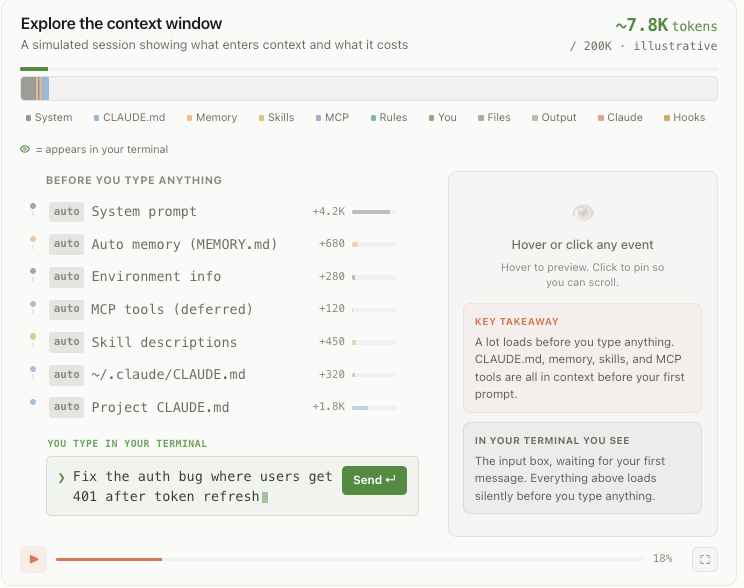
Not only does the larger instructional context within the body of the subagent not auto-invoke, it never enters the parent conversation at all.不仅子代理主体中的更大指令上下文不会自动调用,它根本不会进入父会话。
The subagent then runs in its own fresh context window, and the only thing that returns to your main session is the subagent’s final message (often the aggregated result of many subtasks) plus metadata. 子代理随后在其自己的全新上下文窗口中运行,唯一返回主会话的内容是子代理的最终消息(通常是多个子任务的聚合结果)以及元数据。
This pattern scales: subagents can nest up to five levels deep, and dynamic workflows orchestrate tens to hundreds of background agents without requiring you to specify each detail of the subagent architecture. The orchestration plan and intermediate results live in script variables rather than in Claude’s context window, which enables scale without losing instructional fidelity.此模式可扩展:子代理可嵌套至多五层,动态工作流可编排数十至数百个后台代理,而无需为每个子代理架构的细节单独指定。编排计划和中间结果存放在脚本变量中,而不是 Claude 的上下文窗口,从而在不失指令忠实度的情况下实现规模化。
Tip: That isolation is one of the main reasons to reach for a subagent instead of a skill. Use a subagent when a side task like deep search, a log analysis pass, or a dependency audit would clutter your main conversation with intermediate results you won't reference again. Use a skill when you want the procedure to play out inside the main thread so you can see and steer each step.提示:这种隔离是选择子代理而非技能的主要原因之一。当侧任务如深度搜索、日志分析或依赖审计会用大量中间结果污染主会话且这些结果不会再次引用时,使用子代理。需要在主线程中看到并引导每一步时,使用技能。
Hooks钩子
Hooks are user-defined commands, HTTP endpoints, or LLM prompts that provide more deterministic control over Claude’s behavior by firing on specific events in Claude’s lifecycle like file edits, tool calls, or session start. 钩子是用户定义的命令、HTTP 端点或 LLM 提示,通过在 Claude 生命周期的特定事件(如文件编辑、工具调用或会话开始)触发,为 Claude 的行为提供更确定性的控制。
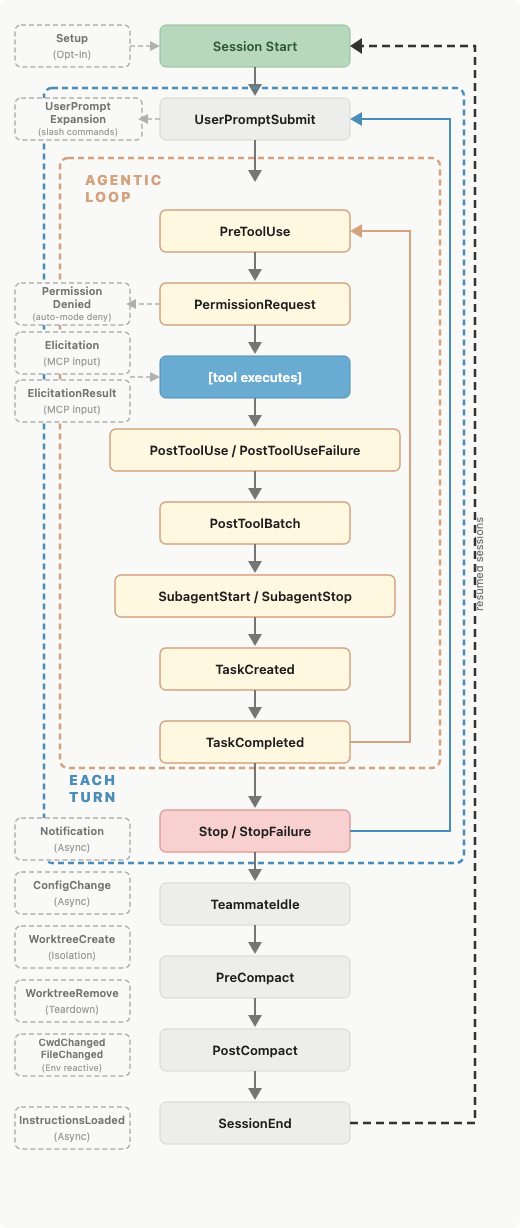
You register hooks in settings.json, managed policy settings, or skill/agent frontmatter. 你可以在 settings.json、受管策略设置或技能/代理的 frontmatter 中注册钩子。
There are several types of hooks: command, HTTP, mcp_tool, prompt, and agent. All hooks are deterministically triggered. The first three execute deterministically while the latter two, prompt and agent, use Claude’s judgment rather than a set of rules to determine the output.钩子类型包括:command、HTTP、mcp_tool、prompt 和 agent。所有钩子均以确定性方式触发。前三种以确定性方式执行,而后两种(prompt 和 agent)使用 Claude 的判断而非一套规则来决定输出。
Hooks have low context costs because the configuration or instruction lives outside the main context window. The harness runs the handler (command, http, mcp_tool) or makes model calls with separate windows (prompt, agent) depending on the hook type. 钩子具有低上下文成本,因为配置或指令位于主上下文窗口之外。根据钩子类型,运行时会执行处理程序(command、http、mcp_tool)或使用独立窗口进行模型调用(prompt、agent)。
Some hooks may have the output saved to the main context window. For example, a blocking hook's standard error is saved within context so Claude knows why the call was denied. 某些钩子的输出可能会保存到主上下文窗口。例如,阻塞钩子的标准错误会保存在上下文中,以便 Claude 知道调用被拒绝的原因。
But most hooks won’t have the output saved to the main window unless the configuration explicitly returns it. If you backed up your chat history into another file for later reference before compaction using the PreCompact event, Claude wouldn’t know which file had the chat history saved. 但大多数钩子不会将输出保存到主窗口,除非配置明确返回它。如果你在压缩前的 PreCompact 事件中将聊天记录备份到另一个文件,Claude 将不知道哪个文件保存了聊天记录。
This makes these hook types fundamentally different from CLAUDE.md, rules, and skills. You can learn more in our post how to configure hooks.这使得这些钩子类型在本质上不同于 CLAUDE.md、规则和技能。你可以在我们的文章中了解如何配置钩子。
Tip: Use hooks for anything that should happen deterministically: running linters after edits, posting to Slack on completion, or blocking specific commands before they execute. A PreToolUse hook can inspect any tool call and exit code 2 to deny it.提示:将钩子用于任何应确定性执行的操作:编辑后运行 linter、完成后向 Slack 推送,或在执行前阻止特定命令。PreToolUse 钩子可以检查任何工具调用并以代码 2 退出以阻止它。
They have low context cost because they are code that the harness runs rather than instructions to Claude that get loaded into context.它们的上下文成本低,因为它们是由运行时执行的代码,而不是加载到 Claude 上下文中的指令。
Output styles输出样式
Output styles are files in .claude/output-styles/ that inject instructions into the system prompt. They never get compacted, load at the start of every session, and are cached after the first request within a session, meaning they have a moderate context cost.输出样式是位于 .claude/output-styles/ 中的文件,会将指令注入系统提示。它们永不被压缩,在每个会话开始时加载,并在会话首次请求后缓存,因此具有中等的上下文成本。
Because they sit in the system prompt, output styles carry the highest instruction-following weight of any method that we've covered so far and should be used judiciously.由于它们位于系统提示中,输出样式在我们迄今讨论的所有方法中拥有最高的指令遵循权重,使用时应谨慎。
Changes to the output style will replace the default output style (unless you set keep-coding-instructions: true in the style's frontmatter). 对输出样式的更改会替换默认输出样式(除非你在样式的 frontmatter 中设置 keep-coding-instructions: true)。
In Claude Code, this would remove instructions that tell Claude it is helping users with software engineering tasks and contains other critical default instructions such as:在 Claude Code 中,这将移除告诉 Claude 正在帮助用户进行软件工程任务的指令,以及其他关键的默认指令,例如:
- How to scope changes; 如何限定更改范围;
- When to add or omit code comments;何时添加或省略代码注释;
- What to do about security concerns; and 如何处理安全问题;以及
- Verification habits like running tests before declaring work complete. 验证习惯,如在声明工作完成前运行测试。
By default, a custom output style drops all of this and Claude Code becomes more of a general assistant than a software engineer assistant. 默认情况下,自定义输出样式会丢弃所有这些指令,使 Claude Code 更像通用助手而非软件工程助手。
Tip: Before writing a custom output style, check the built-in styles. Proactive, Explanatory, and Learning cover the most common needs (autonomy, teaching mode, collaborative coding) without you having to maintain a style file.提示:在编写自定义输出样式之前,先检查内置样式。Proactive、Explanatory 和 Learning 已覆盖最常见需求(自主、教学模式、协作编码),无需自行维护样式文件。
Appending the system prompt追加系统提示
An alternative to modifying output styles is the append-system-prompt flag. Whereas modifying output style files can have large, unintended changes to Claude’s behavior, the append flag is only additive to the original system prompt. It doesn’t modify Claude’s role; it just adds instructions to its default role. 修改输出样式的另一种方式是使用 append-system-prompt 标志。相比修改输出样式文件可能导致 Claude 行为的大幅、意外变化,追加标志仅在原始系统提示上添加内容,不会修改 Claude 的角色,只是向其默认角色添加指令。
It is also passed at invocation time, and only applies to that invocation, rather than persisted as a file across sessions. 它也在调用时传递,仅适用于该次调用,而不是跨会话持久化为文件。
Appending the system prompt can have a higher context cost compared to other methods of passing instructions. It increases input tokens, though prompt caching reduces this cost after the first request in a session. Instructing Claude to use a more verbose or longer style also increases output tokens. 追加系统提示相较于其他传递指令的方法可能产生更高的上下文成本。它会增加输入 token,尽管提示缓存会在会话首次请求后降低此成本。指示 Claude 使用更冗长或更长的风格也会增加输出 token。
Tip: Appending the system prompt is best for adding specific coding standards, output formatting, or domain-specific knowledge. Keep in mind that appending the system prompt has diminishing returns for adherence. Generally, the more instructions you provide using this method, the less strictly Claude will follow them, particularly if any contradict.提示:追加系统提示最适合添加特定的编码标准、输出格式或领域特定知识。请记住,追加系统提示的收益递减。一般来说,使用此方法提供的指令越多,Claude 越不严格遵循它们,尤其是当指令之间存在冲突时。
Quick tips for Claude Code customizationClaude Code 定制的快速提示
If you find yourself doing one of the following, you may want to consider an alternative location for your instructions:如果你发现自己经常进行以下操作,可能需要考虑将指令放在其他位置:
"Every time X, always do Y" in CLAUDE.md. If the behavior should happen reliably, like running prettier after every edit or posting to Slack on completion, use a hook in settings.json instead. The model choosing to run a formatter is different from the formatter running automatically.在 CLAUDE.md 中写“每次 X,都要做 Y”。如果行为需要可靠执行,例如每次编辑后运行 prettier 或完成后向 Slack 推送,请改用 settings.json 中的钩子。模型自行决定运行格式化器与格式化器自动运行是不同的。
“Never do this” in CLAUDE.md. When there's something that absolutely must not happen, an instruction is the wrong tool. Claude will follow the instruction most of the time, but when under pressure, in a long session or an ambiguous situation, or due to a prompt injection in a file accessed as part of the task, the model can fail to follow a prompted rule. A real guardrail needs to be deterministic, and the enforcement methods are hooks and permissions. A PreToolUse hook can inspect a call and exit with code 2 to block it. Managed settings go further: they are admin-deployed, cannot be overridden by a user's local config, and are the only way to enforce a deterministic, organization-wide guardrail.在 CLAUDE.md 中写“绝不能这样”。当有绝对不能发生的事情时,指令并非正确工具。Claude 大多数情况下会遵循指令,但在压力、长会话、模糊情境或文件被注入提示时,模型可能会违背规则。真正的防护需要确定性,实施方式是钩子和权限。PreToolUse 钩子可以检查调用并以代码 2 退出阻止它。受管设置更进一步:它们由管理员部署,用户本地配置无法覆盖,是实现组织范围内确定性防护的唯一方式。
A 30-line procedure in CLAUDE.md. Procedures belong in skills. CLAUDE.md is for facts Claude should hold all the time: build commands, monorepo layout, team conventions. A deployment runbook or a security review checklist should live in .claude/skills/, where the body loads only when invoked.在 CLAUDE.md 中写 30 行的流程。流程应放在技能中。CLAUDE.md 用于 Claude 应随时持有的事实:构建命令、单体仓库布局、团队约定。部署手册或安全审查清单应放在 .claude/skills/ 中,主体仅在调用时加载。
An API-specific rule without paths. If a rule only applies to src/api/**, scoping it with paths: keeps it out of context during unrelated work. An unscoped rule is mechanically identical to putting the content in CLAUDE.md: always loaded, always costing tokens.没有 paths 的 API 特定规则。如果规则仅适用于 src/api/**,使用 paths 进行限定可在无关工作时将其排除在上下文之外。未限定的规则在机制上等同于将内容放入 CLAUDE.md:始终加载,始终消耗 token。
Writing personal preferences to a project-level CLAUDE.md file. All file-based methods have a user-level counterpart loaded for every Claude Code session regardless of which repo you’re in. Use local files for personal preferences (always use semantic commit messages). Keep project-level files for preferences that are team-wide but specific to a given codebase.将个人偏好写入项目级 CLAUDE.md 文件。所有基于文件的方法都有用户级对应项,会在每个 Claude Code 会话中加载,无论所在仓库。请使用本地文件存放个人偏好(例如始终使用语义提交信息)。将项目级文件用于团队范围但特定于某代码库的偏好。
Getting started入门指南
You can find more tips and patterns for getting the most out of Claude Code, from configuring your environment to scaling across parallel sessions, in our best practices for Claude Code documentation.你可以在我们的 Claude Code 最佳实践文档中找到更多技巧和模式,帮助你充分利用 Claude Code,从环境配置到跨并行会话的扩展。
Once you have a few of these working, you can bundle many of them (skills, subagents, hooks, output styles) as a plugin to share a coherent setup across teammates or projects.当你让其中几项工作正常后,可以将许多(技能、子代理、钩子、输出样式)打包成插件,以在团队成员或项目之间共享一致的设置。



Transform how your organization operates with Claude
Get the developer newsletter
Product updates, how-tos, community spotlights, and more. Delivered monthly to your inbox.