Snowflake CoCo for the Power BI PractitionerSnowflake CoCo 为 Power BI 从业者而设
Snowflake CoCo is Snowflake’s AI-powered coding agent — integrated into the Snowflake platform and connects directly to your Snowflake environment, understands your database schemas, your role-based access control (RBAC), and Snowflake best practices out-of-the-box. It writes SQL and Python, develops end-to-end data engineering pipelines, creates ML workflows, manages Snowflake objects, builds Streamlit apps, and much, much more. For anyone who develops on Snowflake, CoCo is quickly becoming the primary tool for getting things done.Snowflake CoCo 是 Snowflake 的 AI 驱动编码代理——集成在 Snowflake 平台中,直接连接到您的 Snowflake 环境,了解您的数据库模式、基于角色的访问控制(RBAC)以及 Snowflake 的最佳实践。它可以编写 SQL 和 Python,开发端到端的数据工程管道,创建机器学习工作流,管理 Snowflake 对象,构建 Streamlit 应用,等等。对于任何在 Snowflake 上开发的人来说,CoCo 正迅速成为完成任务的主要工具。
In this post, we’ll cover:在本文中,我们将讨论:
- An overview of CoCo and what makes it different from other AI coding assistantsCoCo 概览以及它与其他 AI 编码助手的区别
- Introduce the concept of skills and how they make CoCo infinitely extensible介绍技能的概念以及它们如何使 CoCo 无限可扩展
- Walk through two custom skills I created using CoCo Desktop for Power BI practitioners演示我使用 CoCo Desktop 为 Power BI 从业者创建的两个自定义技能
- We’ll wrap with a customer story where we went from a Power BI
.pbitfile to a fully functional Cortex Agent in under an hour using CoCo Desktop and the custom skills我们将以一个客户案例收尾,展示如何在不到一小时内使用 CoCo Desktop 和自定义技能,将 Power BI .pbit 文件转化为完整的 Cortex 代理
In my last blog post we covered the current state of affairs between Power BI and Snowflake Cortex features. This post picks up where that one left off, providing actual tools you can use today to help bridge the gap in your organization.在我的上一篇博客中,我们讨论了 Power BI 与 Snowflake Cortex 功能的现状。本文接着上文,提供您今天即可使用的实际工具,帮助弥合组织内部的差距。
Why Snowflake CoCo?为什么选择 Snowflake CoCo?
Snowflake CoCo is purpose-built for Snowflake development. It understands your account’s RBAC, knows your database schemas, and has deep awareness of Snowflake platform best practices with 60+ out-of-the-box skills (more on this later). However, as you’ll see in this post, CoCo can serve as your organization’s go-to AI-coding assistant for non-Snowflake tasks too. Let’s start by reviewing CoCo’s surface options and what sets it apart from other solutions in the market today.Snowflake CoCo 专为 Snowflake 开发而构建。它了解您账户的 RBAC,熟悉您的数据库模式,并深度掌握 Snowflake 平台的最佳实践,内置 60 多个即用技能(后文会详细说明)。然而,正如本文所示,CoCo 也可以成为您组织在非 Snowflake 任务中的首选 AI 编码助手。让我们先回顾 CoCo 的使用界面以及它相较于市场上其他解决方案的独特之处。
CoCo is available across three surfaces:CoCo 在三个界面上可用:
- CoCo in Snowsight (GA): The web-based experience embedded directly in Snowflake’s UI. It’s context-aware within Workspaces, meaning it knows which SQL file or notebook you’re currently viewing and uses that as background context.Snowsight 中的 CoCo(GA):嵌入 Snowflake UI 的基于网页的体验。它在工作区内具备上下文感知能力,能够识别您当前查看的 SQL 文件或笔记本,并将其作为背景上下文。
- CoCo CLI (GA): A local command-line agent that bridges your development environment (VS Code, Cursor, your terminal) with your Snowflake account. The CLI can read and write to your local file system, making it ideal for managing dbt projects, Streamlit apps, and other code-first workflows. It also supports the Model Context Protocol (MCP) and Agent Client Protocol (ACP), letting you plug CoCo into editors like Zed, JetBrains, and VS Code as a local agent backend.CoCo CLI(GA):本地命令行代理,将您的开发环境(VS Code、Cursor、终端等)与 Snowflake 账户桥接。CLI 能读写本地文件系统,非常适合管理 dbt 项目、Streamlit 应用以及其他代码优先的工作流。它还支持模型上下文协议(MCP)和代理客户端协议(ACP),可将 CoCo 插入 Zed、JetBrains、VS Code 等编辑器作为本地代理后端。
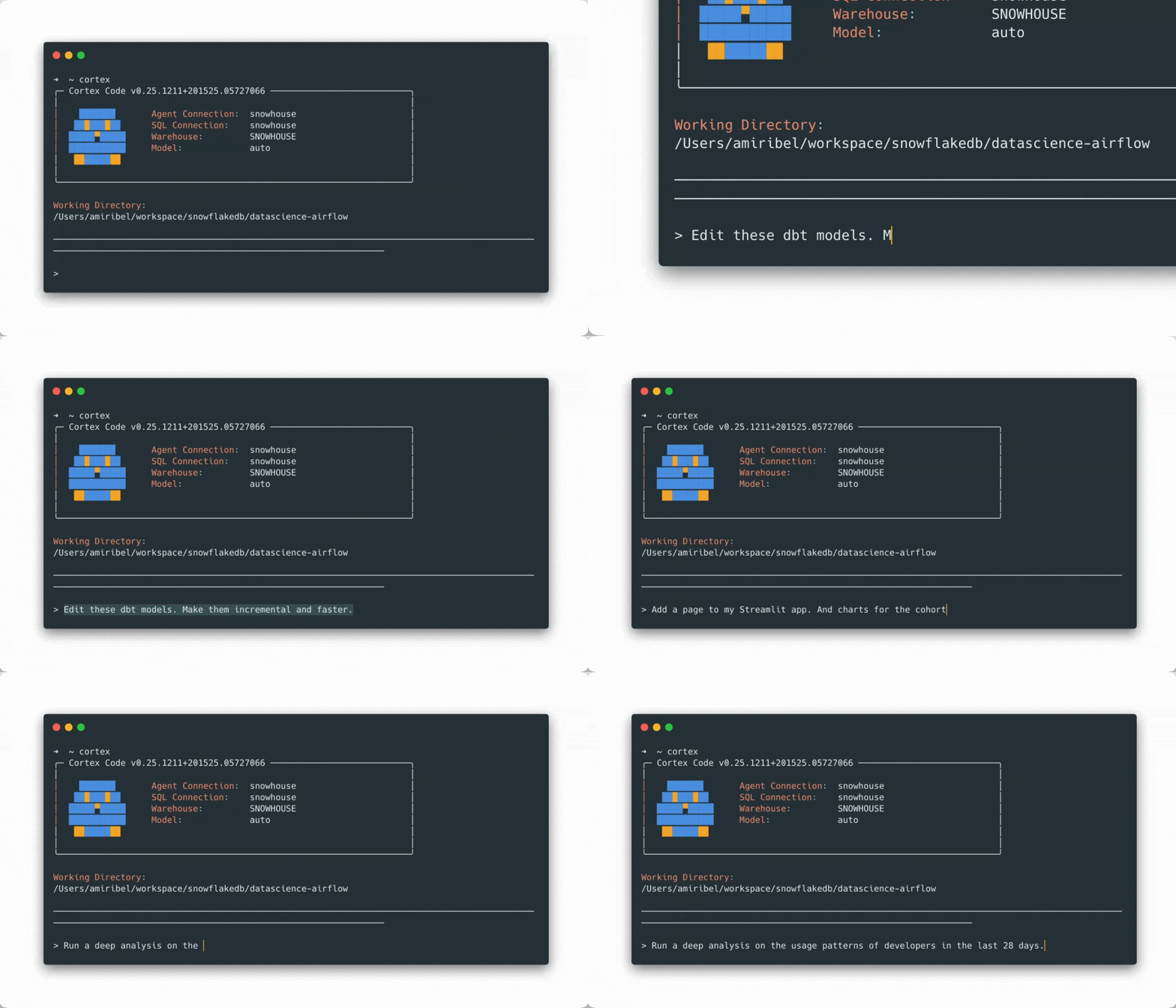
- CoCo Desktop (GA soon): A native desktop application that brings the full CoCo experience into a standalone app. Desktop combines the local file access and extensibility of the CLI with a richer visual interface. All the power of the CLI without living in a terminal window. Screenshots throughout the rest of this post are from CoCo Desktop.CoCo Desktop(即将 GA):原生桌面应用,将完整的 CoCo 体验带入独立应用。Desktop 结合了 CLI 的本地文件访问和可扩展性,并提供更丰富的可视化界面。拥有 CLI 的全部功能,却不必在终端窗口中操作。本文其余截图均来自 CoCo Desktop。
➡️ Installation files/commands for CoCo Desktop and CoCo CLI ⬅️➡️ CoCo Desktop 与 CoCo CLI 的安装文件/命令 ⬅️
CoCo vs OthersCoCo 与其他产品的对比
There’s no shortage of AI coding assistants in the market today. What makes CoCo worthy of consideration as your organization’s primary AI-assisted IDE comes down to three things:市场上 AI 编码助手层出不穷。CoCo 能成为您组织的主要 AI 辅助 IDE,归结为三点:
- Frontier models across providers. CoCo gives you access to frontier LLMs from Anthropic and OpenAI. You’re not locked into a single model provider. Snowflake continually updates the models available, so you’re always working with the best available models without managing API keys, model versions, or provider relationships yourself.多供应商前沿模型。CoCo 为您提供 Anthropic 与 OpenAI 的前沿大模型访问,您无需锁定单一模型供应商。Snowflake 持续更新可用模型,您始终使用最佳模型,无需自行管理 API 密钥、模型版本或供应商关系。
- 100% pay-for-what-you-use. No seat fees. Unlike most AI coding tools that charge a monthly per-seat fee (often $20–40/user/month before you even use the product), CoCo is purely consumption-based. You pay only for the tokens you use, at a flat AI credit rate of $2.00 (global). No per-seat licenses. No minimum commitments. This changes the TCO math, especially for large organizations where seat-based licensing creates pressure to either limit rollout or pay for idle seats.100% 按使用付费。无座位费用。与大多数 AI 编码工具每月收取每座位费用(通常 $20–40/用户/月)不同,CoCo 完全基于消耗计费。您仅为使用的 token 支付,统一 AI 积分费率为 $2.00(全球)。无每座位许可证,无最低承诺。这改变了总体拥有成本(TCO)计算,尤其对大型组织而言,座位制许可往往导致要么限制推广,要么为闲置座位付费的压力。
- Available immediately on your existing Snowflake contract. There’s no separate amendment, no procurement cycle, no new contract to negotiate. If you have a Snowflake account, you can start using CoCo today. AI credits draw from your existing Snowflake capacity. Built-in ACCOUNT_USAGE views and cost control parameters provide monitoring and guardrails for Snowflake admins too.可直接在现有 Snowflake 合同上使用。无需单独修订、采购流程或新合同谈判。只要拥有 Snowflake 账户,即可立即使用 CoCo。AI 积分从您现有的 Snowflake 容量中扣除。内置 ACCOUNT_USAGE 视图和成本控制参数为 Snowflake 管理员提供监控和护栏。
The Skill System: What Makes CoCo Extensible技能系统:CoCo 可扩展性的核心
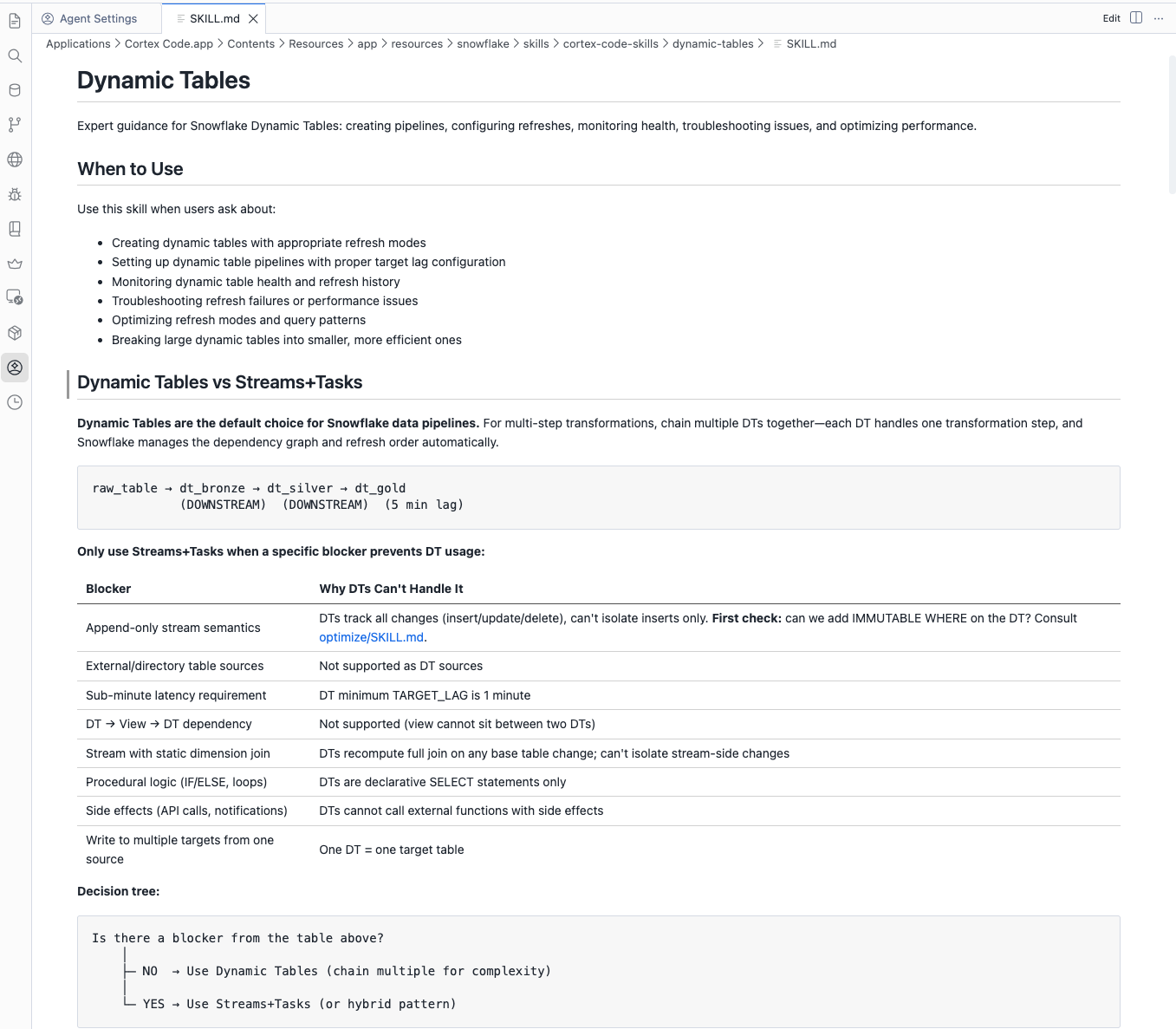
One of the most powerful aspects of CoCo (and any coding assistant) is their support for Agent Skills. Agent Skills are user-defined workflows that extend CoCo’s capabilities into specialized domains. Instead of hardcoding logic into a script, skills give CoCo the context, instructions, and step-by-step workflows it needs to act like a domain expert in a particular area.CoCo(以及任何编码助手)最强大的方面之一是对代理技能的支持。代理技能是用户自定义的工作流,能够将 CoCo 的能力扩展到特定领域。与在脚本中硬编码逻辑不同,技能为 CoCo 提供上下文、指令和分步工作流,使其能够在特定领域表现得像专家一样。
Skills are markdown files (.md) that contain:技能是包含以下内容的 Markdown 文件(.md):
- A name for the skill技能名称
- A description of the skill技能描述
- Instructions for the agent代理指令
- Optional references (E.g., a skill can call sub-skills or code like python scripts)可选引用(例如,技能可以调用子技能或代码,如 Python 脚本)
- CoCo ships with 60+ bundled skills, covering everything from warehouse optimization to data governance to Cortex Agent creation to machine learning workflows. However, the real power is in creating your own custom skills.CoCo 附带 60 多个内置技能,涵盖仓库优化、数据治理、Cortex 代理创建、机器学习工作流等。但真正的力量在于创建您自己的自定义技能。
Building Custom Skills构建自定义技能
CoCo includes a bundled skill called skill-development that makes it straightforward to create your own custom skills. You describe what you want the skill to do, and skill-development walks you through the entire process: defining trigger keywords, structuring multi-step workflows, writing sub-skills for complex domains, and testing behavior. You can even capture a successful CoCo session and convert it into a reusable skill that your entire team can use.CoCo 包含一个名为 skill-development 的打包技能,使创建自定义技能变得直观。您描述技能需求,skill-development 将引导您完成整个过程:定义触发关键字、构建多步骤工作流、为复杂领域编写子技能以及测试行为。您甚至可以捕获一次成功的 CoCo 会话并将其转换为可供团队复用的技能。
Custom skills are also defined as markdown files, which means they’re easy to version control, share, and iterate on. Once installed, they’re invoked automatically when CoCo detects a matching request, or manually via the /skill-name command.自定义技能同样以 Markdown 文件定义,便于版本控制、共享和迭代。安装后,当 CoCo 检测到匹配请求时会自动调用,或可通过 /skill-name 命令手动触发。
I used the built-in skill-development skill to build the two custom skills we’ll discuss next, specifically for Power BI practitioners.我使用内置的 skill-development 技能构建了接下来要讨论的两个针对 Power BI 从业者的自定义技能。
➡️ Power BI Best Practices Analyzer & Reverse Engineer Skills (GitHub) ⬅️➡️ Power BI 最佳实践分析器 & 逆向工程技能(GitHub) ⬅️
NOTE: The skills discussed below and available in the repo linked above are provided as-is and will not be owned nor maintained by Snowflake. While they can absolutely be used as-is, you may want to modify the skills, or build your own custom skills for Power BI, based on your organization’s agreed upon best practices and procedures.注意:以下讨论的技能以及上面链接的仓库均按原样提供,Snowflake 不拥有也不维护它们。虽然可以直接使用,但您可能希望根据组织的最佳实践和流程对技能进行修改或自行构建自定义技能。
Skill #1: Power BI Best Practices Analyzer技能 #1:Power BI 最佳实践分析器
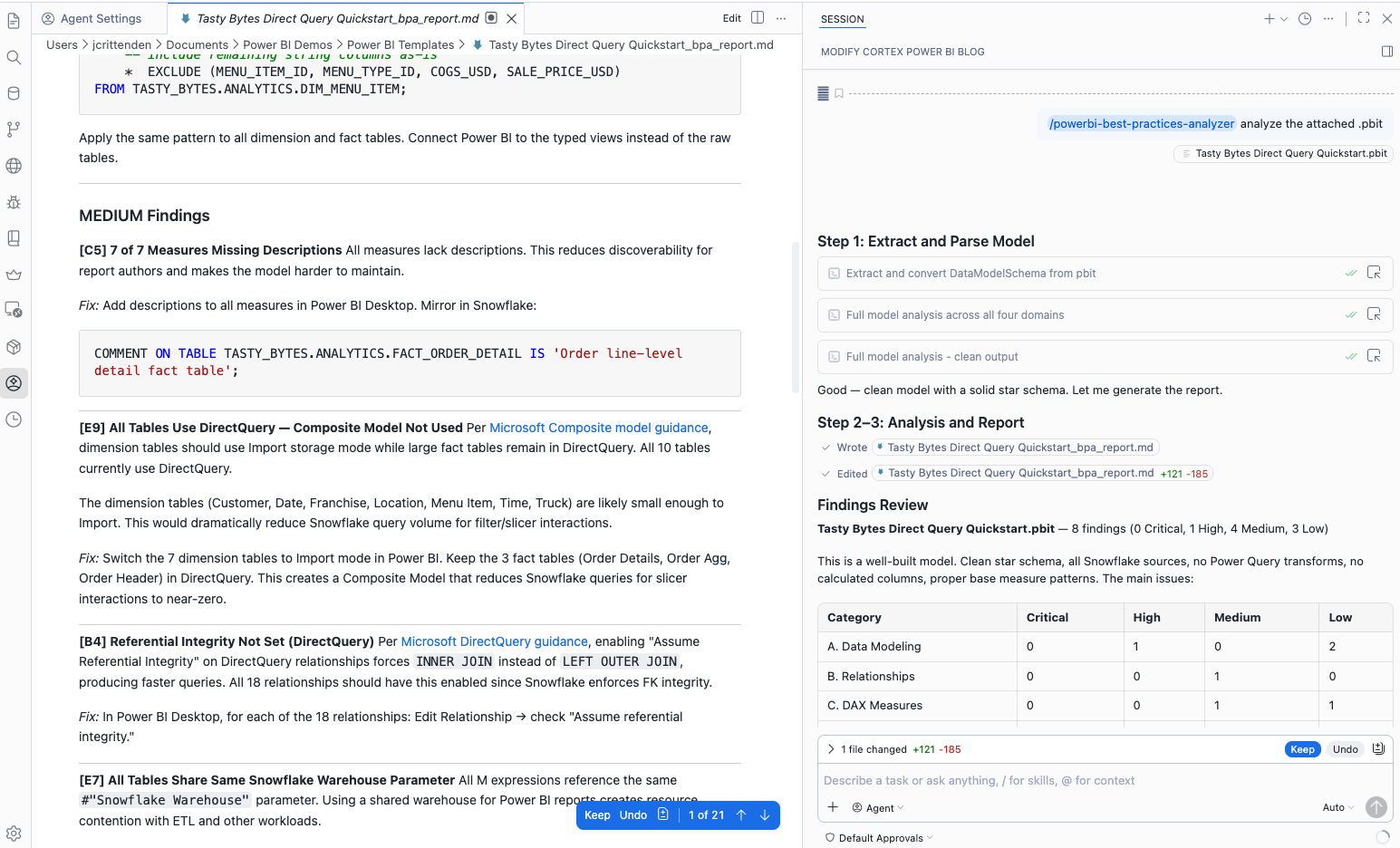
The powerbi-best-practices-analyzer skill does exactly what it sounds like. You point it at a .pbit or .pbix file, and it performs a thorough audit of your Power BI model against documented Snowflake and Power BI best practices. You can also use it in tandem with Power BI’s MCP Servers to analyze semantic models published in your Fabric workspaces.powerbi-best-practices-analyzer 技能正如其名。您将其指向 .pbit 或 .pbix 文件,它会对您的 Power BI 模型进行全面审计,检查是否符合 Snowflake 与 Power BI 的最佳实践。您也可以将其与 Power BI 的 MCP 服务器结合使用,分析发布在 Fabric 工作区的语义模型。
Under the hood, it extracts the DataModelSchema from the file (PBIT/PBIX files are ZIP archives, which most people don't realize), parses the model, and dispatches the analysis across four specialist domains (sub-skills):在内部,它会从文件中提取 DataModelSchema(PBIT/PBIX 文件是 ZIP 压缩包,很多人并不知晓),解析模型,并将分析分发到四个专门子领域(子技能):
- Data Modeling and Relationships: schema design, calculated tables and columns, relationship patterns, numeric precision数据建模与关系:模式设计、计算表和列、关系模式、数值精度
- DAX Measures: base measure patterns, CALCULATE overuse, time intelligence placement, format stringsDAX 度量:基础度量模式、CALCULATE 过度使用、时间智能放置、格式字符串
- Power Query and Connector: M expression transforms, custom SQL usage, ODBC vs. native Snowflake connector, relative date filteringPower Query 与连接器:M 表达式转换、自定义 SQL 使用、ODBC 与原生 Snowflake 连接器、相对日期过滤
- Performance and Security: Row-Level Security (RLS), cross-filtering behavior, DirectQuery-specific rules, slicer patterns性能与安全:行级安全(RLS)、交叉过滤行为、DirectQuery 特定规则、切片器模式
The output is a prioritized findings report with severity ratings (Critical, High, Medium, Low) and actionable SQL and DDL fixes for every applicable finding. Every Critical and High finding comes with a recommended Snowflake-side fix, whether that’s a view to push a calculation down to the database layer, a clustering key recommendation, or a suggested connector change. The skill primarily leverages Power BI’s Guidance Documentation and will look for potential violations of recommended best practices.输出为带有严重性评级(Critical、High、Medium、Low)的优先发现报告,并提供针对每个发现的可操作 SQL 与 DDL 修复。所有 Critical 与 High 级别的发现均附带推荐的 Snowflake 端修复方案,例如将计算下推至数据库的视图、聚簇键建议或连接器更改。该技能主要利用 Power BI 的指导文档,查找可能违反推荐最佳实践的情况。
To run the skill, open CoCo Desktop or CLI and type:运行技能,打开 CoCo Desktop 或 CLI 并输入:
/powerbi-best-practices-analyzer
Here is my Power BI file: /path/to/my-report.pbit
Alternatively, CoCo Desktop allows you to easily upload the file as an attachment to your prompt.或者,CoCo Desktop 允许您将文件作为附件上传到提示中。
CoCo will extract the model, run the four-sub skills, and drop a full findings report in the same directory as your file. No external tools required. No manual schema inspection. Just a clean, prioritized report in seconds.CoCo 将提取模型,运行四个子技能,并在与文件相同的目录下生成完整的发现报告。无需外部工具,无需手动检查模式。几秒钟即可得到干净、优先级明确的报告。
Skill #2: Power BI Reverse Engineer技能 #2:Power BI 逆向工程
The powerbi-reverse-engineer skill takes things a step further. Rather than auditing your existing model, it takes a .pbit or .pbix file and reverse engineers it into a Snowflake Semantic View.powerbi-reverse-engineer 技能更进一步。它不是审计现有模型,而是将 .pbit 或 .pbix 文件逆向工程为 Snowflake 语义视图。
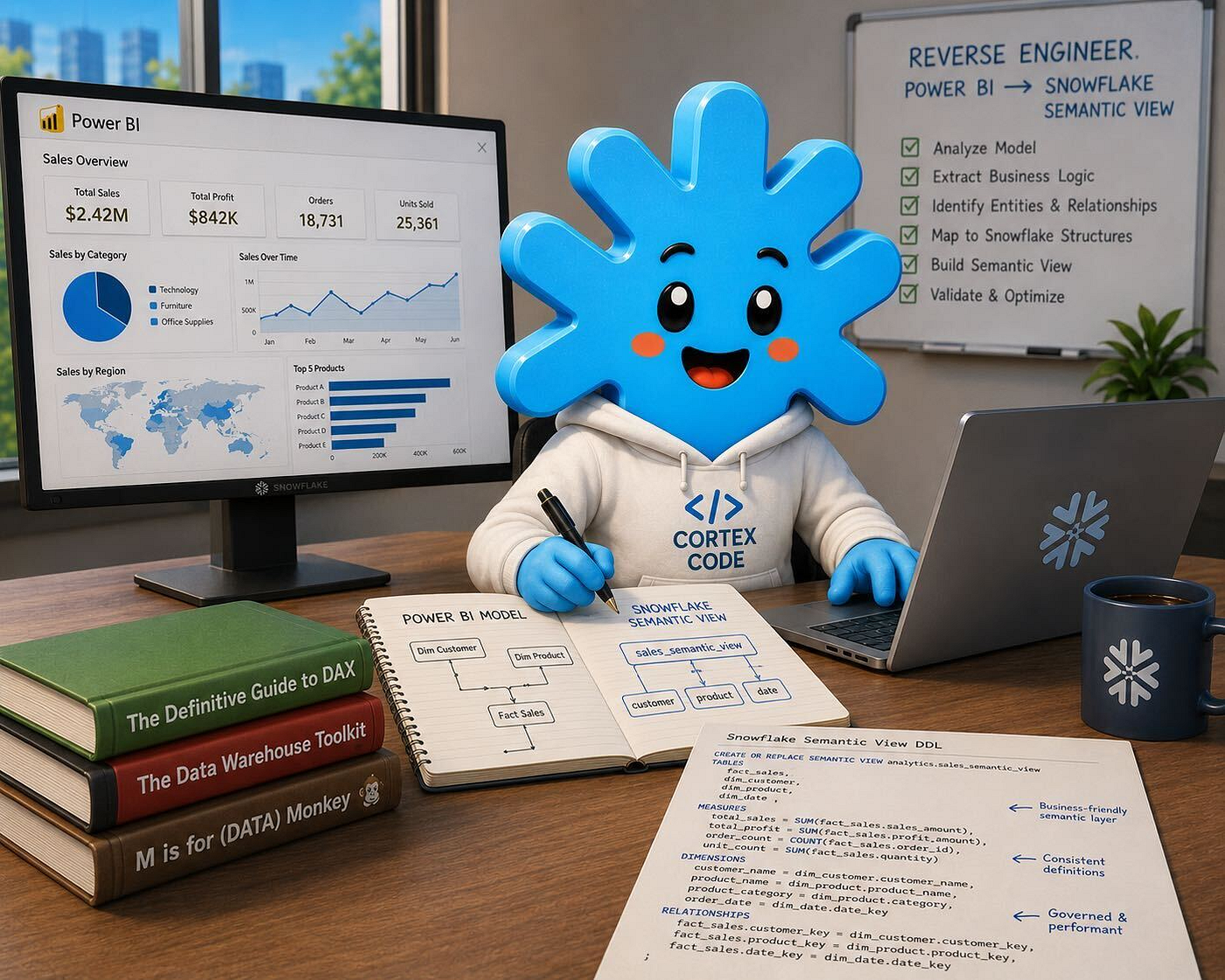
For those unfamiliar, Snowflake Semantic Views are the foundation for Snowflake’s industry-leading text-to-SQL service. Semantic Views are securable objects in Snowflake that contain rich metadata including table relationships, column descriptions, synonyms, verified queries, and business metric definitions. This metadata is what allows Snowflake to understand your data in context and generate accurate SQL from natural language questions. Semantic Views also serve as tools for Cortex Agents, enabling natural language “chat with your data” experiences. I detail both of these features in my previous blog post you can find here.如果您不熟悉,Snowflake 语义视图是 Snowflake 行业领先的文本转 SQL 服务的基础。语义视图是 Snowflake 中可授权的对象,包含丰富的元数据,如表关系、列描述、同义词、已验证查询和业务度量定义。这些元数据使 Snowflake 能够在上下文中理解您的数据,并从自然语言问题生成准确的 SQL。语义视图也是 Cortex 代理的工具,支持自然语言的“与数据对话”体验。我在之前的博客中详细介绍了这些功能,链接如下。
Here’s what the reverse engineer skill does, step by step:逆向工程技能的工作步骤如下:
- Extracts and parses the DataModelSchema from the
.pbitor.pbixarchive从 .pbit 或 .pbix 压缩包中提取并解析 DataModelSchema - Analyzes Power Query (M expressions) to identify the actual source table names and data sources for every table in the model分析 Power Query(M 表达式),识别模型中每个表的实际源表名和数据源
- Documents the full semantic model, including tables, columns, relationships (active and inactive), DAX measures, and any Row-Level Security roles记录完整的语义模型,包括表、列、关系(活动和非活动)、DAX 度量以及任何行级安全角色
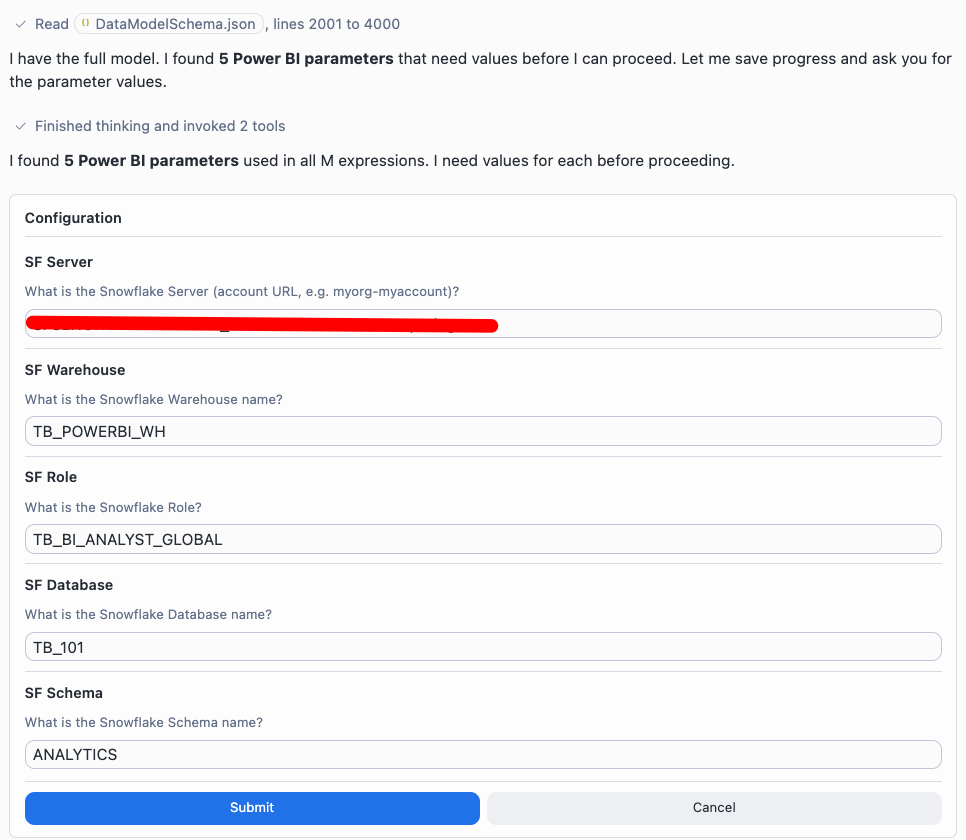
- Presents a full analysis for your review before generating any DDL, including a table mapping (Power BI logical name to Snowflake physical name) and a categorized measure summary在生成任何 DDL 之前,提供完整的分析报告供您审阅,报告中包含表映射(Power BI 逻辑名 → Snowflake 物理名)和度量分类摘要
- Generates a complete
.sqlfile containing all supporting database objects (date tables, helper views) and theCREATE OR REPLACE SEMANTIC VIEWstatement, converting DAX measures to SQL metrics, mapping relationships, and building out dimensions and facts from your column inventory生成包含所有支持对象(日期表、辅助视图)以及 CREATE OR REPLACE SEMANTIC VIEW 语句的完整 .sql 文件,将 DAX 度量转换为 SQL 度量,映射关系,并根据列清单构建维度和事实表
The skill is smart about what it can and can’t convert. Simple DAX aggregations like SUM, COUNT, and AVERAGE become SQL metrics. Ratio measures become DIV0(...) equivalents. Display-only measures like FORMAT and UNICHAR arrow indicators are documented but skipped. Complex calculated tables (like DAX CALENDAR-based date tables) get translated into Snowflake DDL to build a date table in Snowflake.技能能够智能判断哪些可以转换。简单的 DAX 聚合如 SUM、COUNT、AVERAGE 会转为 SQL 度量。比例度量会转为 DIV0(...) 等价物。仅显示的度量如 FORMAT、UNICHAR 等会被记录但跳过。复杂的计算表(如基于 DAX CALENDAR 的日期表)会被翻译为 Snowflake DDL,以在 Snowflake 中创建日期表。
Non-Snowflake sources like Power Platform Dataflows, Excel files, or Web API connections are clearly documented and commented out in the generated DDL with a note about their origin.非 Snowflake 来源,如 Power Platform Dataflows、Excel 文件或 Web API 连接,会在生成的 DDL 中明确记录并注释,注明其来源。
To invoke the skill:调用技能的方法:
/powerbi-reverse-engineer
Here is my Power BI file: /path/to/my-report.pbit
Target: MY_DATABASE.MY_SCHEMA
Semantic View Name: MY_SEMANTIC_VIEW
CoCo walks you through the analysis, waits for your confirmation at key stopping points, and then outputs a .sql file with the complete Semantic View DDL and any supporting database objects.CoCo 将引导您完成分析,在关键停顿点等待确认,然后输出包含完整语义视图 DDL 及所有支持对象的 .sql 文件。
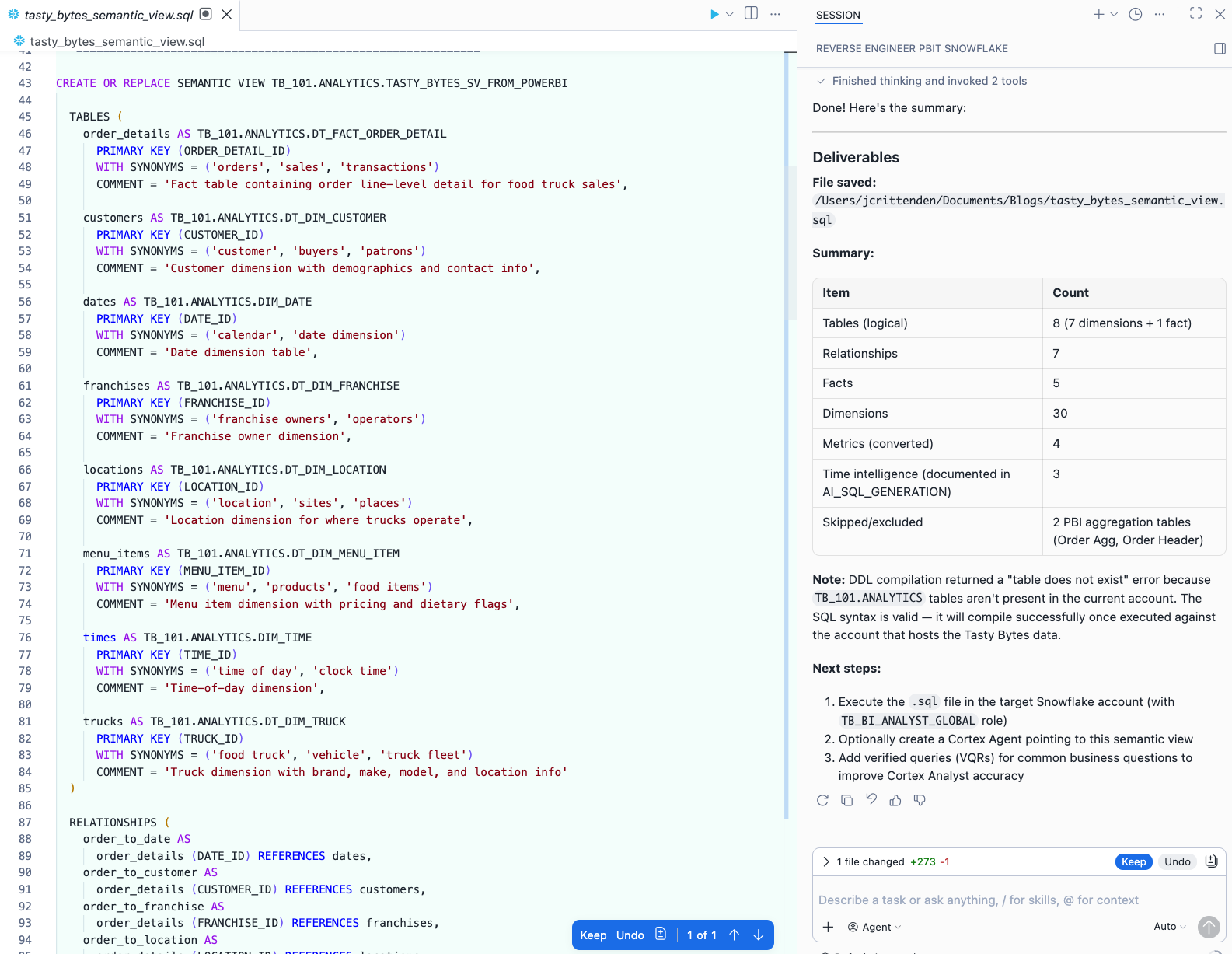
NOTE: The Semantic View generated by the reverse engineer skill is a starting point, not a finished product. You’ll want to review the output, enrich descriptions and synonyms for key business columns, and add verified queries to seed the model with golden examples. But the heavy lifting, particularly the DAX-to-SQL conversion and the relationship mapping, is done for you.注意:逆向工程生成的语义视图是起点,而非最终产品。您需要审阅输出,丰富关键业务列的描述和同义词,并添加已验证查询以为模型提供黄金示例。但繁重的工作,尤其是 DAX 到 SQL 的转换和关系映射,已为您完成。
➡️ Power BI Best Practices Analyzer & Reverse Engineer Skills (GitHub) ⬅️
Real World: From Power BI to Cortex Agent in Under an Hour真实案例:在不到一小时内将 Power BI 转为 Cortex 代理
Recently, I worked with a customer who had an import Power BI semantic model against Snowflake and several other data sources. They wanted to enable a “chat with your data” experience for their sales team using Cortex Agents and Snowflake CoWork, but the idea of manually rebuilding their entire semantic model in Snowflake felt daunting as they had just completed their Power BI semantic model and reports.最近,我与一位客户合作,他们在 Snowflake 以及其他数据源上导入了 Power BI 语义模型。他们希望为销售团队提供基于 Cortex 代理和 Snowflake CoWork 的“与数据对话”体验,但手动在 Snowflake 中重建整个语义模型的工作量令他们望而却步,因为他们刚完成 Power BI 语义模型和报表的构建。
We sat down together with CoCo Desktop and walked through the entire process in a single session:我们与 CoCo Desktop 一起进行了一次完整的现场演示,步骤如下:
- Exported their
.pbitfile from Power BI Desktop从 Power BI Desktop 导出 .pbit 文件 - Ran
/powerbi-best-practices-analyzerto identify any issues. We found a handful of calculated columns, as well as a calendar table created in DAX, that could be pushed to Snowflake. We noted them and moved forward.运行 /powerbi-best-practices-analyzer 识别问题。我们发现少量计算列以及一个基于 DAX 的日历表,可迁移至 Snowflake。记录后继续。 - Ran
/powerbi-reverse-engineeragainst the.pbitfile. CoCo extracted 12 tables, 8 active relationships, and 35+ DAX measures from the model. The model contained four fact tables with conformed dimensions. The model also had its connection string parameterized (e.g., database, schema, environment), which is why we went the CoCo route, instead of our built-in Semantic View Autopilot capability.对 .pbit 文件运行 /powerbi-reverse-engineer。CoCo 提取了 12 张表、8 条活动关系和 35+ DAX 度量。模型包含四个事实表和统一维度。模型的连接字符串已参数化(如数据库、模式、环境),这也是我们选择 CoCo 而非内置语义视图自动化的原因。 - We reviewed the analysis output. CoCo correctly identified all Snowflake source tables from the M expressions, mapped the relationships, and categorized the measures into convertible (28), display-only/skip (4), and complex/manual review (3).我们审阅了分析输出。CoCo 正确识别了所有来自 M 表达式的 Snowflake 源表,映射了关系,并将度量分类为可转换(28)、仅显示/跳过(4)和复杂/需人工审查(3)。
- Once we confirmed the target database and schema. CoCo generated the full
.sqlfile with supporting objects (e.g., a brand new date dimension) and theCREATE OR REPLACE SEMANTIC VIEWDDL.确认目标数据库和模式后,CoCo 生成了完整的 .sql 文件,包含支持对象(例如全新的日期维度)以及 CREATE OR REPLACE SEMANTIC VIEW DDL。 - We then executed the script to deploy the Semantic View to Snowflake and added a few verified queries.我们随后执行脚本,将语义视图部署到 Snowflake 并添加了若干已验证查询。
- Lastly, we asked CoCo to create a Cortex Agent that would call the newly created semantic view as a tool. We gave it some context around the purpose of the agent, how it should respond to users, and told it to generate 15 pre-seeded questions to get end users up and running. CoCo generated and executed a subsequent
.sqlfile to create our Cortex Agent. We then opened our agent from Snowflake CoWork and took it for a spin!最后,我们让 CoCo 创建一个调用新建语义视图的 Cortex 代理。我们为代理提供了用途背景、响应方式,并指示生成 15 条预置问题以帮助终端用户快速上手。CoCo 生成并执行了后续的 .sql 文件以创建我们的 Cortex 代理。随后我们在 Snowflake CoWork 中打开该代理并进行试用!
The total time from .pbit export to a working Cortex Agent answering natural language questions was an hour. The bulk of that time was spent reviewing and tweaking the generated Semantic View, not generating it. The /powerbi-reverse-engineerskill got us 90% of the way there, even highlighting the tables and relationships that couldn’t be converted because they were sourced from SQL Server and not Snowflake.从 .pbit 导出到可回答自然语言问题的工作代理总耗时约为一小时。大部分时间用于审阅和微调生成的语义视图,而非生成本身。/powerbi-reverse-engineer 技能已完成约 90% 的工作,甚至标注了因来源于 SQL Server 而无法转换的表和关系。
CoCo Desktop was a natural fit for this workflow. The customer could see the .pbit file on their local machine, watch CoCo extract and analyze the model in real time, review the generated SQL side-by-side, and then deploy it straight to Snowflake, all without switching between a terminal, a browser, and a text editor.CoCo Desktop 与此工作流天然契合。客户可以在本地机器上查看 .pbit 文件,实时观察 CoCo 提取并分析模型,侧边对比生成的 SQL,然后直接部署到 Snowflake,无需在终端、浏览器和文本编辑器之间切换。
Without the custom skills, this same exercise would have taken days of manual DAX analysis and SQL authoring. With CoCo, the tedious parts were handled automatically and we could focus on the parts that actually require human judgment such as verifying business logic and writing good verified queries.若没有自定义技能,这一过程将耗费数天的手动 DAX 分析和 SQL 编写工作。有了 CoCo,繁琐的部分自动化完成,我们得以专注于需要人工判断的环节,如验证业务逻辑和编写高质量的已验证查询。
Using These Skills Together组合使用这些技能
The recommended workflow:推荐的工作流程:
- Open CoCo Desktop打开 CoCo Desktop
- Run
/powerbi-best-practices-analyzerwith your.pbitor.pbixfile and work through the top findings使用 /powerbi-best-practices-analyzer 对 .pbit 或 .pbix 文件进行审计,并处理最高优先级的发现 - Address any Critical and High severity findings, either in your Power BI model directly or by applying the suggested Snowflake DDL fixes针对 Critical 与 High 级别的发现进行修复,可直接在 Power BI 模型中完成,也可应用建议的 Snowflake DDL 修复
- Run
/powerbi-reverse-engineerwith your cleaned-up file to generate your Semantic View DDL使用已清理的文件运行 /powerbi-reverse-engineer,生成语义视图 DDL - Deploy the Semantic View to Snowflake将语义视图部署到 Snowflake
- Create a Cortex Agent that references the Semantic View as tool创建引用该语义视图的 Cortex 代理
- Interact with your agent in Snowflake CoWork在 Snowflake CoWork 中与代理交互
You don’t need to leverage both skills either. If you just want a quick audit of a Power BI solution, stop at step 3. If you already have a clean model and want to accelerate your path to a Snowflake Semantic View, start at step 4. The skills are designed to complement each other, but each can also stand on its own.您也可以只使用其中一个技能。如果只想快速审计 Power BI 解决方案,可在第 3 步停止。若已有干净模型并希望快速生成 Snowflake 语义视图,可从第 4 步开始。这些技能相互补充,也可单独使用。
Conclusion结论
Snowflake CoCo is a fundamentally different kind of AI coding assistant. It understands your Snowflake environment natively, gives you access to frontier models from Anthropic and OpenAI without lock-in, charges only for what you use with no seat fees, and is available immediately with your existing Snowflake contract.Snowflake CoCo 是一种根本不同的 AI 编码助手。它原生了解您的 Snowflake 环境,提供 Anthropic 与 OpenAI 的前沿模型,无锁定风险,仅按使用付费且无座位费用,并可通过现有 Snowflake 合同立即使用。
The skill system is what makes it infinitely extensible. If you have a domain-specific workflow, whether it’s Power BI model analysis, dbt project scaffolding, or something entirely unique to your organization, you can build a skill for it using the bundled skill-development skill and share it with your team.技能系统赋予了无限的可扩展性。无论是 Power BI 模型分析、dbt 项目脚手架,还是组织独有的工作流,您都可以使用内置的 skill-development 技能构建并与团队共享。
For Power BI practitioners specifically, the two skills covered in this post give you a practical path to improving an existing Power BI model and then converting to a working Semantic View that can be leveraged by a Cortex Agent.针对 Power BI 从业者,本文介绍的两项技能为您提供了改进现有 Power BI 模型并转换为可供 Cortex 代理使用的工作语义视图的实用路径。
Additional Resources其他资源
- Power BI Won’t Support Snowflake Semantic Views — Now What?Power BI 将不再支持 Snowflake 语义视图——接下来怎么办?
- Power BI Best Practices Analyzer & Reverse Engineer Skills (GitHub)Power BI 最佳实践分析器 & 逆向工程技能(GitHub)
- Snowflake CoCo DocumentationSnowflake CoCo 文档
- CoCo CLI Bundled SkillsCoCo CLI 附带技能
- Snowflake Semantic Views DocumentationSnowflake 语义视图文档
- Cortex Agents DocumentationCortex 代理文档
- End-to-End Analytics with Snowflake and Power BI QuickstartSnowflake 与 Power BI 端到端分析快速入门