Injecting On-Demand Domain Expertise: Building a Dynamic Skills Feature for Browser AI Agents按需注入领域专业知识:为浏览器AI代理构建动态技能功能

Gil FinkGil Fink
In our ongoing series on engineering enterprise-grade AI agents using Chrome’s built-in Prompt API, we have successfully conquered performance, persistence, prompt stabilization, and memory compression.在我们关于使用Chrome内置Prompt API构建企业级AI代理的系列文章中,我们已经成功攻克了性能、持久性、提示稳定性和内存压缩等难题。
Our core background agent engine is rock solid. But as we move from basic utilities toward a real, production-ready AI platform, we hit a product engineering wall: monolithic scope creep.我们的核心后台代理引擎坚如磐石。但随着我们从基础工具向真正的、生产就绪的AI平台迈进,我们遇到了一个产品工程瓶颈:单体式范围蔓延。
Up until now, if you wanted your agent to learn a new capability, you had to hardcode more tools into the engine and expand the core system instructions. If you want your agent to write SQL, parse medical data, or check the weather, your master prompt gets heavier, your token consumption spikes, and smaller on-device models like Gemini Nano begin to hallucinate under the cognitive load of unrelated instructions.到目前为止,如果你想让你的代理学习一项新能力,你必须在引擎中硬编码更多工具,并扩展核心系统指令。如果你想让代理编写SQL、解析医疗数据或查询天气,你的主提示会变得更重,令牌消耗激增,像Gemini Nano这样的小型设备端模型会在无关指令的认知负荷下开始产生幻觉。
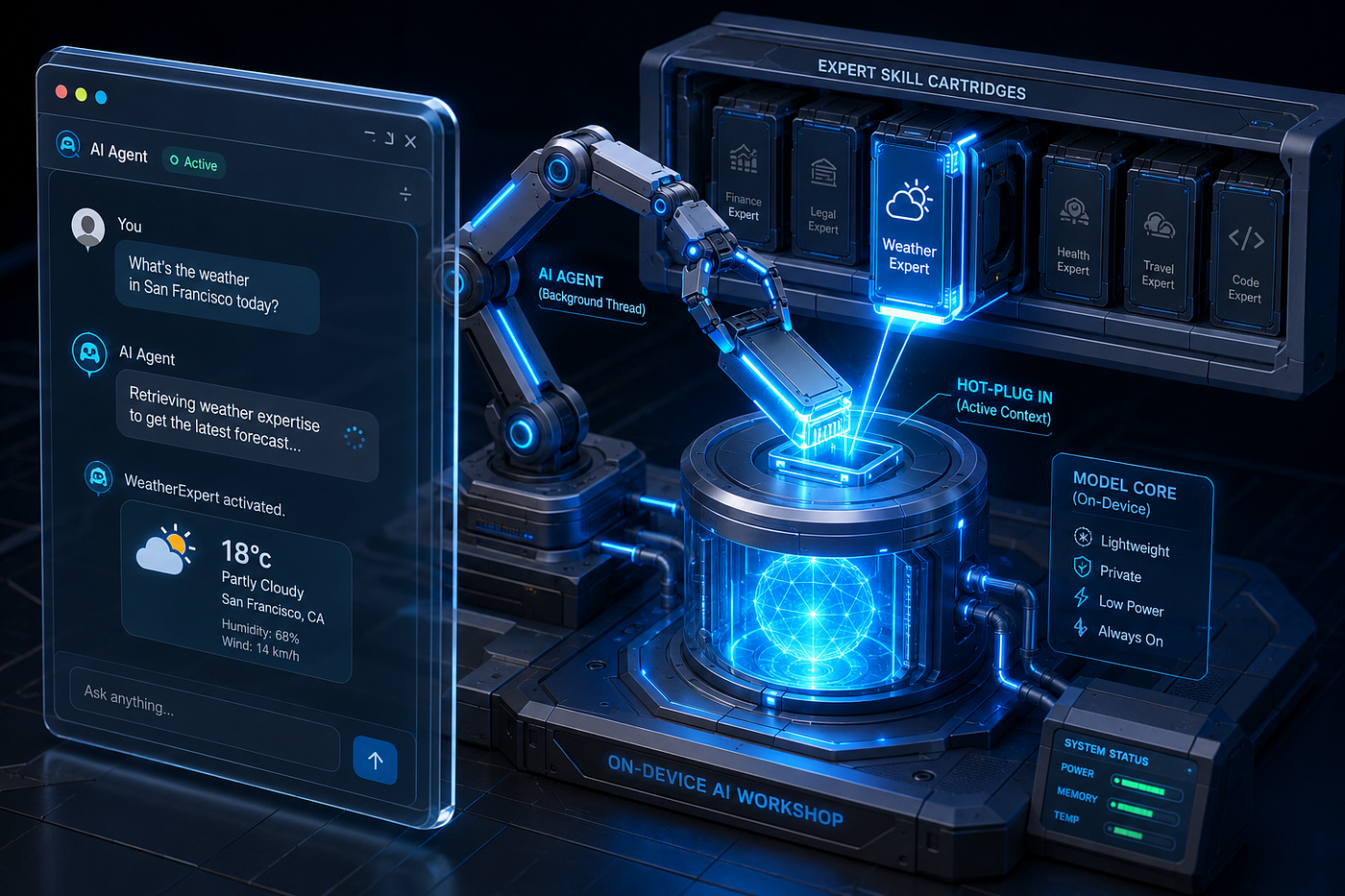
Today, we are introducing a transformative pattern to solve this: dynamic skills retrieval and execution.今天,我们引入了一种变革性的模式来解决这个问题:动态技能检索与执行。
Instead of building a monolithic “know-it-all” AI, we have updated our library to support modular, self-contained skills that are retrieved on demand, injecting domain-specific markdown instructions and local tools into the ReAct loop only when the user’s intent requires it.我们不再构建一个“无所不知”的单体式AI,而是更新了我们的库,支持模块化、自包含的技能,这些技能按需检索,仅在用户意图需要时,将特定领域的Markdown指令和本地工具注入到ReAct循环中。
Why Modular Skills are Critical for Client-Side AI?为什么模块化技能对客户端AI至关重要?
When deploying agents inside consumer browsers, optimizing resources is the name of the game. Modularity isn’t just an aesthetic choice, it’s a strict architectural requirement for three distinct reasons:在消费者浏览器中部署代理时,优化资源是关键。模块化不仅仅是一种美学选择,而是出于三个不同原因的严格架构要求:
- Context window optimization: on-device models have smaller active context constraints than massive cloud endpoints. Swapping domain instructions in and out dynamically keeps our active token overhead highly streamlined.上下文窗口优化:设备端模型的活动上下文约束比大型云端点更小。动态地交换领域指令可以保持我们的活动令牌开销高度精简。
- Decoupled extensions: developers or different teams can build, package, and deploy specialized skills entirely independently. A skill is simply an isolated folder containing a manifest file (
SKILL.md) and its operational tools (tools.js) served over HTTP.解耦扩展:开发者或不同团队可以完全独立地构建、打包和部署专业技能。一个技能只是一个包含清单文件(SKILL.md)及其操作工具(tools.js)的独立文件夹,通过HTTP提供服务。 - Model shielding: smaller models perform exponentially better when given fewer choices. By presenting the agent with only the active tools required for the task at hand, we drastically lower the risk of structural tool-calling failures.模型保护:小型模型在选项较少时表现呈指数级提升。通过只向代理呈现当前任务所需的活跃工具,我们大大降低了结构化工具调用失败的风险。
The Architectural Blueprint架构蓝图
To make this work, we introduced a dynamic loader that parses standard Markdown frontmatter, a standalone keyword-scoring skill retriever, and an updated ReAct loop inside our web worker that plugs tools at runtime.为了实现这一点,我们引入了一个动态加载器,用于解析标准Markdown前置元数据、一个独立的基于关键词评分的技能检索器,以及一个更新后的ReAct循环,该循环在我们的Web Worker中在运行时插入工具。
The Skill Manifest & Dynamic Loader技能清单与动态加载器
A skill is defined by an individual folder served on your network. It contains a SKILL.md file featuring a simple YAML frontmatter configuration block for metadata, followed by deep instructions for the LLM.一个技能由网络上的一个独立文件夹定义。它包含一个SKILL.md文件,其中包含一个简单的YAML前置元数据配置块用于元数据,后跟供LLM使用的详细指令。
To keep the library completely independent of heavy npm packages, we implemented a fast, lightweight regex frontmatter parser and dynamic file loader:为了使库完全独立于繁重的npm包,我们实现了一个快速、轻量级的正则表达式前置元数据解析器和动态文件加载器:
import { Tool } from './prompt-chain-worker.js';

export class Skill {
    constructor(name, description, instructions, tools = []) {
        this.name = name;
        this.description = description;
        this.instructions = instructions;
        this.tools = tools;
    }
}

export function parseFrontmatter(markdown) {
    const regex = /^---\r?\n([\s\S]*?)\r?\n---\r?\n([\s\S]*)$/;
    const match = markdown.match(regex);
    if (!match) {
        return { attributes: {}, body: markdown };
    }

    const yamlStr = match[1];
    const body = match[2];
    const attributes = {};
    const lines = yamlStr.split('\n');

    for (const line of lines) {
        const parts = line.split(':');
        if (parts.length >= 2) {
            const key = parts[0].trim();
            attributes[key] = parts.slice(1).join(':').trim().replace(/^['"]|['"]$/g, '');;
        }
    }

    return { attributes, body };
}

export async function loadSkillFromUrl(baseUrl) {
    const cleanBaseUrl = baseUrl.replace(/\/$/, '');

    const skillMdUrl = `${cleanBaseUrl}/SKILL.md`;
    const res = await fetch(skillMdUrl);
    if (!res.ok) {
        throw new Error(`Failed to load skill manifest from ${skillMdUrl}`);
    }
    const markdown = await res.text();
    const { attributes, body } = parseFrontmatter(markdown);

    const name = attributes.name || "UnnamedSkill";
    const description = attributes.description || "";
    const instructions = body.trim();

    let tools = [];
    try {
        const toolsUrl = `${cleanBaseUrl}/tools.js`;
        const module = await import(toolsUrl);
        const rawTools = module.tools || module.default || [];
        if (Array.isArray(rawTools)) {
            tools = rawTools.map(t => new Tool(t.name, t.description, t.executeFn));
        }
    } catch (err) {
        console.warn(`Could not load tools for skill ${name}:`, err);
    }

    return new Skill(name, description, instructions, tools);
}
The Intent Routing Layer意图路由层
To evaluate if an available skill is relevant to what the user requested, we added a dedicated SkillRetriever. This class implements a token overlap scoring metric matching tokens against the skill's declared title and semantic description block:为了评估可用技能是否与用户请求相关,我们添加了一个专门的SkillRetriever。该类实现了一种令牌重叠评分指标,将令牌与技能声明的标题和语义描述块进行匹配:
export class SkillRetriever {
    constructor(skillsArray = []) {
        this.skills = skillsArray;
    }

    async getRelevantSkills(userPrompt, topK = 1) {
        if (this.skills.length <= topK) return this.skills;

        const query = userPrompt.toLowerCase();

        const scoredSkills = this.skills.map(skill => {
            let score = 0;
            const targetText = `${skill.name} ${skill.description}`.toLowerCase();
            const queryTokens = query.split(/\W+/);
            for (const token of queryTokens) {
                if (token.length > 3 && targetText.includes(token)) {
                    score += 1;
                }
            }
            return { skill, score };
        });

        return scoredSkills
            .filter(item => item.score > 0)
            .sort((a, b) => b.score - a.score)
            .slice(0, topK)
            .map(item => item.skill);
    }
}
Hot-Plugging the Web Worker Engine热插拔Web Worker引擎
Next, we stitch the skill retrieval, custom instruction payload compilation, and dynamic runtime tool injection into the worker’s orchestration layers.接下来,我们将技能检索、自定义指令载荷编译和运行时动态工具注入整合到Worker的编排层中。
First, update PromptTemplate to cleanly host the custom skill instructions segment inside the top-level template context:首先,更新PromptTemplate,将自定义技能指令段干净地托管在顶层模板上下文中:
export class PromptTemplate {
    constructor() {
        this.systemInstruction = `You are an autonomous AI agent with long-term memory. Think step-by-step.
            You must STRICTLY output valid JSON matching the schema.

            Rules:
            1. If you need data, set "toolName" to a tool and "toolInput" to the query. Leave "finalAnswer" as "".
            2. If you know the answer, set "toolName" to "none" and put the answer in "finalAnswer".`;

        this.fewShotExamples = `
            --- Example 1: Using a Tool ---
            User: What is the current stock price of Apple?
            {"thought": "I need to look up the real-time stock price for Apple (AAPL).", "toolName": "FetchStockPrice", "toolInput": "AAPL", "finalAnswer": ""}
            Observation from FetchStockPrice: 175.50
            {"thought": "I have the observation. I can now provide the final answer.", "toolName": "none", "toolInput": "", "finalAnswer": "The current stock price of Apple is $175.50."}

            --- Example 2: Answering Directly ---
            User: What is the capital of France?
            {"thought": "I know the capital of France is Paris. No tool is needed.", "toolName": "none", "toolInput": "", "finalAnswer": "The capital of France is Paris."}
            `;
    }

    format(relevantTools, historyTurns, userPrompt, summary = "", skillInstructions = "") {
        const toolDescriptions = relevantTools.length > 0
            ? relevantTools.map(t => `- ${t.name}: ${t.description}`).join('\n')
            : "- none: No external tools available for this query.";

        const summaryPart = summary
            ? `Conversation Summary (Background Context):\n${summary}\n\n`
            : "";

        const skillPart = skillInstructions
            ? `Active Skill Instructions & Guidelines:\n${skillInstructions}\n\n`
            : "";

        return `${this.systemInstruction}
            Available tools for this request:
            ${toolDescriptions}
            - none: Use this if you do not need a tool.

            ${this.fewShotExamples}

            --- Current Conversation ---
            ${summaryPart}${skillPart}Prior History:
            ${historyTurns.length > 0 ? historyTurns.join('\n') : "No prior history."}

            User: ${userPrompt}
            Output your next step as JSON:`;
    }
}
Then, modify prompt-chain-worker.js to look up relevant skills and hot-swap their bundled tools into the current active execution maps before starting the loop cycles:然后,修改prompt-chain-worker.js,在开始循环周期之前查找相关技能并将其捆绑的工具热替换到当前活动执行映射中:
import { MessageContext } from "./consts.js";
import { AgentMemory } from "./agent-memory.js";
import { PromptTemplate } from "./prompt-template.js";
import { ToolRetriever } from "./tool-retriever.js";
import { SkillRetriever } from "./skill-retriever.js";
import { isRecoverableError, runWithTimeout, delay, compressHistory } from "./utils.js";

export class Tool {
    constructor(name, description, executeFn) {
        this.name = name;
        this.description = description;
        this.executeFn = executeFn;
    }
}

export function createAgentWorker(toolsArray, skillsArray = []) {
    let msgId = 0;
    const resolvers = new Map();

    const memory = new AgentMemory();
    const toolRetriever = new ToolRetriever(toolsArray);
    const skillRetriever = new SkillRetriever(skillsArray);
    const promptTemplate = new PromptTemplate();

    const agentSchema = {
        "type": "object",
        "properties": {
            "thought": { "type": "string" },
            "toolName": { "type": "string" },
            "toolInput": { "type": "string" },
            "finalAnswer": { "type": "string" }
        },
        "required": ["thought", "toolName", "toolInput", "finalAnswer"]
    };

    function askLLM(prompt, schema = agentSchema) {
        return new Promise((resolve, reject) => {
            const id = ++msgId;
            resolvers.set(id, { resolve, reject });
            self.postMessage({ id, type: MessageContext.llmRequest, payload: { prompt, schema } });
        });
    }

    function logToMain(message) {
        self.postMessage({ id: 0, type: MessageContext.agentLog, payload: message });
    }

    async function runReActLoop(userPrompt, sessionId) {
        let isComplete = false;
        let finalResult = "";
        let loopCount = 0;

        let { history: historyTurns, summary: conversationSummary } = await memory.getHistory(sessionId);

        const relevantTools = await toolRetriever.getRelevantTools(userPrompt, 3);
        const relevantSkills = await skillRetriever.getRelevantSkills(userPrompt, 3);

        let skillInstructions = "";
        if (relevantSkills.length > 0) {
            for (const skill of relevantSkills) {
                logToMain(`System: Activating skill "${skill.name}"`);
                skillInstructions =+ `${skill.instructions} `;

                for (const skillTool of skill.tools) {
                    if (!relevantTools.some(t => t.name === skillTool.name)) {
                        relevantTools.push(skillTool);
                    }
                }
            }
        }

        const toolsMap = new Map(relevantTools.map(t => [t.name, t]));

        let currentTurnLog = `User: ${userPrompt}\n`;
        let currentPrompt = promptTemplate.format(relevantTools, historyTurns, userPrompt, conversationSummary, skillInstructions);

        while (!isComplete && loopCount < 7) {
            loopCount++;

            const responseText = await askLLM(currentPrompt);
            let response;

            try {
                response = JSON.parse(responseText);
            } catch (e) {
                currentPrompt = `Observation: Invalid JSON format received. You must respond strictly in JSON syntax.`;
                continue;
            }

            if (response.thought) {
                logToMain(`Thought: ${response.thought}`);
                currentTurnLog += `Thought: ${response.thought}\n`;
            }

            if (response.finalAnswer && response.finalAnswer.trim() !== "") {
                finalResult = response.finalAnswer;
                currentTurnLog += `Assistant: ${response.finalAnswer}\n`;
                isComplete = true;
            }
            else if (response.toolName && response.toolName !== "none" && toolsMap.has(response.toolName)) {
                logToMain(`Action: Running ${response.toolName} with input "${response.toolInput}"`);

                const tool = toolsMap.get(response.toolName);
                let toolResult;
                let success = false;
                let retryCount = 0;
                const maxRetries = 3;

                while (retryCount <= maxRetries && !success) {
                    try {
                        toolResult = await runWithTimeout(tool.executeFn, response.toolInput, 3000);
                        success = true;
                    } catch (err) {
                        if (isRecoverableError(err) && retryCount < maxRetries) {
                            retryCount++;
                            logToMain(`Observation: Tool timed out. Retrying...`);
                            await delay(1000);
                        } else {
                            currentTurnLog += `Action: ${response.toolName}("${response.toolInput}")\nObservation: Tool failed with error: ${err.message}\n`;
                            logToMain(`Observation: Tool failed with error: ${err.message}`);
                            currentPrompt = `Observation: Tool '${response.toolName}' failed because: ${err.message}. Please correct the input/parameters, try a different approach, or check tool availability, and try again.`;
                            break;
                        }
                    }
                }

                if (success) {
                    currentTurnLog += `Action: ${response.toolName}("${response.toolInput}")\nObservation: ${toolResult}\n`;
                    logToMain(`Observation: ${toolResult}`);
                    currentPrompt = `Observation from ${response.toolName}: ${toolResult}\nGiven this observation, output your next step as JSON:`;
                }
            }
            else if (response.toolName === "none" || response.toolName === "") {
                currentPrompt = `Observation: You set toolName to "none" but omitted a finalAnswer. Provide your final answer text in the JSON.`;
            }
            else {
                currentPrompt = `Observation: Tool '${response.toolName}' is not loaded. Select from available tools or use 'none'.`;
            }
        }

        if (finalResult) {
            historyTurns.push(currentTurnLog.trim());
            const compressionResult = await compressHistory(historyTurns, conversationSummary, askLLM, logToMain);
            await memory.saveHistory(sessionId, compressionResult.historyTurns, compressionResult.updatedSummary);
        }

        return finalResult || "Error: Reached maximum iterations.";
    }

    self.addEventListener('message', async (e) => {
        const { id, type, payload } = e.data;

        if (type === MessageContext.llmResponse) {
            resolvers.get(id)?.resolve(payload);
            resolvers.delete(id);
        } else if (type === MessageContext.llmError) {
            resolvers.get(id)?.reject(new Error(payload));
            resolvers.delete(id);
        } else if (type === MessageContext.startLoop) {
            try {
                await memory.init();
                const answer = await runReActLoop(payload.userPrompt, payload.sessionId);
                self.postMessage({ id, type: MessageContext.agentComplete, payload: answer });
            } catch (err) {
                self.postMessage({ id, type: MessageContext.agentError, payload: err.message });
            }
        }
    });
}
Creating an Isolated Skill Module: WeatherExpert创建独立技能模块:WeatherExpert
To verify the design, we can implement an independent skill folder inside a static directory (/skills/weather/).为了验证设计,我们可以在静态目录(/skills/weather/)中实现一个独立的技能文件夹。
We define the custom behavior rules inside SKILL.md:我们在SKILL.md中定义自定义行为规则:
---
name: WeatherExpert
description: Retrieve current weather forecasts, temperatures, and conditions for a specific city.
---

# WeatherExpert Instructions
You are the WeatherExpert assistant. When the user asks about the weather or forecast for a specific city, follow these rules:
1. Identify the city or location the user is asking about.
2. Call the "GetWeather" tool with the city name as the input parameter.
3. Once you receive the weather details, summarize the temperature, wind speed, and condition in a friendly, conversational tone.
4. Format the final output nicely (e.g., using bullet points for key weather stats) and add a cheerful sign-off.
And define its local mockup function behavior inside tools.js:并在tools.js中定义其本地模拟函数行为:
export const tools = [
    {
        name: "GetWeather",
        description: "Fetches current weather information for a given city.",
        executeFn: async (city) => {
            const mockWeather = {
                "london": "15°C, Light rain, Wind 12km/h, Humidity 82%",
                "new york": "22°C, Sunny, Wind 8km/h, Humidity 45%",
                "tokyo": "26°C, Humid and Partly Cloudy, Wind 5km/h, Humidity 70%",
                "paris": "19°C, Partly Cloudy, Wind 10km/h, Humidity 55%",
                "sydney": "18°C, Clear, Wind 15km/h, Humidity 60%",
                "berlin": "17°C, Overcast, Wind 9km/h, Humidity 75%"
            };

            const normalized = city.trim().toLowerCase();
            for (const key of Object.keys(mockWeather)) {
                if (normalized.includes(key)) {
                    return mockWeather[key];
                }
            }
            return `20°C, Clear Sky, Wind 7km/h (Default forecast for ${city})`;
        }
    }
];
Now, instead of mixing this domain logic with our core engine, the client instantiation code in my-agent.js can cleanly load it dynamically over HTTP:现在,无需将此领域逻辑与我们的核心引擎混合,客户端实例化代码在my-agent.js中可以干净地通过HTTP动态加载它:
import { Tool, createAgentWorker } from './prompt-chain-worker.js';
import { loadSkillFromUrl } from './skill.js';

const fetchTool = new Tool(
    "FetchData",
    "Fetches text content from a URL.",
    async (url) => {
        const res = await fetch(url);
        if (!res.ok) {
            throw new Error(`HTTP Error: status ${res.status}`);
        }
        return await res.text();
    }
);

const mathTool = new Tool(
    "Calculator",
    "Evaluates math expressions (e.g. '100 * 5').",
    (expression) => {
        return String(eval(expression));
    }
);

const weatherSkill = await loadSkillFromUrl('./skills/weather');
createAgentWorker([fetchTool, mathTool], [weatherSkill]);Summary总结
The update we introduced alters the capabilities of our client-side web agents. When a user asks a calculation query like “Calculate 542 * 13”, the intent matcher leaves the system context clean, executing purely with the global calculator tools.我们引入的更新改变了客户端Web代理的能力。当用户提出计算查询如“计算542 * 13”时,意图匹配器保持系统上下文干净,仅使用全局计算器工具执行。
However, the second the user interacts with a “Weather in Tokyo” prompt, the worker intercepts the stream, pushes the WeatherExpert skill live, seamlessly binds the GetWeather async function, and enforces the unique bulleted layout instructions and friendly tone explicitly outlined in the localized manifest.然而,一旦用户输入“东京天气”提示,Worker会拦截流,激活WeatherExpert技能,无缝绑定GetWeather异步函数,并强制执行本地化清单中明确概述的独特项目符号布局指令和友好语气。
We have successfully migrated from building a simple client-side text wrapper to designing a highly scalable, dynamic plugin architecture for localized edge intelligence.我们已成功从构建简单的客户端文本包装器,转向为本地化边缘智能设计高度可扩展的动态插件架构。
If you are interested in the code, you can find it on my Github — https://github.com/gilf/prompt-chain.如果你对代码感兴趣,可以在我的Github上找到——https://github.com/gilf/prompt-chain。