opendatalab / MinerU2.5-Pro-2604-1.2B 喜欢 154 关注 OpenDataLab 710
Instructions to use opendatalab/MinerU2.5-Pro-2604-1.2B with libraries, inference providers, notebooks, and local apps. Follow these links to get started.
- Libraries
- Transformers
How to use opendatalab/MinerU2.5-Pro-2604-1.2B with Transformers:
# Use a pipeline as a high-level helper from transformers import pipeline pipe = pipeline("image-text-to-text", model="opendatalab/MinerU2.5-Pro-2604-1.2B") messages = [ { "role": "user", "content": [ {"type": "image", "url": "https://huggingface.co/datasets/huggingface/documentation-images/resolve/main/p-blog/candy.JPG"}, {"type": "text", "text": "What animal is on the candy?"} ] }, ] pipe(text=messages)# Load model directly from transformers import AutoProcessor, AutoModelForMultimodalLM processor = AutoProcessor.from_pretrained("opendatalab/MinerU2.5-Pro-2604-1.2B") model = AutoModelForMultimodalLM.from_pretrained("opendatalab/MinerU2.5-Pro-2604-1.2B") messages = [ { "role": "user", "content": [ {"type": "image", "url": "https://huggingface.co/datasets/huggingface/documentation-images/resolve/main/p-blog/candy.JPG"}, {"type": "text", "text": "What animal is on the candy?"} ] }, ] inputs = processor.apply_chat_template( messages, add_generation_prompt=True, tokenize=True, return_dict=True, return_tensors="pt", ).to(model.device) outputs = model.generate(**inputs, max_new_tokens=40) print(processor.decode(outputs[0][inputs["input_ids"].shape[-1]:])) - Notebooks
- Google Colab
- Kaggle
- Local Apps Settings
- vLLM
How to use opendatalab/MinerU2.5-Pro-2604-1.2B with vLLM:
Install from pip and serve model
# Install vLLM from pip: pip install vllm # Start the vLLM server: vllm serve "opendatalab/MinerU2.5-Pro-2604-1.2B" # Call the server using curl (OpenAI-compatible API): curl -X POST "http://localhost:8000/v1/chat/completions" \ -H "Content-Type: application/json" \ --data '{ "model": "opendatalab/MinerU2.5-Pro-2604-1.2B", "messages": [ { "role": "user", "content": [ { "type": "text", "text": "Describe this image in one sentence." }, { "type": "image_url", "image_url": { "url": "https://cdn.britannica.com/61/93061-050-99147DCE/Statue-of-Liberty-Island-New-York-Bay.jpg" } } ] } ] }'Use Docker
docker model run hf.co/opendatalab/MinerU2.5-Pro-2604-1.2B
- SGLang
How to use opendatalab/MinerU2.5-Pro-2604-1.2B with SGLang:
Install from pip and serve model
# Install SGLang from pip: pip install sglang # Start the SGLang server: python3 -m sglang.launch_server \ --model-path "opendatalab/MinerU2.5-Pro-2604-1.2B" \ --host 0.0.0.0 \ --port 30000 # Call the server using curl (OpenAI-compatible API): curl -X POST "http://localhost:30000/v1/chat/completions" \ -H "Content-Type: application/json" \ --data '{ "model": "opendatalab/MinerU2.5-Pro-2604-1.2B", "messages": [ { "role": "user", "content": [ { "type": "text", "text": "Describe this image in one sentence." }, { "type": "image_url", "image_url": { "url": "https://cdn.britannica.com/61/93061-050-99147DCE/Statue-of-Liberty-Island-New-York-Bay.jpg" } } ] } ] }'Use Docker images
docker run --gpus all \ --shm-size 32g \ -p 30000:30000 \ -v ~/.cache/huggingface:/root/.cache/huggingface \ --env "HF_TOKEN=<secret>" \ --ipc=host \ lmsysorg/sglang:latest \ python3 -m sglang.launch_server \ --model-path "opendatalab/MinerU2.5-Pro-2604-1.2B" \ --host 0.0.0.0 \ --port 30000 # Call the server using curl (OpenAI-compatible API): curl -X POST "http://localhost:30000/v1/chat/completions" \ -H "Content-Type: application/json" \ --data '{ "model": "opendatalab/MinerU2.5-Pro-2604-1.2B", "messages": [ { "role": "user", "content": [ { "type": "text", "text": "Describe this image in one sentence." }, { "type": "image_url", "image_url": { "url": "https://cdn.britannica.com/61/93061-050-99147DCE/Statue-of-Liberty-Island-New-York-Bay.jpg" } } ] } ] }' - Docker Model Runner
How to use opendatalab/MinerU2.5-Pro-2604-1.2B with Docker Model Runner:
docker model run hf.co/opendatalab/MinerU2.5-Pro-2604-1.2B
MinerU2.5-Pro: Pushing the Limits of Data-Centric Document Parsing at Scale MinerU2.5-Pro:在大规模数据中心文档解析上突破极限
🏆 Unmatched SOTA Performance 🏆 无可匹敌的 SOTA 表现
MinerU2.5-Pro is our latest document parsing model (PDF-to-Markdown) that establishes a new industry standard. By focusing entirely on data engineering without altering the original 1.2B-parameter architecture, it delivers exceptional results across the board:MinerU2.5-Pro 是我们最新的文档解析模型(PDF 转 Markdown),树立了新的行业标准。通过在不改变原始 1.2B 参数架构的前提下,专注于数据工程,它在各方面都交出了卓越的成绩:
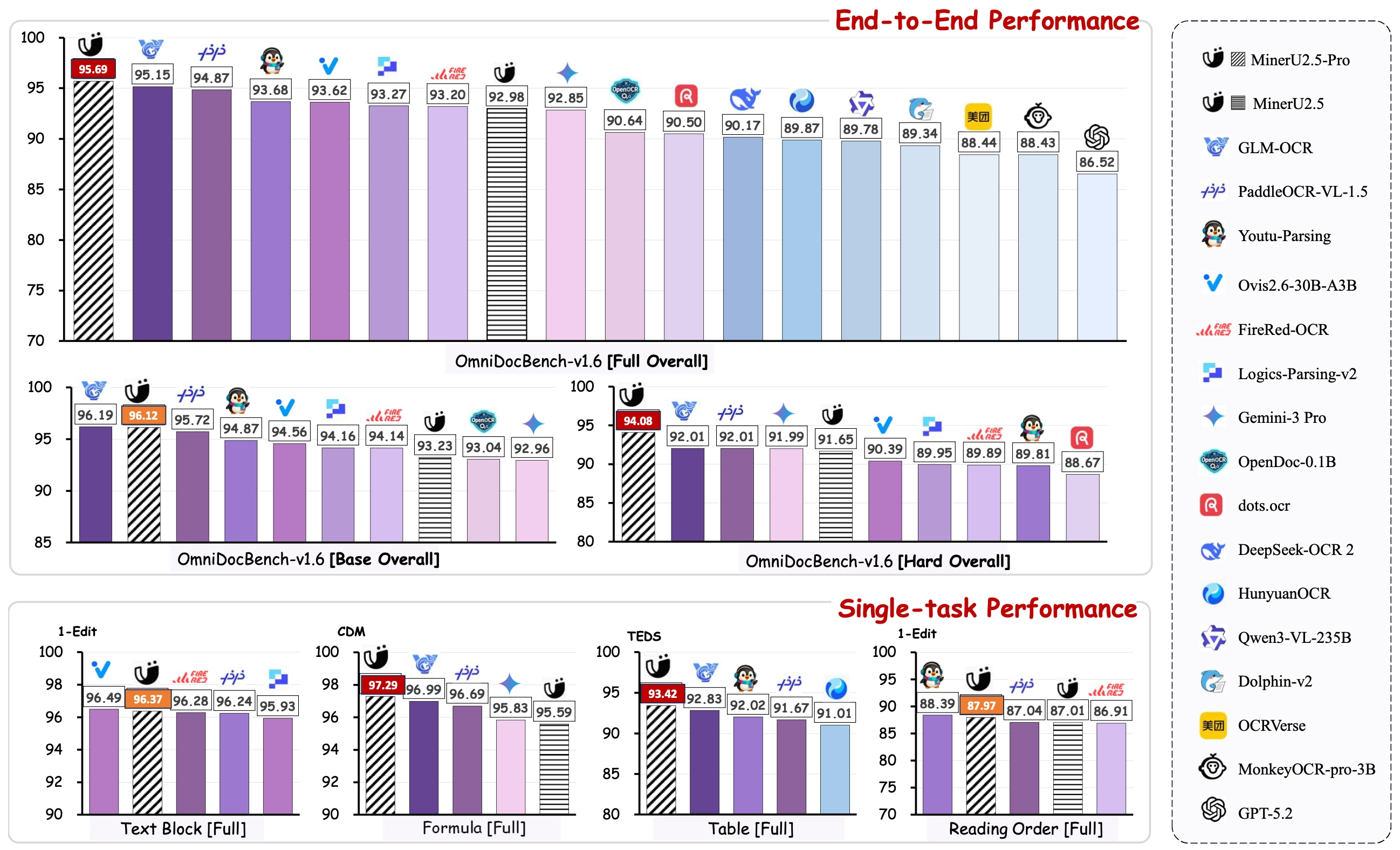
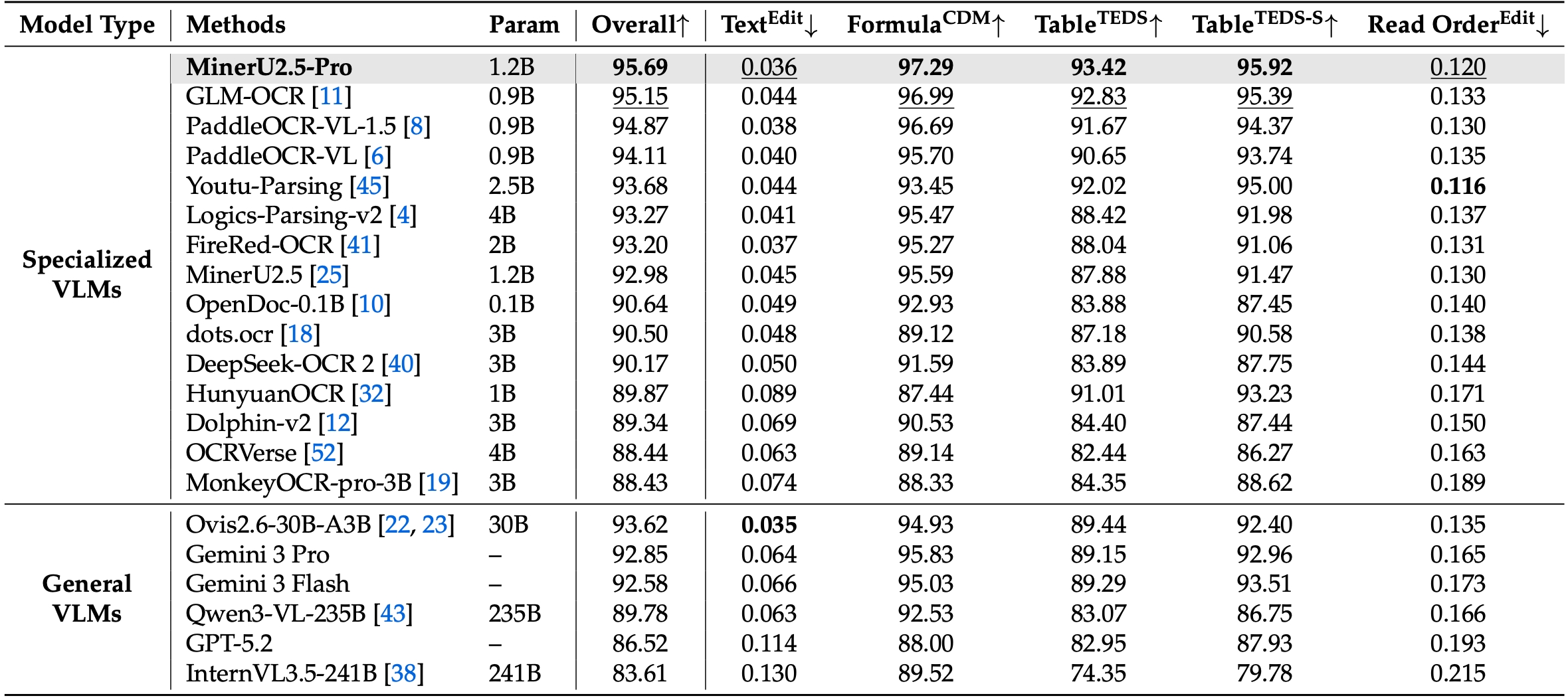
1. Defeating Leading Models on OmniDocBench v1.6 On the newly proposed, highly rigorous OmniDocBench v1.6, MinerU2.5-Pro achieves the absolute SOTA overall score of 95.69. It comprehensively outperforms both top-tier specialized OCR models (GLM-OCR, PaddleOCR-VL-1.5) and massive frontier VLMs (Gemini 3 Pro, Qwen3-VL-235B). 1. 在 OmniDocBench v1.6 上击败领先模型 在新提出的、极其严格的 OmniDocBench v1.6 上,MinerU2.5-Pro 达到了 95.69 的绝对 SOTA 综合得分。它全面超越了顶级专业 OCR 模型(GLM-OCR、PaddleOCR-VL-1.5)以及前沿大规模 VLM(Gemini 3 Pro、Qwen3-VL-235B)。
2. Massive Leap from MinerU 2.5 via Data Engineering Compared to the previous MinerU 2.5 baseline, the overall score skyrocketed from 92.98 to 95.69. This breakthrough was achieved not by scaling model parameters, but through meticulous data engineering—drastically expanding data scale, enriching distribution and difficulty diversity, and systematically elevating annotation quality.2. 通过数据工程实现 MinerU 2.5 的巨大跃升 相较于之前的 MinerU 2.5 基线,综合得分从 92.98 飙升至 95.69。这一突破并非通过扩大模型参数实现,而是通过精细的数据工程——大幅扩展数据规模、丰富分布和难度多样性,并系统提升标注质量。
3. Exceptional Modality-Specific Breakthroughs3. 出色的模态专属突破
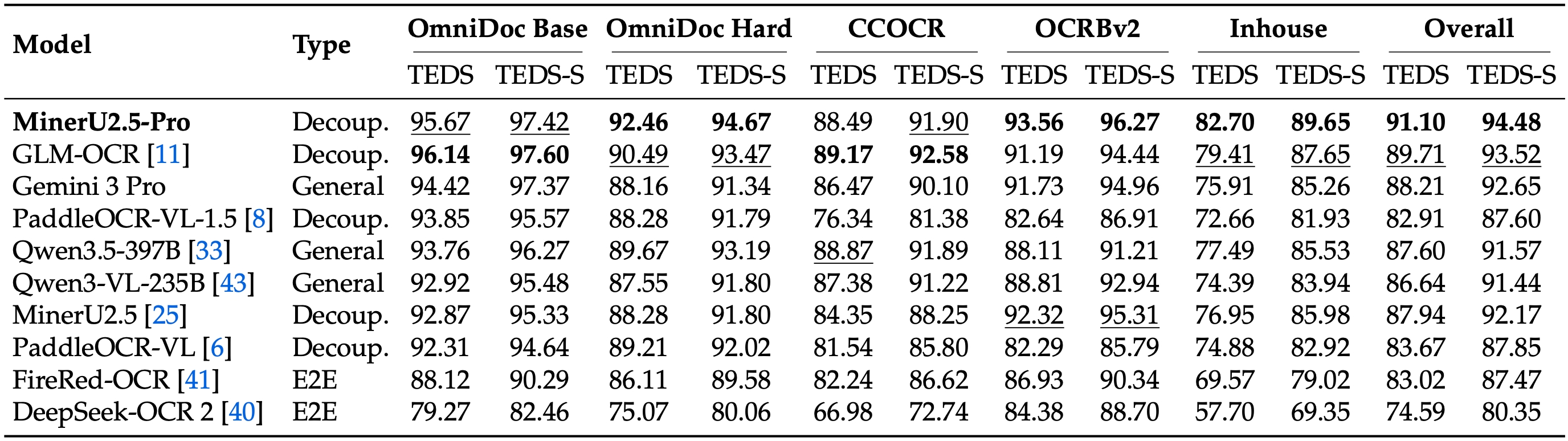
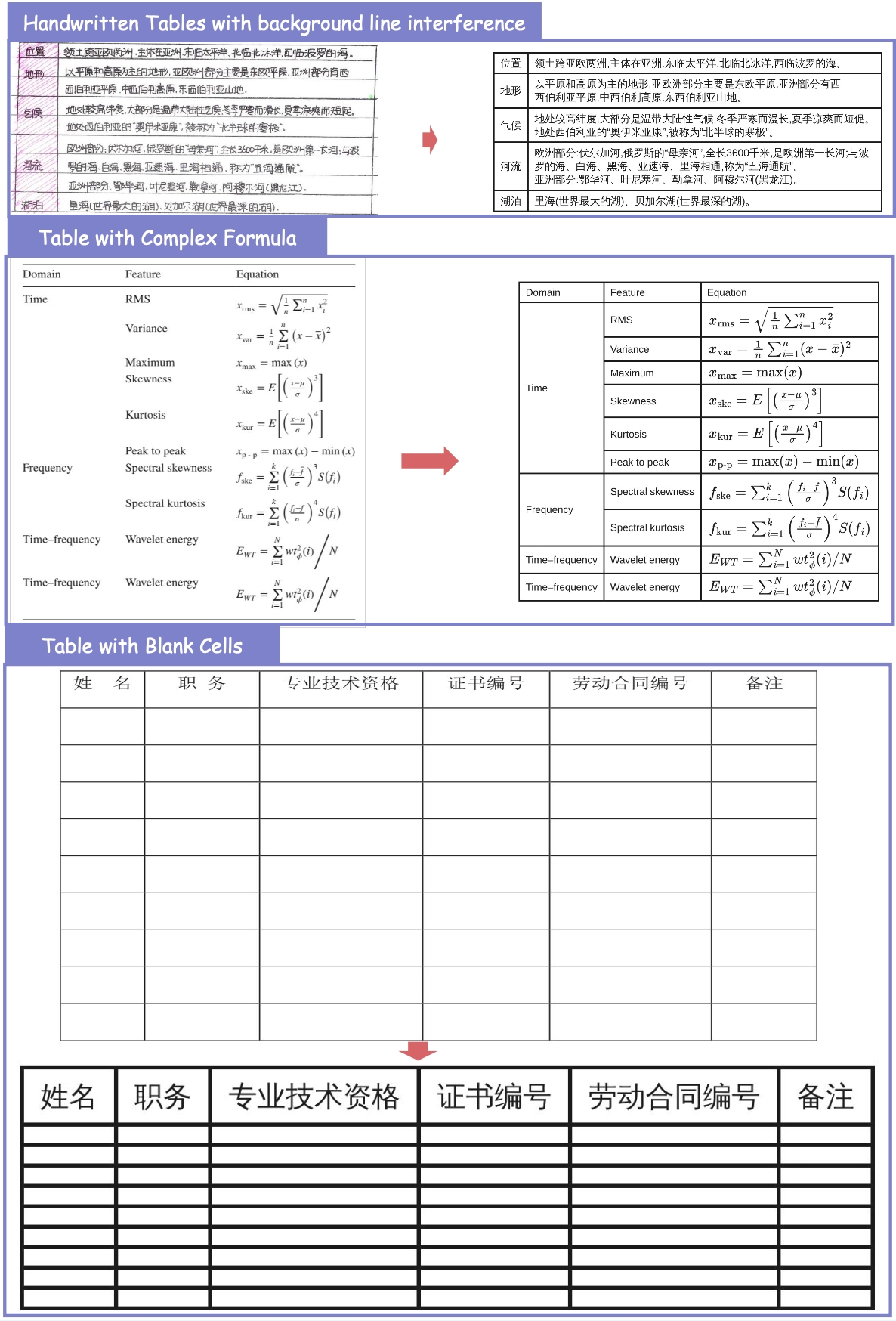
- 📊 Table Parsing: Evaluated across 5 diverse table benchmarks, MinerU2.5-Pro dominates the leaderboard. It outperforms the 2nd place model by 1.39 points and surpasses the original MinerU by 3.06 points (with Table TEDS jumping specifically by +5.54 on OmniDocBench).📊 表格解析:在 5 项多样化表格基准上评测,MinerU2.5-Pro 主导排行榜。其得分比第二名高出 1.39 分,且比原始 MinerU 高出 3.06 分(在 OmniDocBench 上 Table TEDS 具体提升 +5.54)。
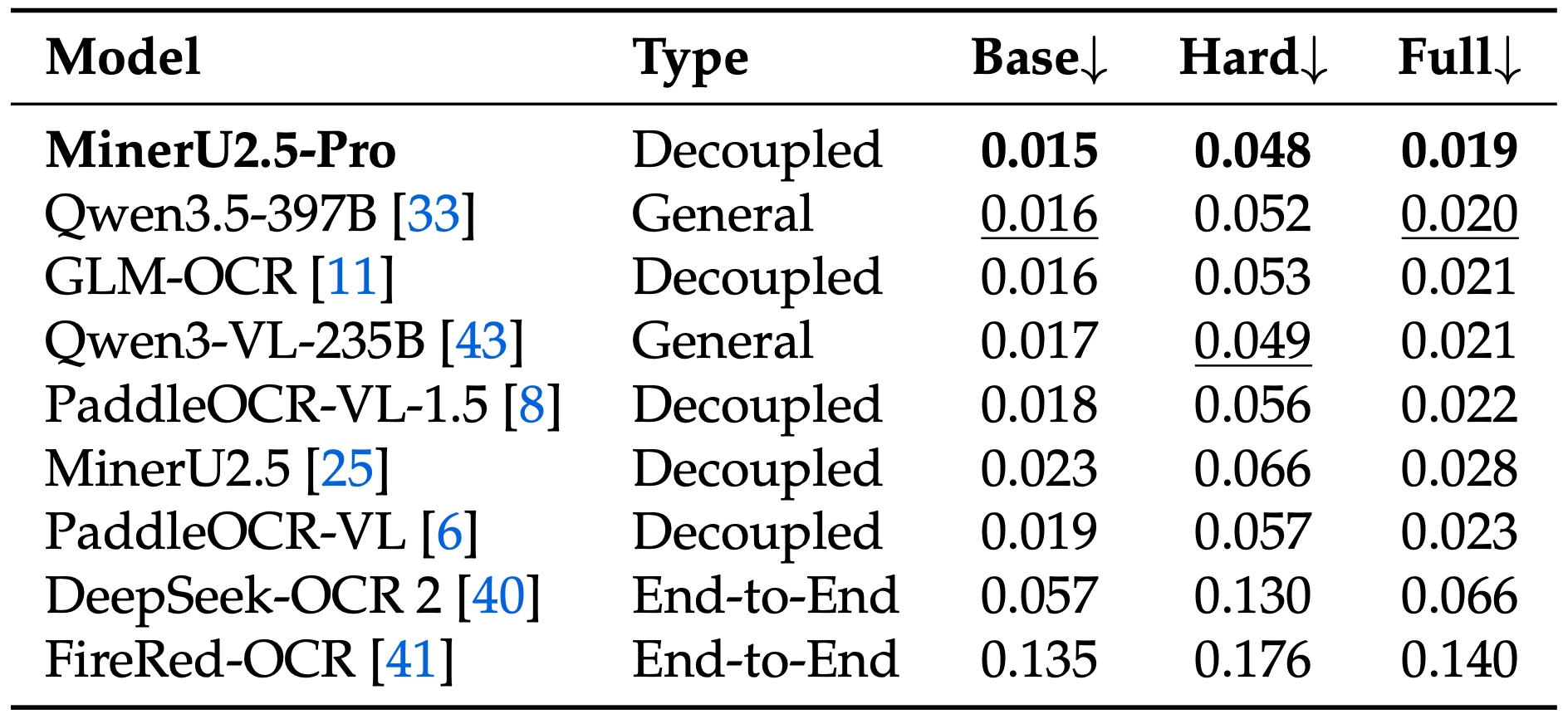
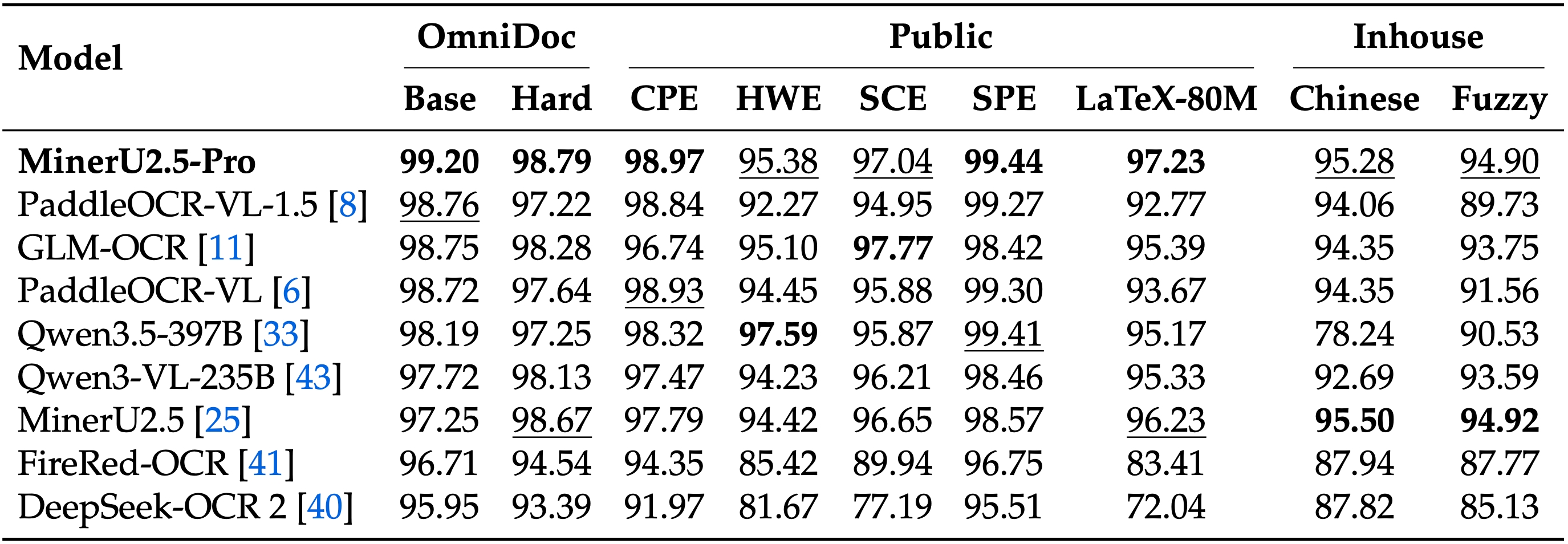
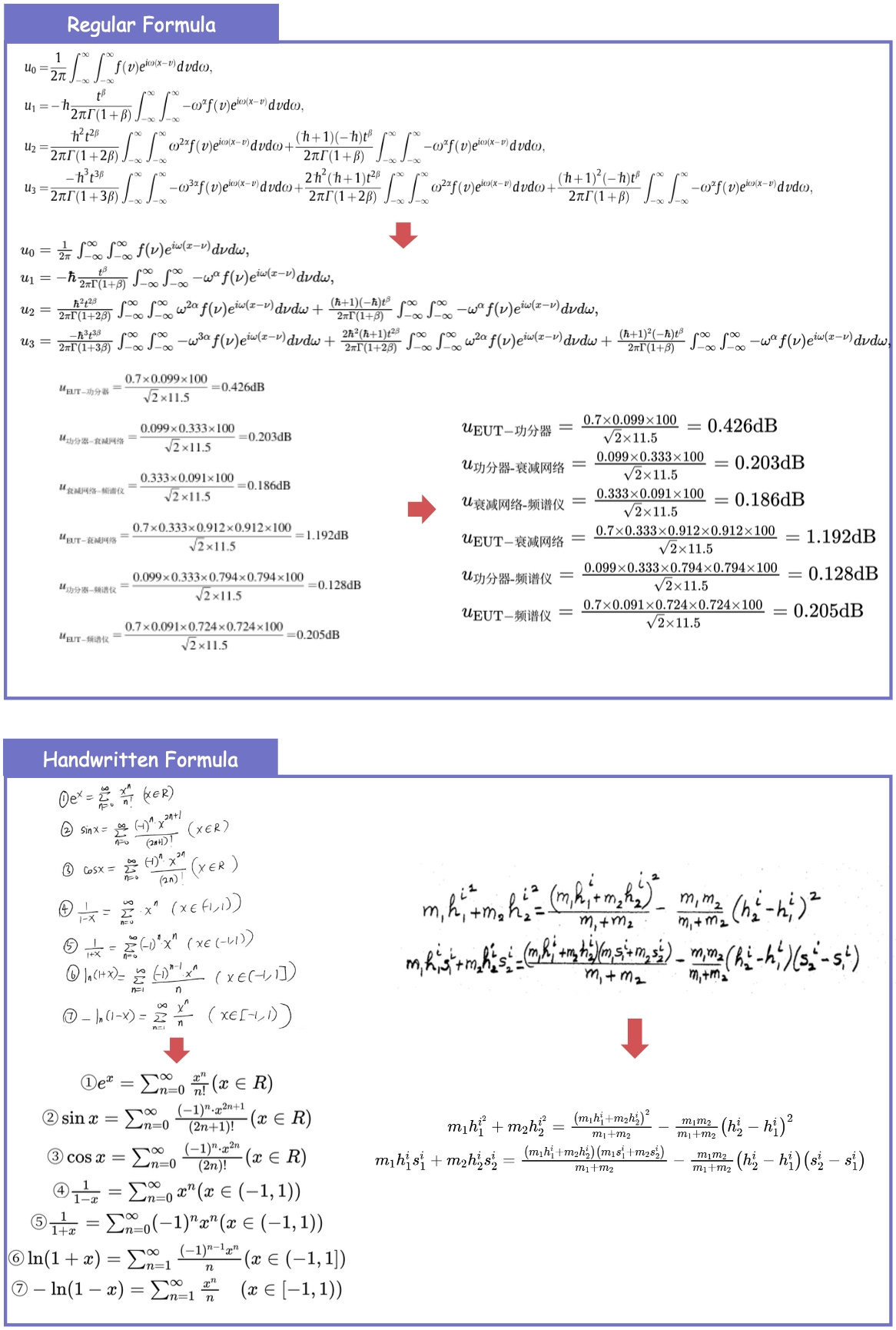
- 🧮 Formulas & Text: Achieves SOTA levels with Dense Formula parsing (CDM) reaching 97.29 (+1.70), and Text Edit Distance dropping to an industry-best 0.036.🧮 公式与文本:在密集公式解析(CDM)上达到 97.29(+1.70)的 SOTA 水平,文本编辑距离降至业界最佳 0.036。
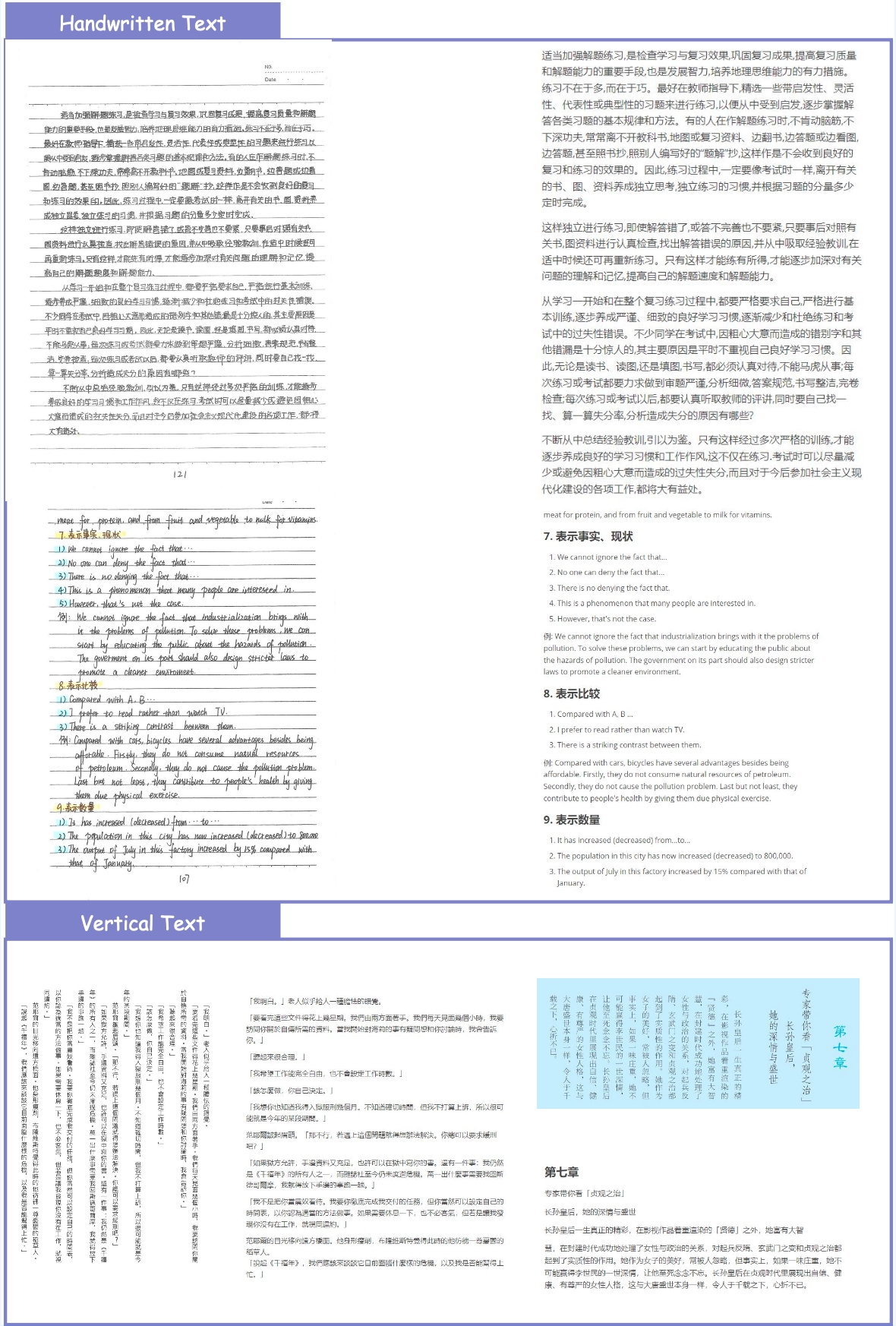
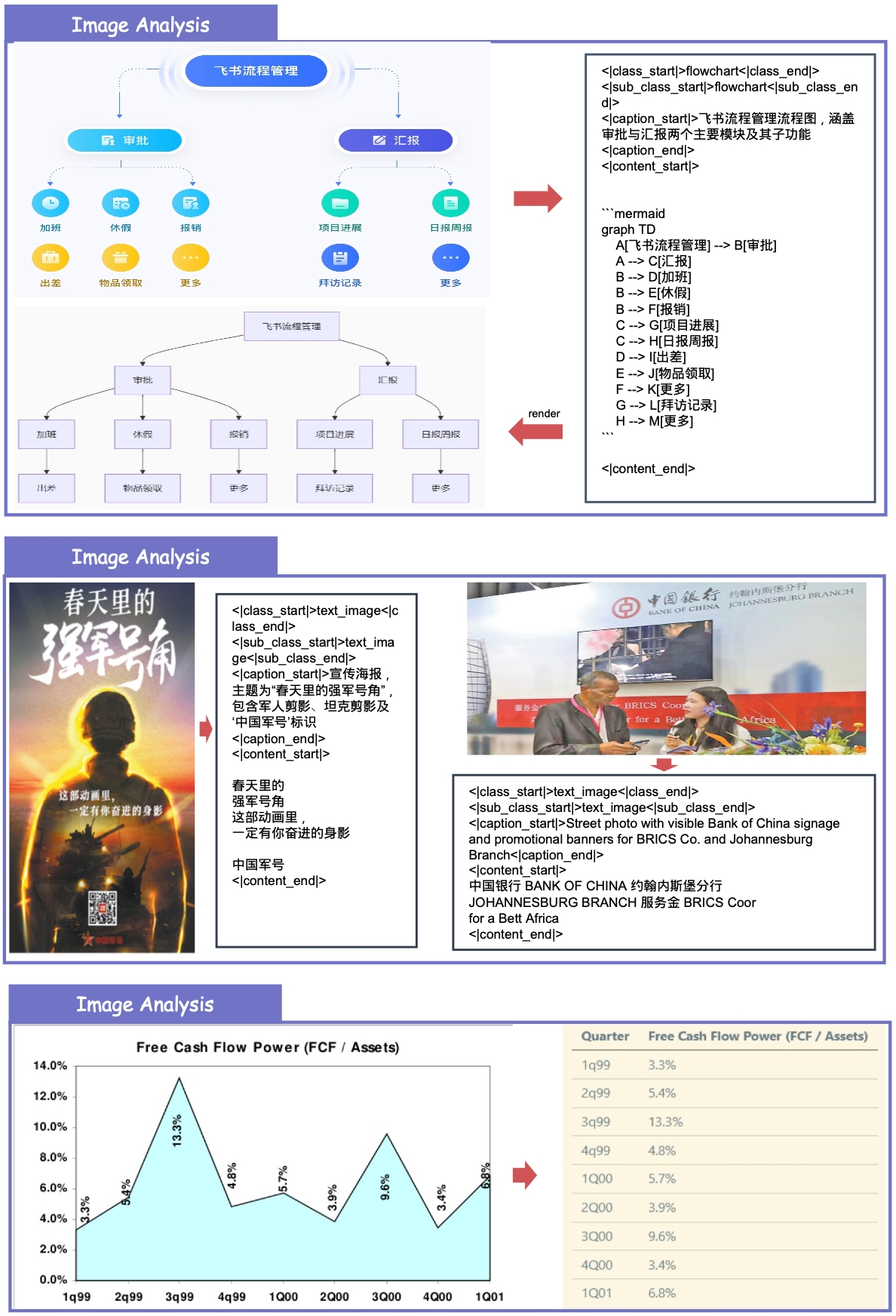
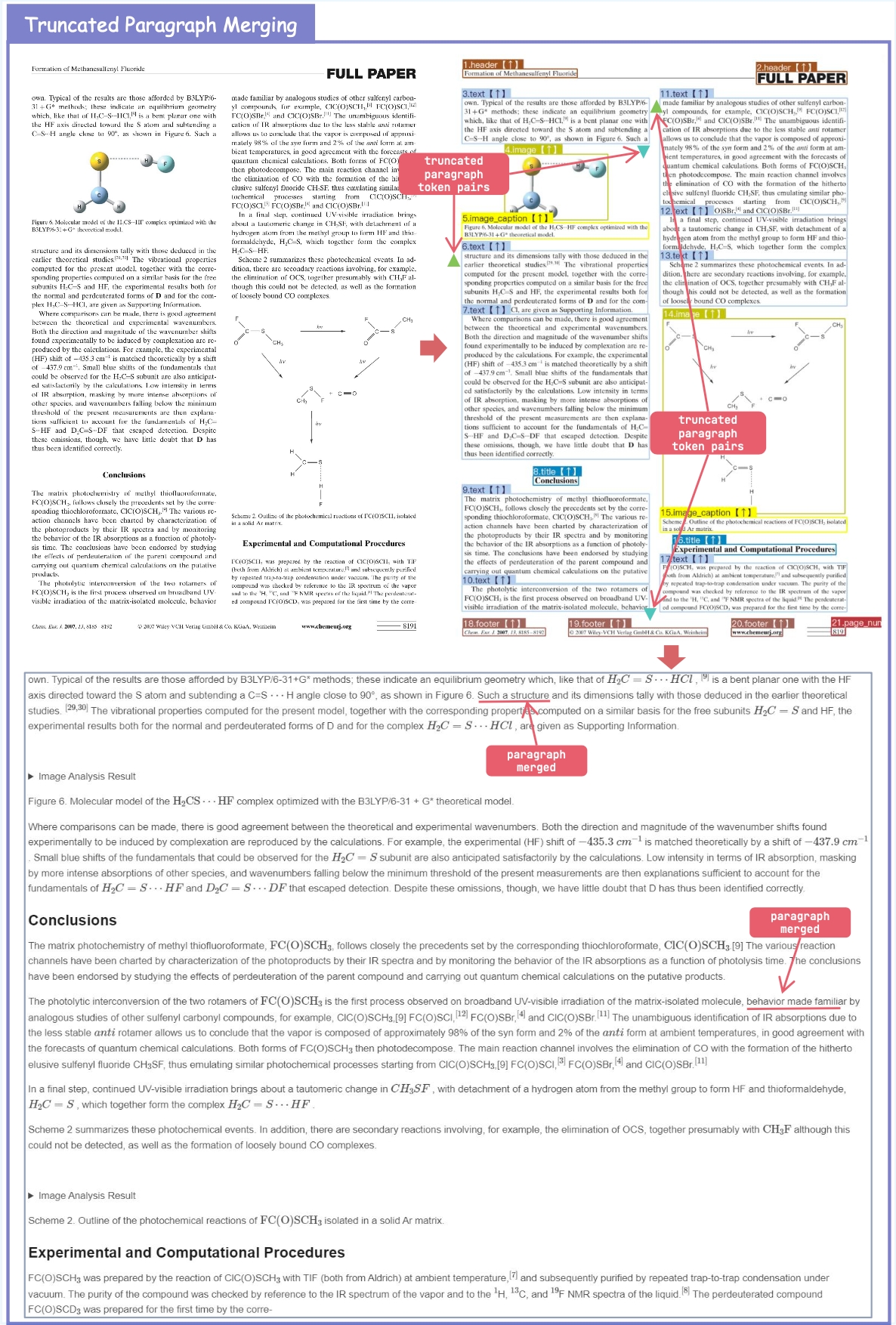
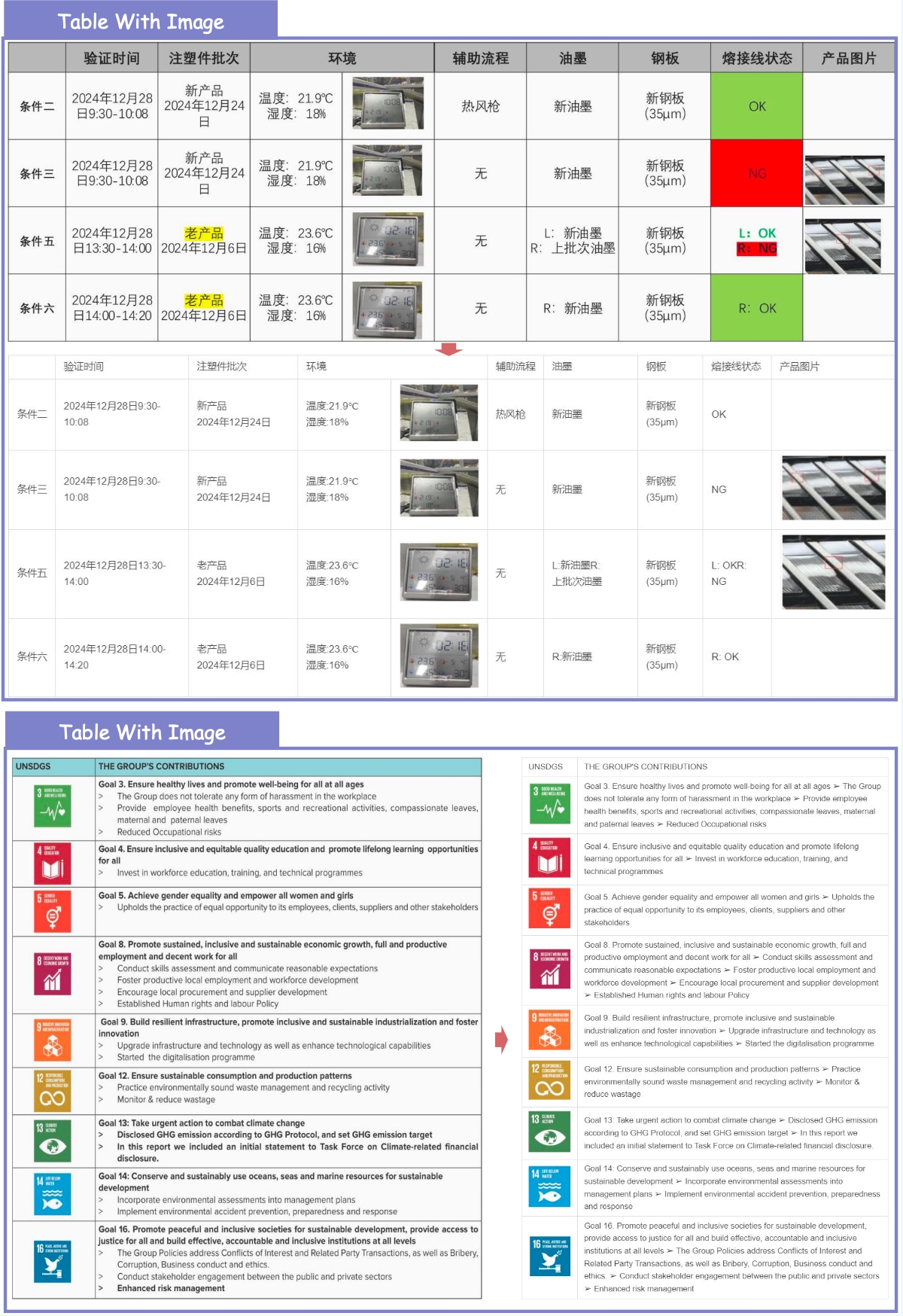
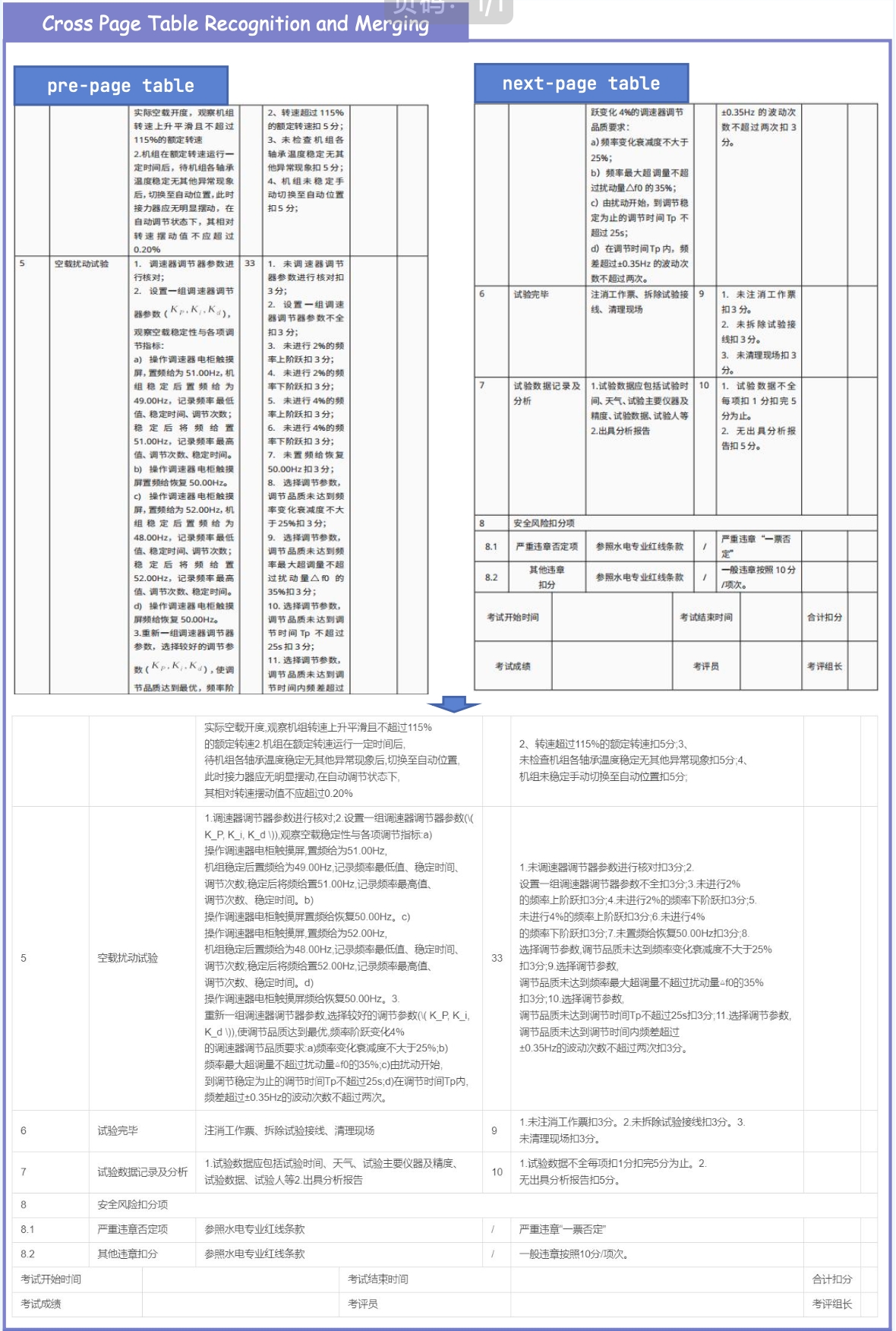
4. ✨ New Practical Capabilities Beyond metric improvements, MinerU2.5-Pro now natively supports: Image & Chart Parsing, Truncated Paragraph Merging, Cross-Page Table Merging and In-Table Image Recognition.4. ✨ 新的实用能力 除了指标提升,MinerU2.5-Pro 现在原生支持:图像与图表解析、截断段落合并、跨页表格合并以及表内图像识别。
💡 How We Achieved It: The Data Engine 💡 我们是如何实现的:数据引擎
Current SOTA models (regardless of architecture) consistently fail on the same set of complex layouts. We realized the true bottleneck is training data deficiency and annotation noise. To fix this, we built a novel Data Engine:当前的 SOTA 模型(无论架构)在同一套复杂布局上始终失效。我们意识到真正的瓶颈是训练数据不足和标注噪声。为了解决这个问题,我们构建了全新的数据引擎:
- Difficulty & Diversity-Aware Scaling: We expanded the training corpus from under 10M to 65.5M pages, heavily targeting long-tail hard samples while controlling distribution shifts.难度与多样性感知扩展:我们将训练语料从不足 1000 万页扩展到 6550 万页,重点针对长尾难样本,同时控制分布漂移。
- Solving the "Annotation Paradox": Complex tables and dense formulas usually suffer from noisy automatic labels. We generated ultra-reliable annotations using Cross-Model Consistency Verification (CMCV) and an iterative Judge-and-Refine pipeline.解决“标注悖论”:复杂表格和密集公式通常受到噪声自动标签的困扰。我们使用跨模型一致性验证(CMCV)和迭代的 Judge‑and‑Refine 流程生成超可靠标注。
- 3-Stage Progressive Training: We maximized data utility by matching data quality tiers to a structured training pipeline: Large-scale Pre-training ➡️ High-quality Hard-Sample Fine-Tuning ➡️ GRPO Format Alignment.三阶段渐进训练:我们通过将数据质量层级匹配到结构化训练流水线来最大化数据效用:大规模预训练 ➡️ 高质量难样本微调 ➡️ GRPO 格式对齐。
Bottom Line: MinerU2.5-Pro proves that systematic data engineering is the ultimate lever for document parsing, providing the most accurate structural extraction available today for LLM data pipelines and advanced RAG systems.结论:MinerU2.5-Pro 证明系统化的数据工程是文档解析的终极杠杆,为 LLM 数据管道和高级 RAG 系统提供了当今最精准的结构化抽取。
1. Quick Start 1. 快速入门
For convenience, we provide mineru-vl-utils, a Python package that simplifies the process of sending requests and handling responses from MinerU2.5-Pro Vision-Language Model. Here we give some examples to use MinerU2.5-Pro. For more information and usages, please refer to mineru-vl-utils.为方便起见,我们提供了 mineru-vl-utils,一个简化向 MinerU2.5-Pro 视觉语言模型发送请求和处理响应的 Python 包。这里给出一些使用 MinerU2.5-Pro 的示例。更多信息和用法,请参考 mineru-vl-utils。
📌 We strongly recommend using vllm for inference, as the vllm-async-engine can achieve a concurrent inference speed of 2.12 fps on one A100.📌 我们强烈建议使用 vllm 进行推理,因为 vllm‑async‑engine 在单个 A100 上可实现 2.12 fps 的并发推理速度。
1.1. Install packages 1.1. 安装依赖
# For `transformers` backend
pip install "mineru-vl-utils[transformers]"
# For `vllm-engine` and `vllm-async-engine` backend
pip install "mineru-vl-utils[vllm]"
1.2. transformers Example
1.2. transformers 示例
from transformers import AutoProcessor, Qwen2VLForConditionalGeneration
from PIL import Image
from mineru_vl_utils import MinerUClient
# for transformers>=4.56.0
model = Qwen2VLForConditionalGeneration.from_pretrained(
"opendatalab/MinerU2.5-Pro-2604-1.2B", dtype="auto", device_map="auto"
)
processor = AutoProcessor.from_pretrained(
"opendatalab/MinerU2.5-Pro-2604-1.2B", use_fast=True
)
client = MinerUClient(
backend="transformers", model=model, processor=processor,
image_analysis=False # default False, set True to enable image/chart analysis
)
print(client.two_step_extract(Image.open("/path/to/page.png")))
1.3. vllm-engine Example (Recommended!)
1.3. vllm‑engine 示例(推荐!)
from vllm import LLM
from PIL import Image
from mineru_vl_utils import MinerUClient
from mineru_vl_utils import MinerULogitsProcessor # if vllm>=0.10.1
llm = LLM(
model="opendatalab/MinerU2.5-Pro-2604-1.2B",
logits_processors=[MinerULogitsProcessor] # if vllm>=0.10.1
)
client = MinerUClient(
backend="vllm-engine", vllm_llm=llm,
image_analysis=False # default False, set True to enable image/chart analysis
)
print(client.two_step_extract(Image.open("/path/to/page.png")))
1.4. JSON result to Markdown (enable truncated paragraph merging) 1.4. 将 JSON 结果转为 Markdown(启用截断段落合并)
from mineru_vl_utils.post_process import json2md
# ... omit client initialize
content_list = client.two_step_extract(Image.open("path/to/page.png"))
md_res = json2md(content_list)
🚧 Cross-Page Table Merging: Currently under integration. Stay tuned!🚧 跨页表格合并:当前正在集成中,敬请期待!
2. Performance 2. 性能
2.1. End-to-End Document Parsing on OmniDocBench v1.6 2.1. OmniDocBench v1.6 上的端到端文档解析
2.2. Text Recognition 2.2. 文本识别
2.3. Formula Recognition 2.3. 公式识别
2.4. Table Recognition 2.4. 表格识别
3. Showcase 3. 展示
3.1. Basic Parsing Capability 3.1. 基础解析能力
3.2. Extra Supported Features 3.2. 额外支持功能
4. Acknowledgement & Citation 4. 致谢与引用
We would like to thank Qwen Team, vLLM, OmniDocBench, PaddleOCR, UniMERNet, DocLayout-YOLO for providing valuable code and models. We also appreciate everyone's contribution to this open-source project!我们要感谢 Qwen 团队、vLLM、OmniDocBench、PaddleOCR、UniMERNet、DocLayout‑YOLO 提供的宝贵代码和模型。也感谢所有为此开源项目做出贡献的朋友!
If you find our work useful in your research, please consider giving a star ⭐ and citation 📝 :如果我们的工作对您的研究有帮助,请考虑给我们点星 ⭐ 并引用 📝 :
@misc{wang2026mineru25propushinglimitsdatacentric,
title={MinerU2.5-Pro: Pushing the Limits of Data-Centric Document Parsing at Scale},
author={Bin, Wang and Tianyao, He and Linke, Ouyang and Fan, Wu and Zhiyuan, Zhao and Tao, Chu and Yuan, Qu and Zhenjiang, Jin and Weijun, Zeng and Ziyang, Miao and Bangrui, Xu and Junbo, Niu and others},
year={2026},
eprint={2604.04771},
archivePrefix={arXiv},
primaryClass={cs.CV},
url={https://arxiv.org/abs/2604.04771},
}
- Downloads last month
- 516,072516,072